We remain fully operational. Our teams are working around the clock to ensure your deliveries continue safely.

Descargar la aplicación


Servicios al cliente
Sobre nosotros
Copyright © 2025 Desertcart Holdings Limited
Descargar la aplicación


Buy anything from 5,000+ international stores. One checkout price. No surprise fees. Join 2M+ shoppers on Desertcart.
Desertcart purchases this item on your behalf and handles shipping, customs, and support to Mexico.
🚀 Elevate your interactive experience with lightning-fast, plug-and-play precision!
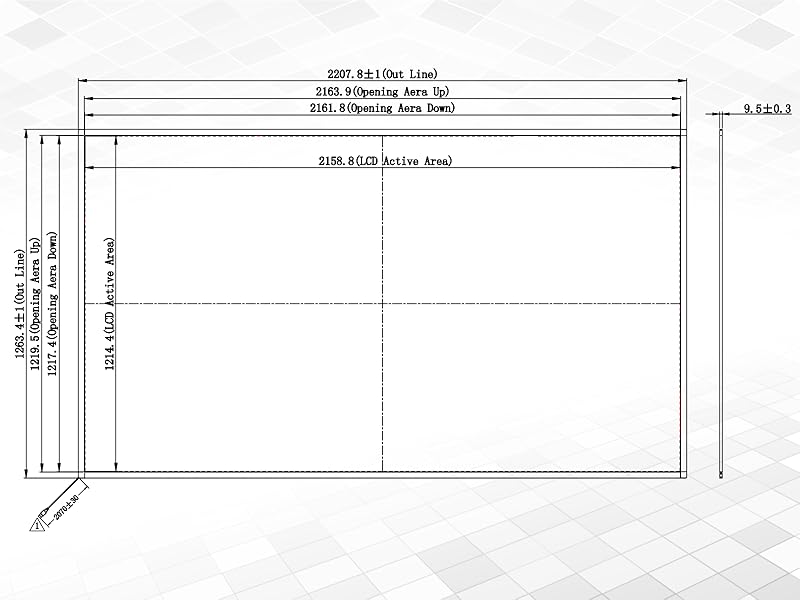
The GreenTouch 98-inch Infrared Touch Frame delivers a cutting-edge multi-touch experience with ultra-fast sub-15ms response time and driver-free USB connectivity. Its rugged aluminum alloy frame and light-resistant design make it ideal for diverse professional environments—from kiosks and digital signage to education and gaming—ensuring smooth, accurate touch input without blind spots or calibration hassles.


| ASIN | B09SZ42B5T |
| Additional Features | Touchscreen |
| Aspect Ratio | 16:9 |
| Best Sellers Rank | #56,188 in Electronics ( See Top 100 in Electronics ) #73 in LCD Touch Panels #991 in Computer Monitors |
| Brand | GreenTouch |
| Built-In Media | USB port |
| Connectivity Technology | USB |
| Customer Reviews | 4.1 out of 5 stars 282 Reviews |
| Display Resolution Maximum | 32768 x 32768 |
| Display Technology | LCD |
| Display Type | LCD |
| Hardware Connectivity | Infrared, USB |
| Has Color Screen | Yes |
| Item Dimensions D x W x H | 50"D x 86.7"W x 0.37"H |
| Manufacturer | GreenTouch |
| Model Number | GT-IR-F98-1 |
| Native Resolution | 32768 x 32768 |
| Resolution | 32768 x 32768 |
| Response Time | 10 Milliseconds |
| Screen Finish | Glossy |
| Screen Size | 98 Inches |
| Screen Surface Description | Glossy |
| Total USB 3.0 Ports | 2 |
| Total Usb Ports | 2 |
| Viewing Angle | 178 Degrees |
| Voltage | 5 Volts (DC) |
A**F
Good Product with Excellent Service
I bought this infrared overlay to use with an in-person D&D session I was hoping to host on the ship I'm on. The frame came in a rectangular white box that seems very sturdy, and was wrapped in separate pieces in plastic packing material that seemed to hold it well and securely, if a bit tight. A screwdriver and spare screws was included in the packaging, which I quite like. While I was assembling the frame, I was alarmed at first at how easily the circuit boards that hold the electronics and IR beads slid out of the frame itself, but I think this is normal and shouldn't cause too much issue with the operation of the frame; the only caution I give is to make sure to be careful when assembling that you're not bumping any of the little beads on the boards or scratching any of the electronics with the frame; make sure especially that the internal metal bars don't pivot and hit any of the IR beads inside. I think when inserting the pins into their receptacles, it's good practice to maintain good leverage on the board that holds the pins and the frame that holds the receptacles, so you can insert the pins fully into the holes. This will also help to keep the black frame screw holes lined up with the internal guiding metal bar holes, so you don't have to push them together super hard to get the screws in. Speaking of, as I mentioned there were a number of small black screws included in the set, including spares. They're easy to insert if the frame is lined up right, although I did struggle to remove them afterwards, which I think is entirely because of how tight I made them. After assembly, I laid the IR frame (32") over my 32" TV; it lined up extremely well and looked good on the black surface. I plugged the frame into my computer, and went to Foundry VTT (with a module installed to get touch interactions to work). The frame worked very well, and I was able to move tokens around on the battle map, but I kept having an issue where my touches on the screen started a rectangular selection, instead of "clicking" and dragging the token. When this would happened was pretty random, but it made moving tokens around difficult. I saw that a number of reviews on this page mention contacting support, so I decided to do that myself via e-mail, and sure enough Robert reached back to me relatively quickly. At my request, he provided a program for me to install; I find it odd, as a side note, that the program can only be reasonably obtained by contacting support, but either way it worked well for configuring and calibrating my touch screen. After some back and forth, Robert helped me figure out that my touch screen had had two of it's IR beads damaged, presumably from my initial fiddling around during installation. He troubleshooted with me, and offered immediately to send me a replacement to my address. I gave him my shipping info, and also took the time to MacGyver a fix by scotch taping the IR beads (which had come loose from their solders on the boards) back onto the board. The touch overlay unfortunately still suffers the issue, but the diagnostics show that the IR beads are actually being registered, so it's possible my solution needs playing around with, or that Foundry just has issues with registering touch (it is a known issue for some versions). Currently, I am waiting for a replacement from GreenTouch, but I am satisfied with the product either way. The issues I'm having are mostly passable for what I'm trying to do, and might be entirely related to the program I'm trying to use. I'll update my review when I recieve a replacement, but I do hope it'll work; either way, the support I recieved from Robert and the engineer at GreenTouch, and the ease of set up, well sized fit for my TV, and generally working condition is a hallmark of good effort for me, despite the relatively simple design. TL;DR Product works pretty good, issues with Foundry VTT, might have been my fault, GreenTouch Robert is sending me a replacement, good stuff! Thanks Robert. Edit 2024-04-30: A few days ago I discovered what might have been the cause to my issue with trying to get the IR overlay to work with Foundry VTT. It seems as though that my issue had stemmed from having a gap between where the screen of the TV (and therefore where the tip of my finger) was, and where the IR overlay was positioned. To remedy this, I used a large plastic TV screen protector that I had coincidentally purchased beforehand for just protecting the screen (also purchased on Amazon, essentially a large plastic sheet that fits on the TV), and after putting it on my horizontal TV and the IR overlay on top of it, the issue subsided, my touches were recognized on Foundry VTT, and the frame has worked even into someone else using it for three hours to move their character token on the screen. So, the IR overlay I have works great for what I'm using it for, and GreenTouch is still sending me a replacement. Good stuff! Oh, and the screen protector that I'm using isn't creating too much of a visual issue with figuring out where my touches are going to be registered on the frame, even though my TV's bezel is pretty tall (so there's a bit of a gap between my finger and the TV picture), so no issue there, at least not yet. TL;DR The gap the TV bezel was causing between the TV screen and the IR overlay was creating issues (see attached image), eliminating the gap through a plastic screen over the TV stopped the issue. Good product!
J**.
It works!
I was skeptical but hopeful after reading all the reviews and I have not been disappointed! The packaging was very well done and protected the frame pieces. After opening everything up I couldn’t find the screws so I emailed the company (found on the back of the instructions) and let them know. They emailed me back right away letting me know where to look just in case but they would send me some if needed. They were attached to the usb cord so I felt stupid but now I can tell you a little about their support and how they were super responsive! Putting the frame together was pretty good, some of the screw holes didn’t line up exactly but with some finagling I was able to get it together. I attached it to the 32” tv with 4 of the double stick tape that it came with and it’s holding well so far! I hooked my tv up to the laptop to try it out and it worked like a charm! I didn’t have to calibrate it or anything! There is a learning curve with how the touchscreen works but as long as your patient it becomes second nature quickly! So far I love it! I’ve made a wall calendar for myself for under $200 that works! I will be sure to update if anything changes!
A**X
Works out of the box, adhesive pads are no good
I purchased one of these to put on a TV that is hanging on a wall that shows a a browser with a calendar, weather, etc. We use the touch screen with the virtual keyboard, and avoid having a physical keyboard and mouse, since we want this to be as clean looking as possible. It worked right out of the box, didn't need to calibrate it. The PC is running Windows 10. I only have two complaints: 1) Since the frame has a depth to it, it sometimes registers more than one touch, as your finger breaks the field it uses to sense a touch and is traveling through the field to get to the actual TV screen. You can get around this by having a gentle touch. Once you get the hang of it you figure out how far your finger has to go to register a touch. 2) The adhesive pads used to hang this frame are not the best. A couple of days after I attached it to the TV, the top left corner started to come off. I ended up replacing the pad with a command strip, and it has been sitting there for about 4 months now with no issues. Overall this has been a good purchase. It only gets light use, as we just need to create calendar events from time to time. At $196, it is a decent cost, especially when you compare it to the price of an actual touch screen monitor, which will cost 3-4 times as much.
S**.
Poor Quality
Worked for a few months then stopped. Worked ok until that time.
B**S
Very responsive and easy setup
I purchased the 46 in version for my gaming room to use with my older TV on the wall. Shipping was very fast, 7 days from order to my door. It was packed very well in a very tough tube and wrapped in foam. Assembly was very easy, I recommend laying on the floor or flat surface to assemble. The unit comes in 4 pieces. Each corner is marked with a letter on each part so you can’t get them mixed up. You slide the corners together making sure the pins line up with the connector. Once all the sections are attached you use the included screws, screwdriver can corner plates to finish the frame. Installation is easy using the included mounting tape to attach it to the TV. The fit was perfect and matched the bezel to the screen. Construction was sturdy with an all metal design. Usage. Everything worked out the box with no need for a driver or software. I was using this on a Windows XP machine and everything was up and running in a matter of seconds. Kind of amazing this works on a 23 year old computer and 15 year old TV. Tracking was very accurate and responsive, I was reality blown away by how well it worked. I had pretty strong LED lighting right above the TV and it had no effect on the tracking. You don't have to touch the screen as you can float your finger right above the screen, touching the screen is much better as you move your finger around the screen. I have a quite old screen that has a pretty tough coating so it has no problems as a tough surface. Very happy with the product. The quality was good and the price was very reasonable. Another thing to note is the exceptional customer service. I have bought other products from this company and when I had a question or issue they responded in a matter of minutes. They are very good and attentive.
R**.
Be careful and patient when assembling!
This thing realllllly works ! I am using this with a 43 inch lg tv for my golf simulator setup. The first thing to note is… take your time assembling by super carefully putting the pins slowly and perfectly into the two corners. This will make sense when u actually assemble. After that … super easy. Put the included 2 sided tape around the assembled frame and mount on the frame of your tv. Go to windows and download and install the app…. Plug your frame into your USB … run the quick test…do the 9 point configuration… and you now have touchscreen monitor ! Make sure you pin the app (app looks like a red fingerprint ) to your task bar. For this price… compared to a real touchscreen monitor of this size… you can’t beat it !
S**N
Really cool technology! Make your big screen into a canvas or game board
First off, make sure you are installing it on a flat surface. With that being said you can add touch screen functionality to anything. Use a projector to shine light onto your coffee table and play digital board games in real life. I have seen people use these to create reusable drawing surfaces, and even one project that tracked the pieces of a tabletop game like Warhammer. I added this to my golf simulator to make interacting with the map and settings effortless. Instead of a table and a mouse or a wireless touchpad, I just tap where I want, and it's done. A series of IR lights are shined from one side of the frame to the other, and it can detect where an object has broken the plane. That signal is sent back to the computer as a touch. The included calibration software gives you tons of options for getting it working just right in your environment. It would be nice if there was a detailed manual for all the options, but some trial and error can give you good results. Customizing in the software lets you control from 1 to 10 points of interaction simultaneously. When I had problems getting the alignment because my surface wasn't perfectly flat, support helped me in real time, outside of their business hours. The screen is working great on top of an acrylic sheet to protect the TV now. If you go this route, you will probably need to add some spacers to flatten the surface of the acrylic because it will flex, unlike a normal TV screen which is perfectly flat.
R**D
Problems with older games. (No mouse emulation)
Returned to seller. I was unable to get it to work anywhere but on Windows Desktop. It arrived via UPS from Amazon in 4 days. It came packaged in a shipping tube that provides extreme protection from enroute damage. Assembly is simple with the provided screwdriver and takes about a half hour on a clean, flat work surface. This frame is extruded aluminum and all led's and sensors are inside the extrusion. Again, very well protected. I put it together, plugged it into a USB port, and started using it right away. It works better than my 73 year old fingers do, but practice makes perfect and my touch screening on the desktop is improving. I have found a pencil eraser to be an excellent stylus for setting it up, especially with small icons on the desktop. It really does work very well, especially after calibrating the touch point with Windows 10 settings. Just search for "touch" and you'll find it. For temporary positioning over the TV, I propped up the bottom of the frame with wood scraps and attached it to the TV frame with "EZ Tack" adhesive clay. This allows fine adjustments for initial testing and calibration without serious glue or hardware. For fine adjustments to the height, use some old playing cards to get it just right. An observation on touchscreen... What I assumed would add to the immersion of flight sims turned out to be, in my opinion, completely wrong. Since the head tracking device is always changing the view onscreen, finding and touching a screen object like [Left Magneto] is anything but intuitive. Even if I "freeze" the TrackIR view, it is still a chore to find and touch any control item... it's like using my finger as a mouse on an uncomfortably large touchpad. It's also very easy to make an erroneous selection. The mouse is much more accurate than touching the screen for me and also keeps my screen much cleaner than smudgy fingertips! I find that extra physical control devices with switches, sliders and buttons, placed properly around your office "Cockpit" add a much greater degree of realism than the touchscreen.
Trustpilot
Hace 5 días
Hace 4 días