We remain fully operational. Our teams are working around the clock to ensure your deliveries continue safely.

Descargar la aplicación


Servicios al cliente
Sobre nosotros
Copyright © 2025 Desertcart Holdings Limited
Descargar la aplicación

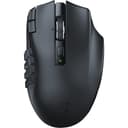
🔥 Dominate your MMO universe with precision, speed, and unstoppable endurance!
The Razer Naga V2 HyperSpeed Wireless MMO Gaming Mouse is a professional-grade, ergonomic wireless mouse featuring 19 programmable buttons, Razer’s HyperSpeed Wireless technology for ultra-low latency, and a Focus Pro 30K Optical Sensor for exceptional tracking accuracy. It boasts HyperScroll Technology for versatile scrolling, mechanical Gen-2 switches rated for 60 million clicks, and an impressive battery life of up to 400 hours on Bluetooth mode, making it a top-tier choice for serious MMO gamers seeking both performance and endurance.


| ASIN | B0BGJT87N2 |
| Additional Features | Focus Pro 30K Optical Sensor, HyperScroll Technology, Mechanical Mouse Switches Gen-2, Programmable Buttons, Up to 400 Hr Battery Life |
| Antenna Location | Gaming |
| Are Batteries Included | Yes |
| Are Batteries Required | Yes |
| Battery Average Life | 250 Hours |
| Best Sellers Rank | #101 in Video Games ( See Top 100 in Video Games ) #7 in PC Gaming Mice |
| Brand | Razer |
| Built-In Media | Charging Cable, Dongle, Dongle Adapter, Mice, Side Plates |
| Button Quantity | 19 |
| Color | Black |
| Compatible Devices | Personal Computer |
| Connectivity Technology | Bluetooth, USB |
| Customer Reviews | 4.1 4.1 out of 5 stars (1,075) |
| Enclosure Material | Plastic |
| Hand Orientation | Right |
| Hardware Platform | PC |
| Item Dimensions L x W | 4.71"L x 2.97"W |
| Item Type Name | Gaming Mice |
| Item Weight | 3.35 Ounces |
| Manufacturer | Razer |
| Model Name | Naga V2 |
| Model Number | RZ01-03600100-R3U1 |
| Mouse Maximum Sensitivity | 30000 Dots per Inch |
| Movement Detection | Optical |
| Number of Batteries | 1 AA batteries required. (included) |
| Operating System | Windows |
| Power Source | Battery Powered |
| Range | 10.0 meters |
| Style Name | Modern |
| UPC | 840272904732 |
| Warranty Description | 2 year manufacturer |
D**A
Just Short of Perfect
I have owned almost every Naga that's been produced, starting with the very first one. I play a lot of MMORPGs (mostly WoW these days) and the thumb keypad is ideal for how I like to play. I'm coming from the Naga X, which was phenomenal, but began to have button issues. I've found with Razer products that that's usually the death knell for one and it's time to move on. I am always hesitant to get wireless mice and keyboards because replacing batteries is just another level of hassle. However, I decided to take the plunge on this one and see how it goes. The connection has been brilliant. I pulled the little USB connector out of the mouse, plugged it into an open port, and it was basically plug-and-play after a quick reboot. The buttons are satisfyingly clicky and everything has been responsive and easy to use. Zero issues with any of that. My one complaint about this mouse is that it is slightly narrower than the Naga X and my pinky finger is not as comfortable. The Naga Epic had an actual pinky rest on it and was the best Naga ever produced. Razer dropped that from the design and it sadly has never returned. I would pay double what I paid for this one if it had a functional pinky rest beside the ring finger rest, but alas. This is as close to perfection as Naga is going to get, though I would give it 4.75 stars if I could because of the narrowness of the mouse. It's just short of perfect.
S**H
Razer is back on top! Naga V2 is awesome.
I used to despise Razer, but nowadays, the MMO mouse from Razer is pretty decent hardware. Their biggest problem has always been their software, however, and I must admit their support for software integrations is lacking. There's no OBS integration and no Discord integration. I'm getting by without setting up macros for hotkey combos by simply using my Logitech keyboard's macro keys for the integrations I want, and the only reason I didn't get another Logitech mouse was Logitech didn't make a new mouse model and discontinued their old, wired G600 model, making it cost too much to replace. I went with the Razer Naga V2 because it was somewhat cheap by comparison and wireless and I felt like giving other brands a try. I ended up really loving the build quality of the Naga V2, but Razer's software was still pretty terrible. The hardware design is pretty good, but there are some ergonomics issues. The top left mouse click buttons (not left click) are hard to find by feel and also a little difficult to reach. There's no palm rest for a big hand to rest on. I think this mouse could benefit greatly from a 3d printable palm extension, but that would increase its weight, and the mouse is very lightweight. I ended up using a wrist rest that helped a little with mouse fatigue. The battery is somewhat easy to swap out, and you don't have to swap often. It uses a single AA battery, and I opted to use a rechargeable lithium battery in it that adds some extra capacity. The LEDs on the buttons are very dim by comparison to my other MMO mice, and they don't have the same flair I get from some other brands. The colors are customizable, but there's no wave effect on the mouse, which is weird because Razer's keyboards have the wave effect. DPI is easy to change on-the-fly. I see no noticeable lag from being wireless. I also don't see any connectivity issues as long as I keep the mouse within 8 feet of its dongle.
R**K
Best mouse I've owned.
After my Logitech G604 at work decided to start having switch troubles, it was time to look for another mouse. I was hoping to get another Logitech G604 or similar since I utilize the side buttons for work and for gaming. Unfortunately, at least as of the last time I searched, Logitech discontinued the G604 and didn't plan on making another similar. I'm glad I started looking at Razer mice as this one caught my eye and I was intrigued. I've had this mouse now for 9 months and it was the best decision I've made in any of my PC purchases, minus the PC of course. The mouse feels good in your hand and is very light compared to the G604. The feet slide extremely easy on mouse pads for flawless movement. The buttons are very responsive and I enjoy the extra 6 that I get compared to the 604; more commands/shortcuts at a thumb press. Some have had the button paint start to wear off but I have not, at least yet, so I'm not sure if they just have super acidic hand sweat or eating Cheetos while gaming. Anywho, the paint has not worn off in any way and I can still read all the numbers on the side buttons. As far as connectivity, I don't 'hardcore' game so I probably won't ever use the HyperSpeed setting on it but the bluetooth works wonderfully and is very quick to connect on start up. The mouse also has a timeout function which you can adjust via the software. The software I don't hear much good about but I haven't had trouble with it I guess. It allows me to program the buttons as needed and that's about all I use it for since this is the only Razer product I have. I'd recommend this mouse to anyone who doesn't like searching for keys on their keyboard for functions. It's not only a great mouse for gaming but for work when you need button combos that are a pain to do on the keyboard. I liked it so much that I ended up buying another one for home and replaced my G604 at home a few months later.
R**B
Definitivamente fue una excelente compra. No soy gamer, soy programador. Lo compré principalmente por la cantidad de botones que tiene ya que requiero de accesos directos y macros para acelerar la escritura de código y otras cosas. Programar es prácticamente copiar y pegar jaja. Tengo personalizado los botones para Ctrl + C, Ctrl + V, Enter, F5, adelante, atrás, subir y bajar volumen, etc. El scroll horizontal también me ayuda cuando tengo que navegar en archivos largos a lo ancho o en hojas de excel; del mismo modo, el scroll vertical libre es de gran ayuda cuando tengo archivos de miles de líneas de código o en páginas web largos. Me ha servido de mucho para no tener que hacer combinaciones con el teclado ya que simplemente presiono un botón con el pulgar. Me costó un poco al principio aprender la ubicación de los botones, pero conforme se desarrolla la memoria muscular mi productividad y velocidad ha ido en aumento. Igual tengo dos empleos por lo que trabajo con dos PC distintas y con el switch que se ubica en la parte de abajo facilita cambiar entre equipos en cuestión de segundos; un equipo lo uso con bluetooth y el otro con el dongle 2.4 ghz. Eso sí, está limitado a solo dos equipos. Me hubiese gustado que soporte un dispositivo más. Anteriormente había adquirido el Logitech mx master 3s, pero era un mouse muy grande y pesado para mi pequeña mano por lo que me resultaba incómodo trabajar. Luego adquirí el Logitech M720 Triathlon, este fue mucho más cómodo para mi mano, pero con el tiempo sentí que requería de más botones y opté por compra este Razer. Este también es un poco grande y pesadito, pero no tanto como el mx master 3s. De momento, en mi opinión, considero este Razer mucho mejor que los dos anteriores de Logitech. El software de Razer Synapse brinda un mundo de configuraciones que sirven principalmente para juegos, pero le he sabido sacara provecho para productividad. Por ejemplo, se puede crear distintos perfiles para guardar la configuración de los botones. Eso es muy conveniente si tienes una configuración para un juego y una configuración distinta para otro juego y no tener que estar configurando los botones cada que cambias de juego. La configuración se guarda en el mouse, no en el equipo como con otras marcas, de modo que no es necesario volver a configurar el mouse cuando lo conectas a un nuevo equipo. Hasta ahora solo un equipo no detectó las configuraciones guardadas, pero es el único caso. Sobre la batería, pensé si solo duraría un par de días porque lo uso durante la jornada completa del día, pero llevo un mes con él y apenas va en un 60 %. La batería que trajo es un Energizer alcalina, eso también ayuda a la larga duración por lo que seguiré comprando baterías alcalinas de la misma marca o Duracell, pero no está de más adquirir baterías recargables para ayudar al medio ambiente jeje. Esa ha sido mi experiencia durante el primer mes. Seguiré actualizando mi reseña conforme lo siga usando.
B**I
Work properly
し**し
ゲームでは移動しながらアビリティ使える 作業ではコピーペーストだけでなく左側のボタンをカスタマイズできてショートカットキーを登録しておくといちいちキーボードに目をやらなくても操作可能。 特にいいのが専用のカスタマイズ画面でテンプレートを分けられる。 いちいち作業とゲームごとにボタンをカスタマイズする必要がないのがいいところ。
A**M
Quick delivery. Only problem i could see was damave to the packaging. Great deal
R**N
4 aydır kullanıyorum vede iki seferdir hafıza siliyor sadece sol üstte dpi tuşları çalışıyor birde sağ ve sol tıklama tuşları çalışıyor diğer tüm hafızaya aldığım tuşları siliyor rutin olaraktan iki ayda bir bunu yapıyor.
Trustpilot
Hace 5 días
Hace 2 meses