
🆒 Stay cool, work smart, and game on with the K10 Cooling Pad!
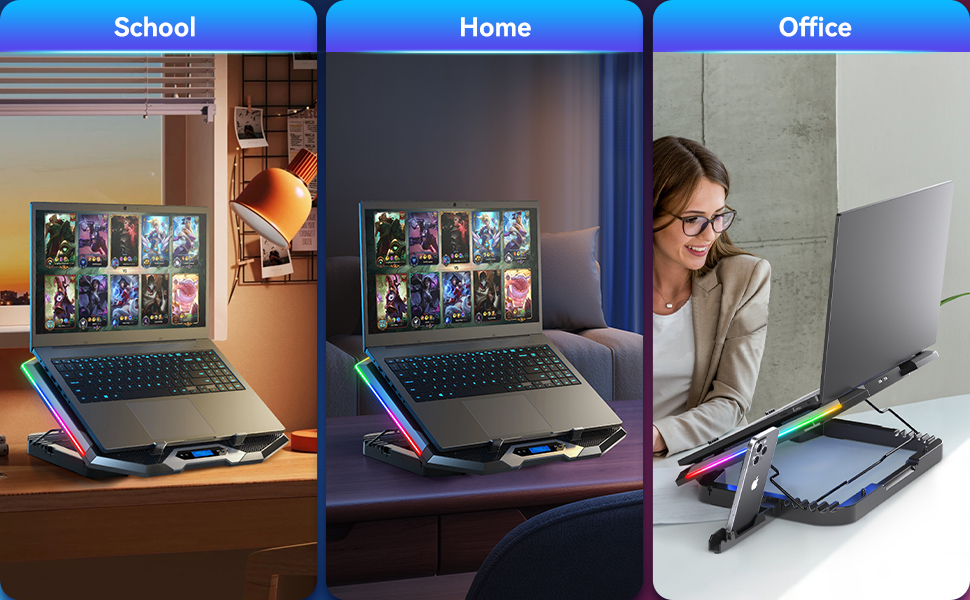
The K10 Cooling Pad by ICE COOLEE features eight super-efficient fans and six adjustable height settings to dramatically reduce laptop temperatures by up to 20°C while enhancing ergonomic comfort. Its whisper-quiet design includes noise-reducing capacitors, an intuitive LCD display for fan speed and RGB control, and ten customizable RGB lighting modes. Built for durability and continuous use, it’s the perfect blend of performance, style, and comfort for professionals and gamers alike.




| ASIN | B0BPRSQGQ4 |
| Best Sellers Rank | #4,011 in Electronics ( See Top 100 in Electronics ) #11 in Laptop Cooling Pads |
| Customer Reviews | 4.4 4.4 out of 5 stars (8,367) |
| Date First Available | February 26, 2023 |
| Item Weight | 2.46 pounds |
| Item model number | K10 |
| Manufacturer | ICE COOLEE |
| Product Dimensions | 16 x 12 x 1.4 inches |
P**B
Doing the Job for 4 Years
I use an LG Gram 17 as my main computer at work. It sit's on the desk for 90% of it's life and honestly not the best desktop replacement as these things get very hot when pushed since they don't have alot of room for cooling. On really intensive tasks, the laptop would throw overheat errors, throttle down, and the top of the keyboard was too hot to touch. Core Temp was showing pegged at the TJ Max temperature and slowing the computer down. I decided to try a laptop cooler to see if it would help. Compared to no cooler, core temp was showing temps as low as 15-20 degrees C cooler during the same tasks! Keep in mind this was on max speed but since I work in a noisy office, I couldn't tell the difference between all the speed settings so sound was not a concern for me. The top of the keyboard no longer got hot enough to not be able to hold a finger on it. Cooling was my primary reason for buying this and it has done that job. A secondary benefit that I didn't realize I wanted was the increased height and better angle for sitting at a desk. I have a 24 inch monitor plugged into the laptop and use a dual screen setup with the laptop monitor. This caused a height difference and I didn't realize how much I was looking up and down when I would bounce from monitor to monitor. My neck is now less strained during prolonged work. The RGB can be turned off, but since I'm also a gamer, I leave the RGB cycling to bring a little of that RGB4Life into the office. As for reliability, my laptop is always plugged in and always on as I may need to remote into it from anywhere and do some work when required. This cooler has been running for 6 months straight, no bearing noise, no failed fans, and the lights are still cycling. Overall, it has done everything I want it to do for a reasonable price. 9 MONTH UPDATE So 9 months running 24/7 (I do not turn this off) on my work desk...it's still running strong. No noises or bearing failure, it was full of dust but a quick hit with compressed air and it was all clear. The lights are still working as they were on day 1 (not that it matters in my office setting). So, still very impressed with this unit. I've had high end Corsair case fans fail on me in a shorter time frame and much shorter hour count. 2 YEAR UPDATE Yep...2 years, non-stop running, fans at full speed. Still no failure. Just buy it. 4 YEAR UPDATE Here we are, 4 years later. The computer that this thing was cooling officially died last week. Yet even after 4 years of 24/7 on max fan speed it has been working fine. No issues whatsoever.
W**Y
Nicely designed, very quiet
I recently purchased a 12 year old Lenovo ThinkPad laptop. These old workhorses are awesome but they do produce some serious heat! So, the best thing is to pair it with a good laptop cooling pad. This one by Ice Coorel has 8 cooling fans. You can operate it with either the top or bottom 4 fans separately, or set it to use all 8 at once. You can also set the speed of the fans so that the noise level is easily controlled. I personally am using all 8 fans and the fan noise is still not bad at just a hair above a whisper. The cooling effect on the laptop is great although the laptop still generates considerable heat. All in all, for the price, this cooling pad appears to be well built, operates on a USB cable, plus provides an additional USB port to make up for the USB port used for power on the laptop. You can elevate the rear for better air movement. It also has a swing out arm to support a cell phone if desired. Nicely designed. I'm very satisfied with this purchase.
K**S
The fans are troopers that have lasted years, but the RGB lights started acting weird really quickly
I purchased this cooling stand in December of 2021 to use as a means of helping keep my laptop cool while running games or drawing software, and am writing a review after two years of use. I'm happy to report that even after two years of nearly daily use, the fans remain fully operational, and the controls for them still function as intended--the + and - buttons still adjust speed and holding down the power button still allows me to switch between having all the fans running or just one of the two rows. The fan speed is decent even on the lowest setting (when you turn it on, it's automatically on level 3). I generally default to using it on max speed. It absolutely helps keep my laptop cooler when running software like Genshin Impact. It's not capable of keeping it cold or anything extreme like that sadly, but it decreases the heat intensity enough that I turn on the fans anytime I'm going to be using software that's demanding. On the highest setting with all the fans working, it does make a very even, consistent noise, but it's better than the whirring of my laptop itself when it gets really warm. I don't find it that distracting because I wear headphones, but it's certainly not "whisper quiet" or anything. The stand part itself also is pretty nice; it has several height options that can come in very hand for holding laptops at all sorts of angles as necessary. It has a metal bar supporting it, which I like for stability. The one drawback/flaw to it is that my RGB lights only operated correctly for a few months before they started acting weird. (The blue lights that turn on with the fans still work fine). One day, they turned off and I couldn't turn them back on, and figured they'd died and it was fine since the fans were operational. But then... one day, weirdly, the lights started to slowly come on by themselves. One moment they were dark, the next there was a little bit of red and blue. The very edges turned a color and then different splotches of color slowly crept up until the whole thing was a blotch of random colors that didn't respond to the controls. I couldn't change the lights, I couldn't turn them off. And then, weirdly, the lights were functional again, responding to the controls... but when it got unplugged, the lights didn't come back on, nor could they be turned on. And then the cycle repeated. And continues to repeat. Randomly splotches of lights will turn on and change over the course of several days. Then I unplug the cooler because I can't stand the lights being on all night. It's very odd. I don't know what caused it or why it seemingly can be functional yet generally refuses to. I'm wondering if it has something to do with me having the cooler plugged into a power block in an outlet and not the USB of my laptop? Or maybe it's just a faulty part of the device that wasn't going to make it long regardless of its power source. Either way, the RGB lights do not function as intended. Since this isn't super important to me because the fans still run just run and the stand itself holds my laptop as it should, I let the matter be, but if you want a cooler with long-term light up effects, this may not be it. If you're just after long-term functionality of the stand and fans, however, for the price it's certainly proven itself to be a trooper. I didn't anticipate it running well for 2 years. The only part of it that's sustained any wear is the power button (the plastic covering cracked, revealing the little silver button underneath). I clean out any accumulated dust with a paintbrush, tweezers, and can of compressed air every so often and turn it on nearly every day, so I'd say my ~$30 was well spent.
S**H
Works very well; a great item to protect your battery from overheating.
P**N
This is keeping my laptop cooler by about 5C compared to the name brand cooler I was using. I'm also able to sit up straighter, and am not experiencing neck pain or fatigue from leaning forward when using the laptop on a flat surface. Really worth the money on these aspects alone. My only criticism is not having the ability to turn off the RGB lights.
A**D
Los ventiladores funcionan con un ruido moderado y tienen un total de 6 velocidades, así como poder cambiar la forma de RGB del producto
L**.
Fácil instalação e uso
P**ん
モーター音がうるさくなる、叩くとおさまる。
Trustpilot
Hace 3 semanas
Hace 1 semana



