We remain fully operational. Our teams are working around the clock to ensure your deliveries continue safely.

Descargar la aplicación


Servicios al cliente
Sobre nosotros
Copyright © 2025 Desertcart Holdings Limited
Descargar la aplicación
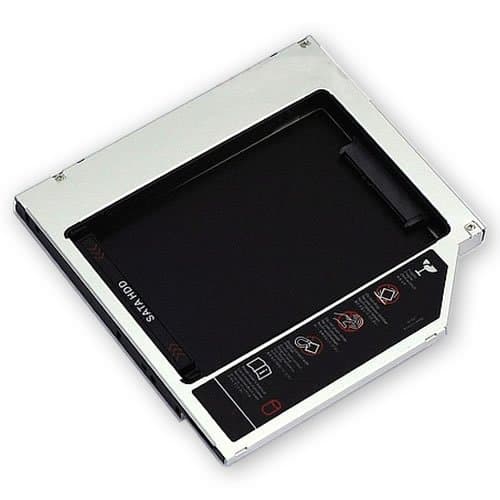
🚀 Elevate Your Storage Game!
The JUSTOP® 2nd Hard Disk Drive/SSD Caddy is a sleek and efficient solution for expanding your laptop's storage. Designed for SATA 2.5" hard drives with a maximum thickness of 9.5mm, this caddy features a plug-and-play interface, supports hot swapping, and is compatible with multiple operating systems including Linux, Windows, and Mac. Weighing just 59g and measuring 128 x 128 x 9.5 mm, it’s the perfect blend of functionality and portability.
| ASIN | B005NC38HM |
| Brand Name | JUSTOP |
| Compatible Devices | Laptop |
| Customer Reviews | 4.0 4.0 out of 5 stars (13) |
| Hardware Interface | IDE |
| Hardware Platform | Linux, Mac, Windows |
| Manufacturer | JUSTOP |
| Supported Devices Quantity | 1 |
| The Standard Size of the Hard Drive or the Bay the Hard Drive Is Compatible With (in inches) | 2.5 Inches |
| UPC | 610256543451 |
M**E
Just what I need
The product is excelent, but the first time that I mounted was not working because the connector is quite hard and was afraid to broken so when listen the click thought was connected but it was not worked. So I mount again with a old hard disk which was not afraid to broke and connect more strong, then listen click and clack and work fine because the screws can fix it. So I will say that if the screw can not fix the hard disk, it is because have to connect more strong. Actually it is working fine and the product is the most cheap I found.
D**A
Didnt work
Could not get this to work. Later found out that there are some hard drive compatibility issues. Seagate being one of them, which is what I have. Refund was swift and easy.
F**T
Does the job - If you fix it a bit
I like the product because I used it to install an extra hard drive in my laptop but the quality leaves a fair bit to be desired. The caddy is fairly robust. Since it is internal that isn't too much of an issue. The real issue is the screw holes - both quality and positions. I had to gently re-bore the holes to accept the standard screws and to force relocate one which was well off location. The re-bore had to be very gently done as the screws are tiny. I was worried that the whole thing might be unusable if I'd just slipped up a tiny bit in correcting the problems. I suppose it's value for money but if it's designed to replace an existing device it should be fit for replacement without rework or customer 'fixes' being applied.
D**R
works well in my old MacBook Pro
Note that if you have a newer laptop you may need a SATA to SATA caddy such as Akasa N Stor 2.5 inch Slimline SATA Optical Disk SATA HDD Adapter instead of this, I think the unibody MacBooks have a SATA external connection on the optical drive whereas the older models (such as mine) have an IDE connecter. Note that this device accepts a SATA drive internally (e.g. the type of your drive should be SATA) and contains a SATA -> PATA converter within the caddy so that the external connector is IDE (the part that plugs into your laptop's innards). I bought this when upgrading my old MacBook Pro (Model 4,1, Early 2008) to an SSD drive. I bought an SSD Samsung 128GB 830 SSD SATA 6GBPS 2.5 inch Desktop Basic Kit for my laptop and placed it where the hard drive Samsung M8 1TB 2.5 inch 5400 RPM SATA II OEM Internal Hard Drive Compatible with Sony Playstation PS3 was, and moved the hard drive into this caddy. Combining these components can significantly boost the speed of your laptop by installing an SSD where your hard drive currently is, whilst maintaining a large drive for media and documents via a large hard drive installed into this caddy. To put it in perspective my 4.5 year old MacBook Pro now feels as responsive as my flatmates brand new MacBook Air, and seems faster on a lot of tasks! I used the SSD for a new install of the new OS (Mountain Lion) and use the old hard drive in this caddy for media storage and documents. The combination works very well and feels very very fast, although this is due to the SSD not the caddy. When replacing the optical drive you need to remove the mounting brackets (in my case, three of them) from the old optical drive and attach them to this drive. Unfortunately although the holes are present in the caddy the screws in the Apple drive are slightly too thick and of a different thread to what the caddy accepts, luckily I had some tiny screws (I think from an iPhone 3g repair kit) that fit nicely. I have been using this for several weeks without problems, I would give this five stars if it included the screws for the mounting brackets, as it is I will deduct one star for that inconvenience.
A**M
Perfect for Toshiba HDD and Macbook2,1
I'd recommend this product to any white/black MacBook2,1 late 2006 owner. I just replaced my Toshiba hdd with a Samsung 250GB ssd. This installation was very easy. Those worrying about it, just do what I did and sit down with a YouTube video. I used a tutorial on how to remove MacBook keyboard. This caddy fits perfectly and works fine with my Toshiba HDD.
J**R
Does the job
So this is a lot cheaper than some other options and had no reviews so I was skeptical. But when the item arrived I installed it with minimum fuss. The only adaption I had to make was to simply pull of the plastic cover that would sit along the cd-tray opening, it literally just pulls off.
S**N
Not compatible with Samsung SSD drive
I bought this for my 17" early 2007 MacBook Pro 2,1 with the intension of installing an SSD as a boot drive. I bought the Samsung 840 EVO 120GB to install into it. The drive could not be recognised through this caddy. After testing the SSD and the caddy separately and determining they do both work, just not together, I ended up using this caddy for my existing WD 640GB 5400 and installing the Samsung SSD into the primary drive slot. The mac will boot from the old HD in the caddy without the need to reassign boot disks. 3 Stars - I hope this helps someone
J**E
this is a long time since I purchased this item ...
this is a long time since I purchased this item but at the time it did exactly what it was supposed to do. Still installed on my old Mac and still working!
Trustpilot
Hace 1 semana
Hace 1 mes