We remain fully operational. Our teams are working around the clock to ensure your deliveries continue safely.

Descargar la aplicación


Servicios al cliente
Sobre nosotros
Copyright © 2025 Desertcart Holdings Limited
Descargar la aplicación
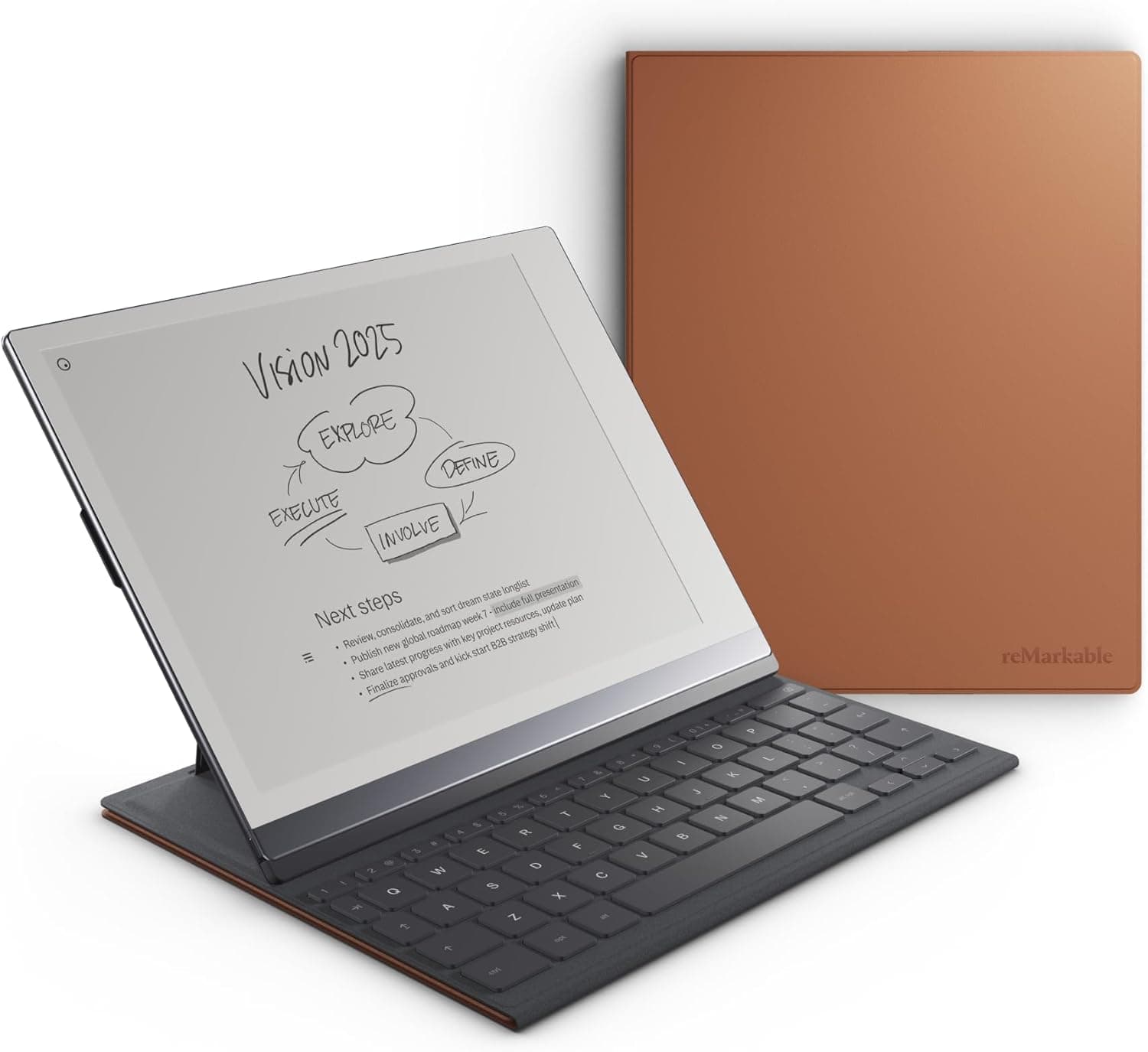

⌨️ Elevate your note-taking game with the reMarkable 2 Type Folio — where paper meets precision.
The reMarkable 2 Type Folio is a premium, slim-profile keyboard folio designed exclusively for the 10.3” reMarkable 2 tablet. Featuring 64 tactile, backlit keys with 1.3mm travel, it offers a laptop-like typing experience on a glare-free CANVAS display. The folio supports two fixed typing angles for ergonomic comfort and folds away to protect your device in style. Lightweight at 453 grams and crafted from water-repellent faux leather, it enhances productivity by combining typing, handwriting, and sketching seamlessly, with cross-device note syncing via the Connect subscription.


| ASIN | B0BXPQB5CS |
| Additional Features | Backlit |
| Antenna Location | Office |
| Best Sellers Rank | #37 in Tablet Keyboards #307 in Tablet Keyboard Cases |
| Brand | reMarkable |
| Built-In Media | Keyboard, folio case |
| Button Quantity | 64 |
| Color | Brown |
| Compatible Devices | Tablet |
| Connectivity Technology | RF |
| Customer Reviews | 4.5 4.5 out of 5 stars (291) |
| Enclosure Material | Faux Leather |
| Generation | 2nd Generation |
| Global Trade Identification Number | 07090045257104 |
| Hand Orientation | Ambidextrous |
| Item Dimensions L x W x H | 7.76"L x 9.69"W x 0.51"H |
| Item Weight | 453 Grams |
| Keyboard Description | Backlit Keyboard |
| Keyboard Layout | QWERTY |
| Manufacturer | reMarkable |
| Model Name | Type Folio |
| Model Number | 166470 |
| Number of Keys | 64 |
| Power Source | Wired |
| Style Name | Contemporary |
| Switch Type | Tactile |
| Theme | Professional |
| Unit Count | 1.0 Count |
| Water Resistance Level | Water Repellent |
M**.
Functional and Professional!
Awesome keyboard! High quality. Very portable and somewhat lightweight. Typing yields a great experience. I just wished there was a flap to secure the pen. But it's a wonderful device that extends functionality of the device and it looks very professional.
R**.
A Perfect Compliment to ReMarkable
This product completes the ReMarkable package. The Folio provides protection and additional peace of mind when traveling with ReMarkable. The Folio is expensive, but you get what you pay for--the build quality is top-notch. The built-in keyboard is solid and feels great to type on. Having the option to write or type on the ReMarkable is a welcome addition. The folio's interior features a lining made of premium material, which helps to keep the ReMarkable 2's screen clean and smudge-free. It can also acts as a comfortable resting surface for the hand while writing or drawing on the tablet. Additionally, the ReMarkable 2 Folio offers versatility in its design. The cover can be folded back to form a stand, allowing users to prop up the tablet at different angles. This is particularly useful for reading or viewing content, providing a hands-free experience. One minor downside to note is that the folio does not offer storage for the stylus. While this is a small inconvenience, it would have been convenient to have a designated spot to securely hold the stylus when not in use. Overall, the ReMarkable 2 Folio is a fantastic accessory that complements the ReMarkable 2 tablet perfectly. Its stylish design, sturdy construction, and functional features make it a must-have for ReMarkable 2 owners. Whether you're looking for protection, convenience, or an improved user experience, the ReMarkable 2 Folio delivers on all fronts.
E**A
Great product
Great addition to the reMarkable. Looks lovely and being able to combine the typing and writing abilities is very convenient.
D**Y
Save money and ge this one.
This keyboard feels great to type on. Takes a bit of time to learn some shortcuts but works well.
E**P
A Stylish Addition with Some Limits
I’ve been using the Type Folio for my reMarkable 2, and it has become an essential part of my workflow. The Type Folio is a great addition, offering a blend of handwriting and typing flexibility, which allows me to seamlessly switch between note-taking by hand or typing. The design is elegant and professional, making it perfect for meetings—when I pull out the keyboard, it often draws attention. That said, it does add noticeable weight and bulk to the reMarkable 2. While I haven’t weighed it, the Folio nearly doubles the weight of the device and adds significant thickness. One of the key features of the reMarkable 2 is its thinness and lightness, so if that is important to you, you might find the Type Folio detracts from the slim, paper-like feel that makes the tablet so unique. For longer note-taking sessions, I often remove the tablet from the Folio to regain that sleek, “paper sheet” experience. However, it’s still manageable to take notes with the Folio attached if needed. The typing experience itself is surprisingly pleasant. The keyboard feels tactile and satisfying. However, there are some compromises. For example, the lack of common features like a delete key and some unusual key placements require an adjustment period. Despite this, the overall experience is still impressive. One of the significant downsides is the limited functionality of the reMarkable 2 as a word processor. You are mostly confined to plain text typing, with no real support for text formatting, editing features, or app integration. While it’s great for distraction-free writing, it falls short if you’re looking to draft emails or complex documents. I often draft basic notes or outlines and then transfer them to my Mac or another device for final edits. It would be fantastic if reMarkable offered Word document integration to make the typing experience more robust. The price is definitely something to consider. At $199, the Type Folio is quite expensive for what it offers. To put it in perspective, it costs as much as a Nintendo Switch Lite! While I do appreciate having the option to type on my reMarkable 2, I feel the price is steep, especially given the limitations of its typing functionality. It’s a nice-to-have accessory, but at this price point, it’s something you should only invest in if you have some extra budget to spare. In my case, I was able to justify the purchase because I caught it on sale. In conclusion, the Type Folio is a fantastic accessory if you’re a reMarkable 2 power user, but it’s definitely not a must-have. If you type often and love the reMarkable ecosystem, you’ll appreciate the convenience it offers. However, its limited functionality and high price make it a luxury, rather than a necessity.
M**0
Great accessory for the Remarkable
Very nice typefolio. Very good quality and feels very premium. Kind of high price but everything remarkable is. Very worth it though
B**N
Coming the full circle with High Tech!
It is a simple device, easy to use, easy to move around with, connects to the internet, able to send emails, you can park articles you see on the internet and don't have time to read in this device and read it later... I haven't written by hand in a while, so I am enjoying that part a lot, it feels like paper, and when necessary, I convert what is written by hand to a formatted document with the press of a button. Amazing battery life. In short, I love it!
V**H
Recommended
Good but expensive
A**.
Very useful. I'm using it more often than I thought I would. The ease of switching from typing to writing by hand is fantastic; very intuitive and improves my note-taking. The only con is laguages available, but I understand that's a software limitation of the ReMarkable device itself. I wish it had Romanian :(
L**U
Recomendable
S**.
Was only Remarkable when I first saw it in use. Device works for 14 days before needing it to be charged again. The Remarkable is cloud based ecosystem in which all devices work in tandem with your data. The Remarkable pen also included with the original product which can be used with the keyboard Folio,which does not come bundled.
A**R
Buying my Remarkable 2 second hand it didn't have the type folio so I've been using the on screen keyboard. A real keyboard is way better. Love it! Snaps in place. No charging, it uses your paper tablets power to operate.
D**L
The keyboard gets connected to the tablet in a very hassle-free manner. All you have to do is bring them together close and they will get attached immediately through their magnets, and voila you can start typing. It also acts like a folio and protects your tablet. However, skip getting the folio if you will only use it as a digital notebook. Many people do not find good use for it. So buy it after proper consideration. But if you do buy it, I can assure you that the typing experience will be really smooth.
Trustpilot
Hace 5 días
Hace 1 semana