We remain fully operational. Our teams are working around the clock to ensure your deliveries continue safely.

Descargar la aplicación


Servicios al cliente
Sobre nosotros
Copyright © 2025 Desertcart Holdings Limited
Descargar la aplicación




🔗 Connect Smarter, Work Faster, Live Sleeker
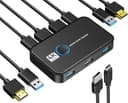
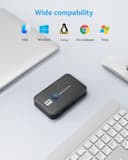
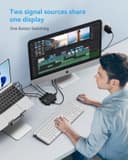
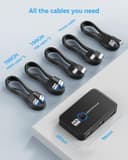
The Giimake HDMI KVM Switch lets professionals effortlessly share one 4K@60Hz monitor, keyboard, and mouse between two computers. Featuring USB 3.0 ports with 5Gbps data transfer, driver-free compatibility across major OS, and a tactile push-button switch with LED indicators, it includes all necessary cables to optimize your workspace and workflow without extra purchases.


| ASIN | B0C6GF5S14 |
| Actuator Type | Push Button |
| Best Sellers Rank | #498 in KVM Switches |
| Brand Name | GIIMAKE |
| Color | Black |
| Connectivity Protocol | Usb |
| Connector Type | Hdmi |
| Contact Material | Metal |
| Contact Type | Normally Open |
| Control Method | Push Button |
| Controller Type | Push Button |
| Current Rating | 4 Amps |
| Customer Reviews | 4.1 4.1 out of 5 stars (331) |
| Manufacturer | Giimake |
| Material Type | Metal |
| Mounting Type | No Mounting Required |
| Number of Items | 1 |
| Number of Positions | 2 |
| Operation Mode | manual |
| Specification Met | UL |
| Switch Type | Kvm Switch |
| Terminal | Physical |
| Unit Count | 1.0 Count |
| Warranty Description | 2 year |
A**N
Marvelous little KVM switch! Comes with surprisingly nice-quality cables
This thing works GREAT! I have multiple computers but hate rotating between keyboards especially because I have a nice main keyboard and mouse that I am used to. The device itself is really light and almost didn't feel substantial at first, but it's pretty tidy and works well and the button has a satisfying click to it. The cables it comes with are surprisingly sturdy and robust which was a nice surprise, and so was the LED ring to indicate which set you're using--it looks quite nice. Very glad to see that there's no perceptible latency issues with fast typing or a Logitech G305 wireless mouse. Note that it doesn't come with a power brick. I wasn't expecting it to and have many bricks lying around, so not a big deal for me. Only possible downside I can really see is that the switch isn't all that fast. Not slow, but it does take a second to think about it. Looking forward to seeing if it works with an amplifier and TV/media streamers... I won't be upset if it doesn't though. One quibble: I could not get it to work with a Mini-DP to HDMI dongle. I have a computer that has the annoying feature of only having mini-DP outputs, and this switch wouldn't show the display. I have a feeling this is more the fault of the Mini-DP to HDMI dongle, but it's hard to test for sure with the hardware I have. I will continue to play with it and update if I figure out it is the KVM switch that's responsible.
M**.
Amazing Compact HDMI KVM Switch
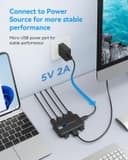
Anyone who uses multiple laptops should get this KVM. The installation can't be simpler, if you have ever used a KVM before, you probably don't even need to read the manual provided with the product because everything is labelled properly. So if you have never used a KVM before and want to share one keyboard, one mouse and a monitor, the instructions are really simple and this will save your life. The quality of the product is really well-built, the blue and green LED ring let you know which laptop (PC1 or PC2) is using the KVM. It provides all the necessary cables (HDMI and USB) and their lengths are fairly good or a typical setup. My setup doesn't even need to connect the DC 5V cable and everything just works seamlessly. I am glad that I now can use one set of keyboard and mouse for two laptops and share a big monitor! This product is amazingly good!
E**S
Great KVM switch for my setup
I was looking for a KVM switch that would let me control my main computer as well as a laptop with a broken display. This switch comes with all of the cables you need to connect your keyboard, mouse and display to it. There are two HDMI cables, two USB-A to USB-A cables and a USB-C/USB-A cable to connect it to a power supply. The switch does not come with a power supply but it can be powered by any USB port or wall charger. I really like that the LED ring changes colors to indicate which source is in use. There's not much to this switch (or any KVM switch) but it fulfills its purpose perfectly. I do not have a 4K monitor to test that output on but it can output just fine on my 2K (2560x1440) high refresh rate monitor. It's an HP x27q and I see no drop in the refresh rate when using this KVM switch. I recommend this switch for anyone that needs a KVM switch.
E**U
Great Device for Sharing a Monitor with Two Computers
I have two separate work laptops and three external monitors. The laptops stay closed as their monitors are too small for my uses. Having two monitors for each computer would be ideal, but I don't have the space. I thought this switch was the perfect solution. But it's low price scared me. But, I decided to give it a shot. I am presently surprised. With a simple push of a button, my middle monitor switches from one computer to the other. There is a slight lag while the monitor connects with the new computer and acquires the settings, but that's maybe 10 seconds, if that. All the monitor setting remain as they should be. On occasion, the desktop icons get a bit rearranged. But I suspect that's because the shared monitor has different resolution settings on each computer. I'd give this product 5 stars except for one thing: Although it comes with HDMI cables, they are the standard cables with the same connectors on both ends. However, my monitors require one-way HDMI cables: One end has the standard HDMI connector that has two diagonal corners but the other end only has one diagonal corner. Once I got those cables, the hook-up was straightforward and everything worked great. I definitely recommend this if you have the need to share a monitor with two computers. To be clear, however, the data from only one computer can be on the shared monitor at a time. It is a "computer 1 OR computer 2" arrangement, not a "both at the same time/split screen" setup.
A**R
WILL DESTROY YOUR PC - AVOID AT ALL COSTS
While this absolute piece of junk does work as a KVM switch it will backfeed electricity into your PC both through the USB cables and HDMI cables resulting in BSOD's and ultimately hardware failure. I'd been dealing with nearly undiagnosable (no event logs, no bsod minidump files, nothing) blue screens ever since I started using this thing and was going absolutely nuts trying to figure it out. The second I unplugged this thing everything instantly worked again. At first I thought it was just the USB portion of it that was causing the issues but even just having a monitor plugged into it and an HDMI cord out from it to the PC cause the same issues as it's able to get power through the HDMI output on the monitor. This thing killed two NVMe drives and a GPU before I finally figured it out, under absolutely no circumstances should you purchase or use it, just spend a bit more for a proper KVM box from a reputable brand because this thing will cost you far more than you pay for it.
B**G
Time and money both waste, Keyboard and mouse port not working, although they processed refund and not taken back item yet it's useless for me.
R**O
Não funciona para dois notebooks compartilharem monitor, mouse e teclado.
Trustpilot
Hace 1 mes
Hace 4 días