We remain fully operational. Our teams are working around the clock to ensure your deliveries continue safely.

Descargar la aplicación


Servicios al cliente
Sobre nosotros
Copyright © 2025 Desertcart Holdings Limited
Descargar la aplicación

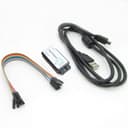
⚙️ Debug smarter, not harder — 8 channels of lightning-fast insight!
The HiLetgo USB Logic Analyzer is a compact, USB-powered device offering 8 channels with a maximum sampling rate of 24 MHz. Designed for embedded system debugging and digital signal analysis, it supports a wide input voltage range (-0.5V to 5.25V) and features a high input impedance of 1 MΩ. Compatible with open-source software like PulseView, it provides a cost-effective, versatile solution for professionals and hobbyists aiming to decode UART, IIC, SPI, and other protocols with precision.
| ASIN | B077LSG5P2 |
| Best Sellers Rank | #16,582 in Industrial & Scientific ( See Top 100 in Industrial & Scientific ) #1 in Logic Analyzers |
| Brand | HiLetgo |
| Brand Name | HiLetgo |
| Cable Type | USB |
| Color | gray |
| Compatible Devices | Modem |
| Compatible Phone Models | No Compatible Phone Models |
| Connectivity Technology | USB |
| Connector Gender | Male-to-Male |
| Connector Type | USB Type A |
| Customer Package Type | Standard Packaging |
| Customer Reviews | 4.5 out of 5 stars 567 Reviews |
| Data Transfer Rate | 24 Megabits Per Second |
| Frequency | 24 MHz |
| Indoor Outdoor Usage | Indoor, Outdoor |
| Item Shape | Round |
| Item Weight | 0.07 Kilograms |
| Manufacturer | HiLetgo |
| Maximum Voltage | 5.25 Volts |
| Model | 3-01-0015 |
| Number of Items | 1 |
| Number of Pins | 8 |
| Other Special Features of the Product | Data Transfer |
| Recommended Uses For Product | digital signal analysis, embedded systems debugging, hardware development and testing |
| Special Feature | Data Transfer |
| Unit Count | 1 Count |
C**R
Good basic hobby logic analyzer
Summary Pros - inexpensive, works well with free open source software Cons - no on board capture buffer, no probes included This is a good little logic analyzer for the home hobbyist or even a small development team. The hardware uses a CY7C68013A microcontroller (an 8051 MCU core with an integrated USB 2.0 interface). It comes with a USB A to mini USB B cable and some short jumpers wires. It is powered by USB so there is no other power supply to deal with. There is no on board capture buffer so your computer needs to be fast enough to receive the data as it comes over USB. With most systems that shouldn’t be an issue providing you are not doing any other intensive tasks, particularly those that use USB, at the same time. Trying to run all 8 channels at 24Mhz though could be an issue on some systems. Looking at the board, there isn’t any input buffering other than series resistors. Care must be taken not to expose the channel inputs to voltages that could damage the on board microcontroller. There is no software included, but one can download the open source sigrok/PulseView which fully supports this device. I tested it with PulseView 0.4.1 on a Windows 10 system and it was recognized as “Saleae Logic” analyzer (an older name brand analyzer). The only part that could be slightly tricky to getting PulseView working is installing the WinUSB driver using Zadig. If you are unfamiliar with Zadig, you can read about it on the sigrok wiki area for windows. Since this board emulates a “Saleae Logic”, there are also commercial software offerings that should work with it. I did an initial test using two channels simultaneously reading a 115200 bps data stream (sample rate set to 500kHz) and it worked flawlessly. PulseView easily decoded the ASCII data once configured. I again captured the same stream setting at 24Mhz (which is way over sampled for the data stream) just to see what it would do, and it worked fine showing the much more frequent sample rate. I’m not aware of a way to setup anything but a simple trigger to start/stop capture using PulseView. That is a software limitation if you are trying to catch a more complex event that occurs infrequently. The jumper wires that came with it are of limited use unless you always have available header pins to connect to in your circuit (doubtful). I suggest ordering a set of “logic analyzer test clips” to complete your setup.
N**K
Works well and compatible wire Saleae Logic
This logic analyzer works perfectly - well worth the cost. It’s compatible with Logic software package and helped solve a rather complex bus protocol I needed to reverse engineer.
D**.
Works, but without better software it's use is quite limited
Setup & use was quite easy. Software has very nice display of decoded serial data. However, there is no ability to trigger on serial data, or to capture for analysis only the decoded serial data (as opposed to all the dead time between data packets), so the capture buffer fills very quickly with the "nothing" between the data you're interested in. There does appear to be a way to export raw data continuously for offline analysis by some other software (and display it with that other software) but it's up to you to write it. I would give it 5 stars if it was more useful with better software. Admittedly, the vendor says it works with open source software. Just be warned... that software makes doing real work with this tool quite difficult (if not impossible). If I can find better software that makes this really useful I'll update this review with links to it.
G**S
Good, inexpensive LA.
Note you will need to download software to use this product. This worked really well for me. I was checking RS422 signals, and it really did a good job with it. I have used it for a few other things now and am still happy with it.
T**F
June 2019 Purchase of HiLetgo 24MHz 8CH USB Logic Analyzer Device With EMI Ferrite Ring USB Cable
I am extremely pleased. I researched and knew what I wanted, what to expect from this little, yet capable, unit. I also understood what not to expects from a $12 piece of hardware. I am not disappointed at all. Configuring it to function with Sigrok's PulseView and Saleae's LOGIC proved just a small ignorance-induced challenge on a Windows 10 x64 newly build workstation, but I was able to get it installed and functioning as intended/desired. It ended up being a pretty shallow learning curve I needed to progress through. Youtube videos and Amazon reviews & buyer question responses helped. User tip: Use Saleae's LOGIC to get the newly connected device configured with drivers, once that is done, try Sigrok's PulseView, prior to trying to force a square peg into a round hole with their Zadiag tool... The unit is very nicely priced, small, and is shipped with the items pictured in the Amazon listing (including the ferrite beaded USB cable (LA has a USB Mini on it)) only. There is no software provided, nor instructions, but, as indicated above, it works with packages that are freely available on the interwebs. The provided test interconnect is a Female to Female configured harness. Tip 2: For use with breadboards and other female-socketed items, I recommend either some male-to-male jumpers or fabricating additional harnesses for use as needed (which I have done - in the attached photo, I show three additional harnesses I made using on-hand supplies I had available - it helps me a lot to have these within easy reach...). if you are in the market for a wallet-friendly Sigrok/PulseView-compatible Logic Analyzer, this may be just what the doctor ordered. Just understand its limitations. The price of the unit doesn't facilitate a super broad bandwidth, noise filtering, or under-/over-voltage protection on the inputs, so one needs to be mindful and work to not exceed published limits (-0.5V to 5.25V). Other than that, and the obvious narrower bandwidth, no negative attributes exist. For the buck, you can't easily beat the bang that this capable little unit brings to the fight. Purchase is recommended. Regarding this OEM/Distributor, HiLetgo hasn't failed me on several technology purchases thus far. Pretty darn happy with them at this time. Take care. -t
C**Y
Incredible value and very useful digital circuit analyzer
Works very well and unbelievable value. I couldn't imagine that for $12.00 I could get a useful logic analyzer. But I gave it a try based on the other positive reviews and it's amazing. There's absolutely no documentation except for listing their support email address, not even a web URL. But don't worry, just download the PulseView software and follow those instructions. Up and running perfectly in under 10 minutes on my OSX desktop. I just plugged the supplied cable into my USB hub and attached a few of the colored signal wires into my project breadboard. It captured the SPI bus from my Arduino project and I was able to spot the problem immediately. PulseView comes with a huge number of protocol decoders built in including one for SPI that I used. The UI is unbelievably responsive for something that is handling millions of data samples. Instantaneous and fluid zooming and scrolling. As expected it has a flexible Trigger function that captured my the signals at exactly the point in time I needed to investigate. I wish I had bought this weeks ago, it would have saved me a lot of debugging time already. If you're interfacing to Arduino, RaspberryPi or doing any type of digital logic breadboarding I'd highly recommend getting one of these ASAP.
R**6
Very impressed, worked great!
I spent hours trying to build a poor-man's Logic Analyzer out of an Arduino. The last time I needed one, they were big, expensive bench instruments that cost way more money than my little hobby project was worth. The thought never ocurred to me to simply buy one, but then I discovered this little gadget and am completely blown away. It worked fantastic, and was super easy to use. Big thanks to the commenters/question answering users who pointed me to the free Salae software. I used it on a Mac and it was very easy to set up and use. I did have to twist the ribbon cable around a bit to make the cable colors correspond to the on-screen colors for the signals. But wow, a fully-functioning 24 MHz logic analyzer for $13. Just amazed. One thing to watch out for: this conforms to TTL logic levels, which means 2.0V or higher is considered logical HIGH. This can be unintuitive for those working in 5V and expecting anything under 2.5V to be LOW. Usually not a problem, but it did get me because the LED and resistor on Arduino's pin 13 were pulling the input low. The LA saw it as HIGH, but the Arduino saw it as LOW. (Burried in Arduino's documentation is the suggestion to "not use Pin 13 as an input.") The gadget itself is light on documentation (for instance, a blue LED lights up when it receives a signal... at least I think that's why it lights. I'm not actually sure). But setup is so intuitive that it really doesn't need anything.
S**.
A great value, but some USB ports may be problematic
When used in conjunction with sigrok PulseView, this logic analyzer is quite useful, particularly given the price. The lack of any documentation is a drawback for those not familiar with this type of device. Like other potential purchasers, I was a little concerned about the number of buyers who reported issues with the device. I ran into some difficulties myself, and the results of my research may be useful. I attempted to use this logic analyzer on five different computers running an assortment of Microsoft Windows releases: Compaq CQ5110F Desktop/Windows 7 Home Premium SP1 (32-bit) HP Compaq 8000 Elite CMT Desktop/Windows 7 Professional SP1 (64-bit) Gateway NE56R12u Laptop/Windows 8.1 Professional Update (64-bit) Dell Inspiron N5110 Laptop/Windows 7 Home Premium SP1 (64-bit) HP EliteDesk 705 G1 SFF Desktop/Windows 10 Professional Version 1909 (64-bit) The appropriate version of sigrok PulseView Version 0.4.1 was installed on each machine, and Zadig was used to install the necessary driver. The results were basically successful with the exception of the Dell Inspiron N5110 laptop. The device worked with both internal USB 2.0 and 3.0 ports and with external USB 2.0 hubs. Once installed, there was no need to use Zadig to reinstall the driver after reboots or for any other reason. The device was identified as “Unknown Device #1” in Universal Serial Bus devices in the Device Manager. The device was also identified as “Unknown Device #1” in the System Tray USB tab prior to the execution of PulseView, but after PulseView executed, the device was identified as “fx2lafw” in this tab. The Dell Inspiron N5110 has two USB 2.0 ports and one USB 3.0 port. I was able to get Zadig to properly install a driver and to get PulseView to work only with the USB 2.0 port on the left side of the laptop. The other USB 2.0 port and the USB 3.0 port are on a separate circuit board from the laptop mainboard (I replaced this small board once when the USB 3.0 port was damaged), and a proprietary Renesas driver is used for both of these USB ports. When I tried to connect an external USB 2.0 hub to either of the USB ports on this small board, a Renesas USB 2.0 hub driver was installed. If I tried to install the same external hub to the USB 2.0 port that worked with the logic analyzer, a generic Microsoft USB hub driver was installed instead. This result suggests that the proprietary Renesas USB driver is at least partially responsible for the failure. After using this Dell laptop for over eight years and with a wide variety of USB 2.0 and 3.0 devices, I have never encountered a USB device I could not use with the proprietary Renesas driver (until now). So if you have purchased this logic analyzer and have had difficulties with sigrok PulseView in Windows, try other USB ports (or a powered hub), particularly if you can find one that uses a Microsoft generic driver rather than a proprietary driver. If you are contemplating the purchase of this device for use with PulseView in Windows, make sure you have at least one USB port that uses a generic Microsoft USB driver.
Trustpilot
Hace 2 meses
Hace 2 semanas