We remain fully operational. Our teams are working around the clock to ensure your deliveries continue safely.

Descargar la aplicación


Servicios al cliente
Sobre nosotros
Copyright © 2025 Desertcart Holdings Limited
Descargar la aplicación
⚡ Take charge of your power — see it, save it, own it!
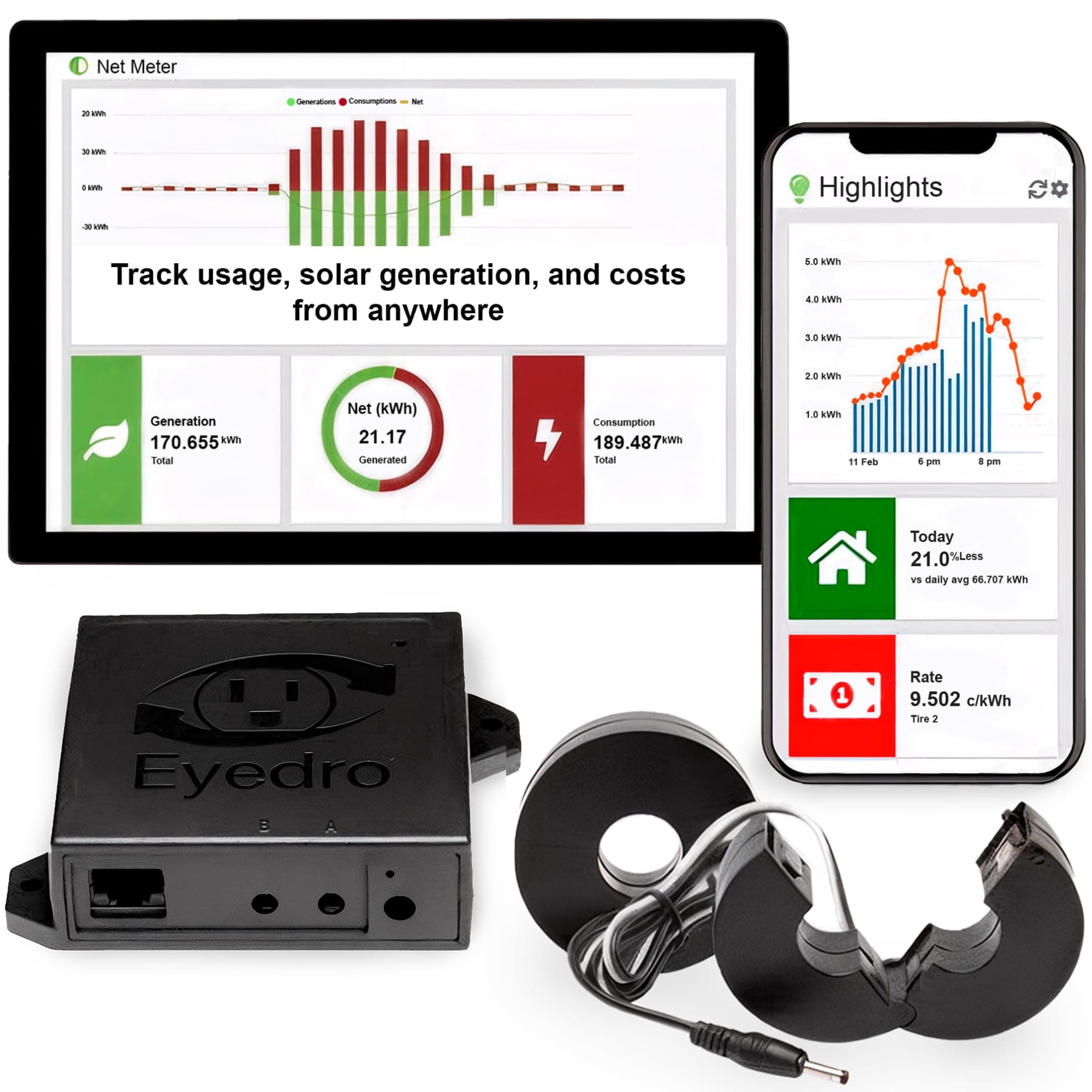
The Eyedro Home Energy Monitor is a compact, dual-sensor smart meter designed for real-time whole-house electricity monitoring. Compatible with WiFi and Ethernet, it provides precise data on power consumption and solar net metering through a subscription-free cloud platform. Ideal for homeowners, smart home enthusiasts, and solar users, it empowers energy optimization and cost savings with detailed reports and instant usage insights.


| ASIN | B0CD2SZX35 |
| Batteries Included? | No |
| Batteries Required? | No |
| Best Sellers Rank | #93,881 in Tools & Home Improvement ( See Top 100 in Tools & Home Improvement ) #14 in Home Automation Modules |
| Customer Reviews | 4.0 4.0 out of 5 stars (629) |
| Date First Available | July 28, 2023 |
| Included Components | 1 x sensor module, 2 x 200A directional current sensors, 1 x 6VAC power adapter (US style), 1 x Ethernet cable, Quick Start Guide |
| Is Discontinued By Manufacturer | No |
| Item Package Quantity | 1 |
| Item Weight | 1.54 pounds |
| Item model number | EYEDRO-HOME |
| Manufacturer | Eyedro Green Solutions Inc. |
| Part Number | EYEDRO-HOME |
| Power Source | AC |
| Product Dimensions | 8 x 8 x 3 inches |
| Style | Ethernet WiFi (EYEDRO-HOME) |
| Usage | Electricity monitoring indoor use |
J**S
Excellent for Sub-Metering and Real-Time Monitoring
We’re using this in a nonprofit setting to sub-meter a separate building, and it has worked perfectly for that purpose. Installation was straightforward, and once configured, it immediately began providing clear, real-time electricity usage data. The readings have been consistent and reliable, which is critical when the data is being used for billing and accountability rather than just general monitoring. What really makes this system valuable for us is how it integrates into our reporting process. We’ve automated a monthly usage report that is distributed simultaneously to both the renter and the building owner, making the payment process transparent and straightforward. Having accurate, real-time data feeding that report eliminates guesswork and avoids disputes. While it supports solar net metering, we’re strictly using it for sub-metering and cost allocation, and it performs exceptionally well in that role. For organizations needing dependable energy tracking with practical reporting applications, this has been an excellent solution.
J**F
Great little device, great website, only one tiny complaint
I purchased this a week ago, and installed it literally in a few minutes. I did not even look at the directions, it's just too simple. The install is really easy if you're at all handy and not afraid of your load panel. Simply put, you remove the cover from your load panel, open the sensor by pushing in the little clip, slide the sensor around one of the power mains, and clip it shut. Repeat for the other sensor. Drop the wires out of the panel and replace the cover. Then connect the sensors to the EyeDro box, run an ethernet cable to it, and plug in the power. Voila! Next, go to their website and register an account, and either enter the serial number from the box or click the "Scan network" option which will find it. That's it, you're up and running! The box itself is very small, about the size of a deck of cards. There are no indicator lights on it, but it does include screws and a mounting template if you want to wall mount it. If you have not decided yet, you can go to their website and play with a demo version of the system, which is nice. It has the following reports: * Highlights. This shows a bar chart with recent power usage per hour, a meter that shows current usage (and is very responsive), today's total usage, today's projected total usage, a comparison to last month, the minimum and maximum amount of power used, the current rate (if you entered it into the setup, such as a tiered rate like I have), your estimated bill to date, and an estimate for your total bill. The best part about the Highlights is that the meter is VERY RESPONSIVE. I can watch the needle move up and down in near real-time. I can see when the stove is turned on, then watch as it cycles the burner on/off to maintain heat. It also shows a +/- designation that shows how much more/less power is being used presently compared to the last time the needle moved. For example, right now it shows -25w after a fan was turned off. If something else turns on, it would show +[number] to indicate the difference. * Insights. This shows your usage compared to other forms of power, such as gas, coal, natural gas, etc. I don't find this very useful. * Live. This shows a very detailed chart of minute-by-minute power usage. * Summary. This shows a bar chart with hourly totals of power usage. * Comparison. This shows a comparison of power used to the previous month on a daily basis. * Bills. This shows a 12 month billing history, daily cost, daily average cost, consumption per tier, and so forth. * Reports. This shows a weekly report of usage compared to previous weeks. * Phantom energy. This shows your minimum usage demand, and helps you track down low-use devices that cost you money while they are supposedly turned off. * What's it cost. This is a usage calculator that allows you to pick from a wide range of devices to determine how much they cost you to operate. * Net meter. If you have solar, or some other supplemental power supply system, this will tell you how much power you have generated versus how much you have used. The mobile website has all of these features as well, and has a really well done "swipe" design that allows you to swipe left/right across multiple screens per area. The site also has a variety of setup options, including a "rates" feature. This allows you to enter your rates from the power company, in one of three ways: * Fixed Price * Tiered * Time of Use You can also specify if you are billed: * Monthly * Bi-monthly * Quarterly Finally, you can also tell it that you have the following fees/charges: * Fixed fees * Variable (per kWh) fees * Adjustment factor * Taxes * Rebates My only complaints: You have to login to the website almost every time you visit, even if it's only been an hour or two. On the mobile site this often results in a box saying "error" and it never goes away, so you cannot login. You have to close the tab/browser, or restart your phone to get back in. (I have reported this issue to them as of 5/10/2015 so hopefully they will fix this.) It's just a little hassle to have to login each time. (SEE PHOTOS) In addition, the "Dial" meter is inconsistent. Some times it has the needle in the red zone for (example) 4 kWh, and then later it will have the 4 kWh in the yellow zone. It's not labelled either, and it should be. (SEE PHOTOS) All in all I really like it. This is exactly what I have been looking for, it's cheap, easy to use, and has really helped me understand what the energy hogs in my house are (hint: it's my HVAC). Finally, I got mine as an Amazon Warehouse Deal, for only $75! The box was very beat up, but the device was perfect and works great. Save yourself a few bucks if you can!
A**R
Great stats, a little buggy, but great customer support
For an overall view of your energy usage, it does a decent job. The interface could be better and it lacks a phone app, but it has some nice data and useful tools. Too bad it requires a sign-in to their cloud service. The connection is unreliable, and I get multiple emails per day saying it lost connection. I tried running an ethernet cable but the problem still remains. Also, the ethernet cable is not hot swappable. If your switch power cycles or you unplug the cable, you will have to pull the power and plug it back in. Their instructions also state you cannot use an ad blocker in your network, so that's a huge red flag. But, their customer support is excellent. Regardless the problem, they will work diligently to solve it. Bumping my rating to 4 stars.
D**S
Not Recommended
Had this unit since November (now February). Accuracy is off by 12% to 24% on the last 2 data sets. I have this on a dedicated wind turbine net metered circuit and when comparing utility reported data for the exact same time period this unit is 30% off (consistently). It is installed correctly so don't go there. I also now have a Sense monitor installed in the same circuit. The Sense unit is within 1% against the utility data. I do not recommend Eyedro if you want anything that is close to being accurate. It also reports negative values during actual production (verified against Sense and the inverter output display). Would venture the algorithm calculations to be off for this Eyedro unit. If I could send it back I would.
J**R
Bastante bueno he logrado identificar los aparatos que gastan más luz, identificando los gastos excesivos he logrado bajar 40% el consumo El precio se me hizo caro... pero ahora que se que es lo que gasta más luz he podido ahorrarla y ahí se pagará el costo de este equipo Me gustaría poder medir cada pastilla de luz pero solo hay esta versión que solo lee la principal
R**.
I've been using this item for about 10 months now (actually I order 2 and use one for my home and the other for my parents house). I have never had an issue with the quality of the product. The website app can be used easily on a mobile device as well as a laptop. Easy to install and setup (they also have setup videos online you can watch). I use it multiple times a day to check my current demand (especially to check the demand of my hot tub and car charger). The daily consumption feature, month reports are convenient to use for knowing your energy consumption and what to expect from an invoice for your electrical utility (the myEyedro reports have always been withing a few dollars of the utilities invoice). I have contacted their technical support team and they are quick to respond and help you out. I would highly recommend this product for the all the features you get for the price; it can't be beat!
M**.
Let me just start with how poor the instructions are on this product (see attached image). It basically says "connect it" and that's it. No information about how it would be configured in a solar system, no information on the best place to connect it in your panel other than "put it on what you want to monitor". I was trying to use it in an off-grid system, all of our power comes from our solar generation (which is stored in batteries). This seemed like a perfect product, given how much solar monitoring is mentioned, for example: - "The EYFEFI-2 is capable of monitoring solar and electricity" - "MONITOR YOUR SOLAR USAGE with the EYEFI-2 and its Two 200A Sensors." - "Check your solar usage to minimize electricity usage and maximize solar use." - "The EYEFI-2 supports Solar and Net Metering." This really sounds like it will monitor solar generation eh? Well, after connecting it at various places along our system and a fair amount of back and forth with customer service, it turns out that this is ONLY able to measure AC AFTER the inverter. It does not monitor how much your solar generates. The only situation in which it "monitors solar" is if you're feeding your panels directly into an inverter and then dumping that directly back into the grid. In this scenario you're technically only using solar to offset your grid usage and your home really just runs off grid with solar as a way to offset costs. This is no difference than if you're using ANY AC monitor and there is NOTHING about this that is specifically designed for solar. It cannot monitor what your panels are collecting. It cannot monitor what your charge controller is outputting. It cannot monitor flow into your battery bank. What it can do is monitor AC current (from grid or from an inverter) and you can LABEL that as "generation" on their website. So misleading and I'd argue is actively deceptive. Lastly, the website is janky as heck and barely works on a phone. The only thing it does to well is monitor usage from your main AC breaker panel. But so does a dozen other AC monitors on the market. If you're looking to "monitor solar generation" this product probably isn't for you. If you're looking to monitor how much your solar is pumping back into the grid, then this would work in that and only that scenario. Ultimately I returned the product and will probably build a raspberry pi system to monitor the output from my AXS Port on my charge controller.
A**X
TLDR: It's a decent home/small-business solution. Gives a much better overview of energy consumption vs what KW Hydro has on their website. Good: - The version I have (2 measurement coils, wired internet connection) is affordable (<150$ on Amazon). - Easy to set up.Power consumption samples up to every 10 seconds. - Almost real-time (~5-10 seconds delay). - Handles correctly power and/or internet loss. - The web interface is reasonably easy to use and share with other people.Has enough advanced settings to be able to automatically estimate electricity bills and time-of-usage/tiered consumption. - The platform can be extended with add-on metering devices. Bad: - Requires an internet connection and the my.eyedro.com cloud to see any stats or download data. - Does not accurately account for voltage drop (since it does not have volt-meter) and power factor (mine is ~90%). So it will show a slightly higher load/consumption than what really occurred. You'll need to adjust this manually, so it's not a "set and forget" kind of setup. - Might not immediately sense subtle changes in load (10w or less), especially when in "change of state" polling mode. - To measure individual circuits (eg. solar net-metering, baseboard heating) one would need a much more expensive version of the device (that has extra measurement coils and ports) or to buy another meter just like this one (for each pair of circuits).
A**R
It works very well. It’s nice to see the actual consumption with my solar setup. It is great for troubleshooting problems. I noticed immediately when my septic pump failed. You really notice power hog devices and try and conserve where you can. Great device. Would definitely recommend.
Trustpilot
Hace 1 mes
Hace 1 semana