We remain fully operational. Our teams are working around the clock to ensure your deliveries continue safely.

Descargar la aplicación


Servicios al cliente
Sobre nosotros
Copyright © 2025 Desertcart Holdings Limited
Descargar la aplicación


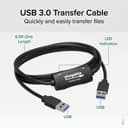
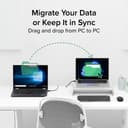

⚡ Upgrade your PC game with instant, secure file transfers!
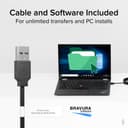
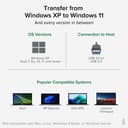
The Plugable USB Transfer Cable offers a fast, secure, and network-free way to transfer files between two Windows PCs. Compatible with Windows XP through Windows 11 (32/64-bit), it includes Bravura Easy Computer Sync software for seamless drag-and-drop syncing. With USB 2.0 speeds up to 0.48 Gbps and no file size limits, it’s the perfect tool for professionals upgrading or syncing multiple machines while protecting sensitive data.


| ASIN | B005OTPVMY |
| Best Sellers Rank | 113,211 in Computers & Accessories ( See Top 100 in Computers & Accessories ) 11,187 in USB Cables |
| Brand | Plugable |
| Cable Type | USB |
| Colour | black / black |
| Compatible Devices | Personal Computer |
| Compatible Phone Models | No Compatible Phone Models |
| Connectivity Technology | USB |
| Connector Gender | Male |
| Connector Type | USB Type A |
| Country Of Origin | China |
| Customer Package Type | Standard Packaging |
| Customer Reviews | 4.3 4.3 out of 5 stars (5,976) |
| Data Transfer Rate | 0.48 Gigabits Per Second |
| Frequency | 480 MHz |
| Global Trade Identification Number | 00649241924487 |
| Included Components | 1x Six-foot (2-meter) USB 2.0 Transfer Cable |
| Indoor Outdoor Usage | Outdoor |
| Item Shape | Round |
| Item Weight | 2.3 Ounces |
| Manufacturer | Plugabke |
| Maximum Voltage | 525 Millivolts |
| Model Name | FBA_USB-EASY-TRAN |
| Model Number | USB-EASY-TRAN |
| Number of Items | 1 |
| Number of Pins | 2 |
| Other Special Features of the Product | Data Transfer, High Speed |
| Recommended Uses For Product | Transferring data between two Windows computers |
| Specification Met | USB-IF |
| UPC | 649241924487 |
| Unit Count | 1.0 Count |
G**M
Plugable Windows transfer cable. Excellent
Upgraded from a Windows XP machine to a Windows 10 machine. They are sitting next to each other but I had to transfer thousands of files from the old to new machine. I couldn't get the transfer working via my WiFi router so I looked for a cable connection. There are a number of USB to USB cable transfer cables online but I bought the Plugable one following reviews and the software that came with it. It is excellent. Quick to install on both machines and then to start the process I opened the software on both machines and plugged in the cable. Nothing happened at first (I realise now it was looking for the other computer) but then up came a 'connected' dialog and the main Tools page. It gives the option to sync both ways, or just one way (old to new or new to old.) Drag and Drop and also the ability to look into the other computer. I brought up my new computer's desktop via that button. I wanted to sync My Documents which took some time as I have over 7000 files in hundreds of folders but when finished there was an exact copy of my old My Documents folder on my new machine. I used USB 2. Would probably work with USB 3 but my XP machine doesn't have it. If you want to drill down the My Documents folder into a sub folder just click the add folder button and a dialog similar to Windows Explorer opens and you can navigate to the folder you want to sync. I then exited the program and switched the cable from the USB2 connectors on the motherboard (recommended but I have other things plugged into those) and reinserted it via hubs and it also worked a treat. Going via a Hub is not recommended however. I am very pleased with this device and the software is first class. It does what it says on the tin - it just works.
T**N
Fantastic! ---- Plugable USB Easy Transfer Cable
Delivered in two days!!!! Works perfectly and the optional downloadable software is excellent and a must have. This is the only 3rd party software available for easy transfer cables and it provides full two way drag and drop file transfer. This can be done from either computer. I transferred files from a 32bit windows 7 starter machine to a 64bit Win 7 home premium machine. The same product key can be used for installs on all your XP, Vista and Win 7 machines. The product is very easy to use and the option to use the Microsoft or the downloadable Bravura software jumps on the screen as soon as you plug the cable in. The cable does not operate like a networked connection as it is intended for file transfer only but it will sync selected folders so they are the same on each computer.
K**T
Cable OK, software not OK
Cable worked as required, but associated software didn't - couldn't seem to connect the two computers. I was transferring files from Vista machine to Win7 machine so maybe this was problem. Anyway, used Windows own "Easy Transfer" with this cable and all went fine.
J**Y
This is just as it says "Easy"
As a silver surfer with not too much knowledge of computers I bought this product to move my files from my old laptop Windows 7 to a new laptop running Windows 8. I downloaded Bravura's app that came with it first, which was completed in a few minutes. Using Windows Easy Transfer program my files were transferred within 20 minutes, they included many photos and a few home videos and what I liked most, all my settings for email, internet etc came too so that I didn't have to set up everything again, which was very important for me.It was all so easy to follow and do and nothing was left behind. Programs themselves are not moved but a list of them are in the report at the end of the transfer and those must be installed either from your discs or from the internet. I am pleased I decided to buy this product as moving all the files using discs would have taken a great deal of time and much more work. I have the Bravura app should I want to move any thing else later using the drag and drop method. Plugable Technologies kept me updated as to delivery, which was very fast to Germany and offered help should I need it - their after sales service is very good indeed.This cable is definitely worth buying and I recommend it for anyone who is not a computer "whiz"as it does what it says and makes life easy and that's what it is all about!
D**K
Didn't do what I wanted
The cable itself is good, and a decent length allows the two computers to be on different tables. The Windows software which transfers the files I didn't find configurable enough - despite setting this to transfer mostly the document files, the software also re-arranged my 'desktop' which I didn't want it to do. It didn't have an undo button but I could have used Windows restore. So, it wasn't for me, but that's not the cable, it's Windows software.
N**A
A really great product
I've just installed this product and used it for the first time. My decision to purchase it was based on the other reviews and I have to say that I'm not disappointed! The transfer cable and software are fantastic and make copying files form one PC to another so easy. Yes you can copy files to a thumb drive or external hard drive and then copy them back to another PC but it's far more hassle and nowhere near as fast when you consider the two stage process you have to go through. I use the drag and drop feature in the software which gives you an explorer window for each PC, one above the other, and it's a very simple matter to copy files across. What I also like is that you can leave the cable connected and copy files across as and when you think about them. This is my first review of a product on Amazon (yes, I should do more!) and I can honestly say that I think the product and the software are awesome. If you want to copy files across from one PC to another then buy this, you won't be dissapointed.
P**U
Ca marche parfaitement bien pour transférer ses données entre deux ordis sans avoir à passer par un Disque dur externe ou autre. Il suffit de lancer l'appli Easy Transfer incluse dans Windows à qq part dans le panneau de config et suivre les instruction de branchement, puis on pour Windows XP, 7, 8, ... mais pas 8.1, ah ben non ca serait trop simple ... et puis il y a le "Cloud" qu'ils veulent nous enfoncer par tous les trous, avec le Cloud tu donnes toutes tes données à Microsoft et autres filiales de la NSA, donc pourquoi voudrais-tu faire une sauvegarde chez toi : qq chose à cacher ? Pour Windows 8.1 il faut installer l'appli de Plugable, je n'ai pas essayé mais j'ai confiance. Procédure perso sous Easy Transfer pour le transfert de fichiers perso 1. Connecter Cable 2. Ouvrir l'utilitaire Easy Transfer . Lancement automatique sous Windows 7 sur chaque ordinateur connecté. . Sinon par la commande Menu Start > Command Line (= Search Box) > Taper "Windows Easy Transfer" ("Transfer de Fichiers et Param. Windows") > Wizard window 3. Choisir "ancien ordi" sur l'ordi source et "nouvel ordi" sur l'ordi de destination. A partir de là travailler sur le nouvel ordi uniquement, l'ancien suivra. 4. Easy Transfer recherche automatiquement les éléments transférables des comptes Utilisateurs, tout décocher. . Pour info les Utilisateurs sont : <votre nom>, DefaultAppPool, Public (Eléments Partagés) 5. Personaliser (Sous n'importe lequel de ces Utilisateurs) > Avancé > Cocher les fichiers de l'ancien ordinateur à transférer, tout le reste doit être décoché. 6. Options avancées > Tab Mapper les lecteurs > Vérifier que . "Lecteur sur l'ancien ordi" contient la taille correspondant à la sélection. . "Lecteur sur le nouvel ordi" est bien sur le bon lecteur de destination. 7. Transférer 8. Vérifier ce qui a été transférer, fermer les fenêtre. 9. Ejecter le cable sur chaque ordinateur et débrancher le cable.
D**P
Working in IT as a Level 2 support tech at a global enterprise corporation, data transfer is probably the 2nd most commonly performed task. Just from experience of working in IT on a team of 5-7 techs, it's very critical to get the job done right the first time and to get the job done correct. Most of the migration techs that were contracted for a few months to migrate computers in the evening from XP\Vista to Windows 7, all were instructed to stick to using USMT for transferring user data instead of cables like this one. After the mess that utility has created and the migration "rent-a-tech" guys have left, my whole team has been playing cleanup by performing the data transfer manually. As easy as it sounds, it becomes quiet the tedious chore when it has to be done on hundreds of different user laptops and even more so when they're encrypted with WinTragic's SecureFlop. I ended up writing a VBScript that I put into an HTA application with a few selection options that must be selected according to the job at hand in terms of stating which OS to which OS is the data being transferred. That solution worked excellently in many situations but at random times also failed to work at all. Which brings me to stressing the enormous level of importance this cable has proved to be. I have made myself a mental note to pay attention where I put this cable at the end of the day and immediately put the cable back into my carrying pouch I keep it in after completing the data transfer. After a few times I've used this cable, it became apparent to me that the software that it comes with is completely useless. It requires installation on both of the computers that the data is being transferred between and you have to enter the registration key into the software each time you install it. Not a big deal as you can install it many times using the provided key when transferring from any PC to any PC. But in my case, I can't leave it installed after I'm done and have to uninstall it after completing the transfer. That becomes a PITA if you have to do it multiple times everyday. But the reason I found it to be useless was because it doesn't allow you to access certain folders that it hides in it's interface like Outlook folders where PST files are located as well as the other location where NK2 file resides. So the way I found this cable to be the most effective tool of my trade was simply by plugging it into the new laptop(running Win7), the Windows Easy Transfer utility pops up immediately which will recognize right away that you're using a transfer cable so the next question is Which PC is this? Choose This is my New PC, then it will ask you if you have the utility set up on your old PC and in the answer choices, select the one all the way on the bottom of the list which says My old PC is running Windows 7. Plug the other side into your old computer, same utility will popup so on the first screen hit Next, the next screen select This is My Old PC, click Next and it will scan the old PC quickly which takes at most a couple of minutes if many people have logged into that PC. But this utility gives you the fine grained control of selecting exactly what you want to transfer, which user profiles you want to transfer if you're logged in as an Admin and need to transfer a user's profile with data of a user that's never logged into the new computer yet. Using this cable I was able to completely transfer my supervisor's manager's complete profile, data, mapped printers, favorites and just about everything else useful. She left the old PC with me while still being logged into it, not wanting to reset her password just to set up the new PC without asking since I had no way to contact her, I was able to use this cable to transfer everything to the new PC exactly as she had it on her old PC. The big sigh of relief was when she came back and went to log into her account on the new PC, it immediately logged her in to her account with her exact desktop as it was on her old PC. I highly recommend this cable if you do data transfers a lot on a day to day basis. Plugable Technologies is a solid manufacturer that makes some of the best quality adapters I've ever bought for computers. Never had any issues with the quality of their products so I don't know how good their customer support is to say much about it other than I can imagine it should be as excellent as the quality of their products that have been the most reliable tools I've grown dependent on to get my job done over the last few years.
T**G
It is not really a Plug and Play device like a Mouse, need to install soft ware first; had a hard time doing that. AND you use it one time, then put it away! How often do you transfer data between PCs?
M**Z
Funciona con puerto USB 3 a velocidad razonable (mas rapido que 1Gb ethernet) tanto con el programa que viene (Easy Computer Sync) como con LapLink PcMover.
B**R
Excellent way to transfer data from old laptop to new laptop. I initially tried copying files via memory sticks. However, some files indicated as corrupted and couldn’t be copied from old laptop. There was no problem opening the files. Bought this cable using USB 2.0 port and connected to USB 3.0, worked like a charm! 😍. Package does not include disk but you can easily download the software.
Trustpilot
Hace 4 días
Hace 1 mes