We remain fully operational. Our teams are working around the clock to ensure your deliveries continue safely.

Descargar la aplicación


Servicios al cliente
Sobre nosotros
Copyright © 2025 Desertcart Holdings Limited
Descargar la aplicación


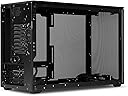
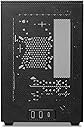

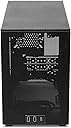
🖥️ Meshroom D: Where compact meets cool — build smarter, breathe better.
The SSUPD Meshroom D Mini-ITX case is a premium small form factor chassis featuring full mesh side panels for superior airflow within a compact 14.93-liter volume. Crafted from high-quality powder-coated SGCC steel, it offers tool-free external panel access and versatile mounting options for fans and power supplies, including support for medium ATX PSUs and inverted builds. Ideal for professionals seeking a sleek, efficient, and flexible ITX build.


| ASIN | B0C8DDR9JS |
| Antenna Location | Gaming |
| Best Sellers Rank | 345,013 in Computers & Accessories ( See Top 100 in Computers & Accessories ) 3,497 in Computer Cases |
| Brand Name | SSUPD |
| Case Type | Mini-Tower |
| Colour | Charcoal Black |
| Compatible Devices | Mini ITX, Mini-DTX motherboards |
| Cooling Method | 280 AIO, Air Cooler up to 142mm high, compatible with Noctua D12L |
| Customer Reviews | 4.7 4.7 out of 5 stars (28) |
| Enclosure Material | Alloy Steel |
| Fan Size | 120 Millimetres |
| Hard Disk Form Factor | 2.5 Inches |
| Internal Bays Quantity | 6 |
| Item Dimensions D x W x H | 24.6D x 16.8W x 36.3H centimetres |
| Item Weight | 7.12 Pounds |
| Light Color | White |
| Manufacturer | SSUPD |
| Model Name | Meshroom D |
| Other Special Features of the Product | Dust Filter, Type-C port |
| Power Supply Mounting Type | Rail Mounting |
| Supported Motherboard | Mini ITX |
| Total USB 3.0 Ports | 1 |
| Total USB Ports | 3 |
| UPC | 840353041844 840353043596 |
J**R
Cool Case
Best little case ever, super efficient for air cooling, fun to build in and a lot of flexibility. A handy tip I would pass on is the internal power cable socket intrudes on the motherboard components. To get round the issue just take out the 2 screws holding it to the case and rotate the fitting 180deg and put the screws back in.
M**P
Surprisingly high quality and very easy to build in. You've got a lot of options for mounting fans and hardware almost anywhere you like, plus it can also fit a medium sized ATX PSU (would definitely recommend an SFX supply though). I managed to cram 3x 120mm fans and an 80mm fan in it with no issues. Additionally, the feet of the case can be moved to the top if you'd like to do an inverted build. In fact, they have extra holes for the power socket and for the power button so you can mount those inverted as well. Really the only thing I disliked is that the panels are a little fragile and can warp a little bit, and also the clips that the panels lock into are rather difficult to remove and relocate - but it's not bad enough to dock a star. Overall, if you're looking for a solid ITX case with lots of airflow, this is a solid option.
C**Z
Could use more cable clearance for the GPU, so the cables don’t bend too much and so you can fit wider GPUs. Maybe the NR200 has that market covered. I wish the bottom weren’t just a mesh, makes it way less intuitive to pick up the pc which you might be doing a lot of since it’s an sffpc. Overall kinda easy to install and nice that it allows for full atx psu’s, though I went with SFX PSU. Would be good if they made a horizontally-mounted case like the SUGO05 From Silverstone, with the mobo lying flat and the GPU sticking perpendicularly up. Better for natural heat exhaust without as much need for fans, except maybe 1 intake and/or exhaust fan.
J**R
I've just finished setting up my gaming rig with these incredible RGB fans and my powerhouse 3080 GPU, and honestly, I'm buzzing with excitement to dive into some Forza Horizon sessions! The vibrant colors and the sleek design of the setup have totally transformed my gaming vibe. What's even more amazing is how this build, despite packing such a punch, is housed in a case so compact that it slides perfectly into my TV cabinet. It's like having a secret gaming beast hidden right in my living room, ready to unleash its power at a moment's notice. Can't wait to rev up the engines in-game and see this setup in action!
M**L
I have not been able to finish a built into this case. I spend 2 weeks looking things up to get this right and nothing seem to have gone that way. The biggest problem being the SFXL power supply and large 3090 FTW3 GPU taking up much of the space. The SFXL size and poor stock cables make it difficult to route cables. A C14S will fit in this case, but it will be difficult to plug in cables with it. Make sure the heat pipes are towards the ram on your mobo to solve some of these issues. A fan on the underside of the C14 will be preferable so you can mount two fans on the side as well. The biggest problem with my build is the power connector for the 3090. The bend in those cables stop the case from closing at all. I will be adding some 180 power connecters to try and fix that last issue, as well as getting a proper SFX power supply to see if the smaller size makes a difference. The case itself is not tool less as some people have claimed, but it is very easy to take apart and customize. some have even flipped the orientation of the case to make the GPU sit at the top, which i might end up doing as well. As another weirder note. I have gotten a number of metal splinters while working with this case. this is not something ive gotten from other cases in the past. With all that, I am very hesitant to return this case, i would like to make it work. After the new parts arrive i hope to get this case working or ill be switching to an NR200 with a bit more space.
R**S
For those who want smaller without (too much) compromise, this case is a neat alternative to slightly larger and more affordable cases. Pros: - You can disassemble nearly the entire chassis to get to where you need - The materials are pretty sturdy, save for the dust filter on the bottom - Several orientations for power buttons, passthrough power cables, PSU, and drives (you can also do an inverted layout! - Dual radiator support (280mm radiator in this form factor is nice) - mATX support with a $60 bracket (??? pricing) - Triple slot GPU support; 325mm length Cons: - The case is very narrow; using 2.5” and 3.5” drives are not advised with AIOs, and cable routing is fairly tough in that space - I ended up getting the wrong manual? I got the Meshroom S manual, but luckily the Meshroom D manual is available online. - Some I/O shields will not fit properly in the cutout. Mine was too small, so I could not use it. - The 120mm fan bracket solution is awkward; There are only two brackets for 120mm fans are included instead of the four possible places the brackets could go I had a great time building in it nonetheless; it was a challenge fitting a side AIO into this thing, along with my stock PSU cables. My advice: - Go air in this case, or at least use an AIO that does not have an in-line pump. - If using an AIO, mount it LAST, ensuring all the cables in the chassis have been routed to your liking. - If you care about I/O shields, use a motherboard that has one built in. - Get some custom length cables, and cut down on the amount of splitters and wiring as much as possible.
Trustpilot
Hace 4 días
Hace 2 semanas