We remain fully operational. Our teams are working around the clock to ensure your deliveries continue safely.

Descargar la aplicación


Servicios al cliente
Sobre nosotros
Copyright © 2025 Desertcart Holdings Limited
Descargar la aplicación

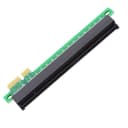
🚀 Elevate your GPU game with effortless PCIe power!
The chenyang PCI-E Express x1 to x16 Riser Card Extender is a compact, driver-free adapter that converts a PCIe x1 slot into a x16 interface, enabling compatibility with various graphics cards across Windows, macOS, and Linux. Ideal for budget builds or headless setups, it offers reliable performance with a layered PCB design, supporting multiple PCIe card sizes at x1 speed.


| ASIN | B0BYMV751Y |
| Best Sellers Rank | #102 in USB-to-VGA Adapters |
| Brand | chenyang |
| Compatible Devices | Graphics Card |
| Customer Reviews | 4.3 4.3 out of 5 stars (81) |
| Hardware Interface | PCI Express x1 |
| Manufacturer | CY |
| Model Number | CY-EP-011 |
| Operating System | Windows, macOS, Linux |
| Style Name | Classic |
T**S
Great price, works flawlessly.
Bought a Chinese special mobo+cpu+ram combo, totally overlooked that it only had 1 pcie 16x and a 1x... Used this adapter for a low end video card for the headless OS install. Worked perfectly, and is super cheap compared to competitors.
D**E
Works well for sas expander
I needed to power an HP SAS Expander card, and this worked perfectly.
E**S
It's just crap.
Don't buy this. It's just crap, it's better cable, it helps you more. This 👎 doesn't work well.
S**E
Worked well and is easy to use!
Worked great with the graphics card I was using in my small form factor PC.
Z**P
Ruined my GPU
Not a big deal but I’d advise using an external one with an adapter with a cable over this. Maybe one screwed into a plate or something as well. Hard to get it straight in a small form factor pc especially since it doesn’t snap in like the PCIe x16.
A**N
Ich habe den Adapter für einen ganz bestimmten Zweck gekauft: Um eine NVIDIA-Grafikkarte in meinem Synology NAS zu betreiben. Der Adapter überbrückt den Slot-Unterschied (8x auf 16x) einwandfrei. Die Karte wurde erkannt und läuft seitdem absolut stabil und ohne Probleme. Wer sein NAS aufrüsten möchte, greift hier zum richtigen Teil.
B**S
Ne fonctionne pas pour carte graphique
L**M
これをするには電源をSFXに交換してファンの向きを変更する必要があります。 Deskmeetに10G NICを追加するためにM.2->PCIEのアダプターを試したのですが、NIC基板とメモリースロットのラッチが干渉してささりません。 基板の位置を上げるしかなかったのでx4のPCIE延長に使える基板を探したのですが、x4でもスロットの向きが90度のものか、マイニング用かx1のものしか見つかりませんでした。 基板のエッジ側とPCIEの間が幅の広いケーブルで接続されているものは売っていましたが、NIC基板の固定が難しそうだったので合いそうな長さのものがないうえ、高いので敬遠。 このアダプターはx16用なのでメモリースロットのラッチの反対の干渉がきになったのですが、ダメ元ので購入。案の定、バックパネルのコネクターの裏に干渉しましたが、ぶつかるネジ用の穴が開いている部分を少し切り取ったところうまく収まりました。 NICも無事PCIEx4で認識されました。 いまいち使い方がわからないアイテムですが、きっとPCを改造するときに使うのでしょう。 期待通り動いてくれたのでよかったです。 PCI Express x4 バス #4 -------------------------------------------------- Marvell FastLinQ Edge 10Gbit Network Adapter ------------------------------ [一般的な情報] デバイス名: Marvell FastLinQ Edge 10Gbit Network Adapter 元のデバイス名: Aquantia/Marvell AQtion AQC107/FastLinQ Edge 10Gbit Network Adapter デバイス クラス: Ethernet Adapter リビジョンID: 2 PCIアドレス番号(バス:デバイス:機能): 4:0:0 PCI Latency Timer: 0 ハードウェアID: PCI\VEN_1D6A&DEV_07B1&SUBSYS_00011D6A&REV_02 [PCI Express] バージョン: 3.0 最大のリンク幅: x4 現在のリンク幅: x4 最大のリンク速度: 8.0 GT/s 現在のリンク速度: 8.0 GT/s デバイス/ポート タイプ: PCI Expressエンドポイント
K**C
グラフィックボードを追加し、パラメーター数の多い、賢いLLMをローカル動作させるために購入しました。 このボードそのものは熱はほぼ出ないので、動作自体は問題ありません。 言語モデルの読み込みだけはちょっと遅いですが、ローカルで30Bクラスを実用的な速度で動かせますし、コスト的にも魅力的ではないでしょうか。 (ほどほどのグラボを2枚使って、VRAMを稼ぐと言う事です)
B**B
used this to put a cheap pcie card in a server that only had a x1 slot worked perfectly
Trustpilot
Hace 3 semanas
Hace 1 semana