We remain fully operational. Our teams are working around the clock to ensure your deliveries continue safely.

Descargar la aplicación


Servicios al cliente
Sobre nosotros
Copyright © 2025 Desertcart Holdings Limited
Descargar la aplicación

Buy anything from 5,000+ international stores. One checkout price. No surprise fees. Join 2M+ shoppers on Desertcart.
Desertcart purchases this item on your behalf and handles shipping, customs, and support to Mexico.
🎧 Elevate your audio game—because your sound deserves the spotlight!
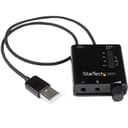
The StarTech.com ICUSBAUDIO2D is a compact external USB sound card that upgrades your laptop or PC audio with high-resolution 96kHz/24-bit playback and recording. Featuring SPDIF digital output supporting Dolby Digital 5.1 and DTS pass-through, it delivers immersive surround sound for home theater setups. With external volume and EQ controls, plus a 3.5mm combo headphone/mic jack, it offers versatile, plug-and-play convenience backed by a 2-year warranty and lifetime tech support.


























| ASIN | B00F7120TQ |
| Audio Output Mode | 2.1 |
| Best Sellers Rank | #45 in External Sound Cards |
| Brand | StarTech.com |
| Built-In Media | USB Stereo Audio Adapter External Sound Card with SPDIF Digital Audio |
| Compatible Devices | Personal Computer |
| Customer Reviews | 4.2 4.2 out of 5 stars (549) |
| Global Trade Identification Number | 00065030852296 |
| Hardware Connectivity | USB |
| Hardware Platform | Mac, PC |
| Item Dimensions L x W x H | 1.9"L x 1.8"W x 0.6"H |
| Item Type Name | External Sound Box |
| Item Weight | 0.03 Kilograms |
| Manufacturer | StarTech.com |
| Maximum Sample Rate | 96 KHz |
| Mfr Part Number | ICUSBAUDIO2D |
| Model Name | USB Stereo Audio Adapter External Sound Card with SPDIF Digital Audio |
| Model Number | ICUSBAUDIO2D |
| Platform | Mac OS X |
| Signal-to-Noise Ratio | 91 dB |
| Surround Sound Channel Configuration | 5.1 |
| UPC | 065030852296 |
| Warranty Description | 2 Years |
A**R
USB Soundcard w SPDIF-Great value & sound, STEREO 3.5mm mic input, records at 24 bit/44.1 kHz+
Highly recommended. This USB adapter works really well as an interface for recording musical instruments with a STEREO 3.5 mm battery-powered microphone like the AT2022 or AT822 (the kind of stereo mics often used with audio-for-video and portable audio recorder applications). It is a worthy replacement for the old Griffin iMic, which only recorded at 16 bit. The stereo mics, combined with this soundcard and a laptop, make for a really light, compact and portable kit for quick, great-sounding recordings. It captures excellent sound at 24/44.1, which I find to be the sweet spot for digital recordings. The latency, input and output levels on the soundcard were very user friendly and pretty optimal. I use it to record electric guitar, which is a relatively loud sound source, so I cannot report in detail on the noise floor of the soundcard. But in preliminary testing with spoken word, the noise level seemed surprisingly good for a consumer-level device, and would likely be more than adequate for most recordings. The hardware volume control on the StarTech is a nice bonus, and very convenient. The StarTech soundcard installed effortlessly in seconds on Windows 10, which automatically installed the right driver. You may need to make some tweaks in the Windows Control Panel/Sound settings to optimize the output and input of the StarTech USA Sound Card for your computer--that is also the place you can change the bit depth and sample rate for this soundcard. I use Cubase as my recording DAW, and this soundcard gave excellent results, both recording via the mic input and monitoring via the headphone output. And Cubase had no problem recognizing and connecting with the StarTech's inputs and outputs. My pre-sales contact with StarTech was impressive. The online chat representatives gave fast responses to my technical questions. I have no idea how durable this will be in the long run. But if it delivers a reasonable service life, I would gladly get this again.
S**S
Works great with my Sennheiser Momentum 2 headphones
I bought this to use with my travel headphones, Sennheiser Momentum 2.0 wired headphones. The M2 headphones are very efficient, which means that I can hear even a little bit of noise. When I plugged them into my business laptop, I heard an annoying hiss. I tried a Creative E1 device and also heard an annoying hiss. With the ICUSBAUDIO2D device, I initially heard a loud hiss; but I turned the volume control dial down a bit, and very abruptly the hiss cut out. My music is still plenty loud enough. The left jack accepts the standard 4-ring plug for headphones + microphone all in one (common on mobile headphones). I was able to plug the M2 directly into that jack; headphones and microphone just worked. I use Linux, and the ICUSBAUDIO2D showed up in the Sound preferences as "USB Audio Device Analog Stereo". I had to adjust the amplification slider for the microphone all the way up or the M2's mic is too quiet, but after I did that it was just fine. Initially, bass sounded terrible. Anything with bass sounded muddy and smeared. But then I realized that the ICUSBAUDIO2D has a mini-equalizer feature: a 3-position sliding switch, with positions for Bass, Direct, and Treble. It defaults to "Bass" and it was applying some kind of bass boosting effect... and I didn't like what that effect was doing to my music. But no problem; once I figured it out, I switched it to "Direct" and I'll just leave it that way from now on. It sounds fine in "Direct" mode. Given how small and light this is, and given that my M2 headphones just plug right in and work with no adapter needed, I have found my new travel audio device. I'll just leave this in my laptop carrying bag all the time. EDIT: I have used this for about a month, and I am completely happy with it. You can get a better audio adapter but it will cost a lot more and probably need a separate power supply. Therefore I have upped my rating to 5 stars. It's the best in its class.
G**.
Adds mic to laptop.
Used with HDSDR to link transceiver to pc. works well.
M**E
More Sound For the Buck
I recently purchased a new Dell computer and was surprisingly disappointed by the quality of the sound. My old Dell computer from the early 2000s sounded way better. After two weeks of making adjustments to enhance the sound quality, I couldn't take it anymore, I needed an upgrade. Since my computer was still under warranty and I didn't want to pay someone to install a new sound card, I looked for an external one. I came across the Startech external sound card. I did have one major concern, would this card be powerful enough with good sound for my huge gaming headphone. I took a chance and bought it. I installed it by just plugging into the USB port, but surprisingly it took a bit longer for the computer to recognize it which is not a big deal considering I have anti-virus/malware on my computer. After about a minute and a half, close to two minutes, the computer said the device was ready to go. I plug in my earphones. Adjusted the volume on the computer, and the device itself. I was blown away by the clarity and power of this card! It made the headphones which I have used on a newer computer even better. Music was high quality, video, and gaming was really good. I'm not into the heavy bass, but I tried it out nevertheless, I made adjustments by using the switch on the back of the unit to "bass" and then make another adjust using iTunes equalizer which has its own bass boost. Same with the treble. So there is a wide range of sound that you can make adjustments too depending upon your taste. This card was only 30 dollars which don't break the bank, and it helped salvage a brand new computer. I love this card! Thank you Startech! :)
P**P
Stereo Audioeingang funktioniert!
A**1
Got this because the headphone socket on my Toshiba laptop had intermittent sound due to a loose connection or similar. Read that a repair would have cost as much as a new laptop, so took this route instead. Checked a few things by ringing up Startech.com first, then bought sound card here on amazon as it was a lot cheaper. Dead easy to install, just plugged in to USB port, waited two minutes, then plugged in headphones after turning down the volume control on sound card which had been factory-set to maximum (then I turned it back up to max), then went on youtube and listened to Celibidache conducting Bruckner's 6th symphony and could not believe how much better the sound was compared to my onboard sound card; much more balanced, spacious, static-free. Then I tried the bass and treble boosts, both of which were far more subtle than I had expected; sounded great on direct too. How on earth do Startech produce such a great product at such little cost? This little gem gets the ultimate recommendation from me
B**B
Cette carte son externe est un petit boitier comme on peut le voir sur l'image. Je l'utilise pour sa sortie S/PDIF uniquement, en conséquence la molette de volume et le bouton arrière concernant les basses sont désactivés. Cette carte fonctionne parfaitement et semble partie pour durer. Le son qu'elle envoie à mon système audio 5.1 Logitech Z5500 est identique à celui que j'aurais avec une carte son intégrée. Le son produit est bien en 5.1, car lorsque le fichier lu est en dts, l'écran de mon système audio affiche bien "dts audio". Idem avec un son dolby où ça affiche "dolby digital". La fréquence d’échantillonnage peut aller jusqu'à 96 khz. Vous pouvez tester avec l'utilitaire windows si vous voulez pour vérifier qu'il y a bien une indépendance des 5 canaux. Le rendu est donc excellent, et regarder un film avec cette carte son est génial. Si vous utilisez le lecteur lecteur multimédia VLC, et que vous ne comprenez pas pourquoi le son n'est pas en dts ou en dolby digital, comme c'était mon cas, c'est parce que dans VLC il faut faire le réglage suivant : outils --> préférences --> audio --> module de sortie : sélectionnez "Sortie audio DirectX" et cocher la case qui vient d'apparaître "Utiliser S/PDIF si disponible".
F**N
Since Apple decided to discontinue to build-in optical outputs in their MacBook Pro's and my TV didn't passthrough DTS signals due to licensing, I needed to look for an alternative to connect my MacBook to my old AV-Receiver (without HDMI). This handy little USB SoundCard is doing the job pretty awesome. As usually no driver installation necessary under MacOS and in combination with VLC Player the DTS and AC3 Passthrough is working great. Very quick processing and posting too. Excellent deal.
A**S
Cómo en la descripción. Funciona perfectamente
Trustpilot
Hace 2 meses
Hace 1 mes