We remain fully operational. Our teams are working around the clock to ensure your deliveries continue safely.

Descargar la aplicación


Servicios al cliente
Sobre nosotros
Copyright © 2025 Desertcart Holdings Limited
Descargar la aplicación

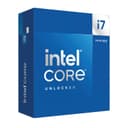





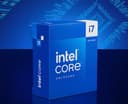
🚀 Power your play and productivity with the Intel i7-14700K — where speed meets smarts!
The Intel® Core™ i7-14700K is a high-performance unlocked desktop processor featuring 20 cores (8 performance and 12 efficiency cores) and 28 threads, turbo boosting up to 5.6 GHz. It supports both DDR4 and DDR5 memory, PCIe 5.0 & 4.0, and is compatible with Intel 600 and 700 series motherboards. Designed for gamers and professionals seeking rapid responsiveness and multitasking prowess, it requires robust cooling solutions due to its 125W power draw.


| ASIN | B0CGJ41C9W |
| Best Sellers Rank | #42 in Computer CPU Processors |
| Brand | Intel |
| Cache Memory Installed Size | 33 GB |
| Customer Reviews | 4.6 4.6 out of 5 stars (1,103) |
| Global Trade Identification Number | 00735858546928, 05032037278485, 05032037278492 |
| Item Dimensions L x W | 4.57"L x 1.73"W |
| Item Weight | 80 Grams |
| Manufacturer | Intel |
| Model Number | BX8071514700K |
| Platform | Windows 11 |
| Processor Brand | Intel |
| Processor Core Count | 20 |
| Processor Count | 1 |
| Processor Number of Concurrent Threads | 28 |
| Processor Series | Core i7 |
| Processor Socket | LGA 771 |
| Processor Speed | 5.6 GHz |
| Secondary Cache | 33 MB |
| UPC | 735858546928 |
| Warranty Description | 3 year |
| Wattage | 125 watts |
F**E
Excellent gaming CPU
I bought this CPU as an incremental upgrade to my i7-12700k , which will go into another more modest build. I really didn't think the i7-14700k would be significantly faster than the i7-12700k, but in some games there's a 10-15 FPS uplift. I don't know if that's the revised P cores doing the work or if it's the extra E-cores. The IMC on the i7-14700k is noticeably better as well. I can run four sticks of DDR5-5600 M/T at 5400 M/T (with tighter timings) which was a pipe dream with the 12700k (which topped at 4800 M/T with the same four sticks of RAM). With that said, it's going to be easier just to buy a two stick kit with the capacity you need instead of dilly-dallying around the BIOS trying to get four sticks of RAM to play nice on LGA 1700. Now is the upgrade worth it if you already have an Alder Lake i7? Probably not, but I was already putting together another mid-range build for someone else and this was an excuse to upgrade. But overall, I'm impressed. This CPU even holds it own again the newer Ultra 7 265k in gaming but will lose out to the higher end AMD X3D CPUs. The downsides here are that this thing has a massive power draw, and needs a beefy cooling solution. I have a 360mm AIO CPU cooler which cools it down nicely (60C-70C in typical gaming loads, topping out in the low 80's when benchmarking) but realistically, you're going to want at least a quality 240mm AIO or a god-tier air cooler. There's also the issue of the 13th and 14th gen CPUs failing prematurely. I have the latest BIOS for my motherboard that in theory should mitigate that problem, and so far I haven't had any issues at all.
R**2
Very powerful processor
This CPU delivers excellent performance. Everything runs fast and smooth, whether for gaming or multitasking. Definitely a great upgrade and I’m very satisfied with it.
A**R
Great item
Great item , temps do run a touch high at times
N**K
Powerful, but needs a good cooling solution
This is a beast CPU. I have a small PC case (intended for aesthetics purposes), so I can't use 360-420 mm aio. Had to use 240mm Nucleus. It definitely can handle it. Cons: noise. So basically I would advice to cut L1-L2 to at least 125w, or, in my case, 80w. Performance loss in usual workload is not that significant, but the noise/temperature are low. Standby temp ~40c. Has integrated graphics. Very fast & powerful.
C**H
i7-14700K is a significant improvement from i9-12900K
I decided the difference between the i7 and the i9 didn't justify the price difference, considering I was already getting about 1/3 more performance than my 12th generation i9. I wanted plenty of motherboard resources so I also bought the MSI MEG Z790 ACE, 32 GB of Kingston Fury 6400MT/s DDR5 and a 2TB Samsung 990 NVMe drive. Cooling had been a slight issue with the 12th generation i9, even with a 360mm AIO cooler, so I went custom loop. Along the way I found a GPU water cooler on sale and decided to install a lot of cooling. The Thermaltake 900 tower can take two 560mm radiators, but I wanted some disks, so I went for a 560x140 and a 280x140, both 45mm thick and backed by 6 fans. Four more fans feed air into the case and there's till plenty of clear space for more air to be dragged in. So what's the result? The processor runs at 85C worst case, and only two cores at that temperature. The fast DDR5 does make a significant difference. I initially ran it at 6GT/s then turned it up to 6.2 and finally 6.4. The last change is a 3.5% change in DDR5 speed and that gave me a 2.4% increase in system speed. I kept my old RTX3070 which used to run over 80C and now runs at 62C worst case. So despite more performance the system runs a lot cooler. I mostly run X-Plane 12, which runs the GPU and CPU very hard, continuously. After several hours the cooling water reached 36C and the worst core temperature was 85C. The processor just works. No stability issues with the standard settings on the MSI Z690 motherboard. There are three standard memory tuning options for 6.0, 6.2, and 6.4 GT/s and all work. This will do for me for a few years.
R**N
She's a beast, but so HOT!!
I guess everyone is right, these things are hot and then some. I went with a off brand AIO, and for the most part I'm good. It does get spicy when I'm rendering or doing some crazy multi tasking. Gaming seems fine, no issues. I play all kinds of games, FPS, MMO's, survival, etc. (Paired with a Gigabyte Gaming 4090 OC, Tforce 64 gigs 6000 M/T DDR5, samsung 990 pro NVME 2 tb x2, no OCing done by me.) I replaced a 5950x, which was having issues for some reason, just felt like it was getting slower and slower, thermal paste and heat were fine on it, never got over 60c with the beefier AIO I had on it. Just took longer and longer to render things. I guess I wore it out! I just think you'll want a good AIO, and/or a solid water cooling solution for this to really get the best out of it. I'm not sure a air cooled option will do you any good, but hey I've been wrong many times, so there might be something that can handle the job. All in all, not bad, but it's not going to give you much performance boost over last gen, matter of fact I found out later 13700k beats it in a lot of tests, blargh! Either way, its fast, and it runs everything great, so I'm happy till the next go around.
A**R
So far so good
Currently have had it for two months with no issues. Time will tell. It’s liquid cooled and haven’t really been stretched to its limits. Pro: It’s fast but with an asterisk. About the same level of performance of the i9 14900K but without the added power use and heat. Con 1: Is prone to crashing and instability. Con 2: E-Cores. Slow and worthless. There is a noticeable performance drop with some applications. Pro Tip: At the time of this review, the manufacturer’s warranty has been extended due to the crashing / instability issues on the 13th and 14th gen processors from 3yrs to 5yrs. Would I buy it again? No, not for me personally.
J**K
Perfekter Prozessor, aber ein Hitzkopf.
N**I
استخدمت المعالج Intel Core i7-14700K تقريبًا من 3 إلى 4 شهور مع تجميعة ألعاب قوية، والتجربة كانت ممتازة جدًا. الإيجابيات: • أداء خرافي في الألعاب والتطبيقات الثقيلة، الفريمات ثابتة حتى على أعلى الإعدادات. • يدعم PCIe 5.0 وDDR5، مما يعطي مرونة كبيرة مع القطع الحديثة. • الحرارة تحت التحكم مع مبرد جيد مثل NZXT Kraken Elite 360، ولاحظت ثبات ممتاز في الأداء. السلبيات: • يستهلك طاقة أكثر من بعض المعالجات الأقل قوة، لكنه طبيعي مع هذه الفئة. الخلاصة: معالج ممتاز لأي شخص يبغى أداء عالي سواء للألعاب أو التطبيقات الثقيلة. لو فيه أكثر من 5 نجوم، كنت أعطيه بدون تردد. تقييم 5 نجوم
E**N
Parfait seul point négatif si vous dispose d’une encienne version du bios le processeur n'est pas reconnu il faudrait flashé une cles usb afin d’installer une nouvelle version du bios pour le processeur sois reconnu attention au amateurs avant d’installer le processeur fait fair quelque manipulation pour mon cas je me suis servis de quelque vidéo.
C**O
Lo compré con una placa que me dejo actualizar la bios para que Fácilmente no tuviera problemas de inestabilidad Saco muy buenos resultados en los benchmarks que hice mas 30000 puntos en cinebench Y la gráfica integrada me deja correr monster Hunter World a 30 Fotogramas por segundo en la mayoría de los casos obviamente con gran con gráficos al mínimo y a 1080 la verdad es que es una gran opción un poco caro el precio pero puedes hacer un poquito lo que quieras incluso hasta sin gráfica si no te importa tanto la calidad visual y lo que te interesa es tener un equipo Versátil lo bueno es que lo puedes poner en una configuración que te desctualizarás hardware después y tendrás una máquina super potente si te lo tomas con calma
M**N
Can game/code/simulate without problems. Doesn't get hotter than 60/70 Celsius with an AIO with most if not all tasks done.
Trustpilot
Hace 1 día
Hace 1 mes