We remain fully operational. Our teams are working around the clock to ensure your deliveries continue safely.

Descargar la aplicación


Servicios al cliente
Sobre nosotros
Copyright © 2025 Desertcart Holdings Limited
Descargar la aplicación

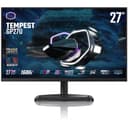
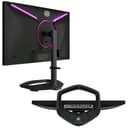
🔥 Elevate your game and workflow with the Tempest GP27U — where speed meets stunning clarity!
The Cooler Master Tempest GP27U is a 27-inch 4K UHD gaming monitor featuring Quantum Dot Mini LED technology, delivering vibrant colors with 98% DCI-P3 and 99% Adobe RGB coverage. It boasts a blazing 160Hz refresh rate and a 1ms response time for ultra-smooth, tear-free gaming with HDR1000 support. Designed for professionals and gamers alike, it offers versatile VESA mounting with tilt and swivel adjustments, plus adaptive sync compatibility for AMD and NVIDIA GPUs.


| ASIN | B09Z6HV9LF |
| Adaptive Sync | G-Sync |
| Additional Features | Adaptive Sync, Swivel Adjustment |
| Aspect Ratio | 16:9 |
| Best Sellers Rank | #142,411 in Computers ( See Top 100 in Computers ) #3,235 in Computer Monitors |
| Brand | Cooler Master |
| Brightness | m2 |
| Color | Black |
| Color Gamut | 99 |
| Connectivity Technology | VGA |
| Contrast Ratio | 10000:1 |
| Customer Reviews | 2.7 2.7 out of 5 stars (82) |
| Display Resolution Maximum | 3840 x 2160 Pixels |
| Display Technology | LED |
| Display Type | LED |
| Global Trade Identification Number | 00884102099243 |
| Hardware Connectivity | DisplayPort, HDMI |
| Has Color Screen | Yes |
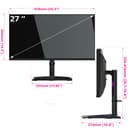
| Item Dimensions D x W x H | 27.4D x 61.8W x 52.6H centimeters |
| Item Type Name | Monitor |
| Manufacturer | Coolermaster |
| Model Name | Tempest GP27U |
| Model Number | Tempest GP27U |
| Mounting Type | Wall Mount |
| Native Resolution | 3840x2160 |
| Number of Component Outputs | 2 |
| Picture Quality Enhancement Technology | Quantum Dot, Mini LED |
| Power Consumption | 47.7 Watts |
| Refresh Rate | 160 Hz |
| Resolution | 4K UHD 2160p |
| Response Time | 1 Milliseconds |
| Screen Finish | Glossy |
| Screen Size | 27 Inches |
| Specific Uses For Product | Multi-tasking,Gaming |
| Total Number of HDMI Ports | 2 |
| Total USB 3.0 Ports | 3 |
| Total Usb Ports | 3 |
| UPC | 884102099243 |
| Viewing Angle | 170 Degrees |
| Warranty Description | 2 year manufacturer |
T**M
First, the good. The monitor is bright. It will give you a true HDR experience only really surpassed by an OLED (which personally I'd never want to use as a monitor due to eventual burn in). The problems start when you start doing non-HDR content while in HDR mode. Which you wouldn't think would be a problem till you realize basically all your computer software is SDR. Not too many games, although more and more are, support it and most desktop software will only use SDR. SDR content is very washed out. Seems to be a saturation or gamma issue as you can mostly compensate by turning down the Black Adjustment setting, but that starts to dim the high end of the brightness scale fairly noticeably. If that was all, I could make due with enough calibration and other tweaking. However there are two problems I just can't ignore. First, half the time when setting my Refresh Rate to 160 Hz the monitor and my other two monitors just shut off and never recover. I have to hard restart my computer by holding the power button. Then like 50% it'll come back up at 60 Hz or at 160 Hz. And it'll just randomly boot in 60 Hz after having been set to 160 Hz. I also had one time where the Nvidia Control Panel could not detect Adaptive Sync Support. I didn't have these problems when just using 120 Hz or 144 Hz. The final nail in the coffin was the local dimming behavior on SDR content. It was almost like the local dimming logic inverted on SDR content. Watch and HDR video and it is near perfect, but just browsing the web and go on a site with Dark Mode and you see the issue right away. The easiest way to test is to show an image with like a 70% gray. If you mouse over the image you can see as a local dimming zone dims as the mouse passes through it. That's not how that works. The mouse is pure white, you should instead see a halo as the dimming zone is brighter than all the ones around it due to the mouse cursor. That is just unacceptable and the only way to "fix" it is disabling local dimming which ruins your blacks, which is kind of the point with HDR. Ultimately it is this last point that forced my hand to return the monitor. 4/5 for Gaming, only loses the 5th start due to the issue with 160 Hz 1/5 for Picture quality, would be 0 if I could, for the issues with SDR (for the desaturation and local dimming issue) 5/5 for Brightness, because it really does get BRIGHT The other
J**T
I already knew the GP27U had some issues and still purchased it anyways, no regrets. It arrived a week early and in perfect condition. Out of the box: -No damage, no dead pixels, color calibration seems fine. (Saw some other reviews mention green/yellow hues but my monitor looks fine if it's referring to the GP27U) -HDR may seem like low brightness but you'll just need to go into your display options and drag the cursor to increase brightness. It now works with local dimming with the recent update. -Blooming, I haven't noticed it much due to the fact that I don't play/watch things in dark rooms. I'll find out soon and update when I get the chance. -4k 160hz with display port, works with Intel ARC A770. You can downsize the resolution but It's lowered to 120-144hz. -Cooler Master is constantly updating the firmware, major reason I still went with it is because I know we'll be able to get support for this product. Best monitor I've ever had for an all-in-one that works with just about anything, coming from a 24.5 inch monitor. (Office, Gaming, Media, Media Creation - Art) There's another monitor by INNOCN named 27M2V. It has all of the same specs but twice the dimming zones compared to the GP27U. I still opted for this one for a quality built monitor that doesn't feel like cheap plastic. The company is also working on firmware updates, I'm not sure how many companies would do that. That's it for now, will update for anything negative or positive that isn't already well known when the time comes.
D**I
I purchased a few 4k gaming monitors and this one clearly outshined the others. The HDR gaming picture is incredible and the colours are very bright. There were some firmware issues early on but those have all been resolved. There are issues with local dimming on HDR if you're working. I noticed heavy blooming using VS Code in dark mode. I use SDR mode for productivity, and HDR for gaming. I have a 27" Asus TUF 1080p gaming monitor I use as a second monitor and the text looks so grainy compared to how smooth the text is on this monitor your think the 1080 monitor had some kind of issue. IMO This is the best 27" 4k gaming monitor on the market right now.
E**C
I've had this monitor for close to two years, and while the current latest firmware (version 1.45) is improved over the FW it came boxed with, it's less bad and not great. At times super flaky when switching HDR on/off, as the screen will briefly go black and gosh forbid if you need to bring up the OSD menu, which is basically impossible if the monitor can't detect a signal, which is this monitor's Achilles heel. If I could reliably bring up the OSD when making changes or troubleshooting a change, it would be an easy 4 star monitor. When the monitor is working, it's great, looks fantastic in games and super bright. But there's a minus 2 star rating caveat for me when you run into video syncing issues.
B**V
Overall: Great monitor for balanced use in gaming and productivity, however, some caveats to consider depending on use case scenario (multi-display) bring it down to 4 out of 5 stars. Picture Quality Pros: The Cooler Master GP27U is a very nice monitor for all sort of activities. In SDR, it shines and you do not need local dimming to get great picture quality. In HDR mode, it is super nice, vibrant, and immersive. The on screen display controls are easy to use even for a person like me whit low vision issues. The black levels are highly impressive for no local diming, then, just are awesome when local dimming is turned on. Cons: Some blooming artifacts in dark scenes were hard to look at for someone with low vision issues. I think others may be okay in case their eyes are not light sensitive. Productivity Pros: The color accuracy is pretty good for people using this for scientific work. THe low black level makes images generated from research, such as electron microscopy and fluorescent/ con focal light microscopy, really contrasted well. Depending on how you choose the gamma setting, you can adjust the black level to allow better focus on brighter areas of the images (gamma = 2.6) or raise the black level to find regions of interest that with notable features (gama = 1.8). I kept the other settings neutral so as to not saturate images with color (for analyzing light micrographs) or gray level (for analyzing electron micrographs). Cons: I could only hve 2 displays showing at a time on my gpu (RTX 3090). I contacted Nvidia about support for triple monitor since it did not work in my case. I found out that you cannot adjust the DSC setting in the display port 1.4 port, so, triple monitor was not supported. Even for dual monitor, you cannot span displays on the gpu because of this issue. Spanning of displays allows CAD or IMAGE-J users to see the "forest" from the "trees" so to speak when looking at large images and then zooming into finer details. Recommendation: If using this only for single display applications or even dual display with no spanning of displays, this is a great choice. If you want to use spanning of displays for dual or triple monitor setup, then, please look at alternatives such as the Gigabyte M28U. Note: Contact Gigabyte and tell them your software and display use case scenario. They will put int a testing ticket and give you a nice report with images of how it worked out so you can make an informed purchase. Totally great!
Trustpilot
Hace 1 semana
Hace 3 semanas