We remain fully operational. Our teams are working around the clock to ensure your deliveries continue safely.

Descargar la aplicación


Servicios al cliente
Sobre nosotros
Copyright © 2025 Desertcart Holdings Limited
Descargar la aplicación

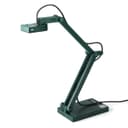
🚀 Elevate your presentations with ultra-HD clarity and seamless streaming!
The IPEVO V4K is a professional-grade 8MP USB document camera delivering ultra-high definition images and smooth 30 FPS streaming. Featuring fast autofocus with Sony CMOS sensor technology, it excels in low-light environments and frequent material switching. Its durable multi-jointed stand ensures versatile positioning, while broad compatibility with Mac, Windows, and Chromebook makes it an essential tool for remote teaching, live demos, and hybrid work setups.


| ASIN | B079DLTG9F |
| Aperture Modes | fixed f3.5 |
| Aspect Ratio | 16:9, 4:3 |
| Audio Recording | No |
| Autofocus | Yes |
| Best Sellers Rank | #9,334 in Office Products ( See Top 100 in Office Products ) #1 in Document Cameras |
| Brand | IPEVO |
| Built-In Media | V4K document camera with attached USB cable (4.90ft/150cm) |
| Camera Flash | no flash |
| Color | Green |
| Compatible Devices | Mac, PC, Chromebook |
| Connectivity Technology | USB |
| Continuous shooting speed | 30 FPS |
| Customer Reviews | 4.5 out of 5 stars 3,770 Reviews |
| Effective Still Resolution | 8 MP |
| Exposure Control Type | Automatic |
| File Format | JPEG, MP4 |
| Flash Modes Description | No Flash |
| Flash Type | Internal |
| Focus Type | Autofocus |
| Global Trade Identification Number | 04712098410895 |
| Hardware Interface | USB |
| Has Self-Timer | Yes |
| ISO Range | 100 |
| Item Dimensions D x W x H | 1.9"D x 3.1"W x 10.9"H |
| Item Weight | 1.3 Pounds |
| Light Sensitivity | High |
| Manufacturer | IPEVO |
| Maximum Aperture | 3.5 Millimeters |
| Maximum Shutter Speed | 1/4000 |
| Media Type | HDD |
| Minimum Shutter Speed | 0.033 |
| Model Name | CDVU-08IP |
| Photo Sensor Resolution | 8 MP |
| Photo Sensor Technology | CMOS |
| Real Angle of View | 72 Degrees |
| Screen Size | 0.01 |
| Self Timer | 10 |
| Sensor Cleaning Method | Sensor Blower |
| Sensor Type | CMOS |
| Shooting Modes | Automatic |
| Unit Count | 1.0 Count |
| Video Capture Format | MP4 |
| Video Capture Resolution | 2448p, 3264p |
| Viewfinder Type | LCD screen |
| Warranty Description | All IPEVO products come with a one-year warranty from the date of purchase. |
| Water Resistance Level | Not Water Resistant |
| Zoom Type | No Zoom |
J**E
Very reasonable price for a terrific product!
I have been using this overhead projector for the last 3 years in both my home and my classroom. I originally purchased it so I could teach at home during COVID protocols. I ended up using this, my desktop computer AND my cell phone while teaching, giving me multiple angles and possibilities while in Zoom sessions. I was even able to use the Ipevo as a camera to show kids at home the Smartboard while I lectured or student actions during labs when we were in hybrid learning (some kids in class, others still at home due to COVID). The camera is quite clear and easy to view for those who were at home. The Ipevo is terrific for its job and price. It is quite small and lightweight. I can easily toss it in my purse or my small briefcase that I use to carry papers and my laptop to and from school. I have used it several times a week, nonstop and can do nothing but rave about it. I far prefer it to the Elmos I have used to teach with as well as other brands. I use this almost entirely to do live casting of guided notes, manipulatives, diagrams, formulas, etc on my Smartboard in my high school classroom. I also use it on microscopes to show students what they should be looking for during labs (while teaching them about air bubbles, microscope technique, etc). I can use it as a secondary web cam for online teaching and I can use it for Zoom sessions as well. I love that you can rotate the head almost 250° allowing this left handed teacher to not have a large mounting arm constantly in the way (ahem, other screen caster companies take note!). Mild negatives: -You will need to download the Visualizer software, but be warned, it has a bit of a learning curve. Once you "get it", it's super easy to work with. -You will need a USB to USB-C adapter to use it on your Apple desktop. -I wish the cord that it comes with was about 30 cm longer, so it would be easier to use in labs. -For a really wide field of view, sometimes you will need to put the Ipevo on top of a mug or kleenex box. No biggie, but just be aware of that.
K**R
Incredible camera at an excellent price!
Wow! I'm actually excited to write this review. I'm a homeschool co-op teacher and I needed a document camera that was within my budget to use during class so students could see what I write on worksheets or do during lab demonstrations. I didn't want to spend too much, and hoped for the best when I ordered the lower-priced IPEVO V4K. I just received it today and tried it out. When I plugged it in the USB port of my Lenovo laptop, my computer automatically loaded the device driver so I didn't have to install any software. However, in the case your computer does not automatically download and install driver software, the camera has the URL of the website with the software, printed right on the base of the camera. Once the camera software was installed, I opened my camera app on the laptop, chose the IPEVO camera, and the camera started working. I used a projector with the camera/laptop setup and had an incredible clear, crisply-focused image on the wall. I am SO VERY HAPPY with this camera. I planned to use it for documents, but decided to try looking at some other objects, and found that the focus and clarity of the items was beyond my best expectations for a $99 camera! The camera has a button for choosing either single focus (if you have a static object such as a document and do not need to change the item's distance from the camera) or continuous focus (if you are doing a class demonstration or moving objects around, and the distance to the camera changes). The focus for moving objects takes about 3-5 seconds, but once the item is in focus, it is very clear and detailed. Another feature is the exposure adjustment. You can increase or decrease the exposure so the object has more detail, or is brighter. The color of the background affects the exposure, so when I had a black background, my object (a sea star) was kind of washed out. Using the exposure button to decrease the exposure brought the fine detail of the sea star right into perfect focus. The opposite worked excellently with a white background. You would probably want to use higher exposure on documents, and lower exposure on items with detail, such as sea shells. The camera also has a microphone, which will be helpful if I need to do any recordings with voice. I have not yet tried the microphone. This camera does not have its own light source, however it worked very well in a dimly lit room. Small print was easy to see and there was no blur around the letters on the projected image. This camera is a teacher's dream. I can use it for hands-on demonstrations, white boards, worksheets, video recordings, photos, and dissections. I love the features included in this camera, and the price was within my budget. I highly recommend this camera.
R**T
A Teacher's Dream: Compact, Clear, and Classroom-Ready!
As a fifth-grade teacher, I've always struggled with the clunky, ancient document cameras provided by the school. They were so big and cumbersome that I hardly ever used them. This year, with teaching math on my plate, I knew I needed a reliable way for my students to see clear, neat work, especially from a notebook. Enter the IPEVO V4K – and let me tell you, it's a game-changer! From the moment I plugged it in, I was impressed. No annoying software downloads, no complicated setup. I simply Googled the camera's name and was immediately directed to a website where I could use the camera right in my browser. This "plug and play" functionality is absolutely brilliant. I know getting software approved and installed on a school computer can be a nightmare, so the fact that I can just connect this and go is a huge win for the classroom. Beyond school, I also have a Twitch stream, and I was hoping this camera could pull double duty. It absolutely can! The resolution is fantastic, providing crisp, clear images that will be perfect for showing off art or notes during my streams. I purchased mine in "used - very good" condition for $74, which was a steal compared to the current $124 price. While there's a small sticky area where a sticker was removed, it's a minor cosmetic detail that doesn't affect the camera's performance one bit. Overall, the IPEVO V4K offers excellent resolution, true plug-and-play convenience, and a compact design that makes it incredibly practical. Whether you're a teacher looking to elevate your classroom presentations or someone like me who needs a versatile camera for other uses, this is a fantastic investment. Highly recommend!
A**R
Camera good -software soso
The camera is good, picture is clear and works great for video conferencing- the stand is sturdy and holds the position that you put it in. The microphone is pretty bad, I had to switch to a different one for conferencing. The software is not very good on PC, it acts weird when you change the window size. When you try to use the corners of the rectangle to select the region to scan the corners are often off the edge of the window and you cannot click them until you restart the software. I wish the software would show as a "virtual cam" in videoconferencing software so that I could crop and zoom the camera during meetings. Overall pretty good and I am glad to have purchased one to support distance teaching.
A**R
easy to use and works perfectly
Easy to set up and works perfectly. Picture is clear and goes edge-to-edge in the window. Buttons are easy to understand. Vastly superior to the multi-hundred dollar one by epson that my workplace tried to make me use.
A**.
Talk About Value & Clarity!
I am so glad I chose the IPEVO V4K document camera! I love it! Dark, forest green would not have been my first choice for color, but this is what I love about this camera: the images are crystal clear...there is no distortion or difficulty focusing whether projecting a paper or an object. Works well in either high or low light. The stand and camera are made of quality materials...the stand has a heavy, rectangular base that measures about 3.5" x 5.25", so camera does not tip over, easily. Additionally, there are three, hinged joints, which are able to lay practically flat. I could be wrong, but the stand possesses quite a bit of heft to it, so I would say it is constructed of metal. The bottom portion of the stand is made up of a hinge, followed by two rectangular rods, another hinge, followed by a single, rectangular rod, with another hinge at the top. The top hinge holds the arm containing the camera. The camera can also swivel from side to side. I'm sure there is much more I will adore about this document camera. So far, the value and quality are incredible. It's a bit late in the school year to get much use from it; however, I can't wait to use this little baby in August!
H**T
IPEVO Document Camera Unboxing Review, From the Linux World.
Consider this a neophyte review., an hour after unboxing and my first document camera. Wow! This changes everything. I use a table top scanner, and digital microscope., but now this. Wow! A few minutes unboxing, and searching for pre-installed ubuntu software and there is my picture. Auto focus works. I am going to rearrange my work area. My little scanner and its fussy software will be less prominent. By the way, my space appropriate 10 inch monitor is smaller than yours and the picture I get is still super useful Later, Update: this document camera is a keeper in my shop. Alignment of paper and camera turns out to be the limiting problem for my purpose. Very likely the camera is going to end up on a cart with a precise arrangement of paper holder and camera stand. But the quality of the camera and the usability of the linux software is still remarkable in my use case. ..
E**T
Great for teaching
I use this camera for online university teaching, to create classes that are more interactive than when using slides. I point the camera down at a plain white pad of paper, which I use as an online whiteboard. It's simpler and more fault-tolerant than an electronic whiteboard for online classes, and the retro feel appeals to my students, who recently rediscovered vinyl records. Three features of this particular make and model stand out. First, the included software is incredibly simple to use. Rather than using this document camera as a second camera in Zoom, and toggling between cameras (which takes a few seconds), I run the camera using their app, and I can just Alt-Tab between the document camera / whiteboard view and my PowerPoint slides. The transition takes a split second and can be done with two keys, rather than going through menus. Second, the camera can be set to fixed focus, so you can lock the focus on the page you're writing on and the camera won't keep trying to focus on your hand or pen. Third, the camera doesn't have a built-in light. This might seem like a drawback, but for my use, document cameras with built-in lights cast distracting shadows from my hand and pen. I found that diffuse room light works better, so why pay for a built-in light? Keep it simple, and cheaper. This camera has allowed me to bring some of the spontaneous, interactive feel of a physical classroom to my online classes. It has exceeded expectations.
Trustpilot
Hace 1 mes
Hace 1 semana