We remain fully operational. Our teams are working around the clock to ensure your deliveries continue safely.

Descargar la aplicación


Servicios al cliente
Sobre nosotros
Copyright © 2025 Desertcart Holdings Limited
Descargar la aplicación

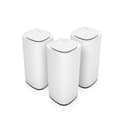
🚀 Elevate your home network to warp speed and never miss a beat!
The Linksys Velop Pro 7 Mesh WiFi 7 System MBE7003 delivers tri-band WiFi 7 technology with speeds over 10 Gbps, covering up to 825 square meters and supporting 600 devices. Featuring cognitive mesh intelligence, it optimizes network performance and security, ensuring seamless streaming, gaming, and connectivity throughout your home or office. Easy app-based setup and advanced WPA3 security make it a future-proof choice for demanding users.
| ASIN | B0CJY25XCH |
| Antenna Location | Gaming, Streaming, Home, Business |
| Antenna Type | Internal |
| Best Sellers Rank | #10,565 in Computers ( See Top 100 in Computers ) #202 in Routers |
| Brand | Linksys |
| Built-In Media | WiFi 7 Router |
| Color | Not Specified |
| Compatible Devices | Laptop, Personal Computer, Smart Television, Tablet |
| Connectivity Protocol | Wi-Fi |
| Connectivity Range | 825 Square Meters |
| Connectivity Technology | Wi-Fi |
| Control Method | App |
| Controller Type | App Control |
| Coverage | 825 square metres |
| Customer Reviews | 3.7 3.7 out of 5 stars (399) |
| Data Transfer Rate | 10 Gigabits Per Second |
| Frequency | 5 GHz |
| Frequency Band Class | Tri-Band |
| Has Internet Connectivity | Yes |
| Has Security Updates | Yes |
| Is Modem Compatible | Yes |
| Item Weight | 4.26 Kilograms |
| LAN Port Bandwidth | 10/100/1000 megabits per second |
| Manufacturer | Belkin |
| Maximum Upstream Data Transfer Rate | 1000 Megabits Per Second |
| Mfr Part Number | MBE7003-KE |
| Model Name | Linksys Velop Pro 7 Mesh WiFi 7 System MBE7003 - Cognitive Mesh Router with Tri-Band and over 10 Gbps Speeds - Whole Home Coverage up to 825 sqm. |
| Model Number | MBE7003-KE |
| Number of Ports | 1 |
| Operating System | RouterOS |
| Other Special Features of the Product | Access Point Mode |
| Router Firewall Security Level | Medium |
| Router Network Type | tri-band |
| Security Protocol | WPA3 |
| UPC | 745883856985 |
| Voltage | 220 Volts |
| Warranty Description | 1 |
| Wi-Fi Generation | WiFi 7 |
| Wireless Compability | 802.11.be |
N**T
Plug & play
Was easy to connect to my other nodes
I**K
Unstable and slow
Worst buy ever. Speed is very slow and unstable, while my precious model did 800mb/s easily, this one struggles to get 100mb/s on the same network.
O**I
مفيد
R**D
Affordable and Best Wifi 6E mesh
I have Asus router Rt-Ax88u which wifi 6 but due to DFS channel i never get good speed. Connected ethernet 6 cable to wan/lan port of Linksys Velop Pro WiFi 6E and startred. I have one 1Gb home fiber connection and I can confirm that now my Iphone 15 Max Pro clock 922Mbps at 6Ghz using channel 1 I tested using Speedtest app.
A**D
Experience with the router after 7 months
I got the Velop Pro 7 Wi-Fi router to fix the internet dropouts caused by my ISP's router. I also got two nodes from the Velop 7 mesh and connected them through a wired backhaul. Unfortunately, after 7 months, I am now experiencing more dropouts than with the ISP router. I keep getting the red light on the router and nodes, and I have to restart the system for it to work. Some days it works, but on many other days I have to restart it 4 or 5 times. I tried tinkering with the settings and updating the firmware, but nothing improved. I should note that when the router and nodes are working, the internet connection is very good, and the coverage is strong. The dropouts are the main issue.
C**N
Not new product, used defective product sold as ew one
Product was not new, incorrectly sealed and wires missing
A**M
Not meet my expectations
Not meet my expectations And interface very basic
K**D
Horrible experience
I am very tech-savy - worked with many routers in my life. This set is a nightmare. Setup is horrible and nodes were are working properly.
M**E
I added it to my mesh network with eight other old Velop, and it is really easy to set up and it is very stable.
N**9
Before I start I will say that nothing will improve the broadband speed to your house other than obtaining a faster internet service. If you are limited to an ADSL service then really chances are whatever router box that was provided by the service provider is as good as it will get in term of broadband speed. What these devices can do it ensure the wifi network speed inside your house operates quickly and minimises dead spots where the wifi signal is weak. If you have ever looked at your phone an date wifi signal has one bar and the internet does not work it is in a "dead spot" I do not think these devices have an inbuilt ADSL modem so if you have ADSL broadband you will still need your current box to provide the connection to the internet. If you have Fibre then you can connect the Fibre modem straight into one of the Linksys devices. = Why get the Linksys Velop Pro WiFi 6E Mesh System then?= The main use is to replace your existing router with one of the units and place the other unit elsewhere in your house. They are not the smallest devices but the smallish towers are aesthetically neutral. They don't have multiple external antennas and with only two network ports on them and a power cable they are not going too have numerous cables attached to them. = Setting up the devices = This was relatively painless. You just need to make sure you have your existing broadband logon details and any specific settings you provided needs. They require an app available from apple/android stores and when they are first turned on they have a special wifi network you connect to to allow them to be set up. It pretty much holds your hand through the process. Just make sure you are next to two power outlets as You will be asked to turn on the second device so it can be set up and paired. Eventually you will create the wifi network for your house and the app will explain that you will be disconnected from the current setup wifi network and to reconnect to the one you just created. One both devices are set up you can switch of the second device and relocate dit to where you want it. Job Done. The app allows you to check the signal strength between the units so look for a stong signal between the two if you can. = The Wifi Network = No complaints with signal strength etc though be aware that passing through walls etc weakens it. Dont expect miracles and any device faces this challenge. The Linksys has three Wifi bands it uses 2.4,5,6 Ghz which wifi speed favouring the 5 + 6 bands. If your devices supports 6 or 6E wifi you will find your devices errs towards the best signal. For a modern device this will all happen automatically. = Whats Mesh = Essentially both devices create one wifi network in your house and as you move out of range of one device it swaps over to the other device to maintain a strong wifi signal on your device. You can if you want connect both Mesh devices together via a LAN cable. This helps avoid issues if the distance between the devices, or the physical barriers between them otherwise results in a weak connection. Using mesh you could also place another device in the middle point. My top tip. If you are buying a new house are gutting a place out. Put in a cabled network with network ports on the walls in rooms (Like phone sockets). It's not that common but will ensure your house is best set up for internet connectivity.
X**L
Posiadam Linksys Mx 5300 i mając iPhone 14 Pro Max nie odczułem żadnej znaczącej różnicy przesiadając się na Velop pro 7 . Moim zdaniem Mx 5300 ma lepszy zasięg od Velop pro 7 prędkości identyczne nawet chyba troszkę gorsze na Velop pro 7 . Rozczarowany .
A**M
Bardzo fajny i wydajny sprzęt
R**�
Ho avuto la fortuna di testare come utente Vine questo sistema WiFi Mesh, formata da un gruppo di dispositivi di connettività che funzionano come un'unica rete e sono rimasto molto impressionato dalle sue prestazioni. Confezionato in un set da tre, questo router Cognitive Mesh Tri-Band offre una copertura fino a 825 m², consentendo una connessione stabile e affidabile in ogni angolo della casa. Una delle caratteristiche più sorprendenti di questo sistema Wi-Fi è la sua velocità superiore a 10 Gbps, è possibile godere di un'esperienza di navigazione fluida e senza interruzioni. La connessione è incredibilmente veloce, anche quando vi sono numerosi dispositivi connessi contemporaneamente. Ho testato il sistema con più di 20 dispositivi e non ho riscontrato alcun calo di velocità o problemi di connessione. La facilità di installazione e configurazione è un altro punto a favore di questo prodotto. Basta seguire pochi passaggi intuitivi e il sistema è subito pronto all'uso. Inoltre, l'app dedicata permette di gestire facilmente le impostazioni di rete, controllare lo stato della connessione e monitorare l'utilizzo della banda. Non ci sono più zone morte in casa, grazie all'ampia gamma di segnale che questo router offre, ho testato la connessione in ogni angolo della mia casa e sono rimasto stupito dalla potenza del segnale anche nei punti più lontani dal router. Ha la capacità di connessione per 600 dispositivi davvero impressionante, questo sistema può gestire senza problemi un numero elevato di dispositivi connessi contemporaneamente, ideale per famiglie numerose o per uffici che richiedono una connessione stabile e affidabile. Lo consiglio vivamente a tutti coloro che desiderano una connessione Wi-Fi veloce e stabile in tutta la casa.
Trustpilot
Hace 2 semanas
Hace 2 meses