We remain fully operational. Our teams are working around the clock to ensure your deliveries continue safely.

Descargar la aplicación


Servicios al cliente
Sobre nosotros
Copyright © 2025 Desertcart Holdings Limited
Descargar la aplicación

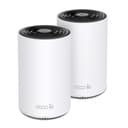





🚀 Future-Proof Your Home Wi-Fi with Lightning Speed & Coverage
The TP-Link Deco XE70 Pro is a cutting-edge tri-band Wi-Fi 6E mesh system designed to deliver ultra-fast 4.9 Gbps speeds and expansive 5,500 sq. ft. coverage. Featuring a dedicated 6 GHz band, AI-powered mesh technology, and 2.5 Gbps wired ports, it supports up to 200 devices simultaneously, ensuring seamless connectivity for gaming, streaming, and smart home ecosystems. Easy to set up via the Deco app and fortified with advanced security, it’s ideal for large or complex homes demanding next-level Wi-Fi performance.


| ASIN | B0CZ7KCN8N |
| Antenna Location | Business, Gaming, Home, Indoor |
| Antenna Type | Internal |
| Best Sellers Rank | #1,519 in Electronics ( See Top 100 in Electronics ) #12 in Whole Home & Mesh Wi-Fi Systems |
| Brand | TP-Link |
| Built-In Media | 2* Mesh Unit, 1 * Installation Guide, 1 * Ethernet Cable, 2 * Power Adapter |
| Color | White |
| Compatible Devices | Iphone, Smartphone, Tablet |
| Connectivity Protocol | Wi-Fi 6E, Ethernet |
| Connectivity Range | 5500 Square Feet |
| Connectivity Technology | Ethernet, Wi-Fi |
| Control Method | App, Remote, Voice |
| Controller Type | App Control, Voice Control |
| Coverage | 5,500 square feet |
| Customer Reviews | 4.4 out of 5 stars 847 Reviews |
| Data Transfer Rate | 4.9 Gigabits Per Second |
| Frequency | 6 GHz |
| Frequency Band Class | Tri-Band |
| Has Internet Connectivity | Yes |
| Has Security Updates | Yes |
| Is Modem Compatible | Yes |
| Item Dimensions L x W x H | 4.1"L x 4.1"W x 6.7"H |
| Item Weight | 2.2 Pounds |
| LAN Port Bandwidth | 2.5 Gbps |
| Manufacturer | TP-Link |
| Maximum Upstream Data Transfer Rate | 4900 Megabits Per Second |
| Mfr Part Number | Deco XE70 Pro(2-pack) |
| Model Name | Deco XE70 Pro |
| Model Number | Deco XE70 Pro(2-pack) |
| Number of Antennas | 8 |
| Number of Ports | 6 |
| Operating System | IOS and Android |
| Other Special Features of the Product | 1 GHz dual-core processor, Access Point Mode, Alexa & Google Assistant Compatible, Free Enhanced Security with HomeShield Basic, Wireless and Wired Backhaul |
| Router Network Type | Mesh, Multi-band |
| Security Protocol | WPA-PSK, WPA2-PSK, WPA3 |
| Smart Home Compatibility | Smart Home Compatible |
| Special Feature | 1 GHz dual-core processor, Access Point Mode, Alexa & Google Assistant Compatible, Free Enhanced Security with HomeShield Basic, Wireless and Wired Backhaul Special Feature 1 GHz dual-core processor, Access Point Mode, Alexa & Google Assistant Compatible, Free Enhanced Security with HomeShield Basic, Wireless and Wired Backhaul See more |
| UPC | 810142820967 |
| Voltage | 120 Volts (AC) |
| Warranty Description | 2 year manufacturer |
| Wi-Fi Generation | Wi-Fi 6E |
| Wireless Communication Standard | 802.11ac, 802.11ax, 802.11b, 802.11g, 802.11n |
| Wireless Compability | 802.11ac, 802.11ax, 802.11b, 802.11g, 802.11n |
#**T
Gamers in large or old houses look here
Some recently moved, new place is very large AND very old. The router was for some reason in the basement, my pc setup on the 2nd floor, basement was concrete and brick, thick walls and tons of space between the router and my setup. Near the router 400up400down speeds, I can game with this it’s not bad at all. On first floor 150up80down. Disaster. On 2nd floor 15up20down speeds. Unplayable. Even using my new ish gaming router the walls just too much I guess. So at the top of the basement stairs I have mesh plugged directly into Ethernet>modem. In living room I have 2nd unit plugged into a power outlet. No Ethernet only WiFi tot he first one in basement stairs. Third unit in bedroom upstairs Ethernet from this unit into my pc. My pc registers Ethernet internet, wifi turned off, and I’m getting 360up/380down consistently. Can play fps games no slingshotting no buggyness, it’s almost as if I’m direct into the router like at our old place. This mesh is a tri channel and that’s a must, it uses a separate channel to talk to the other 2 units leaving the 5g and 2.5g wide open for traffic. App is amazing, I was able to set up, secure and run the whole system, plugging in took more time than setting up. Some older devices wouldn’t connect, so I can a guest channel, with password obviously, and used the app to disable 5g on the guest network, and this resolved all compatibility issues. Absolutely worth the cost, this is what you want if you want stable, consistent, fast internet over a larger space in older heavily insulated homes. 10/10 i would recommend this to ANYONE with any sort of internet issues.
S**N
Great Wi-Fi coverage with easy-to-understand instructions and excellent interface...
I purchased this system because the BGW320-500 modem/router that AT&T provides with their fiber internet didn't provide good enough Wi-Fi coverage, among other issues. I put the main unit near the AT&T router and spread the other two satellite units in the living room and the master bedroom. This meant the three TP-Link units were well distributed throughout my home. Immediately we went from spotty Wi-Fi performance to excellent coverage and speeds everywhere in my house, even the back bedrooms which before had hardly worked at all. The setup is very easy, with great instructions that guide you through the process. The speeds of downloading and uploading doubled right after installation. What is really great is the interface to the units which is easy to use, and was working fine right out of the box, but it provides access to many features that can be tweaked as you wish. The satellite mesh units can be connected via Wi-Fi or ethernet for better speeds. I have them connected via Wi-Fi and it works well. The streaming units (Roku and Apple TV) connected easily and we get great streaming performance to our 4k TVs. All the IoT devices (refrigerator, coffee maker, dishwasher, Apple Pod, Atmos speakers, etc) connect fine and operate flawlessly. It required some work to get the AT&T BGW320-500 into "passthrough mode", as AT&T does not provide the ability to have the unit operate in "bridge mode" which allows all Wi-Fi and other functions to be handled by a better unit like this TP-Link product. I had to do quite a bit of Googling and reading guides and forums where other users had worked out all the settings that need to be adjusted on the AT&T BGW320-500 to get it to work well with this unit (or any unit, for that matter). Luckily there is a robust user's forum on the TP-Link website where a collection of gearheads documented the procedure to get things working well. Once I got that all worked out, I got the full 1 gigabit speed I'm paying for and it operates flawlessly (even after a power outage, it all came back up working fine). My family (and others that have stayed with us over the holiday) have really enjoyed the much better Wi-Fi coverage and speeds this unit has afforded. I have my Synology NAS (running my Plex server) connected via ethernet to this unit, as is my MacBook Pro, because I get better speeds that way (as my 2018 MacBook Pro does not have Wi-Fi 6e capabilities). However, the Wi-Fi speeds to my newer PC laptop (and my wife's newer MacBook Pro) which does have Wi-Fi 6 matches the upload and download speeds of my hardwired ethernet connection to my MacBook Pro. So, if you're looking for better coverage or speeds, I can recommend this product wholeheartedly. It's definitely one of the best mesh router products out there, easy to set up and easy to use.
C**Y
Excellent Upgrade!
I bought this to replace an aging router (Netgear Nighthawk X6). Netgear stopped upgrading its firmware and connections were dropping on some of the 35 devices typically connected. I was also getting tired of having to reboot it every time I wanted to connect my Kindle (connects just fine with Deco) I also wanted to upgrade to the new Wi-fi 6 standard. I chose the Deco with its 2 satellites partly because I wanted to hook up 2 IP cameras via ethernet. Previously, this was done with a Powerline connection. (Theoretically, I could connect these via Wi-Fi but connecting was difficult and not robust enough.) The camera connection worked a lot easier than I expected. (Honestly, the camera connection was my most dreaded aspect of router replacement.) It took a couple of days but I was able to connect my 40 devices. I also wanted to take advantage of the new mesh technology. I got a good deal on this device during the Amazon Prime day. Setup was pretty easy. I'm also impressed with the app. It used to be that I had to sign on to 192.168.0.1 to do the advanced tweaks on the older routers. Perhaps this is an advancement in router technology in general rather than this Deco. It's cool nonetheless. I haven't had to use the laptop to tweak this router. I can monitor devices, review reports, schedule reboots, toggle on/off devices, and lots of other things. I am very happy with this router. It is robust and has some cool features. Setup was pretty straightforward. It's also a very good value compared to other routers with similar features.
C**R
Great product, but no in-app speed test :(
Great product for price! Pros: simple set up, very strong router, app very customizable - setting specific devices to certain WiFi bands, giving permanent priority to devices, etc. Worked great for my WFH situation. Cons: the annoying status light - horrible color choices (green=operational / red=problem) - brightness cannot be adjusted - can be shut off completely via app or set to a schedule only), also- this model doesn’t have an in app Speed Test! What a poor choice from Tp-link. I hate this as I use the app to manage a family member’s network, who lives a state away. I’ll be returning it for this reason alone, unfortunately. Nonetheless, a great product worth consideration for others. The 6Ghz band really helps with wireless backhaul.
Y**O
Solved What Spectrum Technicians Couldn’t: Rock-Solid WiFi at Last
After months of frustration with Spectrum’s modem failing to handle the active service in my home, I kept running into the same issue: devices would randomly disconnect, the connection dropped frequently, and nothing seemed to work consistently. Multiple technicians came to investigate, but none could pinpoint the actual problem. That’s when — thanks to my trusted alliance with Pescuezo (my personal AI tech wizard 😄) — we took matters into our own hands. We researched the best value-for-money solution that matched my real needs and landed on the TP-Link Deco AXE4900 (Deco XE70 Pro). Let me tell you: it was a game-changer. I’ve been using this mesh system for over two weeks now, and the results have been outstanding: ✔️ Incredible coverage – It reaches every corner of the house with a strong, stable signal. ✔️ Rock-solid stability – No more dropped connections, even with multiple devices streaming and working simultaneously. ✔️ Easy setup – The TP-Link app made installation quick and painless. ✔️ Impressive speed – For the first time, I’m fully using the bandwidth I’m paying for. ✔️ Sleek design – It blends in beautifully with my home decor. If I had to mention one minor drawback, I’d love an extra Ethernet port on each satellite unit — but that’s just nitpicking. In short, this mesh system fixed a long-standing issue that even ISP technicians couldn't resolve. If you're working from home or have a tech-heavy household, this is worth every dollar.
Z**A
Easy to install/setup, great connection, reliable and boosted my internet experience
Setting these up provides a more reliable and stronger signal than my wifi router did, actual multiple wifi routers that I tested. I initially had the 3 Pack X60 setup but two of these gave a better signal that was also more reliable and faster than those 3 did. I now have 4 of these in my 3 bedroom house and they are working flawlessly. Initially my wifi speed was around 50-100. Now it is 550-600mbps 3 rooms over from the cable modem. I am glad my cousin told me about the deco systems since I hadn't heard of them before. They work well, some better than others. I would highly recommend the XE70 as it provides great signal strength and performance. I have one in my living room, one at the other end of the living room near the hallway, one in the master bedroom and one in the office. Again the XE70 gave better performance by a good amount compared to the X60.
K**A
Do NOT buy Deco — firmware breaks your smart home, and support is painfully slow and unhelpful.
Do not buy any TP-Link Deco system. Their recent firmware releases broke essential smart-home functions across multiple Deco models, and support took several weeks to provide even part of what I needed to fix it. After the update, all of my Deco units (XE75, XE75 V2, BE63, XE70 Pro) began causing major 2.4 GHz instability. This wasn’t a small annoyance — it disrupted core parts of my home: • My Ecobee doorbell constantly dropped offline, which meant no video alerts and false alarms when trying to arm the security system. • Meross smart plugs running CO₂ shutoff for my aquariums disconnected randomly — and if CO₂ stays on overnight, fish can die. • Twinkly, Nanoleaf, Hue lights constantly fell offline. • Logs clearly showed ARP-table failures and 2.4 GHz issues directly caused by Deco firmware. I did the legwork: collected logs, identified the failure mode, confirmed it with multiple test cycles, and found community posts showing that beta firmware existed to fix this exact problem. I told TP-Link support this in every email and repeatedly asked for the correct beta builds. It still took six back-and-forth exchanges, over several weeks, before they finally sent beta firmware — and even then it was incomplete. One file installed, another wouldn’t install because it wasn’t recognized as newer, and they never sent anything for the XE70 Pro. Meanwhile, when I posted on Reddit, I got clearer answers in one day than I did from TP-Link support in weeks. I’m not writing this to rant — I want other buyers to understand what they’re getting into. If Deco firmware breaks (and based on the community reports, it happens often), you may spend weeks chasing support for files that should be easy to provide. And during that time, your smart-home devices may simply not work. If you rely on smart-home stability, security cameras, alarms, or automations of any kind, avoid Deco. There are other mesh systems that won’t leave you stuck waiting weeks for partial fixes to issues caused by their own firmware.
P**.
EASY set up, no tech skills needed - “Plug and play!”
(**4 month UPDATE at end**)I was concerned that this system may require more technical skills than I have to set up, but I was wrong. I'm 64 years old, just average computer skills, and had these 3 Decos set up in ~15 minutes - and most of that was downloading the app, making your account, passwords, etc. I have Mediacom as my internet provider, and a Hisense router/modem combo. The TP Link Deco was literally 'plug and play', with simple step by step instructions. I had read reviews where you may have to do something to 'bridge' or (unbridge?) your router (to get higher internet speeds I suppose) but I only had to plug one of the TPLink Decos into my modem and that was it. I placed the other two Deco units in other rooms, plugged them in and the 'main' TP unit recognized them. As you connect your devices to the TP Link network the Deco with the best signal automatically picks them up (assuming you have more than 1 Deco unit). On the TP app you can see which Deco unit your device connected to. I had no issues with my existing router/modem or internet provider/service, nothing to change or set, etc. I get around 850 mbps download and ~40 up on my cell when it's on the TP Link wifi network, and everything in my house and all outside cameras all now have a very good to excellent signal (the total area of my house is at least 3,500 sq. ft.). I suppose people with more tech skills than I could make adjustments to their router to get even higher speeds, but the coverage and speeds I get are more than enough for streaming movies, PlayStation games, cameras, and numerous other devices. I got this because I've recently installed a few security floodlight cameras around my house, and had a poor signal on the ones at the rear of the house. Now all cameras have a good signal, and I have a wifi signal in my garage where before I had none. *There's also a "WiFi Toolkit" app that you can download on your phone that allows you to very easily check your wifi signal easily all around your house, so you can use that to determine where to place a camera or, if you are limited on where you can place a camera this app will tell you if your signal is sufficient at that location. That app can save you a lot of time and trouble, to show if your device will have a sufficient signal before you mount or install it. Very handy app. Everything in my house (around 22+ devices - cell phones, iPad, PlayStation, robot vacuums, TVs, Alexa, smart lights, etc.) connected easily to the TP Link wifi. You just have to go to each device’s settings and change its wifi network to the TP Link network. I've only had the system for about two weeks now, but so far, it's been perfect. **4 month Update: I’m happy to say that everything still works great, no issues. Anytime I add (or replace) a device I just choose the TP Network and it connects, no problems. I have several different devices from different manufacturers- Simplisafe alarm, Ring and Tapo floodlight cameras, Kasa and Govee lights/devices, PlayStation, Alexa, Shark, and Roku TV - and everything connects and works great with no problems.
Trustpilot
Hace 2 meses
Hace 3 días