We remain fully operational. Our teams are working around the clock to ensure your deliveries continue safely.

Descargar la aplicación


Servicios al cliente
Sobre nosotros
Copyright © 2025 Desertcart Holdings Limited
Descargar la aplicación

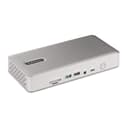
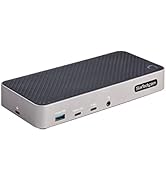
⚡ Power Your Productivity with the Ultimate 40Gbps Docking Station!
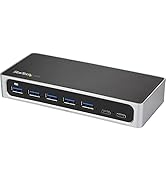
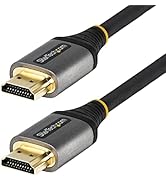
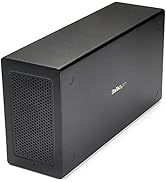
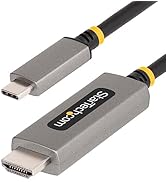
The StarTech.com Thunderbolt 4 Dock is a premium 16-port USB4/Thunderbolt 4 docking station delivering up to 40Gbps data transfer, quad 4K 60Hz display support on Windows, dual 4K on Mac M3/M4, and 98W laptop charging. Designed for cross-platform compatibility and enterprise reliability, it future-proofs your workspace with versatile connectivity and robust power delivery.





| ASIN | B0CTTR34K9 |
| Best Sellers Rank | #21,655 in Electronics ( See Top 100 in Electronics ) #332 in Laptop Docking Stations |
| Brand | StarTech.com |
| Color | Space Gray |
| Compatible Devices | Apple MacBook Air M1/M2/M3/M4, Apple MacBook Pro 13 M1/M2/M3, Apple MacBook Pro 14 M1 Pro/M2 Pro/M3 Pro, Apple MacBook Pro 16 M1 Pro/M2 Pro/M1 Max/M2 Max/M3 Pro, Apple MacBook Pro 15 2019/2018/2017/2016, Apple MacBook Pro 13 2020 Intel/M1, Apple MacBook Pro 13 2021 M1 Pro/M1 Max, Apple MacBook Air 2022 M2, Apple MacBook Pro 14 2021 M1 Pro/M1 Max, Apple MacBook Pro 16 2021 M1 Pro/M1 Max, HP Spectre… |
| Customer Reviews | 4.5 4.5 out of 5 stars (30) |
| Hardware Interface | HDMI, MicroSD, Thunderbolt, USB, USB 2.0 |
| Item Dimensions L x W x H | 3.8"L x 8.3"W x 1.4"H |
| Item Weight | 0.44 Pounds |
| Manufacturer | StarTech.com |
| Number of Ports | 17 |
| Total Number of HDMI Ports | 2 |
| Total Usb Ports | 7 |
| UPC | 065030899277 |
| Warranty Description | 3-Year |
| Wattage | 180 |
M**T
Works well, wish it was a bit less plastic.
This dock does exactly what it claims to do, and functionally I have no real complaints. It runs a dual-monitor, two-PC setup without hiccups, handles Thunderbolt 4 bandwidth properly, and has been stable in daily use. Displays connect cleanly, peripherals behave as expected, and charging works as advertised. From a pure “does the job” standpoint, it’s solid. The ports are all in good positions, it was obviously well thought out and is easy to populate - nothing is too close to anything else like some of these. That said, it’s hard to ignore the price relative to the competition. Compared to a lower-priced UGREEN dock I own, this one feels noticeably less premium. The StarTech enclosure is mostly plastic and feels a bit rickety, especially if you’ve handled all-aluminum docks. Nothing is actually broken or unreliable, but the tactile experience does not match the price tag. I use the UGREEN dock at home and this one at work, and in real-world operation they perform similarly. This StarTech dock works perfectly fine, it just doesn’t feel like a premium piece of hardware. You’re paying more for branding and specs on paper than for build quality. If you need a Thunderbolt 4 dock that can reliably drive a dual-monitor setup and you care about clean aesthetics on your desk, this will do the job without drama. Just be aware that it’s probably a bit overpriced for what it physically is, even though it performs exactly as it should.
T**.
Works great for my setup, plenty of connection options
Works great with either my personal laptop (MSI) or work laptop (HP) and two monitors (one monitor at 5k/60Hz, the other one at 2k/60Hz). Really like the large number of connection options. Setup was easy, price is acceptable. Would buy again.
B**Y
Got my 4 work screens...
Haven't tested on linux yet but the thunderbolt trait is what makes it better than the other for technical reasons. Works on windows fine. The limits would be your computer hardware. Also, keep in mind different management software ket you choose gpus for monitors. Used a dated intel software and got all 4 monitors and the mirrored laptop running. Will see how well everything else behaves in time but star tech is a reputable brand and the tech in this is made of solid options so hopefully other features work well. Would love to help them design the next but best option based off my search so long as all aspects work. Yes, the pictures have two suns... AI struggle bus temp generated backgrounds to test my background script.
E**E
Better for Windows
Not a great value for MacOS. I have the PluggableTBT-UDM for a MACBOOK Air M4 - it was slightly sluggish to start up cmpared to the high bar Cal Digit TS4. But it worked for the most part. I thought that, by upgrading to the more video intensive StarTech, the handshake would improve. Instead I have black out on my primary HDMI out. I am sure this isn't indicative of all of the units. But I can't help but wonder if this dock is mostly suited for Windows laptop well above MAC OS
S**S
Docking Station
Fast, working well with my laptop. No complaints. Happy with the purchase. 😃
R**T
Works with Several Mac's
Worked exactly as I needed. I use a laptop pc which can be easily connected with 2 monitors with no issues even without this item. However Mac's are a bit more complicated to link with additional monitors. I have tried this item with a M1Pro chip, M4 chip and M4Pro chip, and each time I was able to use two external monitors separately in addition to the mac's screen lid open, so having three separate screens, and all of these items only using 1 USB C port of each of the Mac's..and all three I did not have to install any additional software which was something I did not want to do.
D**E
Computer Cable May be Undersized.
TBT4 cable that came with the dock could not support the bandwidth for a 34" widescreen display at 3440 x 1440p resolution at 60Hz. After switching to a cable that can support upto TBT5 bandwidth have had no issues. Tested all cables and confirmed it was an issue with the computer to dock cable that came with the dock. Either bad cable or the cable that comes with the docking station is not sufficiently sized. 2025 M4 Macbook Pro, Alienware AW3423DW
M**Z
Startech products are awesome
Easy setup, Lots of ports, small footprint, 3 monitors and quality build.
A**I
Very powerful and works just as intended. It got fast ports and display experience is amazing, worth the price.
A**R
Great docking station, great IT support. Works with windows and Mac no drivers required.
C**2
Immediately works without a fuss. Where my Anker APEX 12in 1 TB4 90W failed (USB failed) or that the Plugable TBT4-UD5 couldn't handle (can't do even 3 screens even with USB-C 10GbPS port) , the Star-Tech 132N-TB4USB4DOCK could do without breaking a sweat. I load my TB4 hubs to the gills with 3 x 27" monitors and a 4th travel monitor, with keyboard, mouse, webcam, Jabra, Senheiser gaming headset and all, and it connects easily to my Lenovo with the TB 4 cable with ease. I have always been using high-end hubs all my life and Star-Tech is bland, boring, looks pretty sad design-wise, but at the end of the day, it always delivers. I shouldn't have spent time with Anker or Plugable and gone direct with StarTech all along. Glad i finally bit the ($$$) bullet. The extra price is worth your sanity.
N**E
Today's laptops have minimum ports, so it's great to get 6 USB-A ports for keyboard,mouse,and game controller, etc . It could use extra USB C ports in my opinion. Also easily powered my laptop.
B**R
Only caveat is to ensure is if using 4 displays like I am is to use native Display Port and HDMI cables and monitors. Don't try and use DP to HDMI cablles or adapters as the monitors won't return from power saving so device requires a power cycle in that situation. However with the right cables and monitors it works superbly, no complaints at all so far. I get 4 fully functioning monitors running off my Lenovo laptop using thunderbolt 4.
Trustpilot
Hace 2 semanas
Hace 2 meses