We remain fully operational. Our teams are working around the clock to ensure your deliveries continue safely.

Descargar la aplicación


Servicios al cliente
Sobre nosotros
Copyright © 2025 Desertcart Holdings Limited
Descargar la aplicación

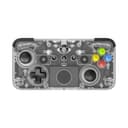
🎮 Own the game with precision, style, and wireless freedom!
The CRKD NEO S is a premium wireless collectible controller compatible with Nintendo Switch, PC, mobile devices, and popular handheld gaming systems. Featuring Hall Effect sensor thumbsticks and triggers for drift-free, precise control, it offers seamless Bluetooth switching across multiple platforms. Limited edition designs paired with a companion app unlock unique rarity and customization options. Re-mappable back buttons and adjustable trigger sensitivity provide tailored gameplay enhancements, all powered by a long-lasting battery and housed in a sleek classic clear shell.


| ASIN | B0CVYBGYBB |
| Additional Features | Headphone Jack, Motion Sensing, Multiuse, Rumble, Wireless |
| Best Sellers Rank | #5,351 in Video Games ( See Top 100 in Video Games ) #211 in Nintendo Switch Controllers |
| Brand Name | CRKD |
| Button Quantity | 23 |
| Color | Classic Clear |
| Compatible Devices | Nintendo Switch OLED, PC, Mobile, Smart TV, Steam Deck Legion Go, Rog Ally Gaming |
| Connectivity Technology | Bluetooth |
| Controller Type | Wireless Gamepad |
| Customer Reviews | 4.2 4.2 out of 5 stars (245) |
| Global Trade Identification Number | 00850052138226 |
| Hardware Platform | Desktop, Gaming Console, Smartphone |
| Item Weight | 0.44 Kilograms |
| Manufacturer | CRKD |
| Model Name | NEO S |
| Package Quantity | 1 |
| Power Source | Battery Powered |
| UPC | 850052138226 |
| Warranty Description | 2 Year Manufacturer |
B**N
Excellent for PC Gaming
I absolutely love this controller for when I am playing cozy and relaxed games. I use it for PC gaming mainly so my only irritation is the Nintendo button layout. Even though the buttons are identical they are each keyed so you can not just open the controller and swap it to traditional xbox layout. I inquired with CRKD about getting a set of xbox buttons because I have seen one of their controllers with that layout and know they make them, but I was told it is impossible to swap the buttons and will void the warranty if attempted. Which is disappointing but I understand. The look of the controller is just beautiful. The feel of it is very high quality and doesn't feel like a cheap toy, it has a nice weight and texture. The battery seems to last forever and I am always caught off guard when I need to throw it on the charger. It works flawlessly paired to my PC and to my Steam Deck, I have not had any issues with it dropping the connection or any perceivable input lag. I have not had the desire to attempt connecting it as a pro controller to my PC to use the tilt controls, so I can't speak on that function. Overall this is an amazing controller, it is so good I won't take a star off for my disappointing Customer Service interaction.
А**R
Awesome controller
Great size and awesome design. Pair this with the fret attachment for Fortnite Festival and it makes the value even better. Connects easily to your Switch or Switch 2 and feels great in your hands. A+++
R**C
A cute and functional contoller
I own a lot of controllers and slowly I'm trying to get around to reviewing all of them. First I'm going to say, don't buy this controller if you're expecting great ergonomics. I bought this for form over function, so I won't be knocking points off of it for ergos. Let's just say, I unexpectedly found myself fighting a special FATE pop in FFXIV when I had just logged on to mess around with the controller and it was not a great experience for my hands. That being said, for the boxy shape of the controller in general, it's easily bigger and more comfortable than similar options. Getting that out of the way... I selected this model in particular because I have a PC in my house that is sakura themed, and whenever I see good looking sakura accessories for it, I usually cave. Features: Face buttons are membrane but have good tactile feel. dpad is old school feeling membrane with center pivot. Bumpers are tactile, somewhat noisy. Triggers feel somewhat light to me (subjective) The controller minimizes the discomfort from the form factor by providing you with a wider controller and small contours on the back. Special Features: The standout features that attracted me to this controller were.... - Aesthetics and Collection nature - The compact form factor & the amount of modern features packed into such a small form Cute and collectible things are always a plus to me, even if it's not always practical lol. Also it's cool that this controller has features such as app based firmware updates, remapping, programmable back buttons, and hall sticks in such a small package and a decent price. Functionality: The controller looks great, paired easily with Switch and over Bluetooth to my PC, and works perfectly. I was also able to pair it to my phone to check the rarity and update the firmware without a hitch. The only thing that sometimes happened is it sometimes seemed to not want to connect to Switch, even after waking it up without an issue. Maybe take a half star off for that, but it still rounds up. The responsiveness of the controller didn't seem terrible via bluetooth for me. The placement of - and + doesn't get in the way. I typically don't use back buttons on games I play on Switch, but I find the location of the back buttons to be perfect for my middle finger to actuate with enough space to keep my middle finger off of the button to prevent accidental presses. The joysticks have good resolution allowing me to be able to select time fairly precisely in Genshin Impact, though it tends to jitter between two minutes similar to the 8BitDo Ultimate 2C. A staple of my controller reviews... the Tetris dpad test. I play games on Tetris at as fast of a pace as I can (I'm roughly a 1 minute sprinter in modern Tetris games) and see how many false hard drops I get. Where the controller loses a point for me is in this test. I found it a bit too easy to trigger unintentional hard drops when trying to up my pace. I find that tactile dpads are usually unbeatable in this test and my Mobapad M6 HD joycons (with cross dpad) are my current leader for Switch, followed by my trusty 8BitDo Pro 2. Sadly, Nintendo's own first party Pro Controller is the worst offender in this test. That being said, this is a subjective test. In some types of games, you may want more responsive diagonals... and in general if I slowed down my pace with this controller I would not trigger accidental hard drops... unlike the Pro Controller where it can still happen even if slowing down. In Conclusion: I could see myself playing retro games, or turn based JRPGs with this. The controller is easily suitable for those sorts of games that do not require lots of inputs in a short amount of time, and being flat and compact makes it a nice controller to just stick in a bag if you know you'll be gaming and don't want to bring a bulkier controller. At the end of the day, I'm happy to add this controller to my collection of many. It's good looking and fun and perhaps I'll add the Famicom styled one in the future too, but the likelihood of using them for anything beyond the casual level is fairly low. I think they are a good functional option if you're looking to game casually in style. Edit 9/18/2024 - Changed Formatting more like my other controller reviews.
S**N
Best controller out.
This is by far the best control controller I’ve ever purchased, I use it on my PC as well as my Nintendo switch. I dropped it on the concrete from a decent height, and it had little to no blemishes and still operated perfectly. I would definitely recommend this control controller, I love the customization of the buttons through the app.
J**P
The G.O.A.T.
This is my new daily driver. The app is easy. All three modes work great (Switch, Xbox, Generic Gamepad. Gyro feels nice. No dead zone feature, really means no dead zone. It really feals premium. Make sure you download the manual. Lots of good tidbits. One odd thing is that it when I put it in Xbox mode on Android (COD Mobile) it blinks the whole time. Not a huge deal but a bit annoying. Also if the developers are reading these comments, please add capacitive thumb sticks on your next iteration. Would really love to activate the gyroscope (in Steam) like this.
C**T
Jolie manette avec un design et une forme sympathique. Clairement pas du haut de gamme mais plaisant pour la collection Le packaging est vraiment agréable et soigné
H**L
Manette qui n’arrive souvent pas a ce connecter a mon macbook pro (bluetooth sans doute problématique), je suis obligé d’appareiller en réinitialisant les appareils déjà connu de mon mac.
I**L
This pad is great. All the modern bells and whistles with added childhood nostalgia. Love it!
S**N
Does the job and easy to set up
G**F
So this is my thoughts on CRKD’s Neo S after over 2 weeks of use. So first product I bought from CRKD is Nitro Deck + before my Nintendo Switch died after 7 years having it. It was really good product and when I look in to Neo S I was bit sceptical about the controller, thankfully I got it for sale on here and the give it a go…..it was a pretty good controller. (Despite I haven’t own a 3rd party controllers since PS2 days) The build quality is great, despite look of size of NeoS the design is great that gives out NES look, is surprisingly comfortable to my hands whys, the buttons feel nice & responsive by size I have no issues on accidental button press, the back buttons are good that you can set up more then 2 buttons to the back buttons by app or by the controller itself, great variety of limited editions choice from, hall effect sticks are a must especially long term use, yes this does work with switch (despite I haven’t tested switch yet) and app it has with me works good with more features on hand. Also this has gyro controls so for Switch games or games on mobile or PC it is handy, personally I don’t use gyro is not really my thing. I just leave that off to begin with but is there if you want to use it. One good thing about controller it has like Nitro Deck swappable thumbs sticks you can buy sold separately and if you already have thumb sticks for Nitro Deck it works with Neo S no problem. However, I have come across issues including what people said online about the controller. The Bluetooth issue on PC is real that when I first time connected to PC if is by Switch Pro Controller mode or Xinput, it works good then when I disconnect or put PC in sleep mode. When I try reconnect to PC….it keeps disconnecting, thankfully on CRKD’s Discord I got one of people that helped me getting to work on PC & it hasn’t done it since then. Is odd on mobile it works perfectly with switch mode and xinput mode (Btw this is after the update I did on controller by the app that fixed Switch Mode latency issue) On Switch like I said I haven’t tested controller on Nintendo Switch, I have been told tho it works really well so you don’t have to worry about that issue on Switch. I seen people complaining about latency is worse on xinput then switch mode that I didn’t noticed difference (but is best to pair controller on PC by Switch mode and also wired mode, despite some people say they wired mode is bit off on Switch & PC keep that in mind) sometimes when controller is low on battery it becomes weird with inputs and sometimes the app despite I said to works good, but I didn’t come across bugs which thankfully is not that common with me. Again I have Nitro Deck + so I know how the app is. So if your a person who has PC & buying this controller, I do recommend looking at other options and if you already got Neo S if you planning it to use it on PC. Is best go on CRKD’s Discord so you get help from community. In other hand, if want a controller for switch or mobile who wants to have controller with lots of modern features in a classic build, this is controller for you. Do recommend getting on sale is not really worth £50 for Neo S whys, if you want have charger or Fornite edition yeah go for it I’m not stopping you. Lol So yeah CRKD did good job with the controller despite the bugs, hopefully CRKD fix the PC Bluetooth problems with update to Neo S & also take notes on there future projects and it be cool to see CRKD makes other controllers that are like the XBOX controller….but with there own nostalgic spin on to it. So that is my thoughts on Neo S, I hope this short review is been helpful. 💙🐺👍🏻
Trustpilot
Hace 1 mes
Hace 1 mes