We remain fully operational. Our teams are working around the clock to ensure your deliveries continue safely.

Descargar la aplicación


Servicios al cliente
Sobre nosotros
Copyright © 2025 Desertcart Holdings Limited
Descargar la aplicación

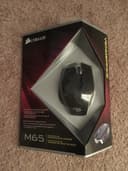
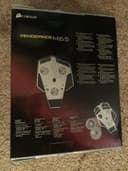
🎮 Elevate your FPS game with precision, power, and pro-level customization!
The Corsair Vengeance M65 is a high-performance FPS gaming mouse featuring an 8200 DPI laser sensor for exceptional accuracy, a dedicated sniper button for instant DPI adjustment, and a robust aluminum unibody design. Its adjustable weight system and onboard profile storage provide personalized comfort and portability, while selectable response times ensure optimal responsiveness. Engineered for serious gamers, the M65 blends durability, precision, and advanced customization to give you a competitive edge.


| ASIN | B00ARD5410 |
| Antenna Location | Gaming |
| Are Batteries Included | No |
| Are Batteries Required | No |
| Brand | Corsair |
| Button Quantity | 7 |
| Color | Black |
| Compatible Devices | Personal Computer |
| Customer Reviews | 4.2 4.2 out of 5 stars (1,171) |
| Enclosure Material | Aluminum |
| Global Trade Identification Number | 00843591027946 |
| Hand Orientation | Ambidextrous |
| Hardware Platform | PC |
| Item Weight | 0.7 Pounds |
| Manufacturer | Corsair |
| Model Number | CH-9000022-NA |
| Movement Detection | Laser |
| Range | feet |
| Style Name | Vengeance |
| UPC | 843591027946 |
D**G
Excellent Entry Level Mouse + Room to Grow: Corsair Vengeance M65 FPS Gaming Mouse, Gunmetal Black (CH-9000022-NA)
This wired, 8 button, “gaming mouse” was purchased December 2014. I have been using it daily for the usual range of desk top computer activities and an on-line FPS. I like the flexibility it offers, especially in weight control and software customization. The design is sharp and it seems very well built. This is not your generic plastic mouse; it has a rigid aluminum frame, connects via a tangle-free braided USB 3.0 chord, and feels solid in the hand. You will notice the difference right away. First a few listed basic features I am using on the M65. I just started gaming on-line on a regular basis about 2 years ago so this is not a review for the seasoned gamers amongst us. It is my first 'gaming' mouse. :: Vengeance M65 Gaming Mouse Features :: :: :: :: :: :: :: :: :: :: :: :: :: :: :: :: ~ 50-82oo DPI laser sensor; with on the fly DPI adjustment. ~ Dedicated sniper button; programmable DPI ~ Selectable Response Time (aka Polling Rate): 1ms, 2ms, 4ms or 8ms ~ Lift Height Adjustment ~ Adjustable Weight Tuning: 3 weights ~ Scroll Wheel; metal with rubber wrapping. [It clicks down but does not tilt.] ~ OS Support: Win7, Win8, Win Vista, Win XP [I’ve had no problems on Win10] What I do use, mostly, is the ‘Manage Performance’ section. This is where you can customize the DPI of four mouse settings for on-the-fly use. The DPI settings mean how sensitive the mouse is. The higher a mouse DPI the further the cursor on the screen will move across the mouse pad. Three of your pre-set DPI settings are controlled by 2 small buttons on top of the mouse, just behind the Scroll Wheel. I find this handy for switching between regular computer use and gaming. The fourth DPI setting is for the Sniper Button located on the left side of the mouse. For instance, to use the Sniper button most people would want very little movement for a more precise solid feel; so the setting is lower, starting at 50 DPI. For a mouse that will zoom across the pad you can set the mouse as high as 8200 DPI. Those are the two extremes and with a wide spectrum of DPI settings you can adjust to your own wants and needs. You can even set separate X/Y axis DPI settings if you desire. Also in the ‘Manage Performance’ section of the software I have set my Report Rate, aka Polling Rate, at 1ms. The higher the Report Rate the more often and accurately the mouse sends it position to the computer. A higher Report Rate (1ms) will use more CPU resources because it has to query the mouse for its position more often. So there is flexibility up to 8ms if you need to be nice to a slower computer. The Lift Height, on the same tab, means your mouse will still sense the pad surface even when lifted off the pad. You can choose from High, Mid-High, Middle, Mid-Low and Low. When a mouse is lifted from the tracking surface, it will not stop tracking for a small height range; this can cause an unexpected extra move. If a player wishes to stop movement as soon as the mouse is lifted from the tracking surface, the lift-off function can be applied to force the mouse sensor to stop tracking. There is also a Surface Quality test which is very easy to do. The measurements depend upon DPI, surface type and movement speed. Certainly if your pad has been exposed to food, dirt, greasy fingers and, then daily dust on top of all that, your dirty surface is going to retard the sensitivity no matter what the DPI and movement speed. If you are going to spend this amount of money on a mouse you should also get a new very good quality, clean, mouse pad as well. To “Tune” the weight and balance of your M65, access to those weights are simple. There are 3 large ½ inch slotted “screw” covers on the bottom; you can’t miss them. You can use a coin or screwdriver to unscrew those covers and then just dump out the weight enclosed. This is all personal preference, as well, so just experiment with each weight out of the enclosure. By the way, you can use a simple ‘switch’ to turn Off the blue light emanating from the front of the mouse if you don’t like it. It is located in the ‘Assigned Buttons’ software, the first tab after the software opens. Just ‘flip’ the switch with your mouse. It’s the only mod I use on that particular page. I do not utilize all its software capabilities, like Macros, multiple Profiles and Button Assignments; those options are used for multiple set-ups for different types of games with different performance requirements and come in very handy when you want to easily change from one game to another. Well, there are the basics of what I use on the M65 whether writing reviews, e-mails, ‘Shopping’ photos, or playing an on-line FPS game about 3 days a week now (It was 4-5 days a week). This mouse has the flexibility to conform to your computer wants and needs. What’s nice is the M65 can grow with you when you feel the need to move into Macros, Button Assignments or Profiles. I would, based on my basic experience of this mouse, give it 5 stars; solid well-made, no problems, feels good in the hand with custom flexibility, even for the novice gamer /computer user.
T**N
Best Mice for the Best Price
Disclaimer: Previously I was using an Anker 2000 dpi mouse. I have also used a Logitech G500s. I have been using the Corsair M65 RGB FPS for 2 months now. All of my examples are about CS:GO, I'm sorry in advance. TL;DR: Very high-quality mouse. Would highly recommend it. I love it. Pros: The weight of this mouse is excellent. I use all three weights, but even without weights the mouse only feels slightly too light. The RGB lighting has excellent color. Probably my favorite part about the mouse is its surface material. The entire mouse is covered in anti-sweat material that actually works. The top of the mouse is covered in a fine layer, whereas the sides of the mouse are a slightly thicker gauge. The Anker I was using before would make my thumb and pinkie sweat profusely due to its gloss plastic sides, but the Corsair hasn't produced any gross sweat stains or markings anywhere, all the while keeping my hands cool and dry. The look of this mouse is superb, whether you're a minimalist or a flashy character, this mouse will please your eyes. It's sleek and tasteful, and even the logo doesn't look bad. The feel of this mouse in my hand is very comfortable. So comfortable that it almost feels custom. Maybe I just got lucky. Finally, the cord has a material covering which is nice. Cons: I praised the anti-sweat material on this mouse, but Corsair forgot to put it on their Sniper button, so there are said gross sweat stains around the edges of the Sniper button. Woe is me. I wish the scroll wheel had less clicking resistance. The click is very satisfying, but it takes a little too much pressure. That being said, the scroll wheel is otherwise high-quality. Unfortunately, the cord material feels slightly cheap as though it could fray easily if your desk were too rough and the cord rubbed on the corner. Mine is still in very good condition though, and I have a wooden desk. The Sniper button is well-placed if your thumb is flat against the mouse, but when I AWP in CS:GO I have may hand in a small claw, holding further back on the mouse which puts the tip of my thumb directly on the Sniper button. In tense situations I tend to put a lot of pressure on my thumb and pinkie and a few times now I have accidentally clicked the Sniper button while turning left or right and under-shot my targets. The obvious solution here is to set your Sniper button dpi to match that of your main dpi. But what's the point of a button that does nothing other than annoy you when you change your dpi? An FPS game worth its salt will give you the option to have a default sensitivity and a scoped/zoomed sensitivity, so the Sniper button is never really that useful*. If they released a model without the Sniper button I think it would be better. Finally, the lighting options given to you in the mouse software leave something to be desired. Don't get me wrong, there is some variety, but when you compare it to the custom lighting profiles you can make for their keyboards, it leaves your mouse feeling a little left out. Conclusion: This mouse is near perfect. Sure, I have lots of writing in my Cons section, but most of those gripes are small, and are really just minor inconveniences. You're left with a fantastic mouse that feels wonderful to hold, slides well, and has a solid feeling. The buttons work great (for the most part), and everything looks cool as hell. This is definitely one of the best mice for the best price. *The Sniper button proved useful when I decided to start going for 360 noscopes. My in-game sensitivity in CS:GO is very low, and I can barely get 180 degress off of an entire mouse pad sweep. However, I could assign a high sensitivity to the Sniper button, and then hold it when I did my 360's. It can also be used as a convenient turn bind for anyone who is into surfing/bhopping.
N**S
This mouse is the best mouse I've ever had so far. I was using a bluetooth mouse that came in a combo with the logitech mx5500. I was getting a bit of mouse lag and couldn't adjust properly the sensitivity of the mouse. I'm a serious PC gamer and I'm always looking for anything that can slightly enhance my gaming experience and this one is a must! It is very confortable and it's easy to switch between the different sensitivity settings while staying focused on your game. Alot of people who start gaming on a PC forget that a good mouse and a good keyboard are critical. It may sound weird but you can get serious injuries with a bad keyboard and a bad mouse if you use it quite often like me. Even if I have large hands, it feels realy good in my hands. The wire comes with a velcro belt so you can adjust its length and prevent a messy setup. Combine it with a Corsair Vengeance K70 which has a USB port and you barely feel that this mouse is wired. Its very lightweigt and the color combination possibilities are amazing! I've always bought Corsair products and I always will. With them, I always feel that they come up with quality products that lasts.
S**M
Compré este mouse algo a ciegas, ya que solo tenía como referencia las recomendaciones de la marca Corsair. Y estoy muy contento con mi compra. Este mouse es excelente, súper cómodo de usar.Tiene varias configuraciones de dpi en los botones centrales, con el LED central como identificador de los dpi. Todo esto es totalmente configurable en la herramienta de software de Corsair. Además, tiene distintas pesas en la parte inferior para que lo acomodes al peso necesario para tus juegos. Lo uso en un mousepad Steelseries y todo el setup es muy cómodo de usar.
A**A
+ Incredibly solid and heavy + Braided light cable + Comfortable design - Uselessly high DPI - Sniper button too close to thumb One of the best FPS mice out there.
D**E
scroll wheel died. it WAS my favorite mouse.
も**な
こちらはあるFPSで有名な方が使ってると聞き、FPS用に買いました。 前回は500円以下の投売りマウスでFPSをしていたのですが なかなかエイムが出来ない事に気付き、いっそ1万位のを買ってみようと思い購入しました。 まず使用感の説明からさせて頂きます。 大きさは、私は比較的手か小さいのでほんの少しでかいので、手がデカイ人はあまりお勧め出来ないかもです。 手が小さくても握りやすく、すべりがよく、手から離れにくいです 重さは結構重いです、ずしっとくるのですが、左右にスライドしやすくしっかりとまるので凄くいいですね。 あと光の色も微調整可能です。〈これだけで1日がつぶれる勢いだと思いますw 光はオン、オフで設定が可能です、ちなみにオンにしていると光の熱が少し伝わり、カッコイイのですが手汗が凄い方は 多分手汗ブッシャーもおかしくないと思いますので、プレイ中は基本オフにして置くと熱がないので普通のマウスとなんら変わりません。 手汗なんて大丈夫だぜーっって方は喜びましょう。 横のスナイパーボタンでエイムが遅く出来るらしいのですが、こちらはスナイパー系統の使用者にはいいと思いますが 特攻系の方はあまり使わないと思います〈中距離や遠距離の使用はかなり重宝〉。ちなみに設定によりエイム設定は可能です。 マウスパッドはRazer Goliathusを使用してます。 FPSでの使用感はエイムがしやすく、微調整が出来るので設定微調整だけでかなり時間がかかる程設定の幅が広く www.corsair.com/downlods ここからは三年後のレビューになります。 まず三年は持ちました。壊れたわけでもなく三年も持ちました なぜ今変えようと思ったのは、単純に違うものがほしくなったのでG903を買いました。 そして使用感ですが、最近のFPSでの流行の一つでRazer商品に比べるとくそ重たいです。 私はそれが好きでしたので問題なく使用する事が出来ました。 そして大きさですが三年前にも記載しましたが、私は手が小さいので覆い被せ持ちの方で手の小さい人はオススメです。 大きい人だと多分はみ出すかもしれません。 私は手が小さく覆い被せ持ちでしたのでむしろかなり良かったです。 そしてスナイパーボタンですが、一切しようしませんでした。 むしろスナイパーボタンが一つのサイドボタンだったらどれほどよかったかと考えた位私には不必要に感じました。 あとは光の話ですが、私は多汗症の為。ライトの熱が凄く伝わりやすく感じてしまったので三年間で最初の1週間しかライトが点いてました。 ライトとスナイパーボタンは割りと個人的には合いませんでしたが、メインであるマウスの使用感に関して関係ないので星は下げません。 dpiはマウスホイールのしたのボタンにいくつか設定可能なので自分はいつもしようしていたdpiのしたに最大8200DPIの奴に設定すれば FPS中の味方との遊びでえらい回転できるので笑いは取れます。関係ないですね。 以上になります。何度もいいますが、3年も持ちましたのでおすすめです。
Trustpilot
Hace 2 semanas
Hace 4 días