We remain fully operational. Our teams are working around the clock to ensure your deliveries continue safely.

Descargar la aplicación


Servicios al cliente
Sobre nosotros
Copyright © 2025 Desertcart Holdings Limited
Descargar la aplicación

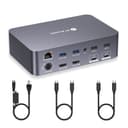
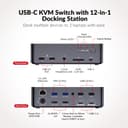
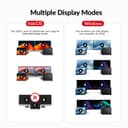
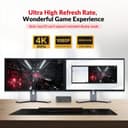
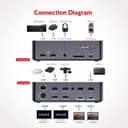

⚡ Elevate your workspace: Dual monitors, dual laptops, zero compromises.
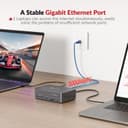
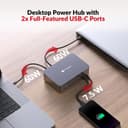
The AV Access KVM Switch Dock is a powerhouse 12-in-1 docking station designed for professionals juggling two laptops and dual 4K monitors. It features dual USB-C MST ports delivering 60W power and 5Gbps data, a 1G Ethernet port for stable networking, and EDID emulation to prevent screen flicker during device switching. With gaming-ready refresh rates up to 240Hz and ultra-fast 2-3 second switching, it’s ideal for home office multitasking and high-performance gaming setups.




| ASIN | B0CP4PD3SM |
| Best Sellers Rank | 7,819 in Computers & Accessories ( See Top 100 in Computers & Accessories ) 14 in KVM Switches |
| Brand Name | v AV Access |
| Colour | 2 Laptops 2 monitors (iDock C20) |
| Compatible Devices | Laptops |
| Country of Origin | China |
| Customer Reviews | 4.1 4.1 out of 5 stars (299) |
| Hardware Interface | 3.5mm Audio, Ethernet, SDXC, USB 2.0, USB 3.0 Type C |
| Input Voltage | 20 Volts (DC) |
| Item Weight | 1.76 kg |
| Manufacturer | AV ACCESS |
| Number of Ports | 15 |
| Total HDMI Port | 2 |
| Total USB Ports | 8 |
| Unit Count | 1.0 Count |
| Wattage | 120 watts |
T**M
Supports ultra wide monitors
Just arrived yesterday and I’m already very impressed. It does everything it says it would, plus one or two things it didn’t say it could! The switching is seamless, the elimination of window resizing, sharing of peripherals - including a bluetooth mouse that is now shared across all devices (connected to the unifying receiver plugged into the Dock). One thing the product description doesn’t tell you is that it will support an ultra wide monitor at 3440 x 1440. I was forced into buying a new hub after my old one died, and now I wish I’d had a 2 laptop hub a long time ago. Well done AV Access 👏
P**D
A formidable KVM. Great buy.
I’m happy I didn’t cheap out on this and go for something of a poorer quality. This is a formidable device, a high build quality and brilliant signal quality. It happily powers my smaller work laptop from the USB-C (not my gaming laptop though, but I knew this) I also bought the wired button switch which makes a huge difference. Overall, excellent. No regrets at all about the purchase.
A**R
Works perfectly as a KVM switch and a hub
This is an excellent product. I've searched a long time for something to allow me to 1) share keyboard, mouse, etc. between work and home laptops, 2) add connectivity for each with their limited USB-C connecters and 3) to enable push button switching from one machine to the other. This product does all 3 out the box and my desk is now the cleanest it has even been! Great stuff.
K**O
Works with Dell Latitude 5530 but not with Thinkpad T580
This appears to be the only choice for a KVM docking station which delivers power to two laptops simultaneously and does not require installation of a DisplayLink driver. As stated in the description, when connected to an ultrawide monitor with a 5120 × 1440 display, the output is limited to 3840 × 1080. This is a bit strange when a laptop can deliver 5120 x 1440 when connected directly to the monitor with an HDMI cable. Selecting 3840 x 1080 gives a rather fuzzy output, so I chose to run this with two 2560 x 1440 connections in PBP mode on the monitor. This worked fine with a Dell Latitude 5530 laptop. However, I could not get it to work with my personal Thinkpad T580 with integrated Intel UHD Graphics 620. The second HDMI output was limited to 1280x800. The AVAccess online chat technical support were very responsive in making suggestions, but there was no way we could get it to work. Moreover, charging and graphics output with the T580 became intermittent. I have therefore returned the item, and will just have to forgo the convenience of switching laptops at the press of a button. Moreover, I can get full 5120 x 1440 from the T580 with my old Lenovo dock, and directly from the Latitude 5530, which is better than 3840 × 1080 or PBP mode with the dock.
C**R
OP KVM
This KVM switch is a doorstop of an over powered KVM intended to act as a dual docking station. It works by taking video in through the USB C, then pumping out HDMI. It can power two medium powered laptops (up to 60W each) simultaneously, has 6 USB A slots, a further peripheral USB C in, and handles ethernet too. I'll be using this to switch between two laptops and to replace my existing KVM + double double docking station set up. It comes with a big brick adapter to power it. Unfortunately, one of my laptops runs at 140W itself so can't be powered from this beast, but it will still help declutter my desktop. Note a potential issue - you can't have both laptops use the ethernet at the same time, so be sure you're OK for this disconnection. All this said, my existing KVM was a tenth the price, so check this is the right solution for you. But if you are in need of a setup requiring: - 2 x docking stations - 2 x external monitors each - Power over USB C (up to 60W) This may be a worthwhile investment, being comparable in price to a single lower spec OEM docking station.
L**N
Apple Monitor vs AV Access KVM switch
I'm interfacing with Apple monitors via USB-C (Thunderbolt) connections. Despite testing multiple certified cables and a range of compatible adapters across both devices, I’ve been unable to establish a functional display connection. If you have a similar issue and found a solution, I would be happy to discuss further with you.
J**.
Great little box - helpful support (Johnny)
Purchased this forwork - and had issues with the refresh rate - I was having signal failure at any refresh rate above 59.95hz. Johnny gave me clear instructions to reset my box, and it works perfect as expected.
B**B
It works
Personally I know nothing about this thing but my roomie is the techy person and loves it. I believe somehow she has he PC.and laptop connected alot soad keyboard mouse etc.. also all link and going between different things is a smooth process no delays or freezing. Keeps things tidy and clear picture. I can only go off what she says it all looks the same too me . But the box is a bit big but just sits at the back of her desk doesn't get in the way. Seems strong made well and is lasting. She got all excited by it when I asked her to test it so that's got to be a positive sign.
C**R
Excellent unit. I have two laptops each with a USB-C connection that I needed a KVM switch for. Seems this is an oddball combination, but this KVM switch nails it. Good size, clean and solid. I also got the remote switch and it sits right beside my keyboard for easy and quick switching. I anything, I wish there was an additional USB port with power on the front to connect a device that needs charging. If you have two laptops with USB-C connections that support the necessary DisplayPort protocols, this KVM switch is for you. Note: There are other reviews noting about an inability to use the same wired network connection (can only be used for one device, the KVM can't switch that). Network protocols could never support that function to start with, so it's not really a negative on the switch.
C**N
Received my package quickly from Amazon. I do have another AV Access device called the iDockB30 but it's good for two desktops and a laptop and I wanted the one that can connect to two laptops to have as my work keyboard-video-mouse (KVM). It's easy to set up. Just two USB-C cables that go to the corresponding ports on the back of the iDockC20 and power. The other ends of the USB-C cables will go to the respective laptops. I'm a big Lenovo ThinkPad fan so I have a ThinkPad T14 Gen 5 AMD from my work and a ThinkPad P14s Gen 5 AMD as my personal daily driver. Turned on the unit and works well. Though the T14 had a little issue connecting but once I rebooted it worked fine. I'm able to press the switch on the docking unit to switch between the two with no issue. Looking over the build it looks solid, and the ports are labeled clearly so you know what device to plug into what. There are a decent number of ports in the back and the SD card reader is convenient to have since at my work place, I sometimes need to use the cards to read any external data. I tested out the network connectivity between the two by switching and it doesn't seem to lose the connection which is nice. Since the power distribution is 60W I would only recommend the KVM for use on business class laptops like the Lenovo ThinkPads. It would be advisable that if you are going to be connecting a gaming laptop on it like a Asus Strix G16 or a Lenovo Legion i7 having USB-C ports it will provide enough power if you plan to game on it. I would only use it for productivity work. I hope the next iteration of the USB-C ports on the docking unit will be like USB 4 or Thunderbolt 4/5 but for right now it suits to what I need to it do at my workplace. I do have dual monitors, and they worked great on them. No issue whatsoever since the monitors I have are 27-inch 1080P and a 32-inch 1440P. I have used it for quite a number of days, and I personally like the device. It is working great so far for me and does what I need it to do. Since I do IT work, I like the fact that I can plug in a second laptop and run through items without having to plug in a monitor etc.
D**N
It does not require additional power sources for the two laptops; it powers them simultaneously through the Thunderbolt Type-C ports, reducing wire clutter. Setup is straightforward: connect the monitor via HDMI, connect the two Type-C cords to the laptop's Thunderbolt ports, then connect the power source, and the functional unit is complete. There are many spare USB ports to support peripherals. It helps a lot when switching between laptops. So far so good.
U**.
Excellent product. Works perfectly well.
S**H
Works well for 2 Windows laptops within only a USB C cable to them. Both show a weak charging status, but at least they still charge. It looks nice and fits under the monitors. Has a lot fewer cables than the other ones and response rate seems good on the monitors for office related work.
Trustpilot
Hace 1 mes
Hace 2 semanas