
🎬 Animate your ideas, own the spotlight, and never miss a frame!
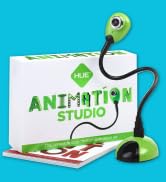
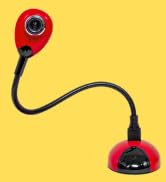
The HUE Animation Studio Complete Stop Motion Kit combines a 720p HD USB camera with an integrated microphone, easy-to-use cross-platform software, and a comprehensive 64-page animation book. Designed for Windows and macOS, it features a flexible gooseneck stand for precise positioning and comes with a durable shockproof carry case. STEM.org authenticated and award-winning, this kit is perfect for educators, creators, and families seeking a professional yet accessible stop motion experience backed by a 3-year warranty.






| ASIN | B0D1VTTRY7 |
| Best Sellers Rank | #120 in Webcams |
| Brand | HUE |
| Color | Red Camera with Carry Case |
| Customer Reviews | 4.0 4.0 out of 5 stars (1,556) |
| Date First Available | April 25, 2024 |
| Is Discontinued By Manufacturer | No |
| Item Weight | 1.72 pounds |
| Item model number | ASC002 |
| Manufacturer | HUE |
| Max Screen Resolution | 720p HD |
| Operating System | Windows, macOS |
| Package Dimensions | 9.17 x 7.24 x 2.95 inches |
| Power Source | USB |
| Series | HUE Animation Studio |
B**T
Sturdy equipment, easy to use, engaging toy that sneaks in all kinds of education opportunities!
I bought this to use with y niece (10) and nephew (8). I thought it would be fun to use first for making Lego movies, but later for illustrating math concepts. When it arrived, I just could not resist! (It's my camera, after all, right?) As soon as I started playing with it, I thought of dozens of ways we could use it at the nonprofit where I work, to create engaging social media mini-movies. Before it arrived, I was worried about how well it would hold up. Having played with it, I'm very confident that it will be a functional tool for both user groups for a good, long time. It is very easy to set up! The camera is very stable and the adjustable position gooseneck base is strong and holds its position fine. The focus ring is easy to adjust, too. I like that we can take the pictures by pressing the spacebar on the laptop if we want, which means I can let the kids move the pieces and I can take the shots quickly for them, to move the process along. We can also take the pictures with the button on the camera base, which is handy when the little guy wants to be in charge. If your kids don't know where to start, or if you want to explore a lot more about what you can do with stop-motion, I definitely recommend the book from the same company. Also, check out the company's website, which includes all kinds of great tutorials that make it all even easier. (I also bought the Square Trade warranty when I bought the camera. Now that I see how sturdy and easy-to-use the whole camera setup is, I doubt that we'll ever need that!)
C**G
Just what we wanted
After a few bumpy attempts to get this camera working, we couldn't be more pleased. The problem had to do with the USB connection as the PC (Win7) on which it is used had an internet access dongle attached to the adjoining port and apparently the two were crossing wires somehow or using too much horsepower. When the camera was plugged into a port on the back of the computer it worked fine. The software installed on the second try--the first problem may have also been due to the internet connection giving out because of the camera being installed next to the dongle. You do have to register the software online to get full use of it (otherwise only 30 day trial) and it's for one computer only. The software is very easy to use and intuitive so there is really no learning curve. We especially wanted this camera because of the shadow box we are using to film our 'movie'. In order to get the right lighting and angles we needed a camera with flexibility and this one does the trick. We can position it as we need due to the long flexible neck which then stays as it's set for multiple frames until we change its position. There are other extras in this kit, but nothing we needed for our movie. We just needed the flexible camera and the software and are very satisfied with both. Having not used other software of this type I can't compare it, but it seems to offer decent editing capability, allowing you to drop or re-position frames, etc. You can take the pictures via the button on the camera itself or the keyboard/mouse, which we preferred so as to not move the camera when we didn't want to. I'm glad it worked out because I didn't see any other options that didn't cost a fortune or were basically toys. Because of the shadow box where the movie scene is, using a camera on the computer itself wasn't an option for us. We are satisfied with this purchase.
S**R
No problem for my 9yr old daughter. Great product!
The good: It took me just a handful of minutes to install the software. Within the hour I had done my own dry run with the camera to understand the basics, gave my daughter a quick verbal how-to, and she had created her first stop motion video. EXCELLENT value for a kid who is interested in making stop motion movies. We really didn't have a use for the little chunks of clay or whatever that is... she is making movies of her American Girl Dolls and the high quality is truly surprising! These are not deal-breakers! I would buy the camera again right away even if none of these items were improved. BUT - 1) Life would be easier if, when you plug the camera into the USB port, it shows up as the default. I'm sure there is a way to do that, but my own laziness has kept me from delving into settings to try to figure out if that's a possibility. All it takes is several clicks to select your camera every time you connect it, and my daughter seems to have no problem going through that so I'm not going to change her current MO lol. 2) The camera comes unplugged WAAAAYYYY too easily from the base. If you touch the camera you have about a 50% chance of breaking contact/communication and you have to multi-click to select the camera again. If you try to LIFT the camera by the neck instead of the base you are about 100% guaranteed to lose it. This means a lot of unnecessary re-selecting and clicking. Seems like any person's natural inclination is to lift it by the neck instead of the base...so I bet this is a common problem. If your kid doesn't need to ever reposition the camera, then this will not ever be something that you're aware of. 3) Might be nice if it was lighted. But not much of an issue.
B**R
Gioco che permette di apprendere la tecnica dello stop-motion divertendosi. Regalo per i figli, molto gradito e usato per alcuni anni. Ideale se collegato ad un computer portatile. Collegato ad un fisso il cavo ne limita l'area di utilizzo.
M**G
Hemos comprado el estudio de animación como regalo de cumpleaños para nuestro sobrino de 8 años y hemos dado de lleno en el clavo! En una semana ya ha realizado un par de vídeos mi hermana me ha comentado que está preparando otro con tres amigos de clase
P**A
I did a lot of research before buying this for my 11 yr olds birthday (which was yesterday so I missed the return window). The camera does not have an auto focus and the focus on the front of it is impossible to use. Even I struggle with it as its hard to grip, and then it moves and you need to start over again. I would return it if I could. Keep looking!!
E**C
I initially had difficulty due to some technical problems, but once I got through to the online support, I was helped efficiently and my problem was resolved. The software was really easy for my kids to learn how to use it and they are really enjoying making videos! I highly recommmend
S**Y
Mit Hue Animation Studio Kamera und Software können Kinder ganz leicht mit Knet-Figuren o.ä. einen Trickfilm selbst entwerfen, fotografieren und vertonen... Da mich nicht nur als Lehrerin die Idee eines Trickfilms mit Schülern schon lange interessiert, begeistert mich die einfache Handhabung von Kamera und Software sehr und zum Test konnten wir zuhause schnell ein erstes Video erstellen. Das Starterkit wird mit einer Kamera ausgeliefert, die einfach an den PC oder Laptop gesteckt wird. Man kann sie biegen und die Fotos passgenau am Kopf der Kamera oder per Mausklick in der Software aufnehmen. Der Karton bietet bereits eine erste Kulisse für die Fotos... Im mitgelieferten Handbuch sind viele Vorschläge für einen Trickfilm von Autorennen mit Spielzeugautos über Daumenkino mit gemalten Bildern bis geschmolzenes Eis rückwärts ablaufend dargestellt... Nachdem ich die Software registriert und die Kamera eingesteckt hatte, konnte unsere Tochter sofort loslegen mit ihrer Szene und die Fotos aufnehmen. Am PC kann man die Bilder dann sehen und per Playback den Film immer wieder anschauen... Die allertollste Funktion ist "Onion Skin": Man sieht im Kamerabild auf dem PC-Bildschirm noch die alte Einstellung als Schatten und kann so genau sehen wie die nächste Position passgenau und geschmeidig eingestellt werden muss. Die Software bietet die Möglichkeit vor und zurück zu blättern, Bilder wieder zu löschen und auch den Film mit dem Kameramikrofon zu vertonen. Wir haben uns für eine Klaviereinspielung meiner Tochter entschieden, die auch nachträglich importiert werden kann... Ein tolles Film-Set, welches groß und klein Spaß macht und ich sehr empfehlen kann!!!
Trustpilot
Hace 1 día
Hace 2 semanas



