We remain fully operational. Our teams are working around the clock to ensure your deliveries continue safely.

Descargar la aplicación


Servicios al cliente
Sobre nosotros
Copyright © 2025 Desertcart Holdings Limited
Descargar la aplicación





⚡ Power Up Your Game with Style!
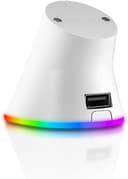
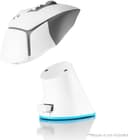
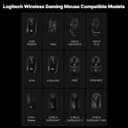
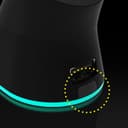
The RGB Charging Dock for Logitech gaming mice offers effortless wireless charging, reduced latency, and stylish RGB lighting. Compatible with multiple Logitech models, this premium dock ensures your mouse is always ready for action while enhancing your gaming setup.


| ASIN | B0D5CPW2FR |
| Best Sellers Rank | #25,260 in Video Games ( See Top 100 in Video Games ) #208 in Mac Gaming Mice |
| Brand | Imation |
| Built-In Media | 1 x USB Cable |
| Color | WHITE |
| Compatible Devices | PC Gaming Mice, Personal Computer |
| Customer Reviews | 4.0 4.0 out of 5 stars (143) |
| Hardware Interface | USB 2.0 |
| Manufacturer | imation |
| Number of Ports | 1 |
| Total Usb Ports | 1 |
| Warranty Description | 1 year as of the date of initial purchase (Proof of purchase is required to obtain warranty service) |
| Wattage | 2.5 watts |
V**I
Solves the problem of keeping your mouse wireless, simple and good value charge solution
Needed a dock as the power play solutions are still over priced and plugging in a mouse is a chore, I still remember when the mx700 came with a dock, its a shame logitech is nickle and diming us this way, but this does solve the problem. I charge a g502 x and the charge cover easily switches to this direct contact adapter, so its not really wireless, but a direct usb charge which is frankly better for the battery as wireless is inefficient and creates heat. If it stops at 88% or so its because the mouse controls the charge and limits it to around that level to increase the batteries longevity. The lighting is nice, and the wire is very long, the double benefit is that the front pass through usb port brings your reciever much closer to the mouse. Its very small on the desk so not obtrusive, and comes with some optional feet which I didn't use. I think they should have included double stick take instead to attach it to the desk, I used some of my own, but bluetac will also do. Its not super obvious when the mouse is charging, but the battery is so long its best not to think about it, the ghub software does show the charge indicator, but I doubt it will ever run out of you charge it at least once a week. The change RGB button on the front turns it on and off, but there are 4 modes and its not clear which one its in, a minor issue. I believe the charge indicator red shows up on the third button press. Just take note that the g502 x lightspeed does not seem to start charging until it drops into the 7x% range to preserve the battery and doesn't top it out.
D**N
Stylish and Functional RGB Charging Station!
This RGB charging station for my Logitech mouse is a total win! Not only does it keep my mouse charged and ready for action, but it also adds a sleek, colorful vibe to my setup. The RGB lighting is customizable and syncs perfectly with the rest of my gear, making my desk look like a high-tech gaming hub. The charging performance is top-notch—it’s fast and reliable, and I never have to worry about running out of juice mid-game. The design is compact, so it doesn’t take up much space, and the build quality feels solid and premium. If you’re looking for a functional yet stylish way to charge your mouse, this RGB station is a no-brainer. It’s practical, visually appealing, and a great addition to any setup. Highly recommend it!
T**Y
Exceptional
Works great, the magnet is strong but not so strong you can quickly pick up your mouse, works on Logitech G502 X Plus
H**N
Affordable alternative to Logitech’s Power Play mat for charging your mouse
I use a Logitech gaming mouse, and one of their key features is the ability to charge the mouse through a specialized puck located on its underside. The catch is that Logitech only supports this feature via their Power Play mat that is rather expensive due to it being marketed and sold only as a way to charge the mouse wirelessly. The Power Play mat is a nifty but flawed product, in my opinion, and I wanted a simpler solution without the need to fumble for and plugging in a micro USB cable to charge the mouse. This is where this item comes in. It takes advantage of the feature but through use of a magnetic puck and a small dock to charge the mouse. It’s easy to plunk down the mouse on the dock and have it charge whenever it’s not in use, ensuring that I’m never out of battery. It also charges at the same rate as Logitech’s Power Play mat. The last thing I want to note is that I’ve tried about three other products that are similar, but this one by far had the most polished build quality and conveniently has its charging cable tucked on the bottom to make sure it’s not in the way. This is an no brainer easy recommendation and a much less expensive way to charge your Logitech gaming mouse.
D**X
Doesn't Charge right out the box.
The product has one primary function to charge a mouse. So you have a full battery life with a nice desk look, however It doesn't work right out of the box I have tried plugging it in to everything. The connection for send the input from the mouse to your device works. The lights works The charging plate fits. But it doesn't charge the mouse. PLEASE DON'T PURCHASE THIS ITEM.
R**A
Great charger that made it so I never had to think about charging my mouse. Sad it's gone.
My partner and I have the same mouse. I got this charger, she got a different one. Neither had great reviews. Mine has worked perfectly, and hers has stopped charging, even though I've had mine longer. I was about to get this one to replace hers, but I guess it's gone, womp womp.
D**S
Its good it does the job
Its compatible its light weighted charged my mouse in a reasonable speed. The rgb its not really customizable.
T**P
It worked for about 6 weeks...
I got the white version. Worked fine for 6 weeks then just stopped working no warning. Went to charge my mouse a few nights ago, Logi software updated, and batt was still at the 59% that it was the night before. Checked against another G series compatible mouse, wouldn't charge that either. Made sure the mouse was still charging with the cable...zero issues. Charger just went bad. It's unfortunate because I liked doing it this way, less hassle, and don't want to pay for the still overpriced Logitech charging pad (Considering this thing came out pre-pandemic, shouldn't it be cheaper...you'd think). Great idea, but needs to be re-engineered, obviously. USB passthrough wouldn't recognize the wireless dongle so I just left that in the charging/connection cable. It's not an inconvenience to charge it the old way, it was just cooler to charge it with the stand. Already in the trash and gone. Too bad, not sad.
Trustpilot
Hace 3 semanas
Hace 1 semana