We remain fully operational. Our teams are working around the clock to ensure your deliveries continue safely.

Descargar la aplicación


Servicios al cliente
Sobre nosotros
Copyright © 2025 Desertcart Holdings Limited
Descargar la aplicación

🖨️ Print smart, print fast, print like a boss.
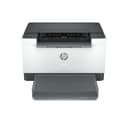
The HP LaserJet M209d is a compact, monochrome laser printer designed for home offices and small businesses. It delivers fast, automatic two-sided printing at 30 pages per minute with sharp 600 dpi resolution. Featuring USB connectivity and a 150-sheet input tray, it combines professional print quality with space-saving design and energy efficiency. Ideal for users who value reliability, speed, and crisp black & white documents without wireless complexity.


| ASIN | B0D96T79YF |
| Additional Printer Functions | Print Only |
| B&W Pages per Minute | 30.0 |
| Best Sellers Rank | #5,765 in Office Products ( See Top 100 in Office Products ) #96 in Computer Printers |
| Brand | HP |
| Built-In Media | HP LaserJet M209d; Dust cover; Power Cord; Reference Guide; Setup Poster; Regulatory Flyer; USB cable. |
| Color | White |
| Color Depth | 24 bpp |
| Compatible Devices | Laptops, PC |
| Control Method | Touch |
| Customer Reviews | 4.3 4.3 out of 5 stars (861) |
| Display Type | LCD |
| Dual-sided printing | Yes |
| Duplex | Automatic |
| Hardware Interface | USB |
| Ink Color | Black |
| Item Dimensions D x W x H | 13.98"D x 8.07"W x 11"H |
| Item Type Name | Laser Printer |
| Item Weight | 7.44 Kilograms |
| Manufacturer | HP |
| Maximum Copies Per Run | [Estimated range: 1-999] |
| Maximum Copy Resolution Black and White | 600 dpi or less |
| Maximum Copy Speed Black and White | 30 ppm |
| Maximum Media Size | 8.5 x 14 inch |
| Maximum Print Resolution Black and White | 600 dpi |
| Maximum Sheet Capacity | 150 |
| Model Name | LaserJet M209d |
| Model Number | 8J9L0F#BGJ |
| Model Series | LaserJet |
| Number of Trays | 1 |
| Other Special Features of the Product | Auto-Duplex |
| Output sheet capacity | 150 |
| Paper Size | 4 x 6 to 8.5 x 14 in |
| Print media | Paper (plain) |
| Printer Connectivity Type | USB |
| Printer Output Type | Monochrome |
| Printer Type | Laser |
| Processor Count | 1 |
| Resolution | 600 x 600 |
| Specific Uses For Product | Home, Office |
| Total USB 2.0 Ports | 1 |
| Total Usb Ports | 1 |
| UPC | 197961893182 |
| Warranty Description | One-year limited hardware warranty |
| Warranty Type | Limited |
J**R
⭐⭐⭐⭐⭐ IT PRINTS, IT WARMS, IT CHANGED MY LIFE (AND MY BANK ACCOUNT SURVIVED)
Alright now, gather ‘round folks, 'cause I gotta tell y’all about the HP LaserJet M209d—the black-and-white laser printer that rolled into my home office like a silent hero and flipped my whole dang life upside down. Let’s start with the facts: I bought this thing to print coloring sheets. That’s right—me, a grown adult with a passion for outlines and clean fill space. And let me tell you… this printer prints ‘em so sharp and clean, I could frame ‘em. In fact, I sell ‘em on Etsy now. Because that’s how professional the quality is. You could hand one of these to a kindergartener or an art therapist and both would cry happy tears. Now—let’s talk connection. Is it wireless? No sir. Why? Because I cheaped out. It was either wireless or electricity, and I said, “I kinda like lights and hot food, so go ahead and gimme that USB cable.” And honestly? Best decision I made. Plug it in, print it out. Simple, fast, dependable—like a good huntin' dog. 🖨️ Print Quality? Stunning. Sharp as a gator’s tooth. Dark blacks, crisp edges. Doesn’t smudge, doesn’t stutter, doesn’t make you wait. If I were any happier with these results, I’d marry it and change my last name to LaserJet. But here’s the real reason I went laser: 🔥 THE WARMTH. Y’all, I don’t know what it is, but there’s somethin’ deeply spiritual about feelin’ a warm sheet of paper slide into your hands fresh off the press. I’ll print even when I don’t need to, just to hold that gentle heat. And this printer? It delivers a solid medium warmth. Not scaldin’, not cold. Like the hug of a flannel blanket on a breezy day. Do I wish it was warmer? Absolutely. Do I sometimes stack the pages just to trap the heat and press ‘em against my cheek like a weird paper sandwich? Also yes. But I accept its warmth for what it is—a gift, not a guarantee. ✅ Professional-level prints, perfect for Etsy or your second-grade niece ✅ Fast warm-up, and even faster printing ✅ USB only (because I picked survival over convenience) ✅ Easy setup—even if you live 45 minutes from a Staples ❌ Not wireless, but hey—it works ❌ I crave a little more paper warmth, but I’ll live Final verdict? This printer is the unsung hero of my home office. It prints beautifully, it warms my soul (and hands), and it didn’t fry my power bill. I love it. I respect it. I’d take it to Thanksgiving if it fit in the truck. Five stars. No regrets. Just vibes and warm pages.
K**R
Very good printer.
Works well and easy to use. Better than expected for the price.
A**N
Best home BW laser printer for non-MS systems
IT WORKS EXACTLY AS IT SHOULD! Easy reliable printing at last. The best thing that can be said for any printer under any alternative operating system (Unix/Linux/*BSD/Mac). HP is generally very supportive of non-Windows systems, but it can still be hit or miss. If you need to do text printing or greyscale image (think copy machine quality) printing this is for you. Open the box, removee shipping tapes, add paper, plug in usb and power. Be sure you have the hplip packages installed with current updates on your system. Turn the printer on and use your systems hardware manager gui to install new printer. Start printing, and go on with your life. Many sets of instructions online suggest using hplip manager via hplip-gui from console to install. I found it doesn't work so well. The instructions I found at HP suggest installing kplip, then using YOUR SYSTEM hardware printer manager to set up the printer. Took less than one minute to do, and it works perfectly. HP Cartridge replacements cost about $65.00 here on Amazon, and at that price your pages are probably going to cost you pennies (remember those?) per page. Less than driving to a print shop and paying their prices. Very high quality, smudge and run free pages. Super quiet when operating, leass noise than any ink-jet printer I have owned, and no waiting to handle page after printing. Laser print is as waterproof as your paper, unlike ink. I despise wireless printers for various reasons, and don't want to open any security flaws in my network if I can avoid them. USB is the way to go for all peripherals. You can share this printer over the wired network without having to set up complicated password/firewall rules to keep Joe next door from printing his garbage on your printer. Less wireless less worry is a good rule to think about. 600 x 600 DPI resolution is more than all you need for anything except professional photograph printing, and if you want to pay for that level of output you would never be looking at the M209d to begin with... If price is the main consideration, check out the same printer available through Amazon renewed/used. I've made several purchases that way, and have yet to be disappointed with any purchase. VERY HIGHLY RECOMMENDED FOR HOME / SMALL OFFICE
R**Y
Reliable and inexpensive no frills printer
Easy, low cost printer with no frills and no extra features. Laser Jets are great for those of us who don't print very often. No worries about clogged jets. However, there are no extra features like blue tooth connectivity, etc.
K**.
Easy installation
The installation is a no brainer. Takes just a few minutes. Included instruction clear and easy to follow. My test print jammed. I hadn't read the explanation of the icon for jam and out of paper. the jam was inside, so it wasn't apparent. After much fooling around, in desperation, I took out the toner cartridge and noticed the paper sheet that had jammed . I think I probably did not have paper guides closed completely. Prints fine, not the fasted, but plenty adequate for home use.
R**Z
Hasta ahora la impresora ha funcionado muy bien, sin ningún problema. Por su precio me parece una muy buena compra. El hecho de no tener conexión vía wifi se resuelve fácilmente a través de una red local inalámbrica.
J**R
Prática e útil no uso doméstico
G**P
Elle imprime très vite et sa qualité est bonne. En spécial (115$) c'est un excellent achat. À noter, l'imprimante n'est pas bluetooth.
A**Z
Excelente impresora..yo la utilizo para hacer papelería social, acepta papel de alto gramaje. El detalle es que es únicamente conexión por cable USB, yo no tengo problema con eso así que por el precio decidí comprarla así, pero debes considerarlo si necesitas que sea inalámbrica está el mismo modelo con conexión wi-fi obvio más cara.
S**R
Product is cheaper on the HP Website! They also will provide 500 free paper with order! Easy to install and use. Quality seems good.
Trustpilot
Hace 2 semanas
Hace 1 mes