We remain fully operational. Our teams are working around the clock to ensure your deliveries continue safely.

Descargar la aplicación


Servicios al cliente
Sobre nosotros
Copyright © 2025 Desertcart Holdings Limited
Descargar la aplicación
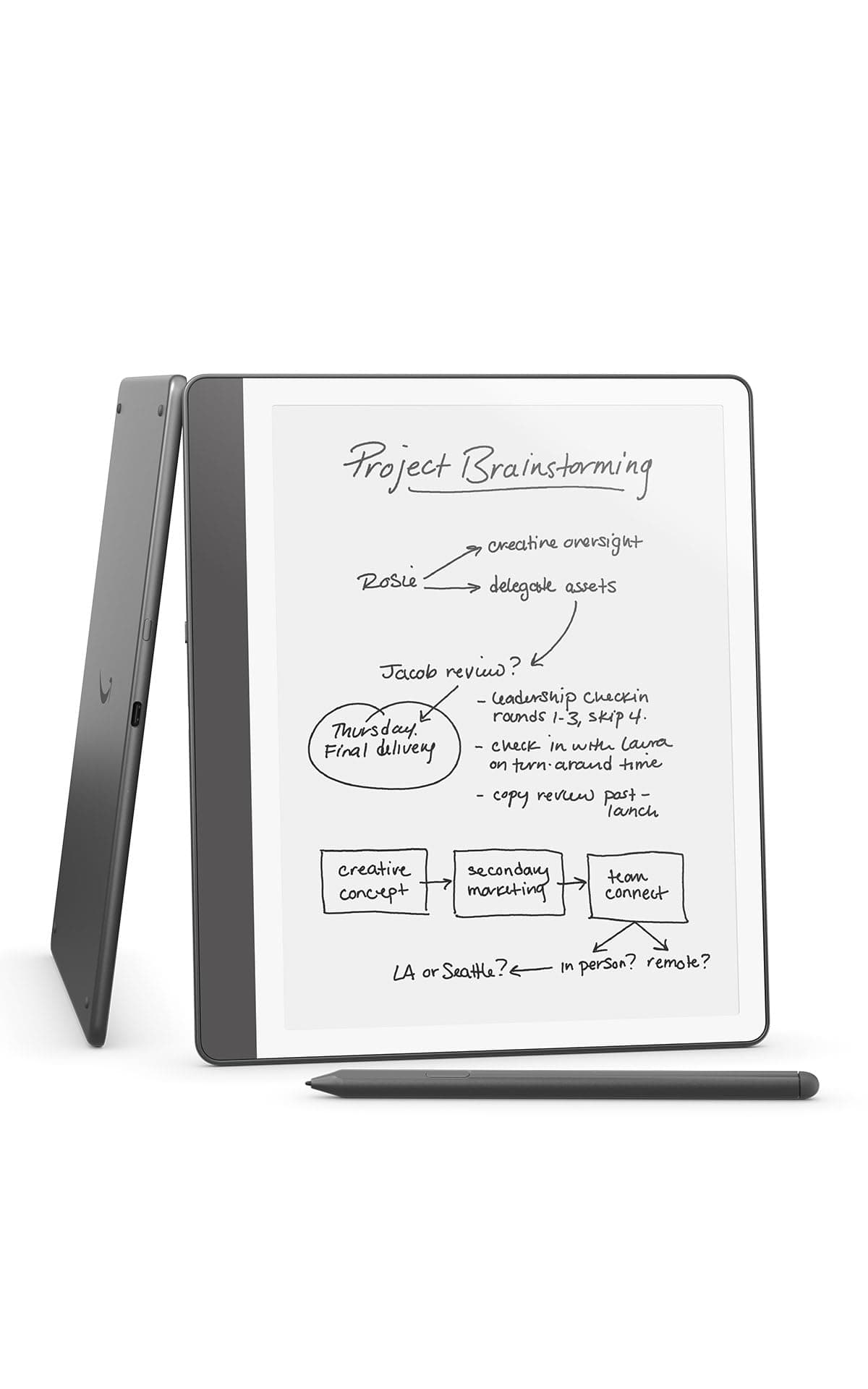
🖋️ Kindle Scribe: Where your ideas flow as naturally as ink on paper.
The Amazon Kindle Scribe (64GB) is a premium 10.2-inch Paperwhite digital notebook designed for professionals who crave distraction-free reading and writing. Featuring a glare-free 300ppi display, a no-charge Premium Pen, and AI-powered handwriting conversion and summarization, it consolidates notes, documents, and books in one sleek device. With up to 12 weeks of reading battery life and seamless PDF markup, it’s the ultimate tool for millennial managers seeking productivity and style in one.
| Display | Amazon's 10.2” Paperwhite display technology with built-in light, 300 ppi, optimized font technology, 16-level gray scale. |
| Size | Device: 7.7” x 9.0 x .22 (196 x 230 x 5.7mm excluding feet) Premium Pen: 6.4” x .35” x .33” (162 x 8.8 x 8.4 mm) |
| On-Device Storage | 16 GB, 32 GB, or 64 GB |
| Weight | Device: 15.3oz (433g device only) Premium Pen: .60 oz (17g) Actual size and weight may vary by configuration and manufacturing process. |
| Wi-Fi Connectivity | Supports 2.4 GHz and 5.0 GHz networks with support for WEP, WPA, WPA2 and WPA3 security using password authentication or Wi-Fi Protected Setup (WPS). Does not support connecting to ad-hoc (or peer-to-peer) Wi-Fi networks. |
| Content Formats Supported | Kindle Format 8 (AZW3), Kindle (AZW), TXT, PDF, unprotected MOBI, PRC natively; PDF, DOCX, DOC, HTML, EPUB, TXT, RTF, JPEG, GIF, PNG, BMP through conversion; Audible audio format (AAX). Learn more about supported file types for personal documents. |
| Accessibility Features | VoiceView screen reader, available over Bluetooth audio, provides spoken feedback allowing you to navigate your device and read books with text-to-speech (available in English only). Kindle Scribe also includes the ability to invert black and white, adjust font size, font face, line spacing and margins. Learn more about Accessibility for Kindle. |
| Warranty and Service | 1-year limited warranty and service included. Optional 1-year, 2-year or 3-year. Extended Warranty available for U.S customers sold separately. Use of Kindle is subject to Amazon's Conditions of Use and the terms found here. |
| Setup Technology | Amazon Wi-Fi simple setup automatically connects to your home Wi-Fi network. Learn more about Wi-Fi simple setup. |
| System Requirements | None; fully wireless and doesn't require a computer to download content. |
| Included in the Box | Includes wifi-enabled Kindle Scribe, Premium Pen, USB-C charging cable, 5 replacement tips, tip replacement tool, and built-in rechargeable battery. |
| Generation | Kindle Scribe 1st generation - 2024 release |
| Battery Life | For reading, a single charge lasts up to 12 weeks based on a half hour of reading per day, with wireless off and the light setting at 13. For writing, a single charge lasts up to 3 weeks based on a half hour period of writing per day, with wireless off and the light setting at 13. Battery life will vary and may be reduced based on usage and other factors such as Audible audiobook streaming and annotating content. |
| Charge Time | Fully charges in approximately 7 hours from a computer via USB-C cable; or fully charges in approximately 2.5 hours with a 9W USB-C power adapter. |
| Documentation | Learn more about Kindle devices with our Quick Start Guide and Kindle User Guide. |
| Available Color | Tungsten and Metallic Jade |
| Software Updates | Learn more about these software security updates. If you already own a Kindle, visit Manage Your Content and Devices for information specific to your device. |
B**E
Perfect Blend of Reading and Note-Taking
I’m really impressed with the Kindle Scribe. It’s the perfect combination of an e-reader and a notebook, which makes it incredibly convenient to have everything in one place. The screen is beautiful—easy on the eyes and great for long reading sessions. Writing feels smooth and natural, and I love being able to take notes, journal, or mark up documents without needing paper. The 64GB storage is more than enough for books, notes, and documents, and the battery life lasts a long time, which is a huge plus. I’ve been using it daily for both reading and writing, and it’s become part of my routine. If you like to read and take notes, this is a great investment.
R**R
Great for reading and writing
I've been a dedicated Kindle user for years, and am now on my 3rd (Paperwhite Signature) and 4th Kindles (this one, Scribe). I had a gift card burning a hole in my pocket, so I did a lot of research on eInk devices including this one, the Boox, the ReMarkable, etc. I pulled the trigger on this one during a solid Prime Day discount, even knowing that a newer version is coming soon. My use case is simple - I wanted something that was a great eReader and a great note taker so I could travel with it to business meetings, read on the plane etc., and take notes that I could easily digitize and paste into my Evernote when back at the office. If it offered an upgraded reading experience at home, then even better. I also like to sketch (mostly analog) and was interested in journaling a bit more. Here's what I really love about the Scribe - It doesn't try to do too much. It is optimized for reading and writing. I've been reading and journaling way more in the month or so since I got it. - It has great battery life, weeks without a charge with fairly heavy use. - The screen is clear and easy to read, with lots of adjustability and a fantastic backlight (I was already used to this on my Paperwhite, but this is a bigger screen that fits much more text) - It's the right size to fit in my bag and be light and easy to use - The writing feels mostly like writing on paper - Once you find the right case for the way you use it, it is easy to hold and prop up for writing. I tried 3 different cases and ended up with one of those folio covers that has a triangular stand. It's great for holding, lap reading, and writing propped on a table or in the hand. I avoided those with pen slots on the side since I found they rub against my writing hand. Amazon sells one but it's very expensive compared to third party models. - Eraser works great - Easily syncs reading progress across my 2 Kindles - Compatible with a wide selection of 3rd-party pens and tips - No subscription fees - Handles flipping over and on side really well, very fast - Very quick and responsive display, no noticeable writing latency - Asymmetrical margin on one side makes it easy to hold without accidentally activating touch screen Here are the things I'd change, and hopefully some of this will change with software updates: - The tips on the pens wear down faster than I'd like. I might risk it and try a metal tip, but still would be nice for a sharper solution that stays sharp - The drawing experience is meh. It's fine for quick, pen-like sketches, but it is definitely not optimized for any kind of art creation. I find the pressure and tilt sensitivity mediocre. It's plenty sufficient for writing though. The writing tool selection is OK, but limited for art. - Pen button is handy and useful, but a little awkwardly placed. I would like it better if it I could program it for "undo" function but that isn't one of the programmable options. - I still keep my Kindle Paperwhite around in the bedroom because it is much lighter and more comfortable to hold in bed when only reading with it. - Syncing notes is mediocre at best. The best option for me is the AI transcription, then email to my self for copy/paste into Evernote. This should be a more seamless integration. AI handwriting recognition and summarization work really well, though. The normal handwriting recognition option doesn't work as well but might suffice for neater writers. In any case, no subscription fees at all for any of it. - I wish I could create real templates from PDFs that worked as templates, not just importing PDFs to use to write on that would need to copied over and over, and live separately from my notebooks. - Some people find the methods of non-PDF book annotation limited (and with PDFs there are restrictions on how to import them for writing on them to work). This is a challenging problem to solve on proper eBooks, and it doesn't bother me really as 1) there are several decent options to choose from, and 2) I don't annotate books that much (I do highlight a bunch, though, and it works great) Why pick this over the ReMarkable or Boox? - Way less expensive than ReMarkable - Best eReader platform for me, as I am deep in the Kindle ecosystem. It just works and works well for reading - It doesn't try to do too much. The Boox is cool but its functionality overlaps too much with my phone and my iPad. Overall, despite all the quirks mentioned above, I still give it 5 stars because I use the mess out of it every day and enjoy the experience immensely.
C**R
Deciding on which to buy ReMarkable VS Scribe??? - The KIndle Scribe is more "remarkable."
I have been using my Kindle Scribe for about 3 weeks and I have to tell you - I love it! I was going to get the Remarkable, but thought I'd get more with my Scribe since it uses the Kindle Library and store. The only thing better on the Remarkable was that the Remarkable had a few colored inks and was a bit larger - like a real sheet of paper. After watching several reviews I thought I'd be happier having access to my Kindle library/store AND the fact that the pen stylus actually "hit" like a pen on paper feel on the tablet. I know there are some disconnects when it comes to typing everything on a computer vs writing long hand notes on a pad of paper. But I always felt that I had a more thoughtful approach to my writing when I wrote on paper. I think its more thoughtful. So I was sold on one of them...with a price tag half that of the Remarkable, with a 64 GB storage - I got the Scribe. I have literally used it everyday. I now make notes of little ideas I get that I want to get back to since its so easy just to pick up and start writing. I have started a book that I have on my mind for over a decade, that now I can pick up my tablet and write...it has templates: storyboards, daily planner, dotted paper, graph paper, different types of lined papers, blank, etc....and it is super lightweight. It has a no glare screen and YES it feels like you are writing on paper. You can choose from different types of writing instruments, pen stroke thickness, use of a quick button (which I use for highlighting). This response time to the ink to "paper" is very fast...no drag at all...however there is a slight drag when you erase that it may leave a ghost image but it does disappear as soon as you start writing again. What I LOVE that I didn't intend to LOVE is the Kindle library and store. It was a perk, but at the time I was choosing between the Remarkable and the Kindle Scribe I was looking for what would be t he best tablet. HOWEVER, the Kindle Library and Store is great for your kindle books you bought - you can use the stylus to underline, make notes, highlight, etc...everything you can do with your Kindle PLUS more - there are certain crossword kindle books and word find puzzles and "write on" books that you can use in the Scribe. At half the price of the Remarkable, and increased functionality as not just a notepad, also a reader, a PDF editor, and features AI on board, I think the Kindle Scribe is quite "remarkable" even over the ReMarkable.
Trustpilot
Hace 3 semanas
Hace 2 semanas