We remain fully operational. Our teams are working around the clock to ensure your deliveries continue safely.

Descargar la aplicación


Servicios al cliente
Sobre nosotros
Copyright © 2025 Desertcart Holdings Limited
Descargar la aplicación
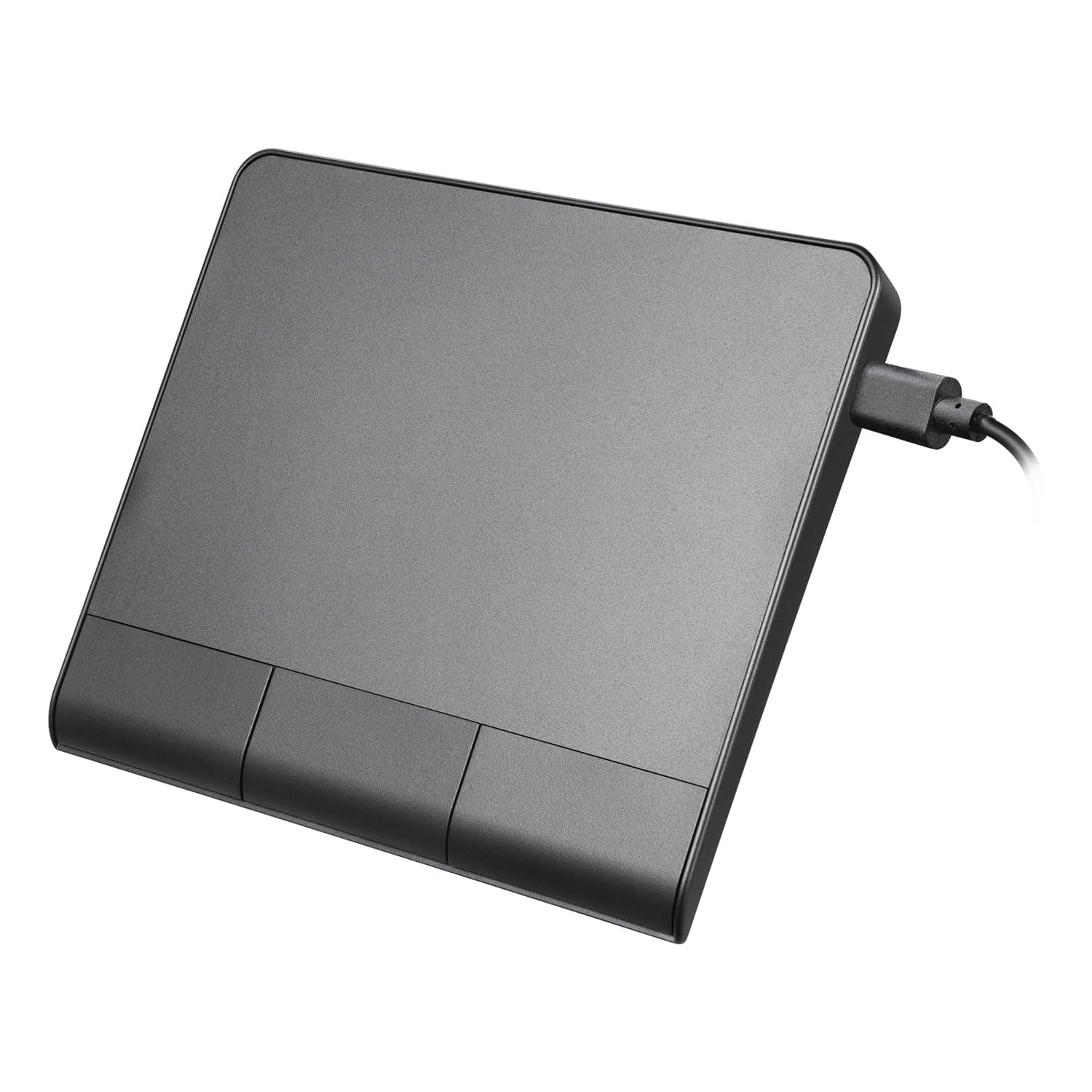
🖥️ Navigate like a pro with precision and style — don’t get left behind!
The Perixx PERIPAD-506 is a sleek, wired USB touchpad featuring a large 135x116mm multi-touch surface optimized for Windows. It offers high precision with 400 dots/cm sensitivity, a detachable USB-C cable for stable connectivity, and customizable settings to enhance professional workflows. Designed for ambidextrous use and backed by a 12-month warranty, it’s a reliable accessory for managers and creatives seeking smooth, responsive navigation.


| ASIN | B0DHLDGBQ5 |
| Antenna Location | Office |
| Are Batteries Included? | No |
| Are Batteries Required | No |
| Best Sellers Rank | 21,791 in Computers & Accessories ( See Top 100 in Computers & Accessories ) 1,811 in Keyboards, Mice & Input Devices |
| Box Contents | USB Cable |
| Brand Name | perixx |
| Button Quantity | 3 |
| Colour | black |
| Compatible Devices | Personal Computer |
| Country of Origin | China |
| Customer Reviews | 4.1 4.1 out of 5 stars (274) |
| Enclosure Material | Plastic |
| Hand Orientation | Ambidextrous |
| Hardware Platform | PC |
| Item Dimensions L x W | 13.5L x 13.5W centimetres |
| Item Weight | 0.14 Kilograms |
| Manufacturer | Perixx |
| Model Name | 12355 |
| Model Number | 12355 |
| Mouse Maximum Sensitivity | 400 Dots per Centimetre |
| Movement Detection | Optical |
| Network Connectivity Technology | USB |
| Operating System | Windows |
| Power Source | Power cord type |
| Product Features | Multi-Touch |
| Product Finish Type | Rubberized |
| Product Warranty | 12 Month Limited Warranty |
| Style Name | Modern |
| Theme | Technology |
| Unit Count | 1.0 Count |
H**R
Good.
Works well. Switch on the back turns on and off the buttons. Track pad always on. Would be cool to have a wireless usb connection but no big deal.
T**A
Does what it says, if somewhat cheaply
It does what it says on the tin, so to speak. The surface is actually smoother than I expected, which is nice. The gestures work well. Three buttons are great, but they feel really rather cheap and are loud. Palm rejection is... okay. Mostly, I haven't found it to fit my flow much as it is quite large. Overall it is good enough for me to keep.
D**K
I like it!
I've now had this product for nearly a week. As with any new product of this nature, it's going to take a couple of days to get used to the feel and how it reacts when you move your fingers over it. But now I've gone through the adjustment period and am used to it, can't really say anything bad. It does exactly what I paid for it to do, seems to work ok. Very easy to install, you just basically plug it in and that's it. So based on my experience, money well spent.
A**R
FYI it works great on Chrome OS!
Very pleased. Works as you would expect.
M**D
Maybe a bit too big?
This is a fairly big trackpad, measuring 13x9cm or 16cm diagonal. Due to its size you may find yourself hovering your hand above it rather than resting your palm to the side as you would with a smaller trackpad, and this quickly becomes uncomfortable. If you rest your hand on the pad you run the risk of misdirecting the cursor or hitting the buttons, unless you retrain yourself to use it differently or turn the buttons off. On a laptop you're less likely to do this as your hand can rest on the large plastic or metal section to either side of the pad, but you don't have that luxury here. Looking past this, it's an attractive trackpad presented in an attractive case. Windows detects it automatically and supports the sort of multi-touch gestures you'd get from any MacBook made in the last 15 years. It's not Mac compatible. If you connect it to a MacBook it gets detected as a keyboard and asks you to press a specific key to identify it; a key which of course it hasn't got. Cancel this though and after unplugging and replugging it will then be recognised as a trackpad instead, but every time you lift your finger from the pad the cursor gets thrown to the top-left corner. It's identified within Windows as:- VID: 0x258A (Sino Wealth Electronic Ltd.) PID: 0x000A I can't find details of this device online so was unable to find out if a more suitable driver was available. The switch on the back isn't described in the manual, but it turns the three buttons on and off. Without them you can tap or gesture on the trackpad (the pad doesn't click down, it's not a clickable or haptic pad) but you can switch them on if you want buttons as well. Given its size it's not for everyone, even if used with a wrist rest.
R**H
Not Linux friendly
Didn't work onmy Linux mint
C**R
Not all operating systems can use it's full functionality
Works well with Microsoft, but not all features are useable in Linux due to Linux software issues regarding the hardware interfacing. However, this can be fixed in the future.
A**O
Not fluid/smooth at all
Clunky, overly sensitive, or not sensitive enough. Wait for the next model. This one seems to be "not fully baked" yet. It's really hard to adjust so it works flawlessly. Have to turn sensitivity to highest otherwise most clicks don't work. And then it's overly sensitive. It's not fluid. Causes strain on hand / wrist. Might end up sending it back.
S**I
Good Product
A**R
Works great with Ubuntu Linux right out of the box!
C**R
Ich erstelle viele Einträge auf Webseiten mit horizontalem Slider. Das Wischen durch Dutzende Einträge ist mit der Maus etwas mühsam. Daher wollte ich einfach mal probieren, ob es nicht eleganter geht... und habe das Peripad 506 ausprobiert. Ich finde das Ding richtig gut! Es hat dieselbe Funktion wie ein übliches Touchpad am Notebook, die Tasten lassen sich an- und abschalten. Die Wischgesten funktionieren gut. Die Tasten sind natürlich "hinten", das mag vielleicht ermüdend sein, wenn man mit dem Daumen immer "nach hinten" tasten muss, aber das kommt natürlich auf den Einsatz und die Gewöhnung an. Und dennoch... sende ich das Pad zurück, denn für meinen speziellen Einsatz – im Slider wischen, OHNE anfassen zu müssen – klappt es mit der Maus tatsächlich doch besser. Ich hatte die Hoffnung, der Mauszeiger würde innerhalb des Fensters bleiben, aber das tut er nicht, er "landet" auf dem anderen Bildschirm. So muss ich immer doppelklicken und halten und wischen, zurückfahren, wieder doppelklicken und halten und wischen... Das geht aus meiner Sicht (und vielleicht will ich mich ja auch nicht umgewöhnen) mit der Maus tatsächlich weniger umständlich. Wahrscheinlich gibt es für diesen Fall keine bequemere Lösung für Windows. Ich meine, bei Apple könne man auch auf das Pad an sich drücken und wischen, man müsse also nicht doppelklicken... Ja nu. Tut mir leid, wie gesagt: Das Ding tut, was es soll. Daher 5 Sterne von mir. Finde es auch gut, dass es kabelgebunden ist, ich mag den kabellosen Kram nicht so gern.
K**T
Prima product, prettiger in het gebruik dan vaste touchscreen op laptop
C**A
Muito Fantástico!!! Funciona no Linux!!!
Trustpilot
Hace 3 semanas
Hace 1 mes