We remain fully operational. Our teams are working around the clock to ensure your deliveries continue safely.

Descargar la aplicación


Servicios al cliente
Sobre nosotros
Copyright © 2025 Desertcart Holdings Limited
Descargar la aplicación
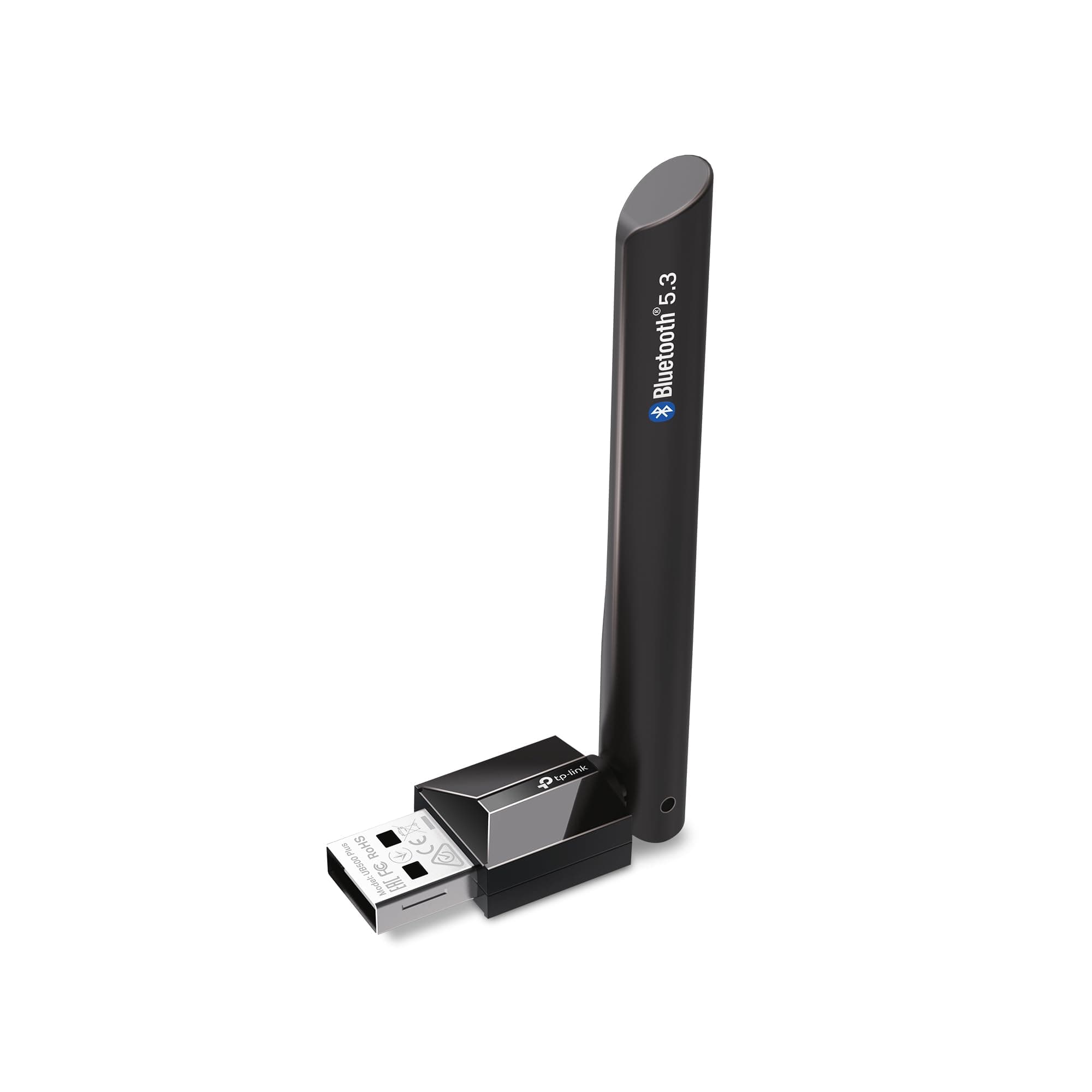
🚀 Elevate your PC’s wireless game with TP-Link’s UB500 Plus — Stay connected, stay ahead!
The TP-Link UB500 Plus USB Bluetooth Adapter upgrades any PC or laptop to Bluetooth 5.3, delivering twice the speed and four times the range of older models. Featuring an adjustable multi-directional antenna for superior reception and plug-and-play ease on Windows 8.1/10/11, it ensures stable, power-efficient connections for keyboards, mice, headphones, and more—perfect for professionals demanding seamless wireless performance.


| ASIN | B0DKFXGR21 |
| Best Sellers Rank | #6 in Bluetooth Network Adapters |
| Brand | TP-Link |
| Built-In Media | Long Range Bluetooth USB Adapter UB500 Plus, Quick Installation Guide |
| Color | Black |
| Compatible Devices | Laptop |
| Compatible Operating System Family | Windows |
| Customer Reviews | 4.4 out of 5 stars 1,223 Reviews |
| Data Link Protocol | Bluetooth, USB |
| Hardware Interface | Bluetooth |
| Item Dimensions L x W x H | 3.19"L x 1.65"W x 0.66"H |
| Item Weight | 9.07 g |
| Manufacturer | TP-Link |
| Mfr Part Number | UB500 Plus |
| Minimum Required Operating System Version | Windows 7 |
| Model Number | UB500 Plus |
| Product Dimensions | 3.19"L x 1.65"W x 0.66"H |
| UPC | 810142823098 |
| Warranty Description | 2 year manufacturer |
F**T
works fine, no driver issues, does extend range enough to matter
Works automagically under linux, better range than the thumbnail-sized adapter I was using. Using the teeny adapter my earbuds would cut out if I went to another room w/o direct LoS. With this adapter I get a perfect connection anywhere in a 2100sf house. Still not enough range to cover the whole yard, sadly, but definitely better. I was skeptical when shopping as a *lot* of these kind of things are bogus (a big "antenna" that's not even electrically connected, just plastic, for looks to fool buyers, and a standard tiny mini-pcb adapter)...but this one delivers. I didn't take it apart, but the performance difference is very obvious.
T**.
Great product
I’ll update if anything changes but so far it’s a great product. Cheap, effective and so user friendly. It was plug and play so once I plugged it in it did its thing. I also just downloaded the driver but the setup was so easy. Update: I wasn’t even using the product properly it’s not plug in play but still quite simple. I never turned off my other blue tooth adapter (the bad one). I noticed this cause the Bluetooth connection seemed funky which had me worried until I figured it out. Just went to device manager and disabled the other adapter and tada the other adapter had its debut. It’s fantastic, extremely strong and stable connection. I no longer need to have a wired connection on my ps5 controllers because the connection is that stable. With the old adapter it would be so unstable that for example in game it would seem like I was drifting off to one direction (which made me think I had stick drift) but it was because the connection was so bad. Great product, recommend to anyone!
S**E
Compact, Reliable, and Works Perfectly
The TP-Link USB Bluetooth Adapter is exactly what I needed to add Bluetooth capabilities to my desktop PC—and it does the job flawlessly. It's small and unobtrusive, and I don’t even notice it once it’s plugged in. Setup was straightforward and painless. I just inserted it into a USB port, installed the driver from the included CD (or downloaded the latest version online), and within minutes, I was pairing my headphones and phone. The connection has been solid—no dropouts or lag—even when streaming music or transferring files. I was impressed with the signal range too. I can move from one room to another and still maintain a stable connection, which is great for listening to music while walking through my house. Overall, this adapter is affordable, dependable, and very easy to use. If your PC lacks Bluetooth or you want a better connection than onboard solutions, this is a smart upgrade. Highly recommend!
D**V
Great range and quality
Works very well. I used to have a problem with staying connected when moving around, but this stays crisp at all times
A**A
Rough installation, Great performance
Installation kind of chaotic: I had to talk to Deepseek and have it help me install the driver on my Windows 10 gaming PC. In the end after 5 install attempts using the default driver and then the specific driver from the support website, I was able to install the driver and disable my PC's default bluetooth driver that comes with the Intel CPU by: Turning off Firewalls Turning off Anti Virus And running the driver setup.exe as Admin This kind of sketched me out so I thought I'd mention it in case anyone else bought this. I can say that worked and my computer didn't explode. Works Really well! Ok, lastly, I want to say I struggled with PS4 controllers not being able to connect to my PC and stay connected. In the past Idk how many things I tried to get the built in bluetooth card to work. I had the same issue with my last PC and so I thought I must be doing something wrong. The PS4 controllers would connect briefly but then disconnect often or whenever I tried connecting another one. SO I've have a hub with long cables all over the place just to be able to play wired with multiple controllers. I just want you to understand the trials I've endured to get a PS4 controller to simply work. Anyway, once this bad boy was up and running I've never had a problem and I could probably connect hundreds of controllers no problem, idk. But even with the installation difficulties, I love this thing like my own son.
E**.
FINALLY!
So let me set the stage, I’ve got an interesting setup. So my computer is in another room of the house, where I actually play is on my tv in my living room. So the on board Bluetooth is a no go to through the walls and such. So I’ve got a powered USB adapter that runs through the wall so I can attach a different Bluetooth adapter that will work in the living room. Sounds simple right? I’ve gone through 6 USB Bluetooth adapters and I think I’ve finally found one that works. All the other ones have some some sort of problem with connect connectivity, range, speed you name it. TP-500 Plus win in all those categories. It was simple to setup, I first disabled the on board Bluetooth and then plug it in. Restarted the computer and it just worked. Everything connected quickly and the fidelity is excellent. Finally working after three years of trying.
E**N
Failed after two months
Well, that didn't last long. Worked for two months then died with the following message: "This device is not working properly because Windows cannot load the drivers required for this device. (Code 31) {Operation Failed} The requested operation was unsuccessful." When I try to update the driver, I get this: Windows has determined that the best driver for this device is already installed. Update: I went to the TP-Link website and downloaded the latest driver. It took several re-boots but is finally working. I updated from one star to three stars. It would be higher except it was such a hassle to get this thing working.
J**.
Excellent quality and range for a fantastic price!
I purchased this for my PC at work so I could listen to music or video content via my Bluetooth earbuds. Installation was a breeze and Windows 11 didn't have any issues with whatever drivers that needed to be installed. Just a pure plug and play. The range is fantastic! The sound in my earbuds is crystal clear with zero static or degradation. I work in an area that has a lot of EMI, but this device didn't suffer at all with providing me excellent performance.
Trustpilot
Hace 3 semanas
Hace 2 semanas