
Descargar la aplicación


Servicios al cliente
Sobre nosotros
Copyright © 2025 Desertcart Holdings Limited
Descargar la aplicación

🚀 Power-packed Mini PC: Big Performance, Tiny Footprint!
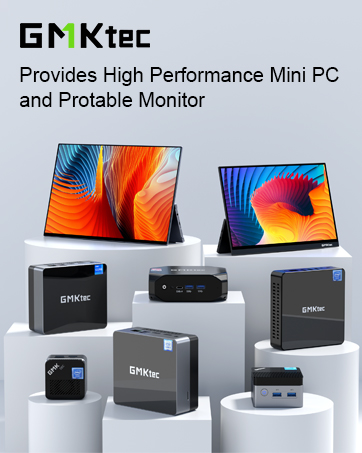
The GMKtec Nucbox M5 Plus Mini PC is a compact powerhouse featuring an AMD Ryzen 7 7730U processor with 8 cores and 16 threads, 32GB DDR4 RAM, and a 1TB PCIe SSD. It supports triple 4K displays, dual 2.5G LAN, WiFi 6E, and Bluetooth 5.2 for ultra-fast connectivity. Preinstalled with Windows 11 Pro and backed by a 2-year warranty, it’s designed for professionals seeking high performance in a sleek, space-saving form factor.













| ASIN | B0DJM1PSPK |
| Are Batteries Included | No |
| Best Sellers Rank | 4,070 in Computers & Accessories ( See Top 100 in Computers & Accessories ) 9 in Desktop PCs |
| Brand | GMKtec |
| Computer Memory Type | DDR4 SDRAM |
| Customer Reviews | 4.4 4.4 out of 5 stars (259) |
| Date First Available | 7 Oct. 2024 |
| Graphics Card Description | Integrated |
| Graphics Card Interface | Integrated |
| Graphics Card Ram Size | 32.0 |
| Graphics Coprocessor | AMD Radeon Graphics |
| Graphics RAM Type | DDR4 SDRAM |
| Guaranteed software updates until | unknown |
| Hard Disk Description | SSD |
| Hard Disk Rotational Speed | 7200.0 |
| Hard Drive Interface | PCIE x 16 |
| Hard Drive Size | 1 TB |
| Item Weight | 1.4 kg |
| Item model number | GMKtec Nucbox M5 Plus |
| Manufacturer | GMKtec |
| Maximum Memory Supported | 64 GB |
| Memory Technology | DDR4 |
| Number of HDMI Ports | 1 |
| Number of USB 2.0 Ports | 2 |
| Number of USB 3.0 Ports | 2 |
| Operating System | 10 Pro/Home/Education, 11 Pro(Preinstalled), Linux, Ubantu |
| Package Dimensions | 18.7 x 18.5 x 10.9 cm; 1.4 kg |
| Processor Brand | AMD |
| Processor Count | 1 |
| Processor Socket | Socket FP6 |
| Processor Speed | 4.5 GHz |
| Processor Type | AMD Ryzen 7 |
| Resolution | 3840x2160 |
| Screen Resolution | 3840 x 2160 |
| Series | GMKtec Nucbox M5 Plus |
J**E
High performance and efficient machine in a tiny package
What an incredible piece of engineering! Very impressed with the performance especially at this price point. The cooling efficiency seems to be really good, with only background levels of fan noise when gaming. Its punching above its weight with what it can play in terms of games on Steam, with the option of adding a GPU via Oculink it can be very capable indeed. Normal office tasks are lightning fast I.e. Web browsing, office products and remote desktop. The WiFi signal strength seems to be trumping my previous computer in the office its located too which is good to see. In the box you'll get a UK power adapter, HDMI lead and instructions, but it was very straight forward. Insert cables, turn on, let it do its updates and voila. I have previously had a query with a previous GMKtec mini pc and their customer service was top notch which is also reassuring. Big fan!
M**Y
Fantastic Mini PC from GMKtec at a really good price point.
This MiniPC (GMKtec Desktop PC Computer 5825U M5 Plus) came with really nice packaging like the last two GMKtec mini PCs I bought. Easy access to the internals, just 4 screws to remove after taking the lid off. 2 x M.2 slots so plenty of room for expansion. Great to have twin 2.5Gb network adapters if you wanted to use it as a router also. They are both Realtek NICs but you can’t have everything I guess! 😊 Comes with Windows 11 Pro, preinstalled, not bloatware at all – other than some of the crap that Microsoft includes these days! 😊 It has three performance profiles accessible in the BIOS. Performance, Balanced and Quite. It’s quite noisy in performance mode, for perhaps 12% more speed. Peak power draw in that mode seemed to be about 48W (25W TDP for the CPU). Balanced is a good compromise, not too noisy and decent performance. Quiet reduces the power available to the CPU (I think max 15W TDP) and definitely stays quiet. In PC Mark 10 I didn’t see it go above 24W draw from the plug in Balanced mode. In terms of results, I got 6145 in performance, 5231 in balanced and 4714 in quiet. If you wanted to use this as a server which is something I’m seriously considering, then it does seem to be a good candidate in terms of the idle power draw. In Windows 11 when Idle it sits at about 6W in the Balanced profile from the BIOS. I got similar results when testing out Unraid 7 on it. Obviously if you are running background services you are going to get spikes in power draw. I haven’t tested it with two NVMe SSD’s yet, but that loadout may increase it a little. I suppose the only drawback there would be the limited storage capacity, but 4TB NVMe drives are getting cheaper, and I guess you could even go for an 8TB drive, but they are still quite pricey. A shame there wasn’t a way of putting a 2.5” Sata caddy in there as well I guess. Not really a prime candidate for gaming, but still a decent iGPU (Radeon Vega 8). Certainly capable of playing less demanding games, just not at 4K! 1080p is fine though. I just tried out Mechanicus (A Warhammer 40K strategy game) and I believe that uses the unreal engine. A few years old now but it played great on here. That was at 1080p resolution. I’m sure it would play Minecraft at 1080p quite well also. My son now wants it for his bedroom as it’s definitely faster than is old Ryzen 3 laptop which is about 4 years old now. The good thing is, it’s quite flexible in what you can do with it, and can be had much cheaper if you already have some ram and an SSD to put in it, going for the barebones option. Especially good if you don’t need Windows and would rather put something like Ubuntu or Mint on it. The only negative I can think of really is the fact that GMKtec don’t make new BIOS updates available to download any more. I went for this after the good experience with the last two GMKtec mini PCs I bought (one was an Intel N100 unit) and the other was a Ryzen 3 based unit. I think the N100 NucBoxG3 definitely ran more quietly than the two Ryzen based units, but it’s quite limited in terms of RAM (single channel and only one slot) and also quite limited in terms of the PCIe lanes it has, so the storage was quite slow in comparison to these Ryzen based models. Plenty of models and options to pick from though. I’m seriously considering replacing my main PC with one of the newer high end offerings with the very good integrated RDNA 3 GPU’s though. Tiny footprint, but a hell of a lot of power! In conclusion though, I wouldn’t hesitate to buy a GMKtec Mini PC in the future.
D**Y
Excellent unit - packs a punch far beyond it's price point (£309)
Excellent little unit. Pros: 1. Brilliant value and build quality. 2. Dual 2.5gb NICs - excellent for connecting directly to a router but also adding a NAS or DAS to the unit taking advantage of very fast file transfers. 3. Compact size and excellent build quality . 4. Very good value for money. 5. DisplayPort as well as HDMI out Things to consider: 1. Dual fan design means that it's a bit noisier than others at full load. However, you can control this via the BIOS (hit ESC on booting > Advanced > HW monitor > CPU fan or System fan) and they've also released a BIOS update but I've not tested it. 2. The Oculink port is on the front. I would have put in on the back. 3. Fixed RAM quotient but very fast Micron chips. Would I recommend this unit? Without a doubt and I have a passion for mini-PCs.
W**.
💻 Solid mini PC, but the VESA mount setup is a letdown
I bought this GMKtec mini PC to replace a different brand’s unit that failed just two months in. This one’s been running strong for nearly four months now — daily use, no issues. Performance-wise, it delivers exactly what I expected based on the specs. It’s quiet enough for an office setting, runs cool, and hasn’t caused any trouble. So far, I’m genuinely happy with it. 🔻 Why 4 stars, not 5? The included VESA mount is a bit of a joke. It’s just a flat rectangular frame with two screw holes. While you can attach it to the back of a VESA-compatible monitor, the PC itself doesn’t fit the mount properly — it has small screw holes on the bottom, but they don’t align with the frame. In the end, I had to just rest the unit on the mount using its rubber feet, which means the weight is hanging on friction alone — not ideal, especially with cables pulling on it. 📸 I’ve included photos to show the design and the issue. If you plan to mount it out of sight — factor that in or be ready to DIY a better bracket. That said, the PC itself is a solid bit of kit, and I’d buy it again — just not for the VESA mounting.
G**R
Ik ben er blij mee. Voldoet geheel aan mijn wensen. Groot werkgeheugen. Veel aansluit mogelijkheden voor app.
R**D
After two days it restart suddenly every 1 or 2 hours .. does not worth the money
D**O
After a month of usage, the pc still works well.
B**N
Etant déjà possesseur de 2 produits de chez GMKTEC (un M7 Pro sur lequel tourne un serveur proxmox pour mon lab de test et un K11 pour une machine bureautique), je cherchais maintenant une autre machine pour monter un routeur sous pfsense, avec du filtrage par catégories, ce qui demande un peu de ressources... L'emballage est, comme d'habitude, très soigné et bien organisé. On pourra apprécier la présence d'un câble HDMI, ainsi qu'un élément d'interface pour les montages vesa (mais il est parfois compliqué de trouver des écrans qui ont un pied + du vesa disponible) Le NucBox M5 Plus est équipé d’un processeur AMD Ryzen 7 5825U, certes un peu ancien, mais qui suffira amplement à l'usage que je veux en faire. Le point fort ici est la présence d'un dual port ethernet en 2,5 Gb/s, qui était pour moi le point principal dans ma recherche d'un mini PC capable de remplacer mon routeur actuel. Pour usage bureautique, il faudra également noter la présence du wifi 6e et du bluetooth 5.2, aujourd'hui indispensables sur un mini PC. Il faut souligner que les mini PC de chez GMKTEC sont fournis avec windows 11 préinstallé (une version très propre, sans logiciels inutiles), mais la licence n'est pas attachée au matériel comme chez d'autres contructeurs. En cas de réinstallation d'un windows, il faudra fournir une licence valide. Il est également possible de télécharger une image fournie par le contructeur, mais je n'ai pas essayé cette méthode. Au niveau matériel, j'ai été assez surpris de constater la petite taille du ventilateur de refroidissement du boitier (en plastique) : environ 40mm, qui s'avère toutefois discret, même en cas de forte sollicitation. En ce qui concerne le stockage, un double port M2 est présent, ce qui permettra d'étendre la capacité très facilement (4 vis pour accéder aux emplacements).A noter également que le SSD fourni est équippé d'un radiateur, ce qui est un très bon point. Juste à côté SSD se trouvent les emplacements mémoire, également très facilement accessibles, ce qui offre la possibilité d'upgrades futures. Les composants internes sont de marques inconnues pour moi : TWSC pour le SSD et AirDisk pour la mémoire. Les puristes préfèreront peut-être prendre la version nue et ajouter leur propres pièces. Avant de me lancer dans l'installation et la configuration de pfsense (que je ne détaillerai pas ici), j'ai eu l'occasion de tester cette machine en usage bureautique et un peu de jeu (Genshin Impact).Le résultat fut conforme à mes attentes : le processeur sait parfaitement gérer les applications type openoffice et la navigation web (avec beaucoup d'onglets), la ventilation est audible dès qu'on sollicite la partie graphique, mais j'ai été très agréablement surpris par sa discrétion. La jouabilité restait très bonne (en 1080p). En conclusion, je dirais que le NucBox M5 Plus est un mini PC polyvalent, offrant un excellent rapport qualité-prix pour la bureautique et le gaming léger, ou même des utilisations un peu plus techniques. Les deux emplacements M.2 et les deux ports Ethernet sont des points forts, permettant une grande flexibilité dans les usages, y compris comme routeur ou éventuellement, plateforme de virtualisation (8 cores, 16 threads). Je recommande !
W**O
Le GMKtec Nucbox M5 Plus est vraiment un bon mini-PC si vous souhaitez faire de la bureautique ou pour votre petit lab de serveur, il est fait pour ça. Oui, ce n’est pas un truc pour du gaming... Également, n’oubliez après votre achat de personnaliser le BIOS, par exemple pour modifier les modes de consommation, pour certains serveurs, être au minimum suffit amplement et votre facture d’électricité sera des plus heureuse... Les seuls petits défauts, mais pour le prix c’est totalement compréhensible, sont le stockage et la RAM, qui sont relativement faciles à changer ; à savoir que l’on peut upgrader la RAM jusqu’à 64 Go au total. Également, un autre point fort est le double port Ethernet en 2,5 Gb/s !
Trustpilot
Hace 5 días
Hace 4 días