We remain fully operational. Our teams are working around the clock to ensure your deliveries continue safely.

Descargar la aplicación


Servicios al cliente
Sobre nosotros
Copyright © 2025 Desertcart Holdings Limited
Descargar la aplicación

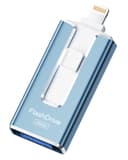
🚀 Unlock your digital freedom with storage that moves as fast as you do!
The SUDEHO MFi Certified 256GB Flash Drive is a sleek, multi-port external storage solution designed for iPhone, iPad, Android, and PC users. Featuring official Apple MFi certification, it ensures seamless compatibility with iOS devices running iOS 12.1 and above. With a massive 256GB capacity, high-speed data transfer up to 40MB/s, and a versatile 4-in-1 USB/Lightning/Micro USB/Type-C design, it offers effortless plug-and-play convenience. Its compact, stylish form factor and app-enabled encryption provide both portability and security for your photos, videos, and files.


| ASIN | B0DHWTGYYT |
| Additional Features | Lightweight |
| Best Sellers Rank | #55,297 in Computers ( See Top 100 in Computers ) #633 in USB Flash Drives |
| Brand | SUDEHO |
| Color | Blue |
| Compatible Devices | iPhone, iPad, Android, PC |
| Compatible Phone Models | Iphone |
| Connectivity Technology | USB |
| Customer Reviews | 4.1 4.1 out of 5 stars (1,286) |
| Flash Memory Type | Memory Stick Duo |
| Hardware Interface | Lightning, USB |
| Item Dimensions D x W x H | 10D x 8W x 5H millimeters |
| Manufacturer | SUDEHO |
| Memory Storage Capacity | 256 GB |
| Model Name | SUD001 |
| Model Number | SUD001 |
| Read Speed | 30 Megabytes Per Second |
| UPC | 799793770237 |
| Write Speed | 25 |
M**E
This product is easy to use. The small, slim design makes it convenient and fits perfectly in my case. Exactly what I was looking for.
C**V
so disappointed, i keep getting an error message stat prevents further image files from being saved to the drive. I even attempted to format the USB drive, which was successful and for a short time allowed me to send a couple thousand image files from my computer to the USB drive, but then the error message started popping up again with attempted transfers and would not allow any further images to be saved to the drive. Below is the error message code. Error 0x80070570 According to ChatGPT the below is the description of the error message code. "The file or directory is corrupted and unreadable"—typically occurs when attempting to copy, delete, or move files to or from a USB flash drive, such as the Rospe MFI Lightning Flash Drive. This error often indicates underlying issues with the drive's file system, hardware, or the specific file being transferred
I**O
This drive DOES NOT APPEAR on the iPad's Files app. You're required to use an app called ROSPE that you download from the app store in order to move files to it. I've tried reformatting it to a different file system see if I could bypass the need for this third party app but that didn't help at all. If you're just in need of a drive to move photos/videos from your ipad to the drive, then it's an okay drive to use if you don't mind using ROSPE, but for my purposes I can't use the drive in the way I need to as the internal storage option in ROSPE shows absolutely nothing so I can't move files other than photos, movies, and recordings. Other than that, plugging the drive into my PC works fine and it is indeed a functional USB drive, but I'm going to be returning it since I expected it to let me move certain files from my iPad and it just doesn't do that.
K**S
Very disappointed. Looked so easy on the ad. Two days later & still will not work.
T**S
Good Value , Quality but not easy to use
Trustpilot
Hace 1 día
Hace 1 mes