We remain fully operational. Our teams are working around the clock to ensure your deliveries continue safely.

Descargar la aplicación


Servicios al cliente
Sobre nosotros
Copyright © 2025 Desertcart Holdings Limited
Descargar la aplicación

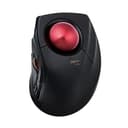
🔴 Master your workspace with precision and comfort — the ultimate trackball for pros who demand more.
The ELECOM DEFT PRO Trackball Mouse offers versatile 3-mode connectivity (wired, wireless, Bluetooth) combined with an ergonomic design tailored for right-handed users. Featuring 8 programmable buttons, adjustable DPI settings (500/1000/1500), and a smooth red trackball on durable ruby bearings, it delivers precise cursor control while minimizing hand fatigue. Compatible with Windows 8/10/11 and macOS 10.13+, it’s powered by an included AA battery and backed by a 3-year warranty, making it a top choice for professionals seeking productivity and comfort.


| ASIN | B07C9T4TTW |
| Additional Features | Bluethooth, Programmable Buttons |
| Antenna Location | Gaming |
| Are Batteries Included | Yes |
| Are Batteries Required | Yes |
| Best Sellers Rank | #14 in Computer Trackballs |
| Brand | ELECOM |
| Built-In Media | AA battery, cable, mouse, user manual |
| Button Quantity | 8 |
| Color | Black / Red ball |
| Compatible Devices | Personal Computer |
| Connectivity Technology | Bluetooth, Wired, Wireless |
| Customer Reviews | 4.0 4.0 out of 5 stars (2,141) |
| Enclosure Material | Plastic |
| Global Trade Identification Number | 04953103349100 |
| Hand Orientation | Right |
| Hardware Platform | Laptop, PC |
| Item Dimensions L x W | 5.25"L x 3.6"W |
| Item Type Name | ELECOM HUGE Wired / Wireless / Bluetooth Finger-operated Trackball Mouse, 8-Button Function with Smooth Tracking, Precision Optical Gaming Sensor (M-DPT1MRXBK) |
| Item Weight | 5.76 ounces |
| Manufacturer | ELECOM |
| Model Name | Deft Pro |
| Model Number | M-DPT1MRXBK |
| Mouse Maximum Sensitivity | 1500 Dots per Inch |
| Movement Detection | Trackball |
| Number of Batteries | 1 AA batteries required. (included) |
| Operating System | Windows 10 |
| Power Source | Battery Powered |
| Range | 10.0 meters |
| Style Name | Trackball Mouse |
| Unit Count | 1.0 Count |
| Warranty Description | 3 year manufacturer |
T**S
Great for Large Hands!
I use the computer for navigating the internet & as a photographer. My hands are pretty large 8" & 1/4. I have always had problems with hand cramps because I have to hold the mouse in sort of a pinch position. For many years I was in love with the original Microsoft big track ball (2010) but they were discontinued so I have been searching for something similar for quite a while. So far this has been a great alternative. I use Lightroom & Photoshop almost daily, sometimes up to 10 hours a day along with a Wacom Tablet for detailed editing but I never liked the Wacom for navigating the internet or programs. The Def Pro has solved all my problems with cramping since it completely changes hand movement. I don't have to pinch the mouse to right & left click because the device comfortably fits in my palm with my fingers relaxed. The thumb becomes the left click, the middle finger becomes the right click & because of the track ball design I can rest the heel of my hand on the desk comfortably. The ball is precise but only as accurate as your finger dexterity. I actually had to slow the speed down a bit. There has been no jumping, stickiness or drag to the ball at all. The thumb wheel is more precise to input than most mice I have used & I have used quite a few. While navigating a page you can scroll back & forth for up & down or tilt the wheel up & down to go right & left. It is a bit tricky downloading the (foreign language) instructions but with persistence & guessing it's not that difficult finding the English version. The mouse works fine out of the box, even with Windows 10 but downloading the Mouse Assistant allows giving the buttons specific operations or changing the function of them. Once you are in the Assistant, it's very simple to use. I'm not a gamer so I have no complaints about the functions available. The only problem I have is that the mouse doesn't wake up after the computer goes to sleep but that may be something to do with the fact that I am using Windows 10 & this device is advertised for Windows 11. I did figure out a workaround of just unplugging the USB plug momentarily which wakes up the mouse which is fine until I upgrade to Win 11. Overall I gave this device 5 stars because it works as advertised & better than several alternatives I tried previously at different price points. I'm not a heavy gamer but I am a heavy mouse user & this item seems to be a good value for function, quality & price. I would definitely buy again or try other ELECOM products.
J**S
Great mouse, with some exceptions.
I am leaving a review of the Elecom Huge and Deft Pro after over a week of intensive "testing" of several trackball mice. Let me begin by stating that I am new to the trackball world so these are my observations from that point of view and I'm leaving these reviews in hopes that it will help someone else who might find themself in a similar situation to what I was in a week ago with no experience with trackballs in a world of opinions. I have mid-sized hands with somewhat thicker "carpenter" fingers and I bought this item to replace a mouse for general and light CAD use. I have a CAD mouse for more intricate work but over the years of design and IT work I'm beginning to develop wrist discomfort. This was the first finger trackball that I tried after testing a Logi M575 that a friend brought over to try for Fusion work. I was hooked on the ball, but I wanted a little more control so I went with the finger style. I found the thumb style to fatigue my thumb joint a little too much. Right out of the box I was impressed by how relaxed my wrist felt on the Huge. I liked the size of the ball and the smoothness of the scroll wheel. It seemed very intuitive to someone new to the trackball realm. The two things I couldn't get over were the stretch of the side buttons with my somewhat shorter fingers and of course, what many of the other reviews talk about, the "stiction" of the ball itself. I did like to overall ergonomics, but decided to defer to the Deft Pro for my next try.I found the Deft Pro to be a better fit for my shorter fingers and the ball a little easier to control for more intricate commands in Fusion while cradling it between my first and middle finger and occasionally passing it off to my right ring finger. I also liked the way that my hand relaxed in a "cradle" position over the Deft Pro while allowing me to rest my wrist lightly on the table. The Huge allowed a straighter relaxed wrist on the device overall, but the Deft Pro felt like it was easier to control for smaller movements. Again though, the bearings on the Deft Pro were too sticky for me and I ordered the bearings to replace them as many have suggested, but decided to return both units before I modified them after finally settling on a combination of a much smoother out-of-the box Slimblade pro for general use and a 3dconnexion CAD and Space mouse combo for design work. The CAD mouse has a really nice form factor for a mouse and I was immediately able to find a comfortable relaxed position on the ambidextrous Slimblade Pro. I didn't have to 'hover' on the Slimblade as many reviews have noted. I realize that this type of setup isn't easy to obtain for a lot of people so I'll leave with this final word based on my spending a week with all three trackballs. Both the Deft Pro and the Huge are great trackballs and a lot of people like them once they are modified to fix the sticky ball issues. As a CAD guy I didn't like the click of the Deft Pro scroll wheel and I though that it felt cheap compared to other scroll wheel mice I've used, but I could have gotten used to that because of the Deft Pro's overall precise control factor if it weren't for the "stiction". Elecom makes track balls feel intuitive, even for new believers like myself, I just couldn't get past the quality issues with the bearings right out of the box. I was either going to spend less for a mouse than the price of Elecoms and deal with the issues they might have caused or spend more and get the performance that I was looking for without having to modify a unit right from the start. These are just my opinions, but I hope this helps someone else who may have been reading reviews for hours, and testing units like I was just to find a suitable replacement.
佐**遼
マウス本体がぴったり入るので重宝しています。 強いていうのならUSBを収納するスペースを削ってもっと薄型になればかさばらくていいかなって思いました。
R**O
Great comfort, very easy to use. Took me a week or two to completely adapt. I would love if the scroll wheel was infinite like the Logitech MX mouse
S**M
User friendly
A**P
In sintesi, dopo l'huge ho deciso di passare alla tracball anche su portatile, optando per il compagno "deft pro" (l'huge wi-fi era troppo grande) primo impatto: Top! E cosa importante! non ho neanche dovuto modificarlo sostituendo le sfere originali perchè precise( a quando pare su questa versione pro ci stanno attenti a mettere le sfere precise)! Tempi di adattamento: gli stessi per l'huge! cioè per chi proviene da una trackball simile quasi zero per chi lo sua la prima volta ...ci vuole da prenderci la mano(anche con qualche videogioco) un po' scomodo è il pulsante selezione per i dpi che si trova sotto la base! avrei preferito il pulsante dpi al posto dell pulsante di selezione frequenza bluethooth(che sarebbe stato benissimo sotto) utilizzabile con bluethoot- wifi- cavo lungo 1,5 m.(nella foto vedrete una mia fissazione che di è proteggere le decalcomanie stampate... non fateci caso!) pro: -Platiche ok non danno la sensazione di essere cheap ,la parte superiore è tramata con un bell effetto dove poggia tutta la mano(circa 18 cm dall' medio fino all inizio del polso). -Posizione della mano risulta rilassata anche se più vincolata rispetto all' huge (e anche per questo modello su internet si possono trovare supporti da stampare in 3d per aumentare l'inclinazione è la comodità). -Buona la disposizione dei tasti principali; che sono ben disposti e facilmente raggiungibili. Anche se come tasto destro mi trovo meglio ad usare l'ultimo(fn3) con l'aulare mentre indice e medio controllano la sfera! -La sfera è 44 mm facilmente manovrabile (vola) è sopratutto le sfere che sono precisie (pare che siano apposta selezionate)! - utilizzabile con bluethoot- wifi- cavo lungo 1,5 m contro (ma lo considero proprio inerzia) -il pulante di selezione dei dpi è posizionato sotto la base e ogni volta per cambiarli si deve alzare il mouse, (con led visibile ma discreto che si illumina dagli spazi aperti dalla rotella, - rotella che risulta essere un po'rumorosa rispetto all' huge). - Avrei preferito il pulsante dpi al posto dell pulsante di selezione frequenza bluethooth ! software: software decente con possibilità di personalizzare il mouse con diversi profili. Essendo il mouse senza memoria interna, si deve avere in funzione il software in background per averlo personalizzato. e qui mi sembra che sia da migliorare! nel fatto che essendo "vincolato a tenerlo attivo) sarebbe bello che il software riconoscesse i programmi in uso, è in automatico caricasse il profilo in automatico (altri software lo fanno) invece ogni volta prima di utilizzare un profilo per un determinato programma lo si deve selezionare. pps per la elecom.... sarebbe bello se potete mettere sul mercato almeno la sfera trakball di ricambio, visto che è la parte che con l'uso può rovinarsi di piu !
M**N
This elecom trackball mouse is great for me because it's universal: it is USB wired, 2.4GHz unwired with USB receiver dongle or unwired bluetooth. It's very precise, and I enjoy working in an armchair with it perched on the armrest and not having to move it over a mouse surface. I'm still finding out how to program its additional buttons, I want to use them as macro shortcuts. It uses a single AA battery, I've had the device for a month or two, it hasn't needed replacement, there's an on/off switch but it does seem to have auto-off too or a very low idle or sleep mode current use. It is a bit larger than I expected, a subjective minor reservation, and it's quite expensive, although in the same range as equivalent Logitech and other well-respected brands' products, and its build quality is evident which reflects the price. Amazon has given me the opportunity to star-rate "sheerness". I don't know what that is, so I've mid-ranged it.
Trustpilot
Hace 1 día
Hace 3 semanas