We remain fully operational. Our teams are working around the clock to ensure your deliveries continue safely.

Descargar la aplicación


Servicios al cliente
Sobre nosotros
Copyright © 2025 Desertcart Holdings Limited
Descargar la aplicación

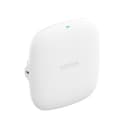
🚀 Elevate your workspace with WiFi 6 power and seamless connectivity!
The NETGEAR WAX210 Wireless Access Point delivers AX1800 dual-band WiFi 6 speeds, supporting up to 128 devices simultaneously. Featuring 1G PoE for streamlined installation, WPA3 security, and flexible mounting options, it’s designed for professional environments needing reliable, high-capacity wireless networks without bulky hardware.
| ASIN | B0DH8B1R5P |
| Antenna Location | Improve wireless network connection for home, game, or business use |
| Antenna Type | Fixed |
| Best Sellers Rank | #45,943 in Computers ( See Top 100 in Computers ) #179 in Wireless Access Points |
| Brand | NETGEAR |
| Built-In Media | access point, installation guide |
| Color | White |
| Compatible Devices | Gaming Console, Personal Computer, Printer, Security Camera, Smart Television, Smart Thermostat, Smartphone, Tablet |
| Connectivity Protocol | Wi-Fi |
| Connectivity Technology | Wi-Fi |
| Control Method | Remote |
| Controller Type | Web Interface |
| Coverage | Medium to Large Spaces |
| Customer Reviews | 4.1 4.1 out of 5 stars (848) |
| Data Transfer Rate | 1800 Megabits Per Second |
| Frequency | 60 GHz |
| Frequency Band Class | Dual-Band |
| Global Trade Identification Number | 00606449170368 |
| Has Internet Connectivity | Yes |
| Has Security Updates | Yes |
| Is Modem Compatible | No |
| Item Dimensions L x W x H | 20L x 15W x 15H centimeters |
| Item Weight | 0.22 Kilograms |
| LAN Port Bandwidth | 1000 Mbps |
| Manufacturer | Netgear |
| Maximum Upstream Data Transfer Rate | 1201 Megabits Per Second |
| Mfr Part Number | WAX210-100EUS |
| Model Name | WAX210-100EUS |
| Model Number | WAX210-100EUS |
| Number of Antennas | 2 |
| Number of Ports | 1 |
| Operating System | Netgear OS |
| Other Special Features of the Product | Access Point Mode |
| RAM Memory Installed | 256 GB |
| Router Firewall Security Level | Standard |
| Router Network Type | Wireless |
| Security Protocol | WPA, WPA2, WPA3 |
| UPC | 606449170368 |
| Unit Count | 1.0 Count |
| Voltage | 12 Volts (DC) |
| Wi-Fi Generation | Wi-Fi 6 |
| Wireless Compability | 802.11ax |
C**R
Der NETGEAR WAX210 ist ein richtig starkes Upgrade, wenn du zuverlässiges WiFi‑6‑Netzwerk mit guter Reichweite und sauberer Performance suchst. Für Home‑Lab, Büro oder kleine Gewerberäume ist das Gerät absolut überzeugend. ⚡ Was den WAX210 auszeichnet WiFi 6 (AX1800) – deutlich bessere Effizienz, höhere Geschwindigkeit und stabilere Verbindungen als ältere AC‑Modelle. Dual‑Band – 2,4 GHz für Reichweite, 5 GHz für Geschwindigkeit. 1× 1G‑PoE‑Port – Strom + Netzwerk über ein einziges Kabel, perfekt für saubere Installationen. Hohe Stabilität – ideal für viele gleichzeitige Clients, Streaming, Smart‑Home und Office‑Traffic. Einfache Verwaltung – Web‑Interface ist übersichtlich und ohne Cloud‑Zwang nutzbar. 📶 Praxis Der Access Point liefert eine sehr gleichmäßige Abdeckung und bleibt auch bei mehreren Geräten zuverlässig. Besonders in Umgebungen mit vielen WLAN‑Netzen zeigt WiFi 6 seine Stärken. PoE macht die Montage an Wand oder Decke extrem flexibel. 🎯 Fazit Ein leistungsstarker, zuverlässiger und zukunftssicherer Access Point, der sowohl im professionellen Umfeld als auch im anspruchsvollen Heimnetz eine hervorragende Figur macht. Preis‑Leistung ist hier wirklich top.
竹**介
しっかり電波も飛んで安定しているので満足です!
K**D
I was having endless issues with the virgin wifi, so I bought 2 of these one for upstairs and 1 for downstairs A lot of the issues I was having were from low signal levels from lights and switches that had WIFI even items like the central heating thermostat and programmer and portable devices. After checking what WIFI channels were in use, some users had set there routers and network devices were going across 8 channels. others on adjacent channels Removed all WIFI lamps and placed into dustbin as their Output WIFI signal strength was very week Ipad was complaining about wpa2 and disconnected a lot Step 1 plugged AP1 into Netgear Switch 1, logged onto AP1 set it to a fixed IP and set WIFI to channel 6 Set Security to wpa2 and wpa3. Set user access name and Password Step 2 plugged AP2 into Netgear Switch 2, logged onto AP2 set it to a fixed IP and set WIFI to channel 11 Set Security to wpa2 and wpa3. Set user access name and Password You can only set up the 5g to default frequencies I left this AUTO Put all devices over to new AP1 and AP2 now a few still objected Set router WIFI to modem mode which then refused to connect anything and cut off Internet access left for 30 min still no joy unable to access router so it was a router reset Tried this 3 times all screwed up Next reset Router Access name and Password Set up DHCP to exclude the IP addresses Id's I had used Had a bright idea to just turn WIFI off, but this just turn's itself back on although you have saved the router config later on in the day. It looks like most devices are working OK. The Apple devices are using WPA3 and have stayed connected OK Amazon Devices all working Amazon Speakers working fine. I have turned off MIC's WIFI light Switches are OK and have stayed connected WIFI CH Programmer and Thermostat staying connected Still have issues WIFI 3 x light controllers looks like they are to meet the dustbin Over all pleased with the improvement The lack of WIFI channels on the 2.4 g network is a major problem that is difficult to resolve. however the 5 g network is available and ready for use. Just a word about this AP restricts you to the lower 5g channels
V**O
Très bon point d’accès Wi-Fi 6, offrant une connexion stable et des performances constantes, même avec plusieurs appareils connectés. L’installation est relativement simple pour ce type de matériel et les options de configuration permettent une utilisation aussi bien en environnement domestique avancé que professionnel. Le PoE est un vrai plus, facilitant l’intégration sans multiplier les câbles. La qualité de fabrication est au rendez-vous et l’ensemble fonctionne de manière fiable au quotidien. Un point d’accès efficace et sérieux, adapté à ceux qui recherchent une solution Wi-Fi moderne et performante.
I**E
Niet makkelijk te configureren, poe is makkelijk in gebruik, mooi design
Trustpilot
Hace 1 mes
Hace 2 meses