Some deliveries may take a little longer than usual due to regional shipping conditions.

Descargar la aplicación


Servicios al cliente
Sobre nosotros
Copyright © 2025 Desertcart Holdings Limited
Descargar la aplicación
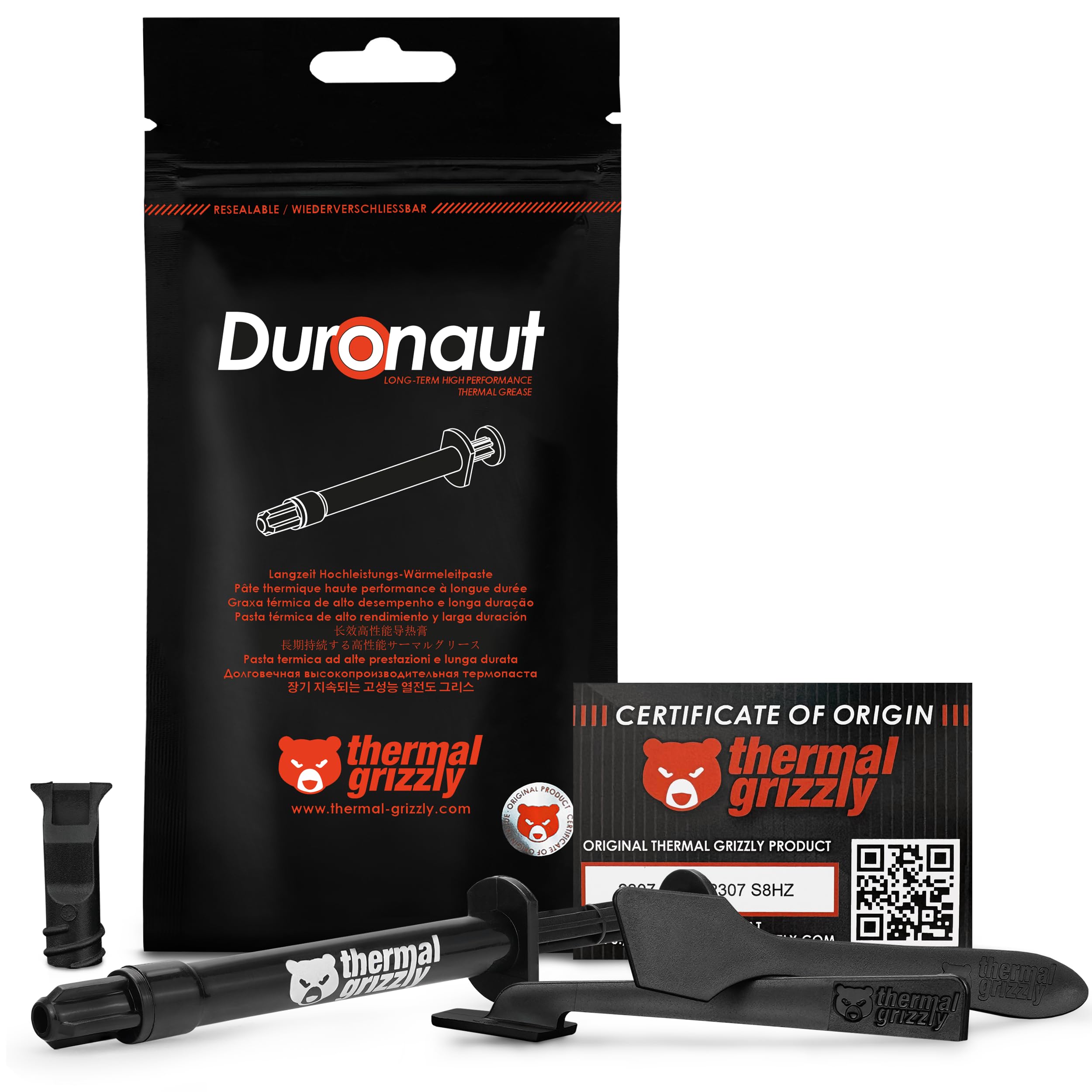
🔥 Keep your cool and lead the pack with Duronaut’s elite thermal power!
Thermal Grizzly Duronaut is a premium 2-gram thermal paste designed for professionals and enthusiasts seeking maximum thermal conductivity and durability. Featuring aluminum microparticles and zinc oxide nanoparticles, it delivers superior heat transfer while being electrically non-conductive and resistant to pump-out effects. Ideal for overclocking CPUs, GPUs, and gaming consoles like PS4, PS5, and Xbox, it includes a precision spatula for expert application and maintains performance over long periods without hardening.




| ASIN | B0DSTWDYD2 |
| Best Sellers Rank | #15 in Silicon Grease |
| Brand | Thermal Grizzly |
| Color | Grey |
| Customer Reviews | 4.4 4.4 out of 5 stars (875) |
| Date First Available | January 14, 2025 |
| Item Dimensions LxWxH | 7.87 x 3.94 x 0.59 inches |
| Item Weight | 0.071 ounces |
| Item model number | TG-D-002-R |
| Manufacturer | Thermal Grizzly |
| Product Dimensions | 7.87 x 3.94 x 0.59 inches |
N**N
Works great but difficult to apply
It has tamed the 90C temp spikes in my PS4! I agree with other reviewers that it's difficult to spread and has the consistency of clay, not grease. It doesn't behave like any other thermal "grease" that I've used. I was able to get it mostly spread in a thin layer, although it was very difficult. Even going slowly, as recommended in the docs, it's hard to get it to stick to the processor. Next time, I may just make an X and call it good. X has always worked for me.
L**S
My CPU is so cool it wears sunglasses at night.
This helped drop my cpu temp by 10C. It was pretty easy to apply if you read the instructions. Came with multiple tools to help spread. Paste was consistent and felt high quality. Worked on my AMD and AIO heat sink. Would use again and again!
T**Y
One of the best brands on the market...
Got a secondhand 2080ti awhile back, but I noticed lately the fans have been ramping up and a 107c hotspot... time for a repaste! This paste worked great and the included tip helped lay down a thin line that made it easier to spread over the entire GPU. My only complaint would be that this paste is a bit of a thick boy and requires a little bit of patience to evenly spread. You could probably fix this by running the tube under hot water for a few to help loosen it up a bit for application. Afterwards my average temps gaming went from 72c to 55c and the hot spotted dropped a massive 50 degrees and is now within normal range. The tube includes about two applications worth so it's good value for the money, would buy again in the future if needed.
J**M
I did buy this product and i very much enjoy it
The Thermal Grizzly Duronaut thermal paste lives up to its name, offering truly impressive cooling performance that kept my CPU running at an incredibly cool and steady temperature of 27−34 ∘ C. The moment I applied it, I noticed a significant drop in idle temperatures compared to other pastes I've used. This level of thermal efficiency not only ensures a quiet system but also provides excellent thermal headroom for demanding tasks and overclocking, keeping the CPU well within safe operating ranges even under heavy load. The performance aspect of this paste is absolutely top-tier and for that alone, it's worth considering for any serious PC builder or enthusiast. However, a major point to consider is the application process. The paste has a very thick, almost clay-like consistency that makes it exceptionally difficult to spread evenly across the CPU's integrated heat spreader (IHS). It required considerable pressure and patience to get a proper, thin layer, and I found myself needing to be extra careful to avoid air bubbles. This is not a "simple smear" type of paste; you'll need to work with it. Ultimately, the Thermal Grizzly Duronaut is a premium product with a trade-off. If you are comfortable with a challenging application process and value exceptional thermal performance above all else, this is a fantastic choice. The stable and low temperatures it provides are well worth the initial struggle with spreading the paste. But if you're a beginner or prefer a more user-friendly, forgiving application, you might want to look elsewhere.
D**.
Apply a good amount, dont worry and dont screw it down too much. Thats it! Enjoy!
Absolutely! I use it on my CPU and then I also applied it on my GPU core cpu and I made a mistake cuz the temps didnt go down as much as they should... stayed the same although it started low but the next day they shot up by 10C so I knew something was wrong and what was wrong is the brace that holds the core cpu of the gpu if you screw it down too tight and it doesnt mean going all the way but even if you tighten it half way or a bit more it'll squeeze out the paste more than needed to keep it really cool! Just tie it down by maybe 2 turns on each one of the 4 corners and trust me ITS ENOUGH!!! Also, be very generous with the application of the paste... Dont worry, just apply it nicely and cover it all and then tie it down just a little and you'll see the temps are AMAZING! I have an RTX3090 and it was time to repad and repaste so i did both! I got the 13W/mk thermal pads and Duronaut as my core paste and WOW! The GPU IS SOOO COOL!!! I also undervolted the GPU and its simply amazing! Im idling at 27C and under load im in the 50's and rarely go over 60C IM EXTREMELY HAPPY WITH THE PASTE!!! THE BEST OUT THERE!!!
L**Z
So far so good!
I am a PC aficionado and I regularly build PCs. I have been using KPX but decided, after watching the gamers nexus video to try out some duronaut. So far temps have been good. Not as good as KPX but it's to be expected as it's not supposed to be a high-end paste. The spread was nice and the included spreader was appreciated. For the money it's definitely a great option. I run an overclocked 5900x for my main system with and arctic 420mm AIO. When doing CPU heavy loads it will hit about 60c. Gaming it sits in the mid 40s. Overall this was a good buy. Definitely recommend if you're looking for a good quality paste that functions well. I can't talk about the longevity as I have just installed it a few days ago. If there are any weird things I will update this review. For the money, this is great thermal paste and I will definitely use it again.
B**N
Make sure to warm it with a hairdryer
This is really high end thermal paste. You'll wanna warm it up with a hairdryer before attempting to spread it. Otherwise it is impossibly thick. I ended up having a false start and wasting it all on a dead i9 processor because it was so thick I ended up using a lot and didn't have enough when I got the replacement CPU and motherboard. I've used it in the past and it is very thermally conductive highly recommend..
J**Y
What happened Thermal Grizzly?
Unsure if I got a bad batch but this stuff sucks! I've used Thermal Grizzly products before and have always been impressed. Not this time, so unusable I just had to throw it out. Bummer.
س**ن
أدائه عالي جدا وسعره مناسب أخذته عشان أغير معجون لابتوبي وصار ما شاء الله تبارك الله حرارته أقل من حرارته لما كان جديد مع إني كسرت سرعته حاجة بسيطة بس لاحد يغير معجون لابتوبه إلا لما يكون متعلم وواثق من الي يسويه وهذا ترا سعره الطبيعي مو معجون أسنان عشان تقول تراه غالي وكمان لزوجته جدا قليلة وصعب في الفرد عشان لا يتسرب من تحت المبرد الزبدة إني ما ندمت أبدا على كل ريال دفعته فيه مع إنه غالي لاكن يستاهل
G**U
Zdaje efekt sprawdzony na i9-12900 i jestem mega zadowolony. Najważniejsze: ciężko się nakłada go. Są sposoby, aby na chwilę wsadzić do ciepłej wody, wtedy ponoć łatwiej się go rozprowadza.
K**I
I used the Thermal Grizzly Conductonaut (2g) on my CPU, and even though I applied a bit too much the first time, it still delivered fantastic results. After cleaning and reapplying carefully, I noticed a clear improvement in my temperatures — significantly lower under load compared to standard pastes. It spreads easily, and you only need a tiny amount to get full coverage. The consistency feels premium, and you can tell it’s designed for enthusiasts looking to get the most out of their cooling setup. If you’re confident applying liquid metal or high-performance compounds, this is an incredible upgrade. Just be careful with the amount. A little goes a long way. Overall, brilliant thermal paste that really makes a difference!
P**R
After a repaste using this compound, GPU hotspot temperature was reduced by 15 degrees Celsius. Will have to see how it goes long term, but it is designed to last longer and reduce pumpout, so I'm very hopeful. Good product
J**Y
J’ai utilisé cette pâte thermique Thermal Grizzly pour remplacer celle de mon processeur, et je dois dire que je suis bluffé par les résultats. Les températures ont baissé de 8 à 10 °C par rapport à ma pâte précédente (une pâte standard), ce qui est un gain non négligeable pour le refroidissement et la longévité du CPU. La pâte est facile à appliquer (ni trop liquide ni trop épaisse), et le packaging est bien pensé, avec une seringue précise et parfois même une spatule fournie selon le modèle. C’est un produit haut de gamme, parfait pour les overclockers ou ceux qui veulent tirer le meilleur de leur système. Un peu plus cher que d'autres marques, mais la qualité est au rendez-vous. Je recommande sans hésiter !
Trustpilot
Hace 3 semanas
Hace 5 días