We remain fully operational. Our teams are working around the clock to ensure your deliveries continue safely.

Descargar la aplicación


Servicios al cliente
Sobre nosotros
Copyright © 2025 Desertcart Holdings Limited
Descargar la aplicación

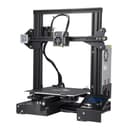
🚀 Elevate your prototyping game with precision and reliability!
The Official Creality Ender 3 is a DIY 3D printer designed for professionals and enthusiasts seeking high-resolution prints with ±0.1mm accuracy. It features a large 220x220x250mm build volume, a rapid-heating bed that reaches 110°C in 5 minutes, and a resume printing function to safeguard against power interruptions. Its advanced extruder technology minimizes clogging, making it ideal for mold sample printing and medium-sized prototypes.


| ASIN | B07D218NX3 |
| Best Sellers Rank | #66,623 in Industrial & Scientific ( See Top 100 in Industrial & Scientific ) #87 in 3D Printers |
| Date First Available | May 13, 2018 |
| Is Discontinued By Manufacturer | No |
| Item Weight | 15.4 pounds |
| Item model number | Ender-3 |
| Manufacturer | Creality 3D |
| Product Dimensions | 8.66 x 8.66 x 9.84 inches |
A**S
Reasonable speeds print accurately. Good 1st Printer
Not the fastest, but print quality is just fine inside a heated enclosure so cool air drafts don't mess up prints. Exactly as I expected after seeing my friend's more expensive version did better prints from inside an enclosure. I bought PLA and ABS filament, and the PLA is good without needing the enclosure, in a warm room, but an enclosure does help it do better. ABS requires a heated enclosure unless you live in a hot desert, as expected. Very reliable and easy to use. No clogging. Prints come out accurate, with a nice finish. Can't speak of durability this soon, but I would bet money that I will find it durable eventually.
B**S
Amazing value 3d printer
Super amazing value and super easy operation (I recommend Ultimaker Cura slicer it's way better than their own slicer) print quality is great and I love how upgradeable it is. I used an ender 3 for 4 years (using it pretty consistently for my 3d printing business I run selling 3d artwork and pushed it pretty hard at times and it made the whole cost of the printer back) before I ended up replacing it with an ender 3 s1 pro because I love the ender series so much and wanted an upgrade plus it had some parts needing replacement (I could have replaced the parts for cheep but it was an excuse to upgrade) If you're looking for a basic 3d printer to get started this one is perfect for you
J**N
INTERIM REVIEW: Not impressed after first 3 prints (will update soon with more info)
I tend to pay the low reviews little attention when making a decision to buy a product, but I'd be lying if I said that I didn't approach my online buying habits with a bit of caution and skepticism. Having looked at the reviews of this printer (both good and bad), I figured I could 1) use this printer to figure out how I was going to get into 3D printing, and 2) "get by" with something cheap while dealing with the current economic turmoil. The only thing this printer has provided is an intro to 3D printing/modeling and an unhealthy amount of paranoia (I'll explain shortly). One pain point was that the package came requiring assembly. I've never had a problem assembling products I have purchase in the past, but the instructions were nothing more than pictures that were difficult to visually decipher. Have become so lazy that we can't use words any more? Moreover assembly didn't really instill much confidence in the quality of the product. I mean this thing has to print in the X, Y, and Z coordinates. Surely alignment of the equipment is an operational "must". Dye cutting and drilling (in my experience) is never 100% accurate to ensure proper alignment. I'm worried that alignment might actually be causing my issue. The issue that I'm experiencing is actually that the printer isn't successfully printing above 4-5 cm. I attempted an overnight print that came out with the bottom half looking fine, while the top half looked like a cat had gotten hold of bundle of yarn and went to town. The print head looks like it's going to take some work to get the PLA off it. I'll probably have to boil it to break the PLA loose. Due to the horrible results of my first real print, I changed the head and filament and increased extruder temperature by 10 degrees. The results were better, but the print was still compressed at around the 4-5 cm height mark. I remember listening closely to the printer while it was printing and remember some very distinct and loud clicks in the motors. This was going on a lot and started to make me paranoid that the vertical stepper motor wasn't advancing. I believe the stepper motor that controls height of the print head was struggling to turn at multiple points in the print. Thus, the printer head wouldn't increase in height at certain points. It would explain why I see compression lines in in the prints. I think this is all caused by misalignment of the rails on the left and right sides of the print head. When assembling the printer, it was rather difficult to attach the top rail to the 2 side rails after they had been secured to the base. I felt like I was going to have to bend the side rails to get the screws to line up on top. I suspect that the ridiculous amount of tension on those rails is what's causing the vertical stepper motor to struggle to turn, and I can't think of a way to fix it other than machining my own aluminum rails. I've started a 3rd print today, but before starting it, I tried loosening and re-adjusting the top and bottom bolds on the left-hand rail (closest to the vertical stepper motor). The print will be done late this evening. I will review the quality and update this review with new information. Other notes: The adhesion bed is a B to get off of the prints. Be prepared to spend some time with a box cutter and some band-aids. The stepper motor that controls the filament feed cannot handle the weight of an entire 1kg spool of filament. It will skip repeatedly if there's too much tension on the filament. I guess the hanging weight of the spool above the printer is too much for it. So be prepared to babysit your printer and unwind some filament to prevent skipping. The printer is pretty loud. It would be nice to go throw this in my closet or garage where I would never have to listen to it. Unfortunately, that's not possible because I have to continuously watch it to make sure it isn't turning my filament into tangled fishing line.
K**E
Learn how to adjust it and it's fantastic... but noisy.
I'm writing this review after a long first day of printing. I'm pretty happy with it, honestly. This is great value. After having built a larger but remarkably similar printer from scratch, I'm also not convinced they're losing money on it. So at least this isn't a case of Chinese dumping. It's simply a good product at a fair price, for once. My first two prints came out looking fantastic. The provided white PLA wasn't enough to complete the dog model, but my somewhat old and probably wet yellow PETG printed just fine as well. Adhesion was quite good on the provided print surface. Obviously, your results may vary. I don't know how good their quality assurance is, but most Chinese manufacturers seem to struggle with it. It could be that I got one of the good ones. The rails aren't bent, the belts are intact, the steppers all work just fine. The electronics are noisy, though. Given the price, this isn't surprising, but it is something most people will probably want to upgrade. Going with something with TMC2208 or better stepper drivers will almost certainly solve the problem. Overall, I'd say it's a good printer for beginners, but not if you're a buffoon or just not mechanically inclined. Learn how to tune this in, and it'll serve you very well. Ultimately, I gave this four stars instead of 5 because of the noise issue and because the manual doesn't mention the single most important detail for making this printer really shine: adjusting the delrin wheels. Since the manual doesn't mention it at all, I'll give a quick explanation here: the delrin wheels that form the linear bearings for this printer need to be properly tensioned. Do _not_ expect the factory setup to be anywhere near correct. Even if they got it perfect, the shipping process can knock them out of alignment again. The printer comes with little wrenches just for this purpose, so use them! On each set of wheels on the X and Z axes, there is one wheel that is mounted on an eccentric spacer. You can identify it because it has a hex shaft instead of a round one. The larger wrench in the kit should fit this hex. If you turn it, the wheel is pushed slightly inward or outward because it's mounted a little off-center from the bolt hole. This is how you adjust the wheel spacing to make the bearing tighter or looser. You should make it tight enough that you can't feel any play when you try to twist the bearing set, but not so tight that it's difficult to make it roll along the rail. You shouldn't be able to turn the wheels against the rail without the whole thing moving along the rail too. If you still have trouble, take your printer apart again and make sure the ends of the rails weren't damaged in shipping, causing them to not mate up squarely. Since the rails are aluminum, it's relatively easy for the sharp corners to be deformed from minor bumps. If the corners are deformed from impact damage, you should file/sand the deformity off so that the face of the end of the rail can mate flatly against the side of the rails you're bolting them to. If your rails are bent, you'll have to take that up with Creality. There's a warranty for a reason, and that definitely counts. If you aren't sure if your rails are bent, take two of them and place them together lengthwise. Rotate one of them 90 degrees a few times, checking if you can see light coming through between them. If you can, at least one of them is bent. Get a replacement. You spent money on the damn thing, make sure you get what you pay for!
S**E
Excelente equipo. El ensamble es bastante intuitivo y con ayuda del manual lo llevas bien. Desde la primera impresión salió excelente.
P**M
I bought this printer as well as the Prusa Mini+. Surprisingly, this printer turns out to be easier to manage and comes up with better and nicer prints. The Prusa Mini+ had some initial teething problems - particularly pertaining to prints being dislodged as it was not sticking to the print plate. I used glue-stick and finally decided to use 90% IPA alcohol solutions, which eventually worked. During this time, the Creality became my most reliable 3D printer! This printer was certainly worth more than the price I had paid and I would recommend anyone who is interested in 3D printing to get one! I absolutely didn't regret making the jump - even though I heard horrible stories about support for this printer.
A**ー
価格に比べて非常にクオリティが高いので満足です。梱包も完璧で開封時に何の心配もありませんでした。組み立てに必要な工具はすべて同梱されていました。テスト印刷用のフィラーも少しだけ同梱されていてありがたいです。 microSDカード(説明書とスライスソフト、ドライバ入り)がUSBアダプタにセットされた状態で同梱されているので、同封されている紙の説明書ではなくまずはmicroSDの中のPDFの説明書を読みましょう。こちらに組み立ての詳細説明が日本語で書かれています。 組み立てと調整が少し必要なので初心者よりは中級者向けなのかもしれません。テーブルのレベル調整の方法は説明書に詳しく書かれています。上部で平らな台の上で作業すると組み立て精度が出しやすいです。ベースのフレームはモータドライバとテーブルのスライドが組み立てられた状態で梱包されていますが、足部分の部品をいったん緩めて平らな台の上で締めなおすと良いです。結束バンドが同梱されていますが、ケーブル類のどの部分をどうやって固定するかは書かれていないですが工夫して固定しました。 スライスソフト(日本語対応)の設定項目はとても細かく、上級者でも様々な材料のための条件出しの研究が十分できます。印刷時の騒音はとても小さいです。自分で調整した設定はすべて名前を付けて登録できるのでとても便利です。スライスソフトからはgcodeが出力されます。設定でフレーバが選べるので他のプリンタ用にも使えると思います。Ender3はMarlinフレーバのようです。ソフトからはプリンタを選択するだけで必要な情報(機械の寸法情報、gcodeヘッダフッタなど)がすべて自動で入力されます。完全にカスタム値を入力することもできるのでプリンタを改造したり自作したものにも対応できそうです。私はマイクロSDカードにgcodeを保存してプリンタ正面のmicroSDスロットに挿入して、カードから印刷しています。 ステッピングモータの動作も滑らかで速いです。標準設定でABS,PLAが問題なく印刷できました。TPUは少し調整が必要でしたが押し出し量120%に修正したら層間剥離なく密着されて良好な印刷ができました。印刷中にパネルでベッド・ホットエンド温度を変更できるのが便利です。
H**D
Ótimo Produto. Recomendo olhar tutoriais antes para montar, mas no geral foi tranquilo. Nunca havia feito isso antes e deu super certo. As impressões possuem uma qualidade boa. Incrivelmente não tem quase nada a perder em relação a impressoras de maior valor. Não possui nivelamento automático, mas é tranquilo de nivela-la. A única dificuldade que tive foi com filamentos do tipo ABS mais baratos que descolavam com facilidade inviabilizando as impressões, mas isso é possível contornar com fixadores e/ou cola feitas para esse fim e configurações adequadas nos fatiadores. Dê preferência a PLA de qualidade que terá ótimos resultados. A impressora veio com ferramentas como alicate, chaves allen, desentupidor de bico e cartão SD. Além disso também veio um pouco de filamento, mas que não foi suficiente para imprimir o "gatinho da sorte" que vem dentro do cartão SD (ficou faltando a cabeça). Pelo valor, super compensa.
S**A
Tenho ela a 2 semanas... Impressões de qualidade, barata, fácil de configurar, altamente personalizável, o barulho de impressão incomoda um pouco, mas a uma solução. Já imprimi várias coisas e sem nenhum tipo de problema. Veja bastante vídeos de como imprimir, configurar e desenhar as suas próprias artes. Eu uso somente PLA PREMIUM, tentei ABS mas não gostei do material e a impressão fica muito difícil, pois ele precisa de uma impressora fechada, pois a mudança de temperatura faz a impressão ficar quebradiça! Dica: Um upgrade indispensável e a troca da placa principal para a versão v4.2.7 que deixa a ender 3 silenciosa a ponto de você ouvir somente as ventoinhas...
Trustpilot
Hace 3 semanas
Hace 1 mes