We remain fully operational. Our teams are working around the clock to ensure your deliveries continue safely.

Descargar la aplicación


Servicios al cliente
Sobre nosotros
Copyright © 2025 Desertcart Holdings Limited
Descargar la aplicación

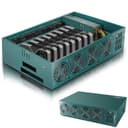


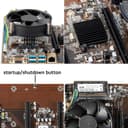
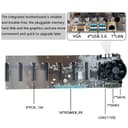
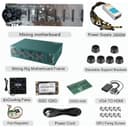
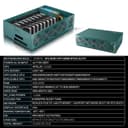
🚀 Dominate the crypto game with power, precision, and plug-n-play ease!
The VTRETU Mining Rig is a turnkey crypto mining solution featuring an 8-GPU motherboard, powerful 2000W universal PSU, Intel Celeron CPU, 4GB RAM, and SSD storage. Its robust steel frame and 8 smart cooling fans ensure durability and optimal thermal management. Compatible with Windows 10, HiveOS, and Linux, this rig is designed for quick setup and scalable mining operations targeting ETC, LTC, XHV, Monero, and Ravencoin.


| ASIN | B09TSFBB3D |
| Brand | VTRETU MINING |
| CPU Model | Celeron |
| Chipset Type | Intel B85 |
| Compatible Devices | Personal Computer |
| Compatible Processors | Intel Celeron |
| Customer Reviews | 3.5 3.5 out of 5 stars (19) |
| Graphics Card Interface | PCI Express |
| Item Dimensions L x W x H | 53.3L x 25.4W x 73.7H centimeters |
| Main Power Connector Type | ATX |
| Manufacturer | VTRETU MINING |
| Memory Clock Speed | 1600 MHz |
| Memory Slots Available | 1 |
| Memory Storage Capacity | 128 GB |
| Model Name | 8GPU Mining Motherboard |
| Model Number | 724487321334 |
| Number of Ethernet Ports | 1 |
| Number of Ports | 8 |
| Platform | Windows 10 |
| Processor Socket | LGA 1150 |
| RAM Memory Technology | DDR3 |
| Ram Memory Maximum Size | 8 GB |
| S/PDIF Connector Type | Optical |
| System Bus Standard Supported | SATA 2 |
| Total Number of HDMI Ports | 1 |
| Total PCIe Ports | 8 |
| Total SATA Ports | 1 |
| Total Usb Ports | 3 |
| UPC | 724487321334 |
| USB 2.0 | 2 |
G**C
The VTRETU GPU mining chassis works perfectly! There were a few modifications I made: 1. The O/S(Windows 10) runs great. No need for downloading another O/S. Just plug the GPU's in the slot and turn on the machine. 2. (please measure the available space to see if the GPU you are going to use will fit.) I am using AMD 6800xt's. Unfortunately they are too long to fit inside the chassis in between the 8 fans. I relocated the front 4 fans to the outside of the chassis.(picture attached) 3. I changed the aperture size to 128MB in "chipset" tab when in the Bios. You can enter the Bios by pressing the ESC key while the computer loads.(I had to press the ESC multiple times) 4. I changed the virtual memory in the "advanced system settings" menu. You can locate this by right clicking on "This PC" go to "properties" then "advanced system settings" Click on "settings" in the "performance" section. Click on the "Advanced" tab then click on "change" in the "virtual memory" section. Virtual memory: Uncheck the box "Automatically manage paging file size for all drives" Click on "Custom Size" I changed the initial size (MB) to 13000 and the maximum size (MB) to 39000. I calculated this figure based on 8GB of memory. The Initial size is one and a half (1.5) x the amount of total system memory. The Maximum size is three (3) x the initial size. So let's say you have 8 GB (1 GB = 1,024 MB x 8 = 8,192 MB) of memory. The initial size would be 1.5 x 8,192 = 12,288 MB and the maximum size would be 3 x 12,288 = 36,864 MB. Once these changes have been made, the miner should be operating perfectly! I am very pleased with my purchase. It is constructed very well and the customer support is great! I will be buying more VTRETU Chassis' s soon.
K**H
Looks good, use vga output for quick setup, although vga to hdmi adapter included didn't work with hdmi monitor. DOESN'T INCLUDE GPU UNITS. manual fan speed knob is handy You will need 220v to get full 2000watts. Windows installed on ssd card, booted right up. 4gb memory installed 64 bit system. Just waiting for the 8 NVIDIA mining GPUs I had to buy separately.
J**E
No display, tried everything and will not work. Disappointed.
J**E
Very well built. It is loud to say the least; however, that is not an issue if you know where you will place the rig. Fan control is great feature at your finger tips. Highly recommend to anyone looking to mine. Great Support as well. I had a video display issue with second rig and contacted Support and they were very very great at helping. I am computer savvy and not afraid to take things apart and reassemble. Support guided me on what to do and BAM!!! Second rig boots to windows. If using diff OS via USB you will need to get to the BIOS and set your USB to boot. Great product, will buy more.
D**D
A fairly easy set up the power cord was tucked under the bar kinda hard to see, but all in all I think it’s worth the money we shall see. It is kind of loud, but you expect that.
Trustpilot
Hace 1 semana
Hace 1 mes