We remain fully operational. Our teams are working around the clock to ensure your deliveries continue safely.

Descargar la aplicación


Servicios al cliente
Sobre nosotros
Copyright © 2025 Desertcart Holdings Limited
Descargar la aplicación

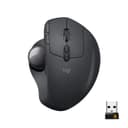
🖱️ Elevate your workflow with precision and comfort — the MX Ergo means business.
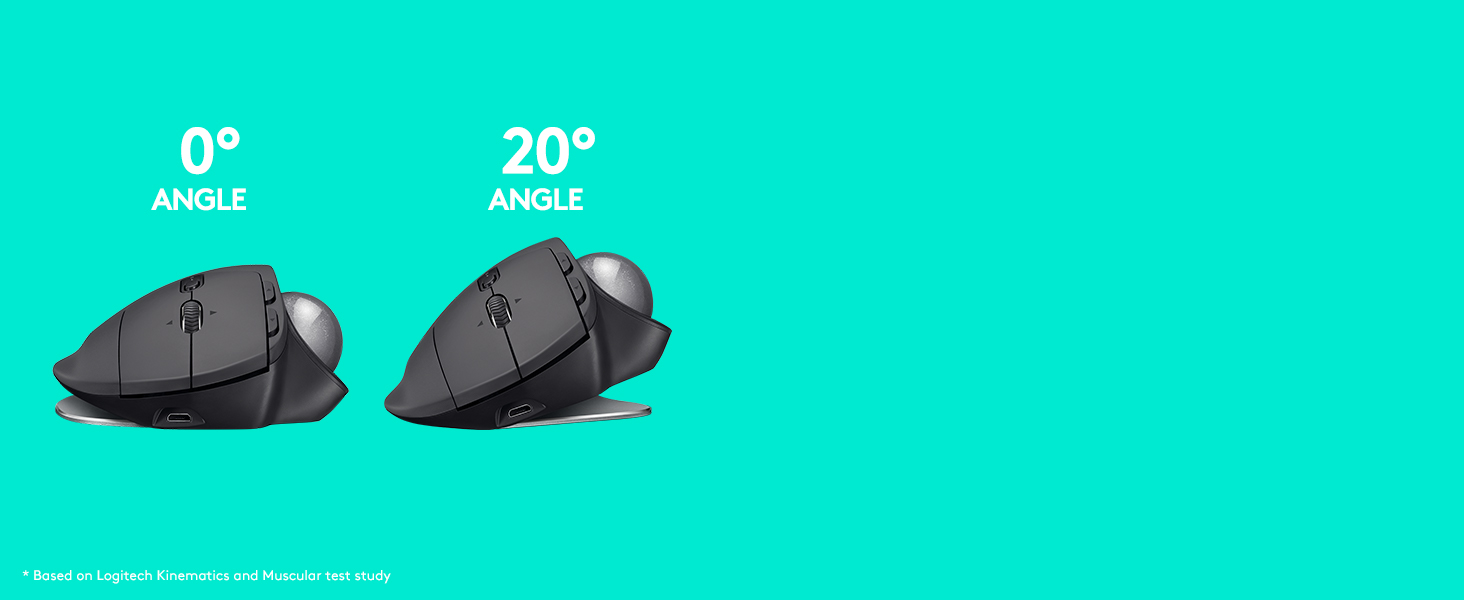
The Logitech MX Ergo Wireless Trackball Mouse combines ergonomic innovation with advanced precision controls, featuring an adjustable tilt (0-20°) to reduce muscle fatigue by 20%. It supports dual connectivity via Bluetooth or USB, includes a precision mode button for cursor speed adjustment, and boasts a rechargeable battery lasting up to 4 months. Designed for professionals seeking comfort and efficiency, it enables seamless multi-computer workflows with Logitech FLOW™ technology, all wrapped in a premium graphite finish.

| ASIN | B0753P1GTS |
| Additional Features | Ergonomic Design |
| Antenna Location | Office |
| Are Batteries Included | Yes |
| Are Batteries Required | Yes |
| Battery Average Life | 4 months |
| Best Sellers Rank | #711 in Computer Mice |
| Brand | Logitech |
| Built-In Media | MX ERGO Advanced Wireless Trackball, Micro-USB cable for recharging, Quick Start Guide, Unifying USB Receiver |
| Button Quantity | 8 |
| Color | Graphite |
| Compatible Devices | Desktop |
| Connectivity Technology | Bluetooth |
| Customer Reviews | 4.5 out of 5 stars 12,369 Reviews |
| Enclosure Material | Graphite |
| Global Trade Identification Number | 00097855132666 |
| Hand Orientation | Right |
| Hardware Platform | Laptop, PC |
| Item Dimensions L x W | 5.7"L x 3.7"W |
| Item Type Name | Logitech 910-005177 MX ERGO Advanced Wireless Trackball for Windows PC and Mac |
| Item Weight | 5.76 ounces |
| Manufacturer | Logitech |
| Model Name | Logitech MX ERGO |
| Model Number | 910-005177 |
| Movement Detection | Trackball |
| Movement Detection Technology | Trackball |
| Number of Batteries | 1 Lithium Metal batteries required. (included) |
| Number of Buttons | 8 |
| Operating System | Windows 10,11 or later,Mac OS X 10.8 or later,iPadOS 13.4 or later |
| Power Source | Battery Powered |
| Range | 10.0 meters |
| Special Feature | Ergonomic Design |
| Style Name | Mouse |
| UPC | 097855132666 |
| Unit Count | 35.2 Ounce |
| Warranty Description | 1 year limited |
S**E
I miss thumb buttons :(
After quite a few years since having the Logi T-RA18 cordless trackball, I wanted once again to go back to just lazy thumbing around on the pc. I'd been staying with the Logi brand since that old trackball, but in traditional corded or cordless mice. Figured it'd been about 10yrs since then, maybe they made improvements on the trackball scene? Yep, they did. Enter this guy. First off, its nice. Very ergonomic. Then add in that tilt feature and it gets better. If you don't like the tilt, just firmly rotate it to the left and it'll plop down flat. By the way, that tilt plate is removable if you want just a flat trackball. I left it on, because I can simply add a bit of pressure and it just flops over flat. Battery life is really good. My old one took batteries, this one has power built in. Probably lithium, can't say for sure. What I can say, is that it lasts quite a long time. Plus, if it DOES start to die, you can simply just plug it in and keep on thumbing around. It charges while you use it. The ball portion is just like it used to be. Nice smooth ball to thumb with. Mine however has a ever so slight divot in it. I can feel it, but can't find it. I also can't be bothered to really look for it as well lol. And just like previous trackballs, there's a hole under it so you can pop it out to clean under the ball. The difference between then and now, is that this ball is in there quite snugly. Took a fair amount of force to pop it out so I could inspect the innards. Keep this in mind and don't use anything that might mar the surface. A new feature I haven't seen yet, is by the ball, there's a button. This button by default evidently will reduce the mouse speed super slow. Great if you want to move the mouse .5mm at a swipe of the thumb I suppose. Me personally, i've no use for it. And, its not in a convenient place to use. You have to stop, and find it in order to push the button. But it might be useful to someone out there. After all, its there right? Aside from that, it's got the typical mouse buttons and wheel along with mouse speed buttons next to the left mouse button. Gaming? Well, that's going to be user preference. And there's a learning curve to it if you've been using traditional mice for awhile, like me. So, I've got both this mouse and the G604 sitting next to it so I can have all my bases covered. By the way, this mouse does not use the g hub software that is found on alot of mice. It uses logi bolt and logi options. So far there's been no conflict between those and ghub. In the end, its a nice addition to my arsenal of gadgetry. I'd say give it a whirl. Keep in mind, there's a learning curve to it! Buy with confidence!
M**T
BUY THIS NOW… UPDATED Sep 2023
Don’t even bother shopping for cheaper trackballs or knock-offs, just get this one and save your time and money. If your reading this review and debating on this or a cheaper off-brand trackball, stop right here. I tried others that seemed like they'd be as good or better for less money, but ended up paying top dollar for this name brand one in the end anyway. I spent more money trying to save money, which is the definition of counterproductive. You get what you pay for once again bites me. This trackball is smoother, better quality, and more reliable than anything else out there. The tilt is amazing and has really saved my wrist. This is my everyday mouse. I also use this for music production, and graphic design and it’s been amazing. I don’t use a trackball for gaming, but if you game with a trackball, I’m sure this will be great for that too. A couple features I LOVE about this mouse: 1. The precision button is great! I use it so much that I’m afraid I will wear it out. I bought another mouse that was basically a rip off of this one, it did not have this feature and was not smooth at all. It made it a nightmare to use for selecting text, let alone trying to draw or click on a smaller button. It also works like a “sniper” button on a gaming mouse. 2. The weight of the base. Cheaper ones and rip offs are too light and either move and/or tilt too easy or they feel like they are going to fly of the desk if you scroll fast or flick the trackball. 3. Lastly, the fact that it has no RGB is a plus in my book. Especially random, Uncustomizable RGB. Can’t we have peripherals without RGB anymore anyway? Don’t get me wrong, I like some RGB LEDs when appropriate, but at least make it customizable. You don’t have to have it cycle through every color in the spectrum in 5 different ways. Let us at least color it to match our rig. I know that this is usually a bad sign and that they are adding RGB to try and make it more appealing, but I bought it anyway. Like I said in the beginning, JUST BUY THIS ALREADY! Your research end here. I made the mistakes, so you don’t have to. *Update Sep 2023* I wanted to share my thought after over a year of use. I use this every day and it still works like it's brand new. I use it to switch between a Mac and Windows machine without any issues. I do maintain it pretty well. I clean the rollers inside and clean the ball with a microfiber cloth. I also do something that makes this mouse even smother, but it's kind of gross. I wipe my fingers on an oily part of my face and lubricate the ball. I can't even tell if i've got oil on my hands or the ball, but it makes a BIG difference. I know, it's gross, but it's my mouse and no one else uses it. There is a trade off though. The roller will collect dust faster, but I just pop out the ball with a cotton swab/Q-tip and clean the roller with it.
T**G
M570 Upgrade
I've used the Logitech M570 for many years. Mice always cramped my hand and I have never had the trackball give me ergo issues. I wore out the first 570 after many years and moved to the second. I used that for a number of years and then recently started to have an issue on my work computer where the left button seemed to be working like a right button on occasion, along with some other glitchy performance. This got me doing trackball research. Meanwhile, it turns out my company's computer help desk just had to upgrade my mouse driver and it was back to working perfectly. But now I had the bug in my head that after many years it was time for an upgrade. For me, the MX Ergo has been a step up in 5 ways: 1) I like the heavier unit that keeps it nice and planted on my XL mousepad 2) I really like the cursor slow-mo button for more precise work when needed 3) the overall grip seems wider and more ergonomic for my hands and I particularly note the ball or meaty part at the base of my thumb now has a resting area, so even more relaxing for my hand. 4) Between the rubbery hand rest and rubber bottomed metal base plate the whole unit just feels more high quality and solid than the plasticky M570 and 5) Because this unit has both the Logitech Unifying USB and Bluetooth and can easily toggle between the two when set up properly from the button at the base of the wheel, I no longer am transferring the Unifying USB from my company computer to work computer, a move I've done thousands of times previously... now I keep the Unifying USB in my work computer and easily toggle to Bluetooth for my home computer work on this MX Ergo as well as my recently acquired K780 keyboard that has similar functionality. Awesome! I find keeping the unit at the 20 degree tilt via the magnetic plate on the bottom is more comfortable for me than the flat position... but the metal plate approach is pretty nifty and one can easily hop between one position and the other on the fly, no formal "adjustment" necessary. The jury is still out on the rechargeable battery that is supposed to go 4 months between charges. With my M570 it always felt I went well over a year before the battery started to give up the ghost. This rechargeable device theoretically ensures one is not caught without AA or AAA batteries. I just hope it is not a planned obsolescence device where energy retention degrades after a few years to the point recharging the trackball becomes annoying, like the crappy degrading battery life on phones we've all experienced. Finally, It is kind of cool that the new silver ball and old blue trackball are the same size... I could swap out the balls and now my new MX ergo has a Blue Ball to show I'm a legacy M570 user.
M**N
The best trackball ever made
I like this so much, I have one for my work PC, one for my laptop, and one for my home PC. Too bad they don't make this in a silent version (Most mice make the click noise when you click a button, but there is like one or two on the market that advertise being silent - I tried one that is quiet but had connection issues.). However, the ability to connect to my laptop with Bluetooth and not need to have the dongle sticking out the side is nice. The ergonomics are very nice especially with the adjustable base. Cleaning it is much better than the Logi counterparts that use the Dongle. I've used those style for decades now and they are harder to clean and have smooth rolling action with the ball, thus choppy curser action and it affects your fine manipulation. The main thing that attracted me to try my first version of this one is the Bluetooth connectivity but I got more than I bargained for as the whole trackball is better than the other style. These are expensive so my first one I bought refurbished to save money. The other two were then new units. I haven't had issues with any of them. Over the years I've encountered that this style of trackball isn't everyone's favorite, but I really like them. I like the position of my hand, and using my thumb to roll the ball to control the curser rather than moving the whole mouse. I believe this style is easier for fine manipulation, like working with graphics, CAD, etc. Even using it with my laptop sitting on the couch, no worries because I don't need a hard surface, I can just have this trackball sitting on my lap as well or right beside me and it works just fine. With a mouse, I'd need a surface under it for it to work. Again, this really is a matter of personal preference, but my opinion is this is the best curser controlling device available to my knowledge. If you're not sure if you'd like this style, then you might consider trying a less expensive version. However, if you already know this is the style you like, it's definitely worth the extra money for this for more than just the Bluetooth connectivity.
J**Y
High Quality trackball that I have been using for years, BUT...
I have owned two of these trackballs and I will say that I really do like them. The first lasted about 3 years before I started getting inconsistent clicks with the left button (randomly and frequently registering multiple clicks instead of a single click, etc.). I bought a replacement and have been using it for about 3 years and now am in the market for a replacement again (same issue, the left button is acting up and registering multiple clicks frequently). The Pros: Very high quality build. The trackball is hefty and has high quality feeling touchpoints. The bottom tilt plate is weighted and removeable. This helps for stability and cleaning. The operation of the ball as well as the wheel and buttons are tactile and smooth. The battery life is incredible! The Cons: The price is very off-putting. Looking now, the price has come down by about half of what I had paid in the past which seems like it should be a good thing, right? My issue here though is that in the 6+ years I have been using this trackball, nothing has been changed. They haven't added new functionality or even upgraded the charging port from micro-usb to usb-c. The switches remain the same so I can reasonably expect to be buying it again in about 3 years. The biggest drawback and inconvenience though is that this only connects to two devices at a time. WHY? Logitech, you make the K780 (a quality wireless keyboard) that switches between three devices. WHY CAN'T YOU MAKE A TRACKBALL THAT DOES THE SAME?!?!?!?!? As it stands, even though the price on the MX Ergo has come down since the first two times I have purchased it, I will be trying a different brand that seems to be a "cheaper" reproduction of the MX Ergo but supports three devices instead of two and at a much lower price point. Even if it doesn't feel "premium" I am willing to sacrifice that for functionality.
J**D
Good purchase
The mouse works very well. The trackball moves smoothly, and there are many buttons you can customize. I like that I can switch between my desktop and laptop with just one click. It was easy to set up, and the buttons respond quickly and smoothly. I have medium-sized hands, and it feels comfortable to use. In my opinion, trackball mice are easier to use than regular mice.
G**N
Great Logitech quality, materials, design and features! Fair price for top end equipment!
I have been using Logitech MX series mice and keyboards for almost 10 years. My work had replaced my wired mouse with an MX Master wireless. Two weeks of 50-60 hours use each week and I bought one for my home system! I had the Logi M570 wireless trackball for my laptop, and when my office system went to 3 monitors, I thought trackball versus "mouse". While the M570 did make it better,, I have large hands/fingers, and discovered 40-50 hours a week had me wanting a bigger trackball "body". And very quickly, I found that Logi made an MX trackball, and I was sold. Every MX product I have (2 MX Master mice, 2 MX keyboards, 1 MX ERGO trackball, 1 MX ERGO PLUS trackball) have the following features: *High quality build, design, materials *Great software for tweaking settings *Rechargeable batteries that really do seem to last forever, and if you need charging while you also need to use it, no problem, just plug in a USB cable to device, it will charge while you continue to us! *They last! After a week of using this, I went to OfficeDepot and bought the MX ERGO PLUS, which comes with a "platform" that the MX ERGO sits on to give you an additional 10 degrees of angle for the tilt. I like using the PLUS for my work, and the MX ERGO for my personal PC. I have noticed over the last several weeks of use that my mouse hand doesn't get as cramped feeling over long periods of use compared to even the MX Master mouse (which I still love, but use trackballs now)! Logitech has been making really great products for years. I even have their "Z" series PC speakers with subwoofer. If you have used a trackball, or want to try one, the Logitech MX ERGO and MX ERGO PLUS trackballs are the ones you want! I would highly recommend Logitech and all products mentioned in this review! I was not paid or compensated for this review.
A**R
Good mouse, buttons don't last sadly
TL;DR: Mouse is good, heavy, but main button goes out after a year or so, cause missed clicked and dropped windows/files prematurely General: This is my 2nd mouse, as the first one had the main button stop working. The Good: - Mouse is solid. Not moving without some effort. - The base has a great rubber surface to help keep it in place - Mouse angle can shift from lean in left or lean out right, depending on your comfort level of angle. - The battery lasts a REALLY long time. I think for (both of) mine, they could go a month or more without a charge...and I use mine literally every day for work, and weekends for work and 2nd job efforts. The Bad: - Still on USB Mini. I would have suspected they'd be on USB-C now. So, this means multiple cables depending on other charging devices on your computer. - Using this for 8+ hours a day, for regular work AND home computer (KM Switch to save space on my desk) the main button is not built for longevity. I've had $30 trackball mice last for years on the button....so I feel this is quite a let-down for this expensive of a product - The 'Tracking Reduction' button (the bottom side of your thumb's first knuckle, just above the trackball) is easy to press when working on the mouse. This reduces the tracking speed to 1/4 of what you have it set to, and interrupts your efforts, to reset it - The 'A/B' button on the top of the mouse is also easy to press, if you're using the scroll wheel. It's directly underneath it and that instantly kills the USB connection and whatever you were doing is either cancelled or (when moving windows/files) drops it where your mouse is at that moment. Not a great place or setting for that. Overall: It's a great mouse, but with the lack of longevity, aged components for charging, and some of the button issues, i would honestly think this should be priced around half of where it is today. If you only use it for 10 minutes ago, you'll likely get some better life from it.
Trustpilot
Hace 1 semana
Hace 1 mes