We remain fully operational. Our teams are working around the clock to ensure your deliveries continue safely.

Descargar la aplicación


Servicios al cliente
Sobre nosotros
Copyright © 2025 Desertcart Holdings Limited
Descargar la aplicación
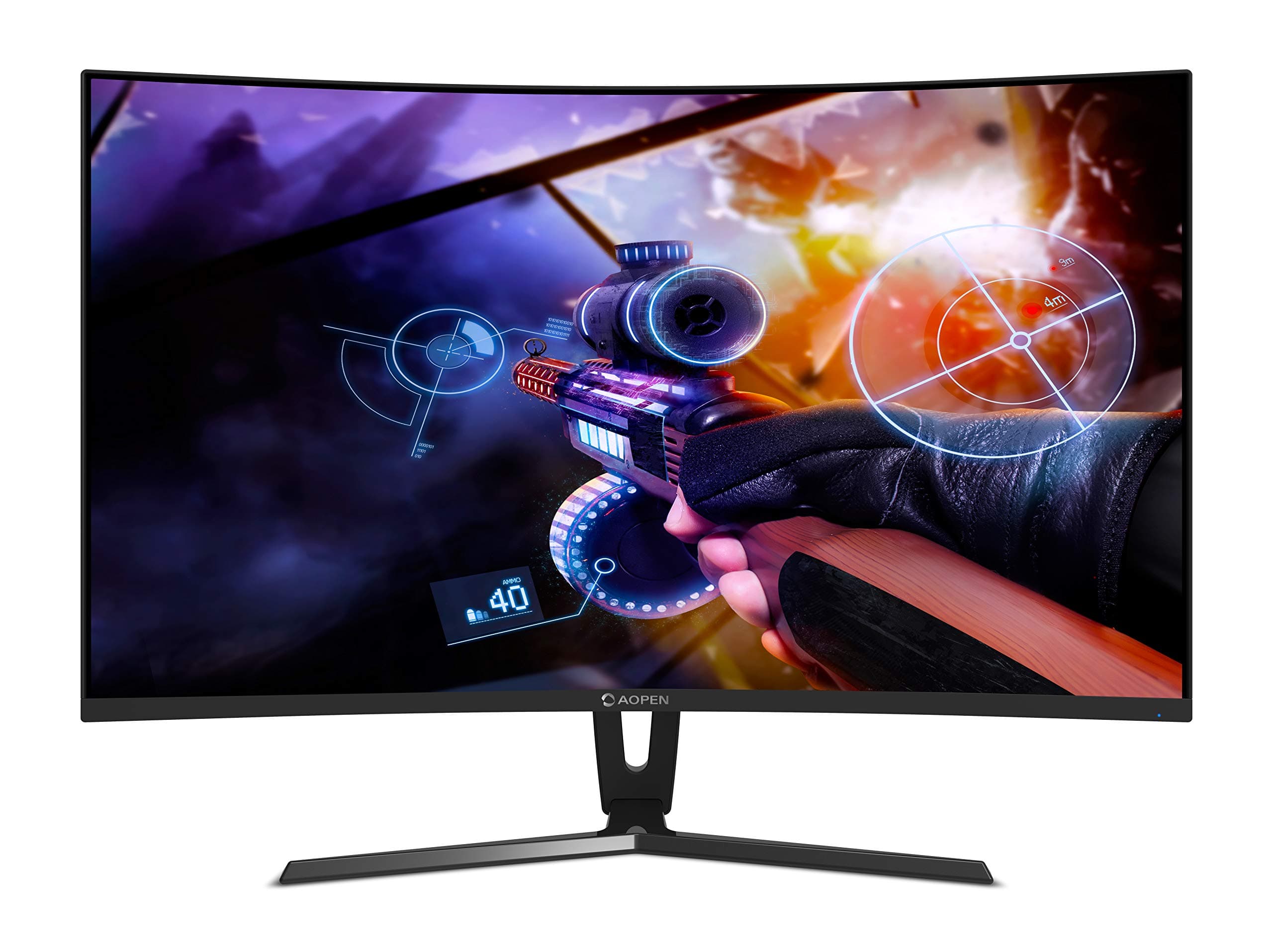

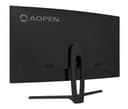
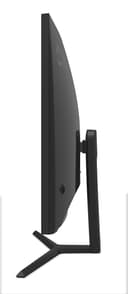
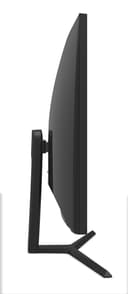

🎯 Level up your game with precision and style!
The AOPEN Acer 24HC1QR is a 24-inch curved gaming monitor featuring a Full HD 1920x1080 VA panel with an immersive 1800R curve. It boasts a fast 4 ms response time and a high 144 Hz refresh rate, enhanced by AMD FreeSync for tear-free visuals. Designed for comfort, it includes flicker-free and low blue light technology, multiple connectivity options (HDMI, DVI, DisplayPort), and a versatile tilt range, making it a perfect blend of performance and ergonomic design for serious gamers and professionals alike.


| ASIN | B07L9DYD9J |
| Adaptive Sync | FreeSync |
| Best Sellers Rank | #287,989 in Computers & Accessories ( See Top 100 in Computers & Accessories ) #2,174 in Monitors (Computers & Accessories) |
| Box Contents | Monitor, Power Cord, HDMI Cable, Display Port cable and Manual |
| Brand | AOPEN |
| Brand Name | AOPEN |
| Colour | Black |
| Customer Reviews | 4.2 out of 5 stars 577 Reviews |
| Display Technology | LCD |
| Display Type | LCD |
| Hardware Connectivity | DisplayPort, HDMI |
| Has Color Screen | Yes |
| Image Brightness | 250 cd / m² |
| Importer Contact Information | ACER INDIA PRIVATE LIMITED Embassy Heights, 6th Floor, No. 13 Magrath Road, Next to HOSMAT Hospital, Bangalore, INDIA – 560025 |
| Item Type Name | Monitor |
| Item Weight | 3390 Grams |
| Manufacturer | Acer India Pvt Ltd |
| Maximum Display Resolution | 1920 x 1080 |
| Model Name | 241QR |
| Model Number | 24HC1QR |
| Mounting Type | Wall Mount |
| Native Resolution | 1920 x 1080 |
| Network Connectivity Technology | Wired |
| Packer Contact Information | ACER INDIA PRIVATE LIMITED Embassy Heights, 6th Floor, No. 13 Magrath Road, Next to HOSMAT Hospital, Bangalore, INDIA – 560026, Acer Incorporated, 8F, No. 88 Sec. 1, Xintai 5th road, Xizhi, New Teipei City, TW 221 |
| Picture Quality Enhancement Technology | Flicker-Free, Low Blue Light |
| Product Features | Blue Light Filter, Curved, Flicker-Free, Wall Mountable |
| Refresh Rate | 144 |
| Resolution | 1920 x 1080 |
| Response Time | 4 Milliseconds |
| Screen Finish Type | Curved |
| Screen Size | 24 Inches |
| Screen Surface Description | Curved |
| Specific Uses For Product | Gaming |
| Total HDMI Port | 1 |
| Total Video Out Ports | 3 |
| Unit Count | 1 Count |
| Viewing Angle | 178 Degrees |
F**S
Overall An Acceptable Monitor Considering The Budget
I have been using this curved monitor for a sometime now. THOUGHTS: Keep in mind that the product is targeted to budget consumers so do not expect to perform like an expensive monitor. COLOR/ACCURACY: It's a VA panel with 4ms of response. Acceptable for its price. Brightness and color accuracy is good but little inferior to msi or samsung monitors that I have used in the past. All within acceptable range. Custom profiles can be set to users liking. REFRESH RATE: Through hdmi upto 120hz output is available at 1080p. Refresh rate also varies on the version of hdmi cable being used (hdmi 1.0 or 2.0). Through display cable upto 144hz is available at 1080p. MONITOR TECHNOLOGY (FREESYNC & GSYNC): Yes it's a free-sync monitor and will work with all AMD cards. It works with gsync too. However there is one minor concern that can be easily ignored (not to be confused with a defect). When gsync is on, I observed faint screen flickering when using cinebench or gigabyte's system information viewer (to control fan speed/temperature). Only the black, grey and white areas of the screen would flicker as long as the programs are kept open on desktop. Your mileage may vary. SOLUTION: Turning off such programs or minimizing them will stop the flickering till you open the mentioned programs again. If you wish no flickering at all turning off gsync (from nvidia control panel) would solve it completely. Again It's not a defect. The VA panel used in the monitor has not been validated by nvidia to be used with gsync (as mentioned in nvidia control panel). For more information check out videos available in youtube. Nvidia is aware of this and has already addressed it in 2019. No flickering observed when playing games or using daily programs or watching movies/videos with gsync on. BACKLIGHT BLEEDING: Some users complained of receiving units with backlight bleeding. It's not a manufacturing defect...not necessarily. Sometimes a design flaw can also be the cause. It all depends on the manufacturing standards how they want to channel the light on screen with minimal leakage to the sides reducing bleeding effect. Mine works just fine. Overall a good product to be used as a daily driver.
F**R
Good but not the best
Using this monitor for 3 months now and here is my review, The curved screen helps for better vision when facing direct. Viewing angles on this monitor are also excellent. Interface is simple to understand and use. In the box VGA, HDMI and DVI all cables are included with good quality built (My favourite thing) Brightness is way too high on this monitor, I keep it in the range of 30-40% Its 1080p but pixels are slightly visible when user mode is changed to gaming or movie. These are the things which are imp for you to know rest part you can check on youtube. Overall its worth the price.
A**R
good monitor with VA panels
I was sceptical about buying this monitor. As I read lots of bad reviews about dead pixels and screen quality issues. After lot’s of research i come down to three options aopen, lg ips with 75mhz refresh rate and Samsung curved quantum dot. Lg is cheapest one but it t has lots of bad reviews and has only 75mhz refresh rate that I don’t think as upgrade. Samsung one is too costly so decided to buy this. I m not sure but aopen and Samsung using same panels or screen technology . Brought this on diwali sale and wait for 20days too see if i come across any issues mentioned in other reviews. And i m glad that device is working fine. There are minor blacklight bleed but its not noticeable. As this one is not IPS panels is was worried about colour vividness. But when i test some YouTube video on this monitor i was impressed with its wide range or colour . Curve features of this monitor but is bit useless for at least 24” I guess if u buy 32inch screen it may feel more immersive with curve. Overall i can say product is good and definitely recommended.
F**O
Complete feature pack for budget gaming.
Pros: Supports upto 4k 144Hz (custom resolution), although the text turns out to be copy as it's not designed for it. HDMI, DP, DVI, cables included within 1920x1080 , 144Hz on DP 1920X1080 , 120Hz on HDMI Free sync+gSync compatible Immersive curvature of 1800R Fast response time of 4Ms Colour correction menu from monitor nipple type button on the back Not too big side bezels~1cm Images quality is natural with sRGb colour profile and great viewing angles from sides. VA panel, which is a trade-off for picture quality from IPS panel and response time from TN panels Bright enough display with 250nits Cons: The stand takes some space in front of the screen Height is non adjustable plus there is no wall mount of any standard Vesa or whatsoever Not Windows HDR compatible, not that it hurts but it just doesn't support it. I love it. Here on I can not go back to 60hz ever again. Will be back to edit this review after a few weeks. If you're still thinking to buy this, just do it unless you could push your budget to 20k (which basically have the same traits but additional physical features like stand, looks, adjustable heights and all) After about 8 months I first noticed some backlight bleeding when the screen goes blank. I was starteled at first but when the screen is lit, there really is no difference. For gaming, you might need the overdrive to stay off in the monitor menu options > gaming to prevent ghosting effects of moving sharp images.the viewing angles are great and color reproduction still on point.
R**J
Fantastic Gaming MOnitor
This is one of the fantastic monitors you get in this price range. Pros: -> 144Hz display(You will really feel the smoothness once you jump from 60 or 75Hz display). -> VA panel gives great contrast as compared to typical TN panel found in other budget 144Hz Monitor. -> Simply a great Gaming Monitor in budget. Cons: -> When in dark black screen you can see the panel is not A+ grade panel(Doesn't matter as normally you won't be in having black screen all the time). -> Doesn't have Vesa mount option, that's a deal breaker for many(Unless they are fine with low monitor height or can buy monitor stand) Conclusion: If you are looking for a budget 144Hz gaming monitor with Freesync/G-sync support and no vesa support doesn't bother you, then its a no brainier . Simply go for it. Highly Recommended.
M**A
Bad quality control by AOpen.
Its a lottery type of panel...you dont know whether you'll get a dead pixel or black spot or a good panel. Picture quality is decent.....blacks are average. The panel i got had a 2 black spots.
S**D
Good value for money if you can get it cheaper
INTRODUCTION: I bought this monitor to replace an old TN panel that I'd been using forever. Its not without its issues but it does get quite a few things right. Hopefully this review will help you decide whether its worth your hard earned money. PRICE: I picked mine up during an Amazon sale when there was a discount offer and a lightning deal on the monitor. At that price, the feature set this monitor provides can't be beaten. The price seems to have gone up since then though. BUILD QUALITY: Build quality is solid. Stand is all metal, pretty sturdy and the monitor doesn't shake too easily. No swivel or height adjustment, but you can tilt the monitor from -5°~ 20°. No VESA mounts either. Bezels are not slim but not very thick either and have a slightly reflective finish. No stuck/dead pixels or any other visual defects to speak of. CURVATURE: The monitor has a curvature rating of 1800R. Curved monitors offer a larger perceived field of view. I had no problems going from a flat panel to a curved one, but it felt a little strange going back the other way once I got used to it. UI: UI is clean, easy to navigate and the exact same one found on the similarly priced Acer panel. Not surprising given AOpen is an Acer subsidiary. Fortunately, unlike the Acer panel which has normal buttons, this one uses a joystick which is much more convenient and intuitive but with one rather annoying design choice - turning off the screen requires you to keep it pressed for 5 seconds. Not ideal if you quickly want to turn off your screen before leaving the room. IMAGE QUALITY: Colors are ok out-of-the-box but you'll probably need to fiddle around with the settings a bit to get the picture you desire. I found the default presets a bit too warm for my liking so I had to tone it down a bit to get a more neutral image. You can switch the color temp between warm, cool, normal and lastly user mode which enables the RGB bias and gain sliders. The panel isn't very bright but a brightness level of 50-60 will be enough for most people. Blacks look pretty nice as they should be on a VA panel. All in all, with a bit of tweaking, you can get a pretty decent image out of the monitor. VIEWING ANGLES: There is gamma shift when looking at the screen at an angle. The image becomes washed out and less bright the further you move from the centre. But its not severe and its a non-issue if you sit right in front of the screen like most people do. 144HZ: Now, onto the two biggest selling points of this monitor: 144Hz and FreeSync. You have to experience a 144Hz monitor to truly understand why so many people recommend one. Forget games for a second - your desktop experience is just so much better. Simple tasks like moving the mouse pointer, dragging a window around, scrolling up and down feel so much more fluid. And once you get used to 100+ fps in games especially FPS, going back down to 60 is something you'll want to avoid. Its not quite the horrible experience going from 60 to 30 but its still jarring. FREESYNC: As for FreeSync, the difference it makes is very evident. No more picking between screen tearing and input lag. And with the latest Nvidia drivers, you aren't restricted to AMD gpus anymore to use FreeSync. As long as you have a Pascal or later series card and a DPI cable, you're good to go. Just enable FreeSync in the monitor menu, then go to the Nvidia Control Panel, click on Set up GSync and tick Enable GSync, Gysnc compatible, Enable for windowed and full screen mode, and Enable settings for the selected display model. That's pretty much it. The FreeSync range is between 48-144Hz but you can extend it using CRU (Custom Resolution Utility). I have extended my range from 40-144Hz because FreeSync is even more beneficial at lower fps. 40fps on a FreeSync panel feels much smoother than 40fps on a non-FreeSync panel. BACKLIGHT BLEEDING: The biggest con, as others have mentioned, is that these monitors suffer from quite a bit of backlight bleeding. Its normal for IPS/VA panels to have a bit of backlight bleeding but its rather noticeable on these panels. I've had two of these, and on a completely black background or even when viewing a dark scene/image, you can see patches near the top and bottom that are brighter than the rest of the screen. Compared to my old TN panel, the black uniformity really isn't good. I mean if you stand far back enough from the screen, it kinda looks like there's a Batman logo on the screen. Of course, the severity of the issue ranges from unit to unit - the replacement I got was better than the original - but its still an issue albeit one that's only evident during dark scenes. If you get a decent unit, keep the brightness at sensible levels, and don't go looking at the edges of your screen every time the screen goes dark, its not something that will really bother you. CABLES: The DP cable that came with the first monitor was not only non-functional, it would stop my PC from even booting into Windows. I had to buy a separate DP cable to troubleshoot the issue. So if you're buying this monitor and plan on using FreeSync, keep a spare DP cable handy just in case. No issues with HDMI or DVI cables though. SUMMARY: Coming from an old 22" TN panel, this monitor has definitely been a good upgrade. The pros sufficiently outweigh the cons in my opinion. Would I pay the current asking price for it? Probably not. But during a lightning deal and/or when there are discount offers, it certainly represents good value for money.
G**.
A lot of features but a horrible VA panel !
I was pretty surprised to see a sublet of Acer selling such a feature packed monitor at such a low price. And best of all they were using VA panel and not TN(which are usually the cheapest and the worst looking). Before i start my rant about its issues, let me say this, for this price you won't get Freesync and 144hz from any other brand, the blacks are pretty good and the panel gets decently bright. And overall can be a decent buy if the panel issues are sorted out which i will discuss next. So despite my apprehensions with this brand and Acer in general, i dived in and bought it, only to realize nothing ever comes cheap, and there is a reason why AOPEN monitors are so cheap, usually with monitors QA(Quality Assurance) plays a big factor when deciding the price. You see the more monitors you have to discard on the assembly line to maintain a certain level of quality, the more end users end up paying for that quality. I think by now you know why these monitors costs to less, for those who didn't get it, the QA department for such cheap monitors is pretty relaxed, they allow relatively bad looking panels to pass through to cut down the price. For some this might absolutely be a non issue, but for the discerning user who values quality, i will not recommend this monitor, the proof is in front of you folks, the pics i have attached here show how a complete black backgrounnd looks on this monitor, its really funny because my 8 year old TN panel monitor looks way better. It seems like we should expect less of panels now than we did 8 years ago(Added a comparison screenshot of this monitor vs my 8 year old TN panel, just look at the panel uniformity and backlight difference between the 2) ! The panel uniformity is all over the place, and if you tell me to look the other way due to the price, i won't because even the costlier Predator series monitors have backlight bleed and uniformity issues. Ok enough talk about the first issue, moving to issue number 2. Typically and technically IPS panels have the best color reproduction, followed by VA and then TN. So i was expecting the monitor to have much richer and better colors than my TN panel, but sadly thats not the case, the colors are completely unrealistic, have an unnatural hue, and to add to that the monitor's edges are DIMLY LIT. Caliberating the monitor on your own helps a bit but its still not a good VA panel. Pros : ------- Good Contrast ratio Intuitive OSD Decent Build Quality 144hz Freesync(works with Nvidia gpus too now, but only with pascal and turing) Cons : -------- Pathetic backlight issues with dim edges Really bad color calibration out of the box Panel uniformity issues Giving it 2 star due to all of this, because in my eyes a monitor should have a solid foundation(The Panel) and then adding extra features adds value, if your panel is this poor then whats the point in having all those features.
Trustpilot
Hace 2 meses
Hace 4 días