We remain fully operational. Our teams are working around the clock to ensure your deliveries continue safely.

Descargar la aplicación


Servicios al cliente
Sobre nosotros
Copyright © 2025 Desertcart Holdings Limited
Descargar la aplicación


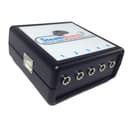
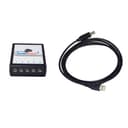
🦶 Step up your workflow game with zero lag and total command!
The StealthSwitch3 USB Foot Pedal Controller is a compact, durable device designed for Mac and PC users who want to program up to 5 foot pedals or switches with keystrokes, hotkeys, or mouse clicks. It features built-in hardware memory for lag-free performance without software conflicts, supports ⅛ inch connectors (with adapters for ¼ inch), and is made in the USA to commercial-grade standards. Ideal for gaming, voice communication, and productivity shortcuts, it offers seamless plug-and-play use with native Mac and Windows configuration software.


| Brand | StealthSwitch |
| Item model number | SS3R1 |
| Hardware Platform | Mac OS X, Windows |
| Operating System | Windows Vista, Windows XP |
| Item Weight | 0.353 ounces |
| Product Dimensions | 2.5 x 2.5 x 1 inches |
| Item Dimensions LxWxH | 2.5 x 2.5 x 1 inches |
| Manufacturer | H-Mod |
| ASIN | B00NUFCR9Y |
| Is Discontinued By Manufacturer | No |
| Date First Available | September 23, 2014 |
U**K
No drama unit that gets the job done.
If you're trying to use footswitches with your computer, this does the trick with no drama. Programming the pedals to implement keystrokes is straightforward using the downloadable software (I'm on Mac - didn't try the Windows software.) Once the box is programmed as you want it, you no longer need the software - so no worries about having some funky process running in the background. The box is small and weighs next to nothing, so it's handy for travel. Some notes to potentially save you some time: * Take care when downloading the software to grab the right one. This box is called the StealthSwitch3 - the company has a different product called the StealthSwitchPro. If you download the other software by mistake, your head will spin wondering what's going on. * The spacing of the jacks is rather close together. This is probably a good thing, since wider spacing would require the box to be bigger. However, if you are using your own pedals (not the ones H-Mod sells), they likely have 1/4" plugs. The SS3 uses 3.5mm (mini) jacks, so you need an adapter. I found that most of the adapters I have are too big in the barrel diameter to allow use of adjacent jacks. Right now I'm only using 2 to 3 pedals, so it's no tragedy - I can just use jacks 1, 3, and 5. But since I may want to use more in the future, I emailed the company, and they pointed me toward some adapters that have a cable (and thus narrower barrels.) The company was, by the way, quite good in answering my questions (even on a holiday weekend.) That definitely adds to the "no drama" factor. Overall, this is a handy, no-fuss no-muss unit. Which in a world of gadgets that waste your time with endless features and bloatware is worth 5 stars any day.
T**R
Did not work at all
Pros: Might work with the least stealthy line of switches ever made by the same company. Amazon return policy is amazing Cons: Unable to get to work in either Win 7 or Win 10 on multiple computers. Would not program any input, making it utterly useless to me. I read every direction I could find online. Comes with nearly no documentation.
R**6
Great Customer service and followup on their product!!
So I have to write this review, which I seldom do. After purchasing this product for use with work and gaming, I received an email from one of the owners who was following up on my satisfaction with their product. When installing the software, I happened to have a windows 10 problem, that required me to reset my OS and re-install all of my programs. It just happened to intersect with installing the software. So after a brief back and forth via email, they convinced me to try the install again. So for customer service...5 stars!! So here is what it does for you gamer's. You can designate one of your 5 foot pedals to be a "toggle shift,alt,ctrl key" or a "hold if down with your foot shift,alt,ctrl key" like a keyboard. So you can have up to 10 keys covered before even thinking of a macro. Unfortunately you are limited to only 4 macros per profile, and each macro is limited to 4 keystrokes. So if you need to add seconds between keystrokes, this product falls short of a gaming keypad. If you have ambitions of steering with your feet, will not hold down the left,right,up,down keys as well. These are only minor issues and I thought I would mention this for those like me that like to push the limits of possibilities. I use CAD type programs for work and this product is ideal for those repetitive tasks. It will also keep your feet moving if you choose to max the capabilities of this product. I give it 4 stars, because I would have liked to see more macros allowed and additional steps to each macro. I have only been using this for 2 hours now, so I will edit this review if I have stated anything incorrectly. I hope this helps.
A**K
Device works, although software is buggy didn't work well ...
Device works, although software is buggy didn't work well in either windows 8.1 or 10, had to manually delete the driver for the device in the device manager to make the software program correctly. And also on some systems I get Error 0x1C5 (453): Can't final DLL entry point usb_open_by_id in libusb0.dll. I mean... it is 2015 we still aren't out of dll hell?
M**E
Exceeds all expectations, and here are the reasons ...
I changed from another company's popular usb-mini connector based controller to the Stealthswitch 3, seeking a more durable solution. Durability: The Stealthswitch3 is durable and rugged enough to be unaffected by dropping or accidental under desk kicking and movement. Software: Think of the software as being similar to radio programming software. You configure your desired footswitch settings, then "write" to the device. Unlike other footswitch products, the settings are retained in the Stealthswitch3, and there's no need to run the programming software in order to make the unit work. After programming the Stealthswitch 3 (via Mac or Windows), you can move it to, and use it on a Linux box, Raspberry Pi, Arduino, or even a Sony Playstation. Although I'm a Macintosh user, I use my Stealthswitch3 for gaming via Parallels. Setting up the Stealthswitch 3 within Parallels, was far easier than other devices, with no need to get into the weeds to cause Windows to recognize the device or the programming software. It just worked immediately after selecting the Parallels usb controller. And so, within Parallels, it works fine with any version of Linux and any version of Windows. The "macro" function of the Stealthswitch is specifically used to take care of modifier key combinations, such as Command-Option-C, or whatever. If you desire literal multifunction strung out macros, then (using your favorite macro program) assign that macro to a key or key combination, and map the Stealthswitch3 to it . Thanks to the phono plug connectors (instead of usb), the unit will handle any kind of pushbutton only to be limited to your imagination. My only recommendation, to the H-Mod staff, is to port the Mac application over to Linux, in order to provide for those users. Final comment. Many thanks to the H-Mod staff for developing this standard-setting product.
C**Z
Excellent System - well worth the price
For the last 6 weeks, I've been using all five pedals all day long, to perform 15 different tasks*, and I could still program at least 6 more tasks. I'm a software engineer, so I type for a living. I've developed medical problems with my right arm, so I try to use it as little as possible. For the last few years, I've been using an AutoHotKey script which allows me to type with just my left hand on just the left side of my keyboard, but there were still a few keys that I couldn't easily hit with my left hand. Adding the pedals has solved that problem. The pedals integrate seamlessly with AutoHotKey (which is free, and there are many free scripts out there). I've got two FS-4 pedals for my left foot, two FS-4 pedals for my right, and an FS-3 in the middle, so it is easy for me to feel which pedal is under my foot (FS-3 and FS-4 have different textures, so they are easy to tell apart when I take off my shoes). I've got the pedals velcro'd to the rug so they stay put. Setup was quick and easy. This (combined with AutoHotKey) is a very powerful system, and it has been working very well for me. *I use the pedals to perform these tasks: shift, select all text on the current row, type "/*", type "*/", type "select * from", go to the top of the page, go to the bottom of the page, page up, page down, run in debug mode (F5), run without debugging (ctrl-F5), step over (F10), step into (F11), create a new page in EditPlus, newline/enter.
P**E
No Windows 10 support!!!!
Not sure how a PC peripheral can still be sold today without support for the most current operating of the last 5 years. Wasn't able to program the device. Returned
J**Y
Box is compact, software is straight-forward, and the website / manual have plenty of information if you run into trouble.
Even though I ran into some issues installing it, the website and quick-start guide had all the information I needed. I use this mainly as a push-to-talk button for voice software like Skype or Discord, and it works perfectly. The box is smaller than I anticipated - which is great for me to mount it to my desk and tuck it out of the way. I have been trying to find a way to program extra function keys (F13 - F24) so I can use 'unused' keys, but can't seem to find a way; I instead just use Scroll Lock as a common trigger. Cord is plenty long and software is very straight-forward. I'd give it five stars if it had just a bit more key customization. If I brute force an F13 key it registers as a "MACRO" and doesn't play well with other software, but that's a pretty minor complaint.
Trustpilot
Hace 1 semana
Hace 2 meses