🔒 Elevate Your Security Game with UltraHD Precision & AI Smarts
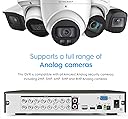
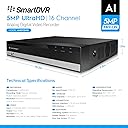
The Amcrest 5MP UltraHD 16 Channel DVR is a professional-grade analog security recorder delivering 5MP resolution at 10fps across 16 channels. It features advanced AI capabilities including face detection, recognition, and perimeter protection with tripwire and intrusion alerts. Designed for easy installation, it uses existing coaxial cables and supports up to 10TB storage for continuous recording. Remote smartphone access via the Amcrest View Pro app ensures you stay connected to your security system anytime, anywhere. Cameras and hard drives are sold separately.
| ASIN | B07MQK4V7N |
| Audio Input | RCA |
| Best Sellers Rank | #343 in Surveillance DVR Kits |
| Brand | Amcrest |
| Compatible Devices | Camera, Smartphone |
| Connectivity Technology | USB |
| Customer Reviews | 4.2 out of 5 stars 390 Reviews |
| Global Trade Identification Number | 00854088008539 |
| Item Dimensions L x W x H | 10.2"L x 9.3"W x 1.9"H |
| Manufacturer | Amcrest |
| Media Format Digital Video | HDD |
| Memory Storage Capacity | 10 TB |
| Mfr Part Number | AMDV108116-H5 |
| Model Number | 4332024997 |
| Number of Channels | 16 |
| Product Dimensions | 10.2"L x 9.3"W x 1.9"H |
| Total Usb Ports | 2 |
| UPC | 854088008539 851032007112 |
| Video Input | BNC/Analog |
| Warranty Description | 1 Year Warranty |
R**E
Good quality and easy installation
Good service and delivery
J**O
Great product
My parents had a Samsung all in one camera system for their house. The system had 10 x 1080p cameras and they never did look that great using the Samsung DVR even with the settings set to high quality (1080p). This is the 3rd year of owning the Samsung and it finally died. The board would recognize if a hard drive was not plugged in but it would never initialize. I purchased this unit for them and configured it in about an hour and the picture quality looks like it is using the full 1080p of the cameras. I have used Amcrest before with their wireless cameras and they always seemed to do well. This unit works well and is easy to navigate using the Amcrest View Pro software. I scanned the barcode with their Apple and Android phones and it just worked. Great device!!
N**A
Knowledgeable, Patient, and Effective at setting up a Awesome DVR
My experience with Adam Pometti with bay alarms has been absolutely fantastic. What do i mean by fantastic? Basically not only was he very helpful as well as thorough with system selection, he also gave me the best options that would benefit my offices in what we were looking for. Not only that he also referred me to an agent that could help me with my home. Highly recommend the alarm for your safety and security. Thank you for your continuous help Adam P. The DVR quality is clean, clear and not noisy.
S**E
Fast easy setup
I purchased the Amcrest Pro HD 16 Channel without Hard Drive about two weeks ago to replace a DVR left behind by the last homeowner. Setup: -Setup was pretty simple although the connections on the rear for each camera seem a little close making it somewhat difficult to attach the connector and turn to lock. I found that if I wanted to remove a connection from say channel 5, I’d have to remove the surrounding cameras to more easily spin the connector off. -There is no power switch, so once plugged in, the unit is on. Once turned on, the programming was a breeze. Step by step, the DVR helps you along the process and you can follow along in the paper manual if need be. -This would not work with my old Dell flatcreen desktop monitor which is probably about 10 years old so I purchased a Sceptre monitor for roughly 70$. Clear picture. I’m using a VGA cable but also have the option for HDMI. - This device did NOT come with a hard drive so I installed a Purple 3TB 3.5 harddrive. The harddrive seems like enough space but I haven’t had much time to see how long it records for. Installation was simple, remove the DVR cover and screw in the harddrive, attach two connectors and reassemble cover. - Motion Detection. Like most DVR’s now, this Amcrest has motion detection. I found it easy to set the locations to record, for example 1 of my front cameras captures a portion of the roadway, I was able to draw the motion detection area as my front lawn and driveway to exlclude the street. Now my phone sends me push notifications through the app when someone is in my yard and not every passing motorist, which brings me to the app. - I’m using and IPhone so I downloaded Amcrest View Lite. It’s a free App. Once in the app you click on device manager and you can scan the QR code sticker on the DVR or you can scan the QR code from your computer monitor during setup. This will then attach your DVR to your phone app. Monitoring is Free and simple. I can go back and view video from my DVR right on my phone over WiFi or LTE. My motion detection also allows push notification so when someone is on my property, my phone will notify me with a banner. By clicking the banner I have it set to show me a video clip of what set it off and it does just that! - Seperate from the DVR, the free app also has the availability to connect to my Amcrest 1080P indoor PTZ camera. I can view and rotate/angle the camera right from the app. All in all it’s a great simple unit to setup, even if you have minimal knowledge of DVR’s. I think clarity could be better but that also coincides with the cameras you have and messing with settings. I wouldn’t hesitate to purchase again and I will update in the future if I find any more features that I like or dislike.
J**L
Well-designed, easy to use, and reliable.
I am a big fan of Amcrest products. This latest 1080p system replaces another Amcrest system I had. I tried another manufacturer's system and was very disappointed. Amcrest has been reliable, easy to use, and accessible from anywhere, without failure. I also like the fact that it is compatible with 720P and 960h cameras; I didn't have to purchase 16 high-resolution cameras all at once . The only downside, if you can really call it that, is that you need to ensure that you are using a compatible hard drive, one that is intended for video or surveillance use. One that is designed for desktop computing may not work. Check Amcrest's compatible hard drive list before you purchase a hard drive for this system. I am using a Seagate Skyhawk 6 TB unit, and am very pleased. I have no trouble heartily recommending the Amcrest surveillance products
B**Y
Good for a day
Device worked well and was easily configured. Sadly after one (1) day in use, the device stopped detecting the SATA drive. Took the drive out of the unit and attached to SATA to USB adapter and plugged into PC, drive detected and functioned normally. Tried two (2) more hard drive in the unit, it would not detect either of those drives. Contacted Amcrest support via email, took over a week for an initial reply. Thereafter support suggested simple changes which I informed them had already been done. Support agent(s) continued reading their script and being less than useful. Threw the unit away and went with another vendor. Not a bad product perse, but the support after the sale is a joke...
S**F
Very Poor Tech Support
I will be honest, I received my shipment no problem, installed the hard drive no problem, hooked it up and booted it no problem. When it came up I configured everything, got finished but had no video of any of my cameras. I played around for a while before calling tech support whereas I was told my cameras were not compatible with this system, I was pissed. The ad on Amazon and the answered questions all said my cameras would work no problem. Anyway, I unhooked everything and hooked my old system back up getting ready to send the Amcrest back. Imagine my surprise when my cameras would not work with the previous system that worked just a couple hours before? Long story short I discovered my camera adapter had failed and I was getting no power to the cameras. Once I solved that issue I hooked the Amcrest back up and I’m thrilled with its ease and the quality of my video not to mention the speed and quality of remote viewing on my iPad. Wouldn’t it have been a shame if I had boxed this back up and shipped it back because some inept person in India was either too lazy or didn’t know enough to help me fix it? Very poor tech support, I wish there was a way to find out who I spoke with because retraining or termination is called for here, I just hope I never have to use tech support again, why don’t companies realize how frustrating it is to speak with someone who can’t speak English and has no more technical knowledge than the average user? The review would have gotten 5 stars had it not been for the lousy tech support
C**J
Awesome DVR and NVR all in one, a must buy
Used Qsee for years but they went out of business and I've become a fan of Amcrest products after purchasing this. System auto detects type of cameras so I was able to use my old Qsee cameras, with new Amcrest BNC cameras and with Amcrest $40 Wifi PTZ cameras all at the same time. What really impressed me is that I could use 16 BNC Cameras with up to 16 IP cameras at the same time. Its a hybrid both DVR & NVR so why not get this. Was able to easily add Hard Drive internally as well as external usb drive (one caveat is there is only one usb port for a mouse & external drive so you'll need a usb splitter) The software has tons of options like Face detection thou I have yet to try. I love that I can listen to the audio live, talk through the cameras and control the movement PTZ. Only con is its only 5mp but for my use 1080p resolution was enough. With only 12 cameras recording at 1080p 265 recording 24/7 I had to get a 10TB hard drive to record 30 days.
8**L
Easy Setup Security Cameras
Works great! I installed the hard drive. EASY I added 13 of the 16 available cameras. EASY I then hooked up to my network. EASY and I know have mobile access. Also EASY
S**N
Not satisfied with the product
It's stopped working
Trustpilot
2 weeks ago
1 month ago