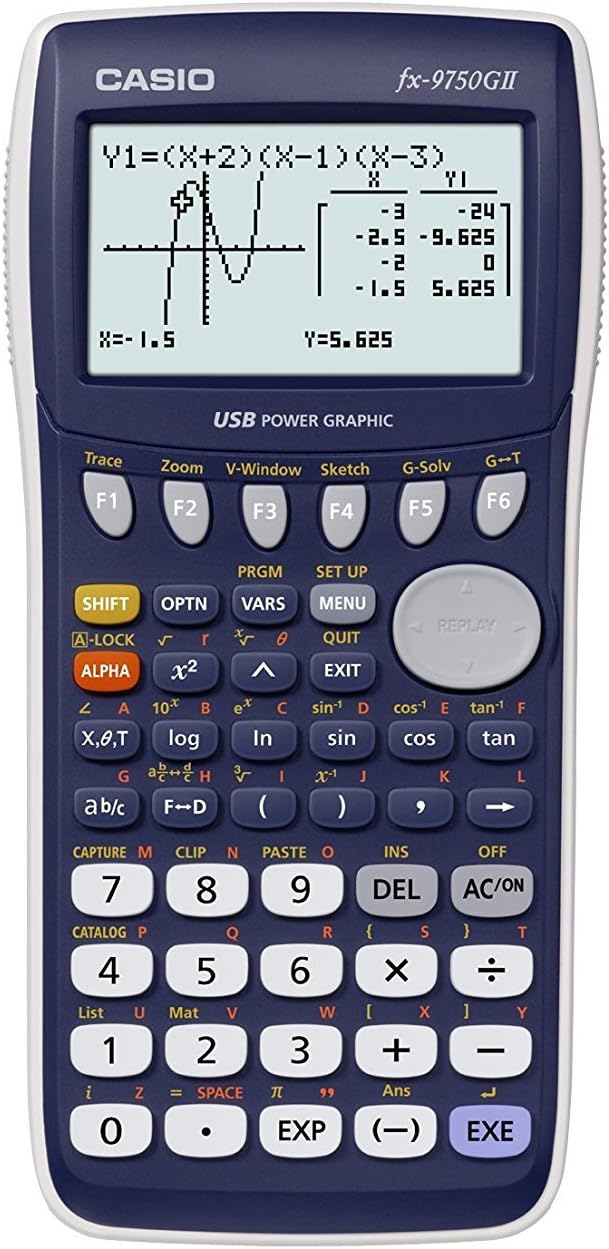

Casio fx-9750GII, Standard Graphing Calculator, White
Product ID: 1144731
Details
- BrandCasio
- Calculator TypeGraphing
- ColorWhite/Blue
- Power SourceBattery
- Screen Size2
⚡62KB RAM high-speed CPU
📊21x8 large display
🔌USB connectivity
Buy anything from 5,000+ international stores. One checkout price. No surprise fees. Join 2M+ shoppers on Desertcart.
Desertcart purchases this item on your behalf and handles shipping, customs, and support to Mexico.
📈 Elevate your math game with Casio’s powerhouse graphing calculator — smarter, faster, and exam-approved!
The Casio fx-9750GII is a professional-grade graphing calculator featuring a large 21x8 character high-resolution display, a fast 62KB RAM CPU for rapid calculations, and USB connectivity for easy data transfer. Designed for students from middle school through college, it supports advanced graphing of conics, inequalities, and parametric functions, plus statistical and financial calculations. Approved for major standardized tests like the SAT and AP exams, its intuitive icon-based menu ensures quick mastery, making it a cost-effective, powerful alternative to pricier competitors.


| ASIN | B00154GSQA |
| Best Sellers Rank | #467,624 in Office Products ( See Top 100 in Office Products ) #140 in Graphing Office Calculators |
| Brand | Casio |
| Built-In Media | Calculator |
| Calculator Type | Graphing |
| Color | White/Blue |
| Compatible Devices | Devices with USB or 3-pin cable connectivity, including computers and projectors. |
| Customer Reviews | 4.6 out of 5 stars 4,088 Reviews |
| Display Type | LCD |
| Enclosure Material | Plastic |
| Global Trade Identification Number | 00079767186050, 02602020002071, 04971850033905, 04971850186045 |
| Item Dimensions L x W | 6"L x 4"W |
| Item Type Name | Graphing Calculator |
| Item Weight | 215 Grams |
| Manufacturer | Casio Inc. |
| Mfr Part Number | FX9750GII-WE |
| Model Name | RA3458 |
| Model Number | FX9750GII |
| Number of Batteries | 1 A batteries required. (included) |
| Power Source | Battery Powered |
| Screen Size | 2 |
| UPC | 999994697238 680808309163 112039989161 088021724426 806791935336 021112283969 617407450729 079767186050 641438182052 031111415902 807031786848 700465277329 782386297235 601000834277 640206656320 823019547898 767872159624 745734284233 809187152300 800011177117 806293937333 079767186043 014444935408 012302291536 808112747246 638084588185 801593134024 151903448588 031113295007 642008957995 0797671834… |
| Unit Count | 1.0 Count |
| Warranty Description | 90 day |
H**N
Passed "Algebra II" with an A- Throughout Last Year - Helpful Tips
When I first got this calculator, I had no idea what I was doing. So, I'll give you terms that went on in the classroom with the Texas Instruments that may be confusing to users of this calculator. This way you guys'll not be as behind as I was when I had to figure this stuff out by myself and with the book (which came in super helpful btw). GRAPHING ------------------------------------- - When the teacher says "go to (press) Y= (Y equals)," what you really do is press the MENU button (it's grey and next to the big circle) then select GRAPH. - If the graph doesn't seem to work at all, or the line seems really funky, First go to GRAPH and then press DRAW. After that you should press F3 (View Window aka how much you want the graph to be able to see) and then F1 to go back to the initial view window (where something will probably be). Use the arrow keys to move around until you get a good view of it. - If you wanna see the entire picture because your calculator is zoomed in too much, first be in GRAPH mode and then DRAW. Then press F2 and choose AUTO. Note: this can sometimes be too much data to go through. Use the previous tip to set the window back to normal. - If you need to find the roots, it's all in the simple touch of some buttons!! After you DRAW your graph, press F5 and then ROOT. This will tell you where the roots, and zeros are. THIS IS A FEATURE OVER THE TI-86, where in the TI-86 you must actually look through the graph/table!! - If you need one of those "shading inequalities" graphed, simply go to the GRAPH setting. After that press F3, then F6 for more options, and then choose which one fits your problem. Not sure how to access the table next to the graph on the same screen yet, if anyone finds that out please comment so. OTHER STUFF ------------------------------------- Switching Modes - If you ever need to switch modes, press the MENU button again. (Choose RUN.MAT for matrices (the MAT option in this mode) and basic calculations.) Need to set Calculator to Degree form - in RUN.MAT mode, press SHIFT and then the MENU button to SET UP. From there you may configure settings. Probability Terms - When you have to learn about probabilities, (in RUN.MAT) press the OPTN button (next to the SHIFT key), go to PROB and everything should be there. List Functions- When working with Lists, you must go to MENU then STAT. After entering your data into the first column you must go back to RUN.MAT and press SHIFT then (1) to put down "List." Type (1) into there for the first column, (2) for the second column, etc... If you were wanting to find the median (for example) of the list, simply press OPTN, select Med, then put down "List" and then press (1). Parenthesis - ALWAYS close parenthesis (()) when doing commands. Also when typing a negative number to a certain power, such as (-2)^7. History - To see previous equations in RUN.MAT mode you must press CLEAR twice. I have no idea why this is like that; maybe it's a feature to help focus on one problem. If you need ANY other tips on a [CERTAIN FUNCTION]/[CERTAIN MATH TERM], use the INDEX in the book!!! I remember trying to go through the pages for 40 minutes to find out a certain function when I remembered... indexes exist!! Lol... Also, DO NOT LOSE THE BOOK!!! It is extremely helpful and pretty easy to understand. BACK TO THE REVIEW ------------------------------------- I will be sure to add more tips later on, however this is enough for a good start. I passed Algebra II A&B with this calculator with an "A-". Don't think that your kid or even *you* may not get an A just because of the choice of this calculator; I made a bunch of silly mistakes that had to do with my thinking and not the calculator itself. It has MORE features than the Texas Instruments for only half of the price!! Someone that I know who is taking college classes has a very fancy Texas Instruments calculator, and even then I heard him say "Yeah, I've got the conics app." With this calculator which is probably 1/3 the price of that one, the conics "app" is a standard feature!! There's no reason why to not like this thing for the price and value it offers! The batteries supplied with the calculator lasted me an entire school year, and I used it outside of math class as well. When it says "Batteries are low! Please replace" you've still got another 2 months or 3 with them lol, but I recommend the Amazon Basic batteries if you're going to need replacing. 100% recommended - it does the job very nicely. (UPDATE) WARNING: If one is taking Calculus, there will be no nDer function for finding the derivative easily. One will have to know how to do these by hand...
J**.
Better than the TI at less than half the price
Our kids' schools all require the TI-84 calculators. Sorry, but this is such a scam. Overpriced calculators - it is shameful that educators are in this together with TI. Teachers should help to encourage competition instead of taking such an active part in the scam, so that the TI calculators can be priced at a more affordable price for all students. Sure, textbooks are to blame also (somebody should look into an anti-trust case), but teachers can make a stand! In total, we had purchased 3 TI-84's for two kids. 2 of the TI-84's have been stolen. That's when we decided we are not going to throw more money away on the TI's. Instead, purchased this Casio. Like other reviewers, we had concerns that textbooks and teachers only teach the TI. But after two stolen calculators, we took the chance. Some reviewers had complained of the skimpy manual. While I am certain that at some point reading the manual will be useful, the calculator is quite intuitive to use. I was able to graph polynomials, solve systems of equations, etc. all without reading the user manual. I then showed my daughter, who is taking Algebra II in high school, how to use those functions. Since then, when I asked her how she is doing with the calculator, her answer was that she could always find a Youtube video that showed her how to do what she needed. So in summary, great calculator for less than half the price of the TI, less chance of it getting stolen (maybe it is good that teachers only teach the TI calculators), and does everything the TI does with a much easier interface.
D**R
Great value for college students taking Probability and Statistics.
I ordered this calculator for a probability and statistics course and was pleasantly surprised to find it has all the main features of the more expensive TI brand. Important advice to students: 1. Make sure you read the "technology" section after each chapter of your statistics textbook if your class has a book that shows the steps for using a calculator. (Usually those are provided after the chapter content and either before or after steps are given for using other technology for solving problems with excel or statistics software.) 2. Look for "how to" videos on YouTube using the name of the particular type of problem you'll be solving. For example: 2 Proportion Z-test 3. Don't get discouraged if some of the steps look slightly different than the TI tutorials if no Casio instructions are found because every time it counted, after the first couple of steps were the same you could then see exactly how to follow the steps using your Casio because the only thing that was different was the particular name or location of the button on the calculator and the same feature is available on yours using a different name or button in a different place, so you will be fine. I had read some of the other reviews on here before ordering mine and almost didn't order because a couple of them said their calculators didn't last more than a month or some other short amount of time. However, mine has been working just fine all semester and most importantly was there for me to use for the proctored exams when it really counted. If you're wondering if you will be alright with this one instead of the more expensive one or if you should just bite the bullet to avoid any chance of problems down the road, based on my own experience using this same Casio fx-9740GII Graphing Calculator, I'd buy this one again. I think you'll be pleasantly surprised (with just a little digging around online) with how many shortcuts for the formulas are possible with this one instead of having to do them manually. I know I was. I saved several hours once I realized there were tutorials online and in the textbook that reduced long formulas into just a few simple calculations. 4. Take the time to really sit down and get familiar with your owner's manual. The extra minutes you spend doing this as well as looking at the names of the formulas and the names of the kinds of problems you'll be required to solve before you do each chapter will make finding shortcuts a breeze and save you hours of frustration and time from the very beginning of the semester. Statistics can be very enjoyable and rewarding as a challenge if you make sure you study and practice problems each day. Stay ahead of your assignment schedule no matter what because it's one of those subjects where you must stay on top of it with each subsequent chapter building on the ones before it. Along with your textbook and your decision to spend at least a half hour every single day (without missing even one) to do your assignments, quizzes and tests, your Casio calculator could be your best friend all semester long for your Probability and Statistics class.
M**L
Great calculator, packaging is like Fort Knox
Bought this for my son to use on the SAT (his other graphing calculator was one that needed to be charged & he kept losing the charging cord). Perfect for that & advanced math classes, great price. But the packaging is insane. I understand anti-theft measures, but there's a fine line between those and anti-CUSTOMER measures and this packaging crosses it. Just be aware that you are going to have to work for this prize of a calculator. Have a first aid kit ready, JIC.
A**A
Graphic Calculator
I got this for my daughter during her senior year and se used it a lot, she said it was very completed for what she needed to do
T**H
The best calculator ive ever use ...better than the Ti-83/84 (in my opinion).
When i first read about the calculator, i was a little bit sceptical about it. Cause i was wired in high school in the teachings of the Ti and i thought this was the only graphing calc there was to do all what i need for school. Until, i read about this Casio and the reviews that came with it. The reviews were very positive with the exception of the time it takes to learn how to use it and how different it is from the Ti. At first i was afraid of getting this because of the differences but, wanted it because it was half the price and good money saver for college. So i bought it and now i do not regret it it is the best!!!!!!!! The calculator is easy to use and very simple. Simpler than most Tis!!!!!!!!!! Do every thing i need and more!!!!!... The setup for the calculator is well put together i like how it is designed. I don't know why the schools are not using this calculator its far more simpler and cheaper than a Ti It really bothers me. The manual is very helpful you dont need to read all of it only just the section you need to know for school for a certain chapter at a time so people should give it a try i highly recommend it. best thing i bought for 42 bucks!!!!!!
E**Z
Calculator arrived promptly and in perfect condition
I bought this for my son who has been addicted to his iPad but also loves math. I saw a Reddit that suggested that sophisticated calculators might be interesting enough to hold the attention of a child the way an iPad might but also be more specifically educational and less psychologically toxic (especially no ads). It works great, he loves it! Thanks to the seller for providing this great product.
C**Y
Unbelievably Low Price
The HP-35, my first calculator, cost $400 + $24 tax. The Casio cost 1/10 + no tax! (I discovered that in FL it is still possible to order without tax from Amazon if the dealer is outside of FL. Amazon began taxing FL residents at the beginning of May.) It is amazing how much more the Casio can do compared to the HP=35, especially in view of inflation! I tutor math, and this calculator does about everything required for high school math including AP Calculus, College Algebra, Pre-Calculus, and other subjects. If more students knew about this calculator, it would soon outsell the TI-84. Of course, if you think you have to have the latest full-color back-lit screen to show of to your friends, then go ahead and spend OVER 3 times as much ($125). But if you are a secretly partly nerdy or fully frugal or both, the Casio will not disappoint. The Casio actually comes with a manual specifically for this model instead of a computer disc or a web address. The screen is smaller than 9860, but contains all the same information, which is more than the TI-84. (The X-axis is longer; it can display two full cycles of sinX in radians when each pixel = 0.1 unit on both axes.) The 9750 does not have the math input option. That would be the only reason I can think of right now that would justify spending more money for the 9860. The 9750 does not have the spreadsheet or the e-act features of the 9860, but I seldom use them.
E**I
School use
Bought for my daughter to Sixth Form studies, it works fine.
S**N
Packaging approach too dangerous
Casio must review the packaging approach. Not many homes have wire cutters to remove the rivets. We risk getting hurt in using other home tools that include knives and scissors.
A**R
CASIO GRAPHING CALCULATOR
product delivered earlier as scheduled , the item is authentic casio and new as it is well in it s packaging and with battery included, the lowest price I got.
A**O
Excelente calculadora
Quería una calculadora científica que hiciera gráficas y fuera programable, por este precio es una excelente opción, no hay nada mejor, cualquiera otra cuesta el doble o el triple. Para mí es una ventaja que use pilas AA porque son fáciles de conseguir y hacen a la calculadora muy confiable. Muy contento con mi compra.
D**.
No está mal
Era lo que esperaba, no me ha sorprendido nada. Es lo que estaba buscando, por eso la pedí. Parece buena
Trustpilot
5 days ago
2 months ago