Desertcart purchases this item on your behalf and handles shipping, customs, and support to Mexico.
🚀 Double your screens, double your impact!
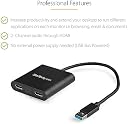
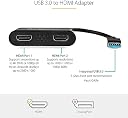
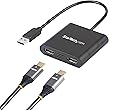
The StarTech USB 3.0 to Dual HDMI Adapter (USB32HD2) transforms a single USB 3.0 port into two independent HDMI outputs, supporting up to 4K resolution on one display and 1920x1200 on the other. Ideal for professionals seeking enhanced multitasking and productivity, it offers smooth performance via high-bandwidth USB 3.0, compatibility with devices lacking multiple video ports, and is backed by a 3-year warranty with lifetime support.


| Asin | B0725K1MHH |
| Best Sellers Rank | #27,329 in Computers & Accessories (See Top 100 in Computers & Accessories) #31 in USB-VGA Adapters |
| Box Contents | USB video adapter (1)^quick-start guide (1) |
| Brand Name | StarTech |
| Colour | Black |
| Compatible Devices | Monitor |
| Connector Type | HDMI |
| Current Rating | 1 Amps |
| Customer Reviews | 4.5 4.5 out of 5 stars (9,472) 4.5 out of 5 stars |
| Global Trade Identification Number | 00065030868952 |
| Importer Contact Information | Shop The World B112 Virwani Industrial estate Western Express Highway Goregaon east Mumbai 400063 Email [email protected] www.shoptheworld.in WhatsApp no +919820168421 |
| Input Voltage | 240 Volts |
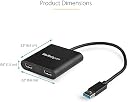
| Item Dimensions | 31.5 x 6.6 x 1.5 Centimeters |
| Item Package Quantity | 1 |
| Item Weight Unit Of Measure | 0.06 Kilograms |
| Manufacturer | Startech.com |
| Manufacturer Part Number | USB32HD2 |
| Model Number | USB32HD2 |
| Number Of Items | 1 |
| Number Of Ports | 2 |
| Packer Contact Information | Shop The World B112 Virwani Industrial estate Western Express Highway Goregaon east Mumbai 400063 Email [email protected] www.shoptheworld.in WhatsApp no +919820168421 |
| Power Plug Type | No Plug |
| Product Finish Type | Matte |
| Specific Uses For Product | HDMI Display |
| Unit Count | 1.0 Count |
| Upc | 065030868952 |
| Warranty Description | no warranty available |
| Warranty Type | Limited |
User
Usb to Dual Hdmi Converter
Excellent product.
User
Super
It's costly but worth . The best product. I bought this after using a cheap brand Rs 1200 that damaged my dell monitor Rs.13000
User
Good one
House of Worship, Lyrics Display
User
Very efficient product.
Very good product. It works very well. Earlier I had purchased some Chinese product from Amazon only but it didn't work. And then I came across this product and I went for it and today I received it and it is working very effectively. Though there is some quality issue if I connect it to a bigger size monitor like 32 inch however picture quality is very nice on small 22 inch monitor.
User
Wonderful product that allows working on two screens.
Fabulous! Absolutely wonderful product. Thanks to this device, I can now work on two screen simultaneously. Or watch a movie on one screen, and do some online shopping on the other. Or have two different worksheet open at the same time. Highly recommended.
User
This HDMI adapter works right out of the box! Very happy!
There is no “risky software” installation required.
User
Dual monitor solution
After getting the run around from tech's at my local computer store and still not being able to get dual monitors to work I thought i would try this as a last resort (my laptop does not support dual monitors using the C Port). The dual HDMI adaptor literally took 2 minutes to set up: plugged the monitors in, plugged it into the USB, the drivers downloaded automatically and voila - 2 monitors that work!!!! I even have it plugged into my USB hub and it works great with no issues.The mouse and keyboard were very laggy at first but all I had to do was restart my laptop and have not had any issues with monitor picture quality, lagging, flashing etc. Absolutely perfect!
User
Solution performante pour accroître le nombre d'affichages sur un ordinateur, avec support 4K
En mai de l'an dernier j'avais acheté une carte graphique externe Full HD (= 1920 x 1200) sur port USB 3.0, de marque Startech (modèle USB32HDEH, toujours disponible : https://www.amazon.fr/gp/product/B00C2AS5C6/ref=ppx_yo_dt_b_asin_title_o05_s00), dont je suis pleinement satisfait (voir le commentaire que j'avais posté à son sujet).En janvier de cette année, je décrouvrais que Startech proposait un autre modèle de carte graphique externe, présentant quant à lui deux sorties HDMI : une en Full HD, et l'autre en 4K (aux dépens du renvoi de port USB présent sur l'autre carte et abandonné ici faute de place dans le boîtier resté de taille identique).J'ai donc eu la curiosité d'acheter ce second modèle, dont je vais ici faire le commentaire.La première bonne nouvelle, c'est que cette seconde carte partage le même pilote (Trigger 6 External Graphics, en version plus récente) que la première carte achetée. Ainsi les fichiers du pilote existant ont été mis à jour sur mon PC, et les deux cartes (que j'ai volontairement gardées toutes les deux branchées, dans un premier temps) fonctionnent à la perfection avec ce pilote partagé.Cette nouvelle carte graphique externe a été branchée sur un hub USB 3.1 7 ports alimenté, côtoyant la carte graphique précédemment achetée, et quelques disques durs.Les différents affichages dès lors disponibles sont les sorties HDMI/DVI de ma carte graphique interne envoyée(s) vers une TV Full HD, l'unique sortie HDMI de la première carte Startech, et les deux sorties HDMI Full HD+4K de la seconde carte Startech. Pour ces deux cartes externes, j'ai branché alternativement un écran de bureau Full HD à l'une puis à l'autre des eGPU, sur le port Full HD correspondant.Pour le port 4K de la deuxième carte, j'ai branché ce dernier sur un petit écran portable 4K d'appoint.Soient 3 terminaux d'affichage distincts : deux en Full HD et un en 4K.J'ai travaillé en mode Extension d'affichage sur les 3 dispositifs, et j'ai volontairement lancé 1 vidéo distincte par terminal d'affichage connecté.J'ai aussi adopté des résolutions d'affichage différentes entre les 3 dispositifs : en l'occurrence la résolution maximale proposée individuellement pour chaque affichage.Et le constat a été intéressant :Pour les deux dispositifs d'affichage raccordés respectivement à ma carte graphique interne et la première carte Startech, mon PC me propose de manière logique 1920 x 1080 comme résolution d'affichage maximale, vu que ces équipements ne savent de toute façon pas aller au-delà.Pour l'écran portable raccordé au port 4K de la deuxième carte Startech, mon PC ne me propose pas 3840 x 2160 comme résolution d'affichage maximale, mais 2560 x 1600, ou sinon 2560 x 1440 (pour conserver un ratio de 66% pour LxH). Et pour cause, ma carte graphique interne (vieille d'une petite dizaine d'années) vient en l'occurrence constituer le goulet d'étranglement : il y a une dépendance entre les cartes graphiques externes et la carte graphique principale.Ainsi quand je lis une vidéo 4K envoyée sur un écran 4K via le port 4K de la carte Startech, j'ai une résolution égale aux deux tiers seulement de ce dont est capable la 4K.Mais donc, j'arrive tout à fait lire un BD UHD (ayant le lecteur adéquat raccordé au PC : TechPulse120 externe) sur chacun des 3 affichages, avec une résolution adaptée (pas d'écran noir ou autre affichage interdisant la lecture du média sous prétexte d'un dispositif d'affichage non compatible).La résolution 2560 x 1600 est en l'occurrence celle qui m'a garanti un rendu parfait et sans accros d'aucune sorte de ma vidéo 4K, à l'inverse de 2560 x 1440.La lecture simultanée de 3 vidéos distinctes par affichage se fait sans heurts : vidéo et audio impeccables. Il faut tout de même noter que la carte graphique interne devient alors fortement éprouvée, avec un taux d'utilisation GPU oscillant entre 75% et 90 et quelques %.La mémoire de la carte graphique plafonne également à un bon giga-octet.Le CPU est quant à lui fort peu sollicité, du moins compte tenu de sa puissance (voir ce que j'avais déjà écrit à ce sujet pour la première carte Startech achetée).Même avec une utilisation intensive Full HD et 4K simultanés des deux ports de la carte externe, cette dernière chauffe très peu (à l'inverse de la première carte achetée), ce qui est un excellent point.Une dernière observation, qui est logique même si elle peut ne pas paraître évidente de prime abord : L'application - si on l'a installée - qui accompagne le pilote de la carte graphique interne, et qui nous permet de définir des profils d'affichage où on calibre par exemple les couleurs / la saturation / le contraste etc n'a aucun effet sur les affichages en sortie des cartes graphiques externes.Donc si par exemple on estime que l'image sur, admettons, l'écran portable raccordé au port 4K de la Startech présente une dominante jaune et trop de contraste, on ne pourra espérer corriger ce ressenti qu'en faisant usage de la télécommande ou des boutons physiques de l'écran.En résumé, un très bon produit que cette carte graphique externe, pour un prix de plus très accessible. Un must-have, en particulier si on a toute une chaîne 4K d'équipements.
User
Perfect Solution for Dell Inspiron Capped at 1080p!
This USB 3.0 to HDMI adapter let me successfully use my Dell Inspiron 15 3530 (plastic chassis model capped at 1080p) at 2k and 4k. I believe this adapter works given that it uses its own external graphics driver ("Connected to Trigger 6 External Graphics") and therefore not reliant on the PC's limitations.To give some background, it was apparent that this Dell 3530 was limited to 1080p from some hardware limitations and its typical display ports based on the official tech specs below:-USB 3.2 Gen 1 Type-C port (for computers shipped with a plastic chassis)-HDMI 1.4 (Maximum resolution supported over HDMI is 1920x1080 @60Hz. No 4K/2K output)Before this adapter, 1080p via native HDMI was both grainy and stretched. Not good for productivity or the eyes. Given that HDMI was capped at 1080p and the USB-C port did not include DisplayPort Alt Mode 1.4, my options were to buy a new laptop, settle for an inferior display at 1080p, or find a workaround solution.From some online searches, a potential workaround solution was in the form of a USB 3.0 to HDMI adapter which led me to this product. While using an older USB-A port seemed counterintuitive at first, this was a successful solution. Although it took a minute, installation was plug and play, and my PC detected both 2k ultra-wide and 4k wide displays tested without the need to download or update any drivers.The dual monitor feature also works well, though I had to first connect my 2k monitor to the 4k display slot to maintain its ultra-wide fidelity, then connect my 4k TV to the 1k display slot (displaying at 1k). The 1k was slightly over scanned while using dual displays, though this is hardly an inconvenience overall when my main intent is to use my PC with a single ultra-wide monitor.The resolution displayed is crisp and smooth. The adapter itself is lightweight plastic and appears well-built, though time will tell on its long-term reliability.Hardware used and tested:PC: Dell Inspiron 15 3530 (max 1920x1080 at 60Hz)Display adapter (this product): StarTech USB 3.0 to Dual HDMI Adapter, USB to 2x HDMI Monitor Converter2k display: Samsung Ultra-Wide HD LS34C650TANXGO monitor (3440x1440 at 50hz)4k display: Samsung 55" UN55MU6290 TV (3840x2160 at 30hz)
Trustpilot
2 weeks ago
1 day ago