🔒 Capture every drive, stay one step ahead.
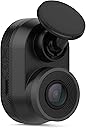
The Garmin Dash Cam Mini is a sleek, car key-sized dash camera that records sharp 1080P HD video with a 140-degree wide-angle lens. Designed for discreet installation, it automatically detects and saves incidents, powered by a durable super-capacitor for extreme weather resilience. With built-in Wi-Fi, it effortlessly syncs footage to your smartphone via the Garmin Drive app, making it the perfect compact companion for professional drivers who value reliability and subtlety.


| ASIN | B07R638L8N |
| Batteries | 1 Lithium Metal batteries required. |
| Best Sellers Rank | #178,296 in Electronics ( See Top 100 in Electronics ) #2,167 in Car On-Dash Mounted Cameras |
| Color | Black |
| Connectivity technologies | USB, Wi-Fi |
| Customer Reviews | 4.1 4.1 out of 5 stars (2,115) |
| Date First Available | May 8, 2017 |
| Item Weight | 0.96 ounces |
| Item model number | 010-02062-00 |
| Manufacturer | Garmin |
| Other camera features | Front, Video |
| Other display features | Wireless |
| Product Dimensions | 1.23 x 2.1 x 1.15 inches |
| Special features | Compact and Discreet; Crisp HD Video; Automatic Recording; Incident Detection |
| Whats in the box | Garmin Dash Cam Mini; Low profile adhesive mount; Vehicle power cable; Long and short USB cables; Documentation |
D**E
Simple & small - but high quality!
I chose this camera for a couple of reasons. I wanted something small (discreet), didn't need a ridiculous amount of features (GPS, lane departure warning, etc...), and I did NOT want one with a lithium-ion battery (those types of batteries don't really enjoy New York weather). This camera fit that criteria, and it uses a super-capacitor instead of a battery (so it stands up to cold and heat even better). This camera gets very warm to the touch during use, but that's considered normal by the manufacturer - so no big deal. When I first tried to connect it to the computer and update it via Garmin Express, the program couldn't detect the camera no matter what I did. I then decided to connect the camera to the phone app and update it that way. The firmware seemed to be very out of date. Once updated, my computer recognized it easily. Setup for the camera (via the app) is very easy. The "good" choices are already selected for you, and you can use the app to view and transfer videos as well as see what the camera "sees" (Live Preview) to make sure everything looks the way it should (since the camera doesn't come with a screen). You can also do things like enable/disable audio and format the SD care (purchased separately), but you can do that with the camera itself, too. I was very happy with the 1080p video quality of the camera. License plates look clear, and everything looks overall very good. I equipped my camera with the Garmin Mini Suction Cup Mount (Garmin's website and the Amazon listing don't show it as being compatible with this camera - but it is. I've posted a review and a photo of the two together on the page for the suction cup mount). I also equipped it with a Garmin Polarized Filter Lens to reduce windshield glare. The lens works perfectly in daylight and makes the night time videos just a little darker (and yet, you can see details better). So, I'll leave the lens on as default. I like that they included two different micro-USB cables in the box. One cable is positioned to point upward when plugged into the camera (for those who want to hide the wire in the trim of their vehicle) and the other is positioned downward (for those who just want it pointed straight down to where the vehicle's outlet is). Since I use the easily removable suction cup mount, I also use the cable that points downward. Everything can be installed/uninstalled in just a few seconds. Again, this camera is for people who just want a dash cam (to basically prove that you did nothing wrong in the event of an accident) and aren't looking for all of the bells and whistles as the more expensive models. This is also the only "new" Garmin dash cam that uses a super-capacitor instead of a battery, so that was worth it. I consider super-capacitors a premium feature. Yes, batteries "last longer" when the camera is not plugged in, but if my camera is ever not plugged in, then I'm not planning to use it. The super-capacitor lasts long enough to save the video it's shooting once the camera loses power - and that's all that really matters. Everything is working perfectly, so I'm extremely satisfied. If anything changes, I'll update the review!
A**R
Good small dash cam
I used this camera for the rear window in my wagon and it’s perfect as it’s very small and doesn’t block the view at all. I bought the Garmin magnetic mount and used that instead of the mount this came with as I wanted to be able to remove the camera much easier if needed. Picture quality is as good as is needed for a dash cam. Not good enough to read license plates unless the cars are very close but that’s not really needed. The Garmin app is also well set up and easy to use and find/download videos. Would recommend this camera to anyone looking for a reliable and compact dash cam.
A**7
Great Small Camera on Day One, but Has its Flaws
After doing a lot of research, I decided to purchase the Garmin Dash Cam Mini for a few reasons: (1) It's small size factor makes it less obvious there's a dash camera, therefore I can place my camera in an inconspicuous location. (2) It uses an adhesive to attach it to my windshield versus other products that only includes a suction cup. (3) It uses the Garmin smartphone app, but unlike some apps that runs all the time while you drive, this one you can access the video files only when you ask the app, meaning saving battery life. Inside the box contains: Camera 13 foot USB cable (for car) 4 foot USB cable (for your computer) Two adhesive window attachments for the camera Twin USB cigarette lighter adapter Quick start instructions Installation: It took longer than I thought. It took me about a good 15 minutes to look for a proper placement, which in the photo is right in front of my rearview mirror so it doesn't block my vision; also required by state law not to place camera in a way to obstruct my vision of the road. But I can still move my head to see if the device is on and easily reach the save button if I witness an incident. The window adhesive is strong enough if you need to attach it to the black dot area surrounding your mirror. Since I live in a major city, hiding the 13 feet of USB cabling is a must, and that took me at least an hour to work it out. I tucked the wires through the crevices to make it not easy to see the wire; only exposing it for a few inches leading up to the USB lighter port. I have to say, my wiring job was pretty impressive, just hoping if I ever buy a new camera, I can use the same USB cable so I don't have to rewire it again. Once set up, I turned on my car to accessories mode to get the lighter port to power up and check if the camera is working. Once done, I used the Garmin app to access live view to make adjustments to the camera to get the best view. Usage: Since I had to take care of some business on the first day of the camera, I did my normal driving, but since living in an urban area means that you have to drive extra defensive, I was able to press the save button on the camera to capture incidents of drivers swerving in my lane, and one nearly t-boning me. Since I pressed the save button, it was easy to use the app later and extract the videos to my phone's memory. Pros: It's small size makes it easy to hide, long enough cabling to hide the wires, 1080p 30fps camera with audio recording is decent, ability to press button on camera to mute the microphone, and save button will save a photograph and video for about 30-45 seconds before button press and after. Garmin app is good to use, and takes a little practice to use it the right way. Cons: The box did not include a crowbar to help you open the crevices of your vehicle to hide the cable, no Micro SD card is included with the camera (it's mandatory to have one to operate it), and no adhesive cable clips. Video footage is decent, but this is not 4K quality, you can mostly read license plates if you zoom in on the video, but it's what you pay for for a lower resolution recording. When downloading the video from camera to your phone's memory, it will do it in 1080p HD quality, but the download rate is roughly one second of video takes one second to download; so if you have five minutes of footage you need to download, you'll be waiting five minutes to get the complete file. The camera lens range is 140 degrees, which is good, but could be more to help cover more of the vehicle. There is no GPS on this, so you won't see the speed, nor location of where you are; the video will show on the lower left the time and date. If you use live camera view, there is about a two second lag if you move the camera or something passes by the view of the camera; it's annoying when you're trying to adjust the camera. Lastly, while this camera includes "parking mode," you need to purchase the cables to hardwire this to your vehicle; I don't have the skills to do install this without professional help. Recommended items you need with the camera: (1) Flat head screwdriver or something similar; this can act as your crowbar to help you access tight crevices in your vehicle to hide the cable. (2) Rubbing alcohol. For the best adhesion to your windshield, use rubbing alcohol to clean the spot, let it dry, then attach. (3) Adhesive cable clips. Use these in cases where you can't tuck the cable in somewhere, it will help keep it organized and tidy. Also use the rubbing alcohol to clean where you want to stick those clips. (4) Zip ties or twine. If you have excess cable, use something to bundle it up. (5) A high endurance Micro SD card (a must). I strongly recommend a higher capacity like 128GB so that you can dig back in your recording footage if you need to. As the card gets written over when full, if the card gets written over too many times, your card may get worn out and you could lose the data; this is why a bigger capacity card means less writing over. (6) Garmin's Polarized Lens. This is a must if you experience glare showing your dashboard; the filter will reduce that glare for a better view in daylight conditions. (7) A video/movie editor app. Once you download your videos to your personal device, you may want to do a compilation or share it with your friends, so get familiar with your editor app to trim, and cut audio (especially copyrighted stuff or private conversations). (8) A cloud storage service for your videos you want to keep. Those videos takes up a lot of space, so instead of eating up precious space on your smartphone, upload it to a cloud storage website to preserve them, and delete the files from your phone. (9) If you want to hardwire the camera to your car to record on "parking mode," you need to purchase the proper wiring from Garmin. The box does not include this, nor does the camera have an internal battery to recharge and record when engine is off.
P**P
Great little camera. It’s small enough that it hides behind my mirror which was important to me as I hate clutter and I find lights to be very distracting and causes me headaches. It gets really hot as other posters have said, I hope it doesn’t melt. The setup wasn’t difficult, I did it from my home computer. Since this doesn’t come with a micro SD card I purchased a 512 gb for an extra $90.
T**J
Bought a pair of these with the intention of replacing my iRoad X9, one for the front, one for the back BUT... one of the boxes arrived without the camera unit so I'm stuck with the X9 as my main dash cam for now. App works much better than most dashcam phone apps available today. Small form factor dashcam is discreet and doesn't get in the way. It's small yet it has just the right features I need - Parking mode, low power consumption (during parking mode), good quality video. What doesn't work so great and needs improvement: 1) Better management of recorded footage - wheres the option to delete parking mode videos? How about an indicator to show how much free space remaining on the SD card? 2) Camera unit runs HOT. Heat is conducted out the back cover so I attached a 1" square heatsink behind which helped a lot with the stability of the camera. 3) Parking mode cable should be included!
J**N
The device is compact! But the device overheat if you keep it on even the car is off. So I just used it when the car is on!
P**Z
Muy útil y fácil de usar
D**C
It seems to be working quite well so far, no problems
Trustpilot
1 month ago
2 months ago