We remain fully operational. Our teams are working around the clock to ensure your deliveries continue safely.

DOWNLOAD THE APP


Copyright © 2025 Desertcart Holdings Limited
DOWNLOAD THE APP


Buy anything from 5,000+ international stores. One checkout price. No surprise fees. Join 2M+ shoppers on Desertcart.
Desertcart purchases this item on your behalf and handles shipping, customs, and support to Mexico.
⚡ Know your watts, save your wallet!
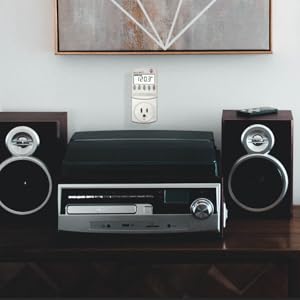
The P3 P4400 Kill A Watt Electricity Usage Monitor is a portable, highly accurate device that measures electrical consumption and power quality for 115V appliances up to 15 amps. Featuring a large LCD display and four selectable monitoring periods, it empowers users to track energy use by day, week, month, or year, helping identify energy drains and optimize electricity bills. It also tests voltage, line frequency, and power factor, making it an essential tool for both energy-conscious professionals and tech-savvy homeowners.


| ASIN | B00009MDBU |
| Amperage Capacity | 15 Amps |
| Batteries | 1 CR123A batteries required. |
| Batteries Included? | No |
| Batteries Required? | No |
| Certification | No |
| Color | No Color |
| Customer Reviews | 4.6 4.6 out of 5 stars (9,733) |
| Date First Available | September 9, 2004 |
| Display Style | LCD |
| Included Components | usage monitor |
| Is Discontinued By Manufacturer | No |
| Item Package Quantity | 1 |
| Item Weight | 5.6 ounces |
| Item model number | LGP4400 |
| Manufacturer | P3 |
| Material | Other |
| Number Of Pieces | 1 |
| Part Number | P4400 |
| Pattern | Monitor |
| Power Source | air-powered |
| Product Dimensions | 8.4 x 2.1 x 6.1 inches |
| Size | Original version |
| Special Features | Portable |
| Style | 1 Pack - Model P4400 |
| Usage | personal |
| Voltage | 115 Volts |
| Warranty Description | 1 Year Limited |
S**G
Great monitor for electrical use.
I purchased this product to keep an eye on my electrical usage of accessories, including heaters in my garage to make sure they are not overloading the system. Works as expected and quality made and seems to be very accurate.
A**S
Good product, do the expected work.
This product works as expected. I purchased this unit to make an analisis about parasit power consumption in my electronic appliances in home. I discover the following: - the lcd requires 180 ~ 230 watts. After going to standby or shutdown, the tv use 60 watts for 3 minutes. This is to cool down the lcd lamp for protection (fans and additional circuit works for this time). Can be a mistake if I remove the AC cable power or enterely shutdown the tv without allow this process to finish. Good discover. After this 3 minutes, the standby mode on the monitor only requires 05. to 1w. - my motorola cable system requires the same ammount of power (27 ~ 30 watts) no matter if this unit is ON or off!!!!... all the time is fully powered (because have an internal hard drive). But I believe (wrong!) this unit must save about 50% if is off.. but no!!!! - the blackberry / sony ericson chargers do not drain any power (0W) from AC if the phone itself is not connected. I DON't need to disconect this chargers from the outlets. - My APC Smart UPS 1500 drain 30 WATTS! even when is completely turned off!!!Is better to disconnect this unit from the ac cable!!! amazing!... - My pc (dimension 9150) is a power hungry pc. Because have pentium D (first edition) who requires a lot of power. This pc requires 230 watts but when I play Command Conquer (3D real time strategy) and because I have a HD2900 ATI High Definition card who requires 650 watts PSU. Interesting: when I play the game the power rise from 230 to 300~320 watts!!!! This unit is very usefull to understand how the electronic systems works and if are energy efficient and how you must manage this units to save power and money. Highly recommended, is cheap and you can check your ac freq and exact voltage (i have 128 volts from 127 expected in the ac line)...... enjoy and sorry my english
C**R
Make sure you update the $/kwh
Works as expected. Just plugged the coffee machine into mine to see what the draw is when it's not running. Make sure you read the manual and set the $/kwh so it calculates it correctly for the cost in your area. It does take some time to come to equilibrium on that so leave it for a bit.
J**.
A handy gadget, for more than one task
The Kill A Watt Energy Monitor (I have the P4400) can be mighty useful for determining energy usage of plug-connected devices, especially ones with varying usage, such as refrigerators, plug-connected air conditioners, humidifiers and dehumidifiers, and perhaps computers. I got mine in 2018, so it may not be quite the same as current models. A few things could be improved: • It would be mighty nice for the display to have a backlight. But, unlike some others, I have no problem reading it when shining a flashlight on it in a dark location. • For some devices (e.g., a refrigerator), it can be mighty inconvenient to read without using at least one extension cord, which is a bit Mickey Mouse. A Kill A Watt Connect (https://www.amazon.com/dp/B0CVS4WXM9) might address this, but some have suggested the 32″ connecting cable is on the short side. I don’t have that model, so I can’t comment from experience. • When plugged into the top outlet in a duplex receptacle, it blocks the lower receptacle. Again, a short extension cord could fix this. • As several others have noted, the outlet receptacle is mighty tight. Not so tight as to be unusable, but much tighter than a normal receptacle—and it doesn’t have the same feel as a hospital-grade receptacle, which is also pretty snug. • There is no battery backup, so acquired data are lost in a power failure. Power failures where I live are infrequent, so this isn’t a big deal for me. There are other models that do have battery backup. This model doesn’t calculate energy cost (some others do), but this isn’t a big deal for me; I think it’s probably easier to just put the energy consumption data in a spreadsheet and figure the cost there. There are some other brands that cost less and even have more features; I haven’t tried them so I can’t really comment. I haven’t felt the need for most of these features strongly enough to try another model. Were it possible, I’d probably give the Kill A Watt a 4.5. A Poor Man’s Clamp Meter? For devices like a hair dryer or toaster that have relatively constant consumption when in use, I’m not sure it’s necessary to accumulate months of data unless one is a real fanatic—so a quick measurement will often suffice. Though intended for monitoring energy use, the Kill A Watt is also an economical substitute for a clamp meter and line splitter. I have a hard time believing that it’s in the same league, but the specifications suggest otherwise—and the indicated values are very close to what I get with a Fluke 87 and i400 current clamp. For someone who’s not an electrician, the Kill A Watt may well be good enough, and it’s easier to use and less expensive. One big convenience: it’s easy to quickly switch between current and voltage under load at the press of a button, which is much harder to do with fancy meter. The Kill A Watt also provides watts, VA, and power factor at the press of a button. Results can sometimes be surprising: I have one low-flicker LED bulb with a power factor of 0.7, while this isn’t great, I remind myself that the VA is still a lot less than that of an incandescent bulb with a unity power factor. And it’s interesting just to know this stuff. For this purpose, the Kill A Watt seems better suited than some of the newer models with extra features that don’t really apply.
E**S
Accurate, Simple, and Addictively Useful
Accurate, Simple, and Addictively Useful The P3 Kill A Watt Electricity Usage Monitor is one of those inexpensive gadgets that quietly changes how you think about energy use. I first bought it to see how much power my old refrigerator was pulling—and ended up testing every appliance in the house. Setup is instant: plug it into the wall, connect any device, and the bright LCD display immediately shows volts, amps, and watts in real time. Leave it running for hours or days, and it totals up the kilowatt-hours (kWh), letting you see exactly what that appliance costs you per day or month. What makes it so helpful is how accurate and intuitive it is. You don’t need to be an engineer—just read the wattage and multiply by your utility rate. I found a few “phantom” power hogs drawing 10–20 watts even when off (like a cable box and an older UPS). It’s also great for testing PC builds, aquarium setups, or any electronics to ensure your power supply is sufficient. The build quality is solid, and the display remains easy to read even after years of use. The only caution: it’s designed for 115V North American outlets only—not for international use. Bottom line: A must-have tool for anyone curious about energy use or looking to cut electric bills. Simple, accurate, and surprisingly enlightening—it pays for itself quickly.
C**T
Very Useful!!
These things are fantastic. They're very helpful to keep track of the amps we are pulling when we have larger shows. It shows you the Watts and Amps. It has some other great features that we don't use but it's nice that it's there. I highly recommend this device when you want to make sure you stay within the amperage limits of an outlet especially.
O**K
Knowledge is Power: Manage Your Electric Bill the SMART and EASY Way
Ever wonder how many watts an appliance is using? I have. That's why I bought this; I was wondering if my "tea machine" Tiger PDN-A50U Electric Water Dispenser, 5.0-Liter was an energy hog or a conservation appliance. Thanks to this, I now know it's an energy SAVER. This could not be easier to use. Simply plug the meter into any wall socket. Leave it there as long as you like and use this meter like an electrical outlet. When you want to measure an appliance's electricity use, you simply press the "Watt" button & the LCD display will show you the real-time wattage usage. For example, with my "tea machine," when it boils water, it uses about 900 watts. Once it stops boiling, it uses just .3 watts, on average, to keep warm. When dispensing, it uses 62 watts (to power an electric pump), then immediately reverts back to its .3 watt "keep warm" usage. This can also be used as a voltmeter (measuring the electricity flow INTO the outlet). For American household power, this is roughly around 120 volts (except in "brown out" conditions). Useful to check during brownout conditions, simply because using some appliances during low voltage conditions can potentially damage them (this, fortunately, rarely happens in the US, but some Californians have occasionally experienced this). There's also a purple KwH button. This will let you measure the KwH usage of an appliance over a period of time. If you have an appliance (say, like a stereo subwoofer) that you suspect might be a Vampire Power Energy Hog (one that uses a lot of power, even when turned off), you can easily confirm this suspicion by plugging it into this meter, pressing the KwH button, & then check in 24 hours and see how many KwH your appliance has consumed. If your subwoofer's an energy hog, just unplug it when you're not using it & you'll lower your electrical bills. I LOVE this device, because it's helped me logically evaluate actual energy usage, instead of just going by my "gut" feeling. Knowledge is Power! This is easy to use & well worth every penny of its cost. In just a month, it more than pays for itself, if you've not been paying sufficient attention to your energy use. Now, instead of guessing how much power you're actually using to operate an appliance, now you can know. Great for everything from rice cookers, tea machines, toaster ovens, computers, printers, stereo equipment, battery chargers & more. A+!
C**S
Good components but design is inconvenient
The device works great -- it measures things and the display gives feedback on power draw almost instantly, and it's great to watch the display change when you turn things on and off. There are two problems: 1. The LCD display can only be read from head-on maybe +/- 20 degrees. I have this installed on the wall next to my desk so I look at it from roughly a 90 degree angle (I can access the outlet fine but I can't look at it head on because the desk is where my head would need to be) so I can't read the display without moving my desk. If I unplug it forgets everything. A swivel screen or an angled or top-mounted display would be really helpful. I might try to find another model that has something like this. 2. When you plug this into a 2-plug outlet it covers both plugs. I can imagine it would also cover a 4-plug outlet. I only have one wall outlet where I want to use this but in order to use it I have to unplug my lamp, which has an awkward connector that doesn't fit into my power strip. Also because of the large size and plug orientation I can't plug the meter into my power strip either because I would have to unplug everything else. Overall the components are good quality and it's fun to watch the meter respond, but it doesn't fit where I want to use it so it's not as useful as I'd hoped it would be. I will fiddle around with it a bit more and may get some value out of it but I would like to find another model which is easier to position and read from other angles.
Trustpilot
3 weeks ago
1 month ago