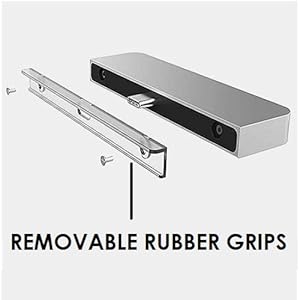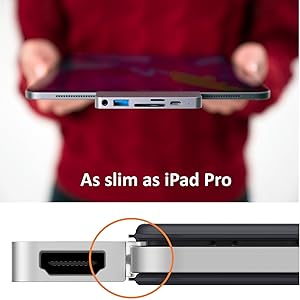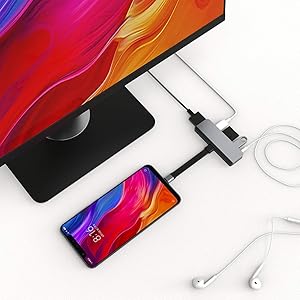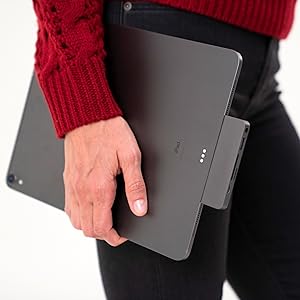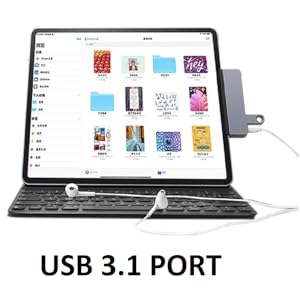
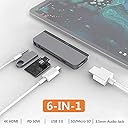



Product Description Simply plug HyperDrive USB C hub to iPad Pro and expand a single USB C connection into 6 ports HyperDrive 6 in 1 USB C Hub for iPad Pro Key Features iPad Pro matching Space Gray and Silver color Aluminum enclosure Patented soft grips that secures HyperDrive onto the iPad Pro Compatible with variety of USB Type C devices USB A Ports, microSD and SD slots for quick data transfer USB C port with Pass Through Charging High Resolution 4K 60Hz HDMI port iPad Pro matching design and colour Compatible with (Not a full list) All MacBook Pro 13", 15" & 16" models with USB C ports All MacBook Air 13" & 15" models with USB C ports All MacBook Pro / Air models with M1 chip All iPad Pro model with USB C port (rel. 2018 and 2020) All iPad Air model with USB C port (rel. 2020) Windows laptops, Surface tablets, Chromebooks with USB C port Android tablets / smartphones with USB C port Devices having Thunderbolt 3 USB C port or Standard USB C port (supporting Displayport Alt mode) are fully compatible PORTS HDMI supporting 1080p / 2160p / 4K@60Hz USB-C 3.0 Data 5Gbps & Power Delivery 60W (Max USB-C PD 30W for iPad Pro) MicroSD UHS-I 104MB/s SD UHS-I 104MB/s 3.5mm Audio Jack (USB 2.0 Audio, 48KHz, 16-bit USB-A 3.1 5Gbps REMOVABLE RUBBER GRIPS Features a removable and replaceable Rubber grip that secures USB-C hub onto iPad Pro. Smartly designed Rubber Grips and USB C extension cable (included in the package) ensures HyperDrive USB C hub will also fit onto an iPad Pro having screen protector and case cover. HIGH RESOLUTION 4K60Hz HDMI port Easily share video from your iPad Pro to compatible HDMI monitors at crystal clear video quality for a great viewing experience. HDMI port supports video out resolution upto 4K@60Hz on compatible USB C devices. Note - HDMI port of HyperDrive will only work on a monitor with HDMI port using direct HDMI to HDMI cable UNIVERSALLY VERSATILE Easily replace the removable Rubber Grips with the USB C extension cable (provided in the package) USB C extension cable turns HyperDrive into a universally versatile hub that is compatible with a wide variety of USB C devices like MacBooks, laptops, tablets and smartphones with Type C ports USB C PASS THROUGH CHARGING and DATA TRANSFER Stop worrying about iPad Pro's battery while connecting it to a TV or listening music using HyperDrive. Simply connect the iPad Pro charger to USB C port of HyperDrive and your iPad Pro will start charging USB C port also supports Data Transfer USB C port supports Max 30 Watts power delivery on iPad Pro and Max 60 Watts Power delivery on other USB C devices. MEMORY CARD SLOTS FOR QUICK DATA TRANSFER HyperDrive is a must have travel accessory for every professional photographer using MacBook or iPad Pro. HyperDrive microSD / SD card slot enables fast file transfer, fast photo downloads at high speeds on your iPad Pro Some USB C devices (example - iPad Pro) only reads one memory card at a time. The card that is inserted first will be detected. LISTEN HIGH QUALITY MUSIC THROUGH 3.5mm AUDIO JACK The much needed universal 3.5mm Auxillary Audio jack allows you to connect iPad Pro to wired earphones or audio speakers and enjoy high quality music seamlessly. The 3.5mm audio jack also supports microphones HIGH SPEED USB PORT HyperDrive's USB 3.1 port allows you to connect iPad Pro to a wide variety of USB devices like pendrives, external HDDs, keyboard, mouse etc For Mac / iPad Pro Users, the external HDD should be in a MacOS / iPadOS readable file storage format to get detected. In some cases, external HDDs (above 1TB ) may not get detected due to high power requirements of HDDs to operate AS SLIM AS IPAD PRO HyperDrive fits perfectly on the side of iPad Pro and feels like a natural extension of iPad Pro. COMPACT ENOUGH TO STAY WITH IPAD PRO WHEREVER YOU GO The rubber grips are designed to hold connection between HyperDrive and your iPad Pro securely. No need to unplug HyperDrive from iPad Pro while carrying along. Just keep it connected as it is and carry wherever you go HyperDrive may get hot while using as Aluminium shell effectively absorbs heat from the circuit and releases it into the air for fast heat dissipation Q. Will it work with older iPad models with Apple Lightning or 30-pin connector? A - NO, it will only work with USB-C devices like the latest 2018 iPad Pro which has a USB-C connector. It will not work with older iPad models with Apple Lightning or 30-pin connectors. Q. Will the HyperDrive work with other USB-C devices other than the iPad Pro? A - YES, the grip is removable to work with any USB-C device including Mac, PC, and Android devices. Please use with the dedicated extension cable when using with other USB-C devices. Q. Can HyperDrive's HDMI port work with a VGA monitor using HDMI to VGA cable ? A- NO, it won't work with a VGA monitor. The HyperDrive HDMI port will work with a HDMI monitor only using direct HDMI to HDMI cable. Please make sure your Display is set to correct HDMI input source Q.How to view files in your external devices in iPadOS (with import/export PDFs for photos/videos) A - To view the contents of your external hard drive, you need to locate the Files app. If you have not rearranged the icons, it typically is in the dock at the bottom of the screen (look for the blue folder with a white background. If you cannot find the folder, from the home page, swipe down from the middle of the screen and search "Files". Or, if you can't find it that way, you can ask Siri to "Open Files". Once there, you need to click on Browse on the bottom and expand "Locations" and locate your drive from the list.. Q. External HDD / Pendrive not getting detected when connected to USB 3.1 port of HyperDrive A - This could be due to one of the following reasons - i) iPad Pro is still running on old iOS software and not updated to the latest iPadOS operating system. iI) USB storage device is not having iPadOS / MacOS readable file storage format. Please change it to exFAT or any other Mac compatible file storage format. (Note - Most of the new external HDDs ship with NTFS as default file storage format which is readable in MacOS but not readable in iPadOS) iiI) Some HDDs require more power to operate and get detected. Due to hardware design limitations by Apple, USB devices can draw a limited power from MacBook. So, use a storage device that requires less power to operate (say 1TB or less) Q. There is no video out to TV / monitor from my USB C smartphone / tablet using HDMI port of HyperDrive. A -Your smartphone / tablet / laptop must support video output over USB C port . (Displayport Alt Mode) Popular devices compatible to support video out over USB C port includes MacBook, Chromebook Pixel, Surface Book 2 Surface Go, Galaxy TabPro S/Tab S4, iPad Pro 2018 model, BlackBerry Key2, Essential Phone, HTC 10/U Ultra/U11/U12+, Huawei Mate 10/20/30, LG V20/V30/V40*/V50, OnePlus 7 / 7T / 7 Pro / 8 / 8 Pro, Razer Phone, ROG Phone/II, Galaxy S8/S9/S10,S10+ Galaxy Note 8/9/10/10+, Oppo R17 Pro, Reno 10x zoom, Sony Xperia 1/5, Microsoft Lumia 950, HP Elite x3 etc Review: Quality is awesome - Product is genuine and quality wise it's too gud and they provide different types of rubber case for it to fit and they also provide a wired rubber case and it's useful when u are using iPad with a case on it ..and it heats up while using and the only plus point of this product is all the products will work properly and the 3.5mm jack also works fine and the quality of audio won't change even while charging ..and if u compare with other type c hub products available in online this is the best other items won't even work ...in next gen of this item they should try to avoid the heating issues Review: Great Design -Keep it up. - The product is really great,have been using it for about 1 month now.It is well designed and matches the colour perfectly of my iPad Pro.All ports work well.I only feel that the screws are very tiny and non magnetic with the screwdriver.So the future product must have handlable screws and preferably magnetic for ease of application.


| ASIN | B07QWP3F3C |
| Best Sellers Rank | #123,718 in Computers & Accessories ( See Top 100 in Computers & Accessories ) #1,445 in USB Hubs |
| Brand | HYPER |
| Brand Name | HYPER |
| Colour | Gray |
| Compatible Devices | Card Readers, Headphones, Keyboards, Laptops, Monitors, Smartphones, Tablets |
| Customer Reviews | 4.2 out of 5 stars 1,610 Reviews |
| Data Transfer Rate | 5 Gigabits Per Second |
| Enclosure Material | crystal |
| Hardware Interface | USB Type C |
| Importer Contact Information | Ingram/Fortune |
| Item Type Name | 6-in-1 USB-C Hub |
| Item Weight Unit of Measure | 30 Grams |
| Manufacturer | Hyper, Sanho |
| Manufacturer Contact Information | Hyper |
| Manufacturer Part Number | HD319-GRAY-JP |
| Model Number | HD319-GRAY |
| Number of Items | 1 |
| Number of Ports | 6 |
| Operating System | Mac OS |
| Packer Contact Information | Ingram/Fortune |
| Product Features | Crystal Clear 4K HDR Video Output, Quick-Charge with 60W USB-C Power Delivery |
| Special Feature | Crystal Clear 4K HDR Video Output, Quick-Charge with 60W USB-C Power Delivery |
| Total USB Ports | 2 |
| UPC | 817110014380 817110014052 817110014045 |
| Unit Count | 1 Pack |
| Warranty Description | 1 year manufacturer |
Y**R
Quality is awesome
Product is genuine and quality wise it's too gud and they provide different types of rubber case for it to fit and they also provide a wired rubber case and it's useful when u are using iPad with a case on it ..and it heats up while using and the only plus point of this product is all the products will work properly and the 3.5mm jack also works fine and the quality of audio won't change even while charging ..and if u compare with other type c hub products available in online this is the best other items won't even work ...in next gen of this item they should try to avoid the heating issues
C**M
Great Design -Keep it up.
The product is really great,have been using it for about 1 month now.It is well designed and matches the colour perfectly of my iPad Pro.All ports work well.I only feel that the screws are very tiny and non magnetic with the screwdriver.So the future product must have handlable screws and preferably magnetic for ease of application.
D**J
Too costly. Costly
Gets heated up after 10 min of use The video is flickering Headphones jack is not working properly when u move the device.(should use without any shear movements) Unable to use if you are using cover for your ipad
A**D
Good but highly priced
Very useful product though expensive!
K**R
It maybe a good device but mine started having glitches on using with ipad pro on day 1
Became faulty on day 1 of use
K**A
Works flawlessly on Galaxy Tab S7+
I was skeptical while buying since I wanted to use it for my Tab S7+. But there was nothing to worry, it works like a charm! All ports work perfectly without any issues! The only downside is the price but I guess it's worth it since it works flawlessly.
B**O
HyperPotato - Same quality available from others for much less
7.4K for a hub was kind of justified back when this was a novelty, one of a kind item. But now there are exact same product available under 4K. You pay more for the Hyperdrive 6-in-1 because they include screwdriver, extension cable etc. I thought the electronics inside will be of better quality but NOPE! The moment I plugged in my headphones in the 3.5mm jack, I was greeted with a terrible hissing noise, indicative of cheap chinese circuitry. My main reason for buying this was being able to keep my tab charging while using some good wired earphones. But now it seems, I'm back to square one: can't get (good) audio while charging. The universe is really conspiring to get me into crappy bluetooth audio! I refuse! TLDR; save your money, buy some of the other USB C hubs under 4K because you are not paying more for quality components just brand name and import duties!
R**.
Work excellent with Elgato
I bought this adapter to do live streaming from my iPad 11 pro through elgato while charging my device and it works like a charm. The only problem is you can’t use the 3.5mm port while using HDMI. Sound can pass through only one media output port at a time.
T**E
Not the best
At first when connected, it couldn’t work, I tried taking it on and off from my iPad Pro a few times but still couldn’t get it to work. I then tried removing the removable piece from it and connected again and it worked. I then tried reattaching the removable plate back and tried again, it didn’t work again and I tried to push it a bit more and it eventually worked. It was quite a scare for me as I heard good reviews about it and when I tried it for myself, it wasn’t the best experience, I connected the hdmi to test the connection and the hub was pretty hot In terms of temperature and I took it off and stop using it. Overall, I’m a bit disappointed and having paid so much for it. I chose this over the anker one which was evenly priced and in the end, it was not ideal. I’m using a 2021 12.9” iPad Pro with magic keyboard, technically speaking, the hub should fit nicely but i guess it could if you tried hard enough.
T**M
Excellent bit of tech!
Great bit of kit that has made my iPad even better! Well worth the price if you’re an avid user of one.
O**L
Perfect. Does what it says and it’s a great fit.
Does exactly what it.ms supposed to do. Slim, clean looking, very functional.
R**N
Ottimo per strumenti musicali
Acquistato per connettere la mia tastiera Yamaha dgx 650 all'ipad per poter usare i suoni degli strumenti virtuali. È uno dei pochi che funziona benissimo per lo scopo! In particolare la vera cosa utile è la porta USB c che non serve solo da ricarica ma trasmette anche dati, e una porta USB a tutti gli effetti. Ad esempio è possibile collegarci l'adattatore jack cuffie della Apple e funziona! Fantastico dongle e direi indispensabile per musicisti che fanno uso dell'ipad pro. Con questo andate sul sicuro.
H**E
Great product works as advetized.
Pretty much a must have for the ipad pro 2018 and beyond. Price is a bit high imho but get it anyway.
Trustpilot
2 months ago
4 days ago