💾 Unlock your data’s potential with speed and ease — don’t get left behind!
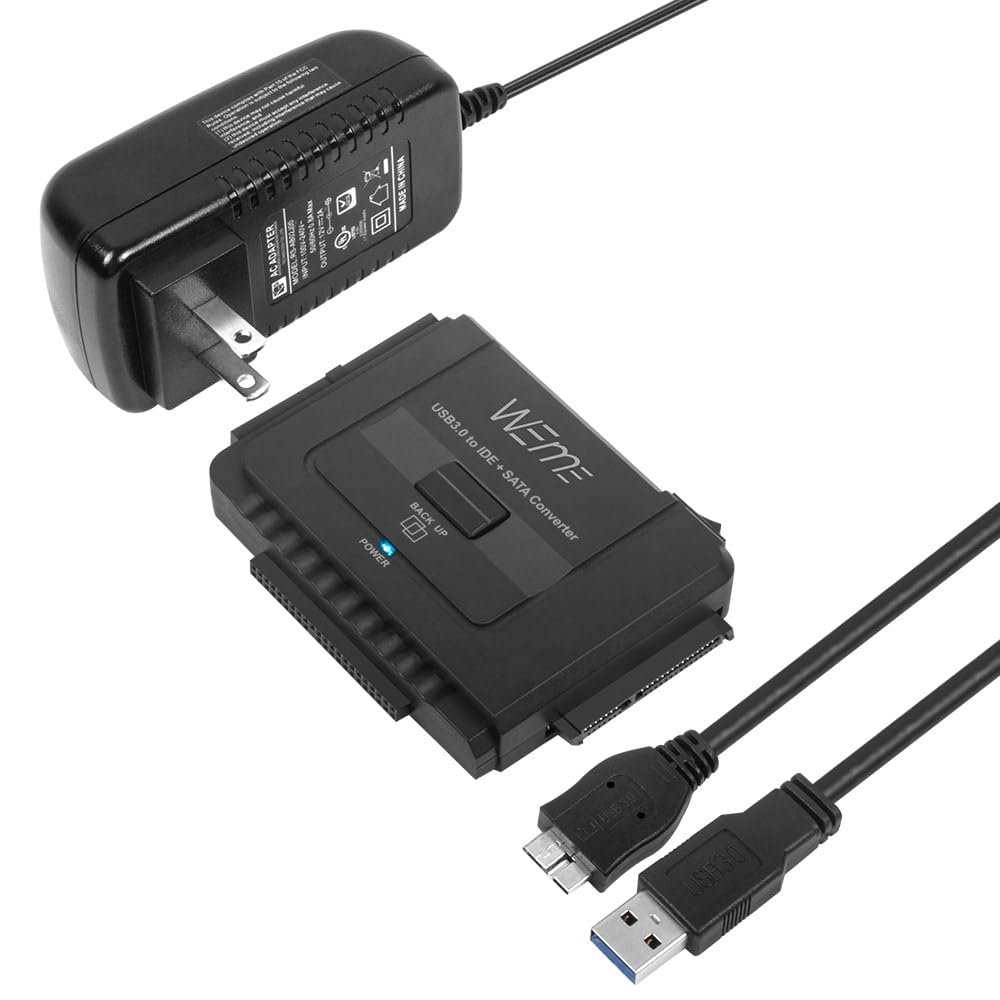
The WEme USB 3.0 to SATA/IDE Adapter is a versatile, plug-and-play converter that connects 2.5"/3.5" SATA and IDE hard drives or optical drives to your computer via USB 3.0. Supporting up to 6TB drives and simultaneous connection of three drives, it features a One-Touch Backup function, LED status indicators, and includes a 12V 2A power adapter. Perfect for fast data recovery, backup, and drive cloning with backward compatibility to USB 2.0/1.1.


| ASIN | B00MVRS38Q |
| Best Sellers Rank | #100 in Enclosures |
| Brand | WEme |
| Color | SATA & IDE |
| Compatible Devices | Desktop, Laptop |
| Connector Type | USB Type A |
| Current Rating | 2 Amps |
| Customer Reviews | 4.5 out of 5 stars 6,754 Reviews |
| Input Voltage | 12 Volts |
| Item Dimensions | 5.8 x 4.1 x 1.9 inches |
| Item Height | 1.9 inches |
| Item Weight | 0.46 Pounds |
| Manufacturer | WEme |
| Model Number | SATA & IDE |
| Nominal Power | 24 Watts |
| Number of Items | 1 |
| Number of Ports | 3 |
| Package Quantity | 1 |
| Power Plug Type | Type A - 2 pin (North American) |
| Specific Uses For Product | PC |
| Unit Count | 1 Count |
| Warranty Description | 30 day free return and refund |
| Warranty Type | Lifetime |
A**E
WEme USB 3.0 to SATA+IDE Adapter - A Lifesaver for Inaccessible Hard Drives!
I cannot overstate how grateful I am for the WEme USB 3.0 to SATA+IDE Adapter, which proved to be a true lifesaver for accessing hard drives that I previously thought were inaccessible. This adapter has earned its place as an essential tool in my tech toolkit. Recently, I encountered a situation where I needed to retrieve data from a couple of hard drives that I thought I had no way of accessing. Fortunately, the WEme USB 3.0 to SATA+IDE Adapter came to the rescue. Its compatibility with 2.5"/3.5" IDE/SATA hard drives and optical drives allowed me to connect these previously unreachable devices to my computer as external hard drives. It was a sigh of relief to find a solution that worked flawlessly. In addition to its successful data recovery capabilities, the WEme adapter offers several other commendable features. The plug-and-play functionality made the setup process a breeze. I simply connected the adapter to my computer via USB and plugged in the hard drives, and they were instantly recognized without the need for any additional drivers or complex configuration. The One Touch Backup (OTB) function provided a convenient way to back up data from my computer to a portable hard drive. The compact design of the WEme adapter, with dimensions of 5.8 x 4.1 x 2 inches, makes it easy to carry and store. I appreciate its portable nature, as it allows me to bring it along when working with different devices or when providing assistance to friends or family who may need data recovery support. The LED light indicators on the adapter are a helpful addition. They provide clear visual feedback on power and activity status, ensuring I can monitor the connection and data transfer process at a glance. The SuperSpeed USB 3.0 capability of the WEme adapter impressed me with its fast and efficient data transfer speeds, saving me valuable time during large file transfers. It is reassuring to know that the adapter is also backward compatible with USB 2.0 and USB 1.1 standards, ensuring compatibility with older devices. Overall, the WEme USB 3.0 to SATA+IDE Adapter has proven to be a valuable tool in my data recovery and storage endeavors. Its compatibility, ease of use, portable design, and impressive data transfer speeds make it a reliable and practical solution. If you find yourself needing to access or recover data from seemingly inaccessible hard drives, I highly recommend the WEme USB 3.0 to SATA+IDE Adapter as an indispensable tool to have on hand.
M**D
Quickly and easily copy an old drive to a new system.
My old notebook died abruptly and I need to copy its drive to my new notebook. This device made that easy. I pulled the 2.5" SATA drive out of the old notebook, plugged it in to this adapter, plugged the cable into my new notebook, and I was able to copy all my old data to the new notebook. No fuss, no muss. It just worked quickly and easily.
J**.
Excellent value, highly recommend
This little guy works VERY WELL. Excellent value for the money. As a 20+ year computer technician, I've used a number of similar solutions in the past with disappointing results. Either they just didn't work or the read bit rate was way too slow. This one had none of those issues. I had a computer motherboard fail and just needed some data from the HDD. Turned the internal drive into an external USB type device and was able to easily extract the data needed with absolutely no issues whatsoever on a Windows 10 computer. Highly recommend.
J**A
Top notch design and superlative functionality
This would have been a five star review, were it not for the pesky e-mail I received requesting I leave feedback. Bad move on the seller's part. Products require some testing time prior to leaving feedback, and these individuals should keep that in mind. Done ranting. On to product review. The product is a brilliant take on the older and much clunkier SATA USB adapter. This one is much more visually pleasing and much simpler in construction and design. There is a blue LED which will immediately light up once everything is connected correctly. The LED will blink when data is transferred, up or down - that thing is bright enough where you may choose to put a piece of masking tape over it, at least I did. Transfer rates are up to par with USB 3.0, dramatically decreasing the time required for downloads and up transfers in general. Looks well built and I expect it to last quite a while, especially since I don't plan to use it daily. I own a Win 10 laptop and my 8TB drive was immediately recognized and read. I tried this on a Win 7 desktop and had no issues whatsoever, but please note that I had already installed the ASRock 3TB+ software which enables the mobo to recognize drives in excess of 2TB. Also, please note that if you own a 2.5 SSD, there may be better alternatives for connectivity, so this adapter is especially helpful connecting large size spinner drives. Overall, this adapter would be a solid five star product, had I not been heckled by the seller to leave untimely reviews.
T**N
Good, fast & cheap.. >>--!--<< PERFECT!
Great tool. Fast & works with large drives (I tried up to 18TB)
R**Y
Works great for older ATA discs
I have a stack of old ATA disks that I need to go through, and this is exactly what I needed. For everyone who says it doesn't work for them, that it didn't read their disk, did you configure the drive select pins? I discovered that if it's set as a primary or slave drive it doesn't work. But when I set the jumpers for CS (cable select) it works just fine. I suspect most computers used the CS setting by default, and that's what this device is designed for. Unfortunately, the instructions don't mention this at all. You may have to go online to see the jumper settings for your drive, every brand is different and they don't always put it on the label. It also helps to have a software tool like IM-Magic Partition Resizer. For example, I have a drive right here that has three valid partitions and none of them are formatted. Windows alone simply doesn't recognize the disk in File Manager. Windows Disk Management shows the three partitions, but doesn't explain that they are not formatted. This device is a hardware tool; coupled with a good software tool and a little knowledge it will do exactly what you need.
S**O
Worked great! Saved my butt
My harddrive was dying and wouldn't get detected by the OS. So I purchased a new harddrive and it came with a copy of Acronis. However, it failed to mention that I would also need a USB to SATA connector if I wanted to try a transfer. I wasn't sure it was even going to work so I just went to local stores including the most well-known department stores and electronics stores and despite touting all the latest crApple products and every adapter known to man they didn't have a single USB to SATA cable in stock. Turns out they are only sold online. Thanks. ANYWAY so Amazon comes through again, I look online and sure enough they have a bountiful selection and I wasn't even going to order one because I wasn't sure it would even work but Prime said 1-day shipping. So you can't beat that. If it would get here tomorrow, I could live one day without a desktop. So, I waited, it arrived, and I connect everything and nothing. The drive boots up and starts whirring but nothing on-screen. Oh well, the harddrive fails to connect. However, the IT guy in me says oh wait, I know the front USB ports are sometimes wonky so let me try one in the back. I do so and boom miraculously with this cable Acronis picks up my old harddrive and I was able to transfer everything out within about 30 minutes I had done a complete clone of a 2tb drive. Well, the story's not completely over, so then I open up partition manager and try to remove one of the partitions that I don't need and accidentally end up erasing part of what I just cloned. However, since the drive was now added as a normal external drive like any USB drive was, I was able to go to My Computer, and just copy over the files and folders that I wanted to keep using the data cable. It took about 4 hours total, and that includes my time of navigating file structures and choosing just what I wanted. I call that a huge win for this product which worked great!
J**M
little adapter which worked as described
I didn't buy this usb adapter for hard drive connectivity issues but for optical drive. However I have a use for several SSD and physical hard drives I have whenever there's a need for them. The major motivation behind buying this adapter is coming from what I recently experienced after I finished making my new desktop. My desktop doesn't have any internal optical drive and I did it on purpose because I wanted to use all available reserved bays inside the case for new and used SSD and physical hard drives I had and I new in advance that the use of an optical drive like DVD drive is not that critical nowadays and I can simply buy an external optical drive to connect with any available USB 3 or even 2, but I ended up being so wrong about that. What I experienced in reality that what is available in the market as external optical drive doesn't work with my operating system (Windows 10 64 bit) or I have to pay for a very well known brand which is simply over 100 dollars so I decided to find a practical way which is also cheaper and i did my research and I found this adapter. I wasn't quite sure until I made connections with what I have already had which is two internal optical drive that I used to use in my older computers and there we go. It worked !! And it worked without a bit of any issue. It's important to mention out for those who doesn't know that it takes higher power for an optical drive to be able to recognize by your computer as a functional device and this little adapter made it possible. Very well designed, quiet affordable and hundred percent functional. I highly recommend it to anyone specially those who are experiencing what I did.
Trustpilot
1 month ago
4 days ago



