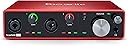
🎛️ Elevate your sound. Own the studio. Never miss a beat.
The Focusrite Scarlett 4i4 3rd Gen is a compact, USB-C powered audio interface designed for musicians and producers seeking professional-grade recording quality and versatile connectivity. Featuring four balanced inputs and outputs, high-performance 24-bit/192kHz converters, and Focusrite’s acclaimed 3rd Gen mic preamps with Air mode, it delivers crystal-clear, low-latency audio capture. Bundled with industry-leading software and plugins, the Scarlett 4i4 empowers creators to produce, stream, and perform with confidence and ease.


| ASIN | B07QSC92NG |
| Audio Input | XLR, USB, Auxiliary |
| Best Sellers Rank | #51,684 in Musical Instruments ( See Top 100 in Musical Instruments ) #295 in Computer Recording Audio Interfaces |
| Brand | Focusrite |
| Brand Name | Focusrite |
| Compatible Devices | Microphone, Instrument, Personal Computer, Headphones, Studio Monitors |
| Connectivity Technology | USB |
| Customer Reviews | 4.6 out of 5 stars 3,072 Reviews |
| Frequency Response | 20 KHz |
| Global Trade Identification Number | 00815301005186 |
| Included Components | Scarlett 4i4 3rd Gen, 1 x USB cable (Type C-A) |
| Item Dimensions D x W x H | 1.87"D x 7.28"W x 4.72"H |
| Item Type Name | Audio Interface |
| Item Weight | 1.4 pounds |
| Manufacturer | Focusrite |
| Manufacturer Part Number | MOSC0026 |
| Maximum Sample Rate | 192 KHz |
| Model Number | AMS-SCARLETT-4I4-3G |
| Number of Channels | 4 |
| Number of Items | 1 |
| Operating System | Mac OS, Windows OS |
| Supported Software | All audio recording software |
| UPC | 815301005186 |
| Unit Count | 1 Count |
| Warranty Description | 2 year warranty. |
J**A
Unleash Your Audio Potential with the Focusrite Scarlett 4i4 3rd Gen!
The Focusrite Scarlett 4i4 3rd Gen USB Audio Interface has truly transformed my recording experience. This audio interface is nothing short of amazing, offering a level of quality and versatility that's hard to beat. Right out of the box, the build quality of the Scarlett 4i4 is impressive. It feels robust and well-constructed, exuding a sense of professionalism. The sleek design is a perfect blend of form and function. But it's the audio performance that truly stands out. The Scarlett preamps deliver pristine and transparent sound, capturing every nuance of my recordings with stunning accuracy. Whether I'm recording vocals, instruments, or podcasts, the Scarlett 4i4 consistently produces clear, detailed, and rich audio. The four inputs and four outputs provide ample connectivity options, making it a versatile tool for a variety of recording setups. The direct monitoring feature is a game-changer, allowing for real-time monitoring with zero latency – essential for achieving tight performances. Setting up the Scarlett 4i4 was hassle-free, thanks to the straightforward installation process and the user-friendly software that comes with it. The Focusrite Control software offers intuitive control over various settings and routing options. I also appreciate the inclusion of Air mode, which adds a subtle brightness to recordings and vocals. It's a fantastic feature that enhances the overall sonic character. Whether you're a seasoned audio professional or just starting on your recording journey, the Focusrite Scarlett 4i4 3rd Gen USB Audio Interface is a must-have tool. It combines outstanding audio quality, versatility, and ease of use in one package. I'm thoroughly impressed with its performance and the creative possibilities it unlocks.
A**T
Great soundung, easy to use little interface!
This thing was a lifesaver for teaching my Zoom music classes. It enabled me to hook up a couple of my higher quality mics for teaching from my drum room. I already had a much larger, bulkier interface with great sound but the lightness, compactness, portability and ease of use of this Focusrite made much more sense for cramming into my main drum room and for now, Zoom teaching studio too. The fairly small size of this unit and its excellent sound were great when combined with my 17 inch laptop. My old Roland Octa-capture still has quieter sounding mic preamps (really only noticeable at high gain though) in it but the Focusrite sounds excellent for its price. Its size and power over USB (USB-C at that!) can't be beat in the convenience departments. The included Ableton Lite software is easy to learn and fun to use too. I'd never used Ableton before owning this but after following the built-in tutorials I was up and recording with overdubs over my own parts in practically no time at all. The included Ableton Lite might not look all that pretty but it's quite easy to get productive with real quick. At first I thought I was going to miss the absence of level meters but the rotary knobs have an ingenious led ring light system around them that indicates when your audio input is registering with 3 different colors - green (good), amber (near clipping) and red (clipping) which gets the job done for most needs. This is a great product for recording your own audio as well as an interface to hook up higher quality external mics for video conferencing especially when it's musician related.
T**.
Works as advertised; provides high quality, as promised!
I'm glad I purchased this Scarlett 4i4 interface from Focusrite. Most of the ratings I read for it were very complimentary and I took a chance. My review is also complimentary. I got this box in order to transfer analog audio from a synth into a Mac as digital. Synth out was unbalanced line level, but the Scarlett is balanced analog line level. Not a problem. I could have used cheaper unbalanced 1/4" TS cables with no problem, according to their tech support. I used custom-made cables with unbalanced 1/4" TS on the synth end, and balanced 1/4" TRS on the Scarlett end, with the shields tied to the neutral conductor ONLY at the synth end, just because that is the theoretically correct, recommended way to do this, but just my own decision! Audio sound is clear and quiet, and to my ears, I cannot detect any degradation at all from the Scarlett. Very good fidelity of audio. No evidence of any noise for my ears. I wish you did not have to use their software control to make it play, but you do. Once you set up the Scarlett 4i4 with their free software controller, it works fine. External build quality of the Scarlett 4i4 is excellent. Depending upon which DAW you use, you have to tell it which outputs to accept, based on how you send selected inputs to which outputs with their controller, in order to get signals; that took a bit to figure out, but it worked. Not using any microphone or guitar inputs, so cannot comment on those, but for a synth transfer, this is a great box.
J**F
Love it!
This is an update. Love the interface now. It didn't work when connected to a Satechi multi-port USB adaptor that Apple recommends for Macbook pros with M1 chips. The Satechi is supposed to have enough power to power the Scarlett 4i4, but it's a piece of crap and doesn't. Don't spend $100 on the Satechi. Search out something that will power the audio interfaces that you use, etc. The Satechi has 1A power output which should power the Scarlett 4i4 but it doesn't. Get something with 1.5A or higher IMO. When I plugged the Scarlett 4i4 directly into my Macbook pro M1, it did exactly what it was supposed to do and the setup screen immediately popped up. It worked with the Focusrite controller at that point. I do have a suggestion for the company. Add a separate power option (USB-C or whatever) because newer laptops (like Macs) are getting fewer input/output options and it would be nice to be able to plug the audio interface into a USB power station or whatever and then hook it to the computer. Other than that, awesome piece of equipment. I hooked up the Scarlett 4i4 to my Macbook Pro M1 chip via a Satechi MULTI-PORT ADAPTER and nothing happened. The lights lit for a second then nothing. I downloaded the Focusrite controller and it says no hardware is connected. I spent an hour troubleshooting and still nothing. I don't have time for crap that doesn't work as advertised. I have an old PreSonus Audiobox that works fine so there is no reason this one shouldn't.
E**G
Good device, but could be better.
I would give the 2i2 product all 5 stars, but 4i4 has a couple of deficiencies that really affect its usability. The only reason for me to get a 4i4 (over 2i2) was having the two line inputs 3 and 4 in the back. I have guitar pedals and other instruments with standard stereo line outputs and I wanted to be able to sing or play along with a stereo instrument. So I use inputs 3/4 as stereo line input and one of the front inputs for mic or another instrument. The front inputs and pre-amps are great, but the back inputs 3/4 sensitivity is too low, so even if I bump the output level on my guitar box all the way, the sound is still too soft compared to the other inputs and music track on the computer. Having to re-adjust my gear to use with this device and then back to use with other devices is pretty annoying - not sure why they wouldn't make the inputs 3/4 normal standard line inputs... Another annoying thing with 4i4 is not having buttons for INST/AIR on the front panel, which 2i2 has. It means that I have to always open the Focusrite Control to make any changes. So my recommendation would be - if you do not really need inputs 3/4, which do not work well anyway, then get 2i2 - it is cheaper and much more usable. Oh, and when I contacted support, they got back to me within a couple of days and explained that it is OK to have fixed line inputs much lower than front inputs. Although my question was different - why the fixed line inputs are not the standard line level inputs, and if there was any way to increase their level with a firmware update of other means, they would not answer these questions and suggested that I add another amp. Update: after further research, I think that inputs 3-4 are the +4 dBu (pro audio gear) type, while I was expecting the consumer-grade -10 dbV level standard - would be nice to have a switch. I could not find this specified anywhere in the docs, nor was this explained by support. I compared this product with a competing solution Volt 476 - their inputs 3-4 are even lower sensitivity and have no controls whatsoever. So I stick with Focusrite - at least the levels 3-4 can be bumped in Focusrite Control software, making them more or less usable. Update 2: To completely solve the problem with inputs 3-4 levels I bought a Morley Line Level Shifter (https://www.amazon.com/dp/B08NQ1SMTJ). It's a passive device that uses transformers to bump the voltage level - another $100, but now I am completely happy.
S**K
Exactly what I needed
This the first audio interface I’ve ever used. I hope they are all this good. The software is great and was super easy to set up. I love that it’s usb c to the computer. I am using this with a digital piano and mic in. That feeds into my computer via usb c. Back out my monitor headphones I can hear the piano and computer audio. I could also chose to hear the mic out the headphones but once the levels were good I choose to mute the mic for my monitor, but not for the sound into the recording. It was all super easy. The only thing I would change is it has an old school midi in and out. I wish that was a second usb c port that could capture midi. This way I could run audio and usb from my piano to this box then, with one usb c connection to my computer, I could capture audio and midi at the same time. You can still do this, the midi just skips this box and plugs into computer directly.
T**S
Great unit.
Great unit. I haven't had a single issue with it. Perfect for a home studio set-up. If I had one wish list it would be to add additional second stereo headphone jack.
A**R
Works well for beginner and does work with Mac OS Catalina
I have used MIDI only a bit in the past and would consider myself just barely more than a beginner. Using a new MacBook Pro 2019 16-inch with a USB-C to USB-C cable from the Mac to the Scarlett, it took about a half hour for me to set this up by downloading the device's app and watching the YouTube how-to videos, which were well done. The steps were very clear. I did not see a link to the manual, but I had Googled and downloaded it first. I would recommend doing that. I did not see videos I needed for connecting the MIDI cables, but I didn't need a video as there is only one MIDI in port and MIDI out port, so it was easy to connect the cables to the proper port from my old FM Yamaha Clavinova keyboard. Using GarageBand, I was able to record and play back tracks just fine. I tried for the output sound using the MacBook's speakers and using headphones plugged into the Scarlett, and both worked fine. I have not tried any other connections yet as I do not have a microphone, electric guitar, or studio monitor. I've only had the Scarlett two days but wanted to let people know it does work with Mac OS Catalina (using version 10.15.5), and so far works smoothly and sounds great.
A**R
HERRAMIENTA PERFECTA
Tiene muchas cosas de positivo: Estructura robusta y elegante, sonido extraordinario, disposición de los mandos y conexiones las adecuadas para trabajar con DAW incluso complejos. La guía de instalación y la descarga del driver y el software tan intuitivas y personalizadas que parecen incluso avanzadas a nuestro tiempo. No me ha parecido tan intuitiva ni fácil de comprender la interfaz de los controles de volúmenes, donde me ha costado bastante entender las funciones del menú FILE y hecho de menos los tradicionales VU meters o sliders y más claridad para saber sus prestaciones porque me ha costado bastante llegar a escuchar mi teclado maestro. Siempre trabajo con Cubase y la velocidad, latencia y precisión son increíblemente poderosas. Hay que felicitar a Focusrite por preocuparse de la calidad, aunque tengamos que pagar algo más que en otras interfaces; merece realmente la pena.
I**S
Lo compacta y la grandeza de su calidad
Muy buen producto compacto, fácil de instalar con una calidad profesional e podido hacer grandes producciones.
G**Z
It's popular for a reason
This is a great unit, comes with a generous software and instrument package. Gives you four input, four output and you can route your signal however you want. Also there is a loopback function to record your computer sounds, plus there's a 5pin midi IN/midi OUT connector for daisy chain your midi devices if you want. Also there is a headphone output INPUTS 2 x combi mic/instrument/line XLR inputs with 48V phantom power 2 x 1/4"balanced fixed line inputs Stereo Loopback Input 1 x 5-pin MIDI input OUTPUTS 4 x 1/4" balanced line outputs 1 x stereo headphone output 1 x 5-pin MIDI output 2 x Scarlett Mic Preamps with a wide 56 dB gain range and +22dBu maximum input level Direct hardware monitoring in mono or stereo THis is a USB bus powered unit (requires a port with at least 900mA) plug and play, just connect to your PC or Mac, connect your mics/instruments, set up routing in its sw and happy days. I am using it with a Samson Q2U XLR mic, and found the preamp has very low noise and with 75-80%(ish) gain it's perfect for spoken word applications. The preamps should easily drive an sm7b. The visul indicator for clipping is OK, it's around the gain knob and you can set it's colours but not the best way to check your levels (hello MOTU!), maybe it's personal preference, perfectly usable to avoid clipping. All in all it's a very capable little unit, small, easy to use, gives you plenty of options to record your thing.
M**K
Excellent
I've had this interface for 6 months or so. It is outstanding. Aside from the 4 inputs, which I use for 3 synths and an input for a microphone utilising a premium pre-amp and compressor, it has 4 outputs, which I use for monitors and one output for accessing the compressor as an external plugin for my DAW when needed, MIDI, which I use in conjunction with a MIDI merge and thru to allow input/output to the 2 synths with the best keybeds (would be nice if manufacturers would include more MIDI options but I think I might be a luddite in even considering MIDI over DIN these days), and a headphone socket. I've used the loopback mode, which works great, the pre-amps are good when I've had occasion to use them to mic a drum kit and aside from sometimes confusing software I literally can't fault it. You can plug the lot in, then just one cable to your laptop and you have everything available. I would like more inputs, but that's not the interfaces fault. There are other options I could have bought. Brilliant sound quality, imperceptible latency. Highly recommended.
D**A
⭐⭐⭐⭐⭐ Interfaccia audio versatile e di qualità
La Focusrite Scarlett 4i4 di terza generazione è un’interfaccia audio ideale per musicisti e producer. Offre una qualità sonora cristallina con preamplificatori molto puliti e bassissima latenza. I quattro ingressi e quattro uscite permettono di collegare diversi strumenti e monitor contemporaneamente. Il software incluso è utile per registrazioni e mixaggio, e la costruzione è robusta e portatile. Facilissima da configurare e compatibile con la maggior parte dei DAW. Perfetta sia per home studio che per utilizzi più professionali.
Trustpilot
1 week ago
3 days ago