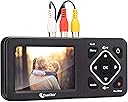
![ClearClick Video to Digital Converter 2.0 (Second Generation) - Record Video from VCR's, VHS Tapes, AV, RCA, Hi8, Camcorder, DVD, Gaming Systems [Requires Working VCR/Camcorder & Tapes]](https://m.media-amazon.com/images/I/819T6fRXBML.jpg)


🎞️ Relive your past in vibrant digital clarity—because memories deserve more than the attic
The ClearClick Video to Digital Converter 2.0 (Second Generation) is a user-friendly device that converts analog video sources like VHS, VCR, Hi8, camcorders, and retro gaming systems into digital MP4 files. Featuring a large 3.5" preview screen, direct recording to USB or SD cards (up to 512GB), and improved audio-video sync, it requires no computer or software. With auto-stop recording and pause/resume functions, it offers a seamless way to preserve and relive your analog memories with crisp SD quality.


| ASIN | B07V9JNRZY |
| AntennaDescription | Television |
| Best Sellers Rank | #25 in Video Converters |
| Brand | ClearClick |
| Built-In Media | 3-RCA Cable, Power Adapter, User's Manual, Video2Digital Converter 2.0 |
| Color | Black |
| Compatible Devices | Camcorder with 3-RCA or S-Video, VCR with 3-RCA or S-Video |
| Connectivity Technology | 3-RCA, S-Video |
| Connector Type | RCA |
| Customer Reviews | 4.5 out of 5 stars 5,354 Reviews |
| Includes Remote | No |
| Item Height | 0.9 inches |
| Item Weight | 6 Ounces |
| Manufacturer | ClearClick |
| UPC | 798578763372 |
| Unit Count | 1.0 Count |
| Warranty Description | Full 1-Year Warranty From ClearClick |
D**W
Performs very well
As someone who has a treasure trove of memories tucked away in various analog formats, finding a way to preserve and relive those moments has always been a priority for me. Enter the ClearClick Video to Digital Converter 2.0 (Second Generation), and it's like I've found a time machine for my cherished memories. Right out of the box, the sleek design of the converter caught my eye. It's not just about looks; the build quality is top-notch, ensuring that this device isn't just a one-time use gadget but a durable piece of technology that I can rely on. The user-friendly interface allowed me to convert my old VHS tapes and camcorder recordings with absolute ease. It was a plug-and-play experience that required no complicated setup. Whether it was my old gaming sessions on classic systems or the precious moments of my family's past celebrations, this converter handled it all. The compatibility with VCRs, VHS tapes, AV, RCA, Hi8, and more made it the only tool I needed for all my digital conversion tasks. The quality of the digital files is astounding. The videos are clear, the colors are vibrant, and the sound is as crisp as the day it was recorded. It's truly remarkable how this device breathes new life into footage that I thought was doomed to fade away. The ClearClick Video to Digital Converter 2.0 has exceeded my expectations. It's an invaluable device that has allowed me to safeguard my family's history and enjoy it in the modern digital era. I would recommend it to anyone looking to convert their analog memories with zero hassle and complete satisfaction. This review is based on my personal experience with the ClearClick Video to Digital Converter 2.0 (Second Generation). It's a product that has not only met but surpassed my needs, providing a seamless bridge from the past to the present. A big thumbs up from a very happy customer
D**H
Darn nice little gadget that does just what I wanted it to do
I have some quibbles. And I thought it was kind of expensive. But I'm giving it five stars because it has been 100% satisfactory for me and has done exactly what I expected. Good gadget, works fine. But one thing I've learned over the years is that with offline converters--digital audio CD recorder, audio cassette to digital converter, now this--WORK. With an offline converter I can get the job DONE. Anything involving a computer as part of the process is tempting--but false economy. I started with a $30 video-input-to-USB gadget and sure enough, the software provided with it broke with an OS change and no updates are available from the manufacturer. I was not picky about image quality. The results look fine to me and I think fully capture the quality of the (usually analog) source. The (analog) transfers from digitally recorded "Digital 8" are better than the ones from analog sources, which convinces me that the device is capturing what's there. I couldn't see any difference in quality between composite and S-Video. I have a concern about the audio quality. It seems fine in anything with a normal level but I think it's possible that there's some audible distortion in quiet passages. The unit was mostly easy to use, there are some quirks to get used to, you need to spend a few minutes and look at the instruction book. The instruction book is much better written than usual, but could be more detailed. I wish there was a wider range of "auto stop" times--they give you 60, 90, 120, and 150 minutes. In theory at least a VHS tape can play for 240 or 360 minutes. And there are times when I was quite sure that a tape only had ten or fifteen minutes recorded, and would have liked a 30 minute setting. However, compression works, and long periods of empty blue screen add surprisingly little to the file size. I bought a SanDisk USB 3.0 flash drive as recommended in the instructions, and it worked fine, but I also tried random old thumb drives from my collection _including USB 2.0_ drives and they all worked fine, too.
T**J
Amazing Little Device!!
Like many people in my age cohort, I have a collection of old videotapes on obsolete formats - About 52 Mini-DV tapes taken of my kids from birth to age 10 on my 1990's-era Sony camcorder, and about 16 old VHS tapes taken by me and other family members. I was considering sending off my tapes to be converted to digital format, but hesitated on sending my only copy of precious family memories out to a conversion service, and then paying the really high price for the conversion. As I looked at options, I originally thought about converting my tapes on my computer, but it involved buying and installing a video capture card, buying and learning the appropriate software, etc. Then I came across this device and read the reviews and took a chance on it. Best decision I ever made!!! This device is amazing - Incredibly simple to operate, and produces great quality video, especially for the price. You literally plug the RCA cables into the device, put in your memory stick, then press play on your old device, and record on this device, and you're on your way. Best of all, it doesn't tie up your computer to do all of this work, and lets you see the progress via the built-in screen (you can also listen as you record it if you want). I would generally just set a tape to record while I was at my computer doing other things, and found I could knock out this whole project in the matter of a few weeks, vs. the months I was expecting it to take. That said, here are a few things I learned along the way in working with this device: - The device has a way to stop recording after a certain period of time. My mini-DV tapes are all 90 minutes, so I though the 90-minute setting would work great. However, I found that my tapes ran 4 minutes longer on average than the 90 minute timer on the device, so you can't necessarily rely on that (not sure if the discrepancy came from the actual recorded length of my tapes, or from the device itself). - When you have finished recording, a counter shows your full recording time. I found that if I removed the memory stick while this was still displayed, I got a corrupted file message when I tried to transfer the file to my computer. However, if I waited until the recorded time counter disappeared (just takes a few additional seconds) this problem went away. - The device lets you record at 720x480 or 640x480 (the old 4:3 format that cameras used in order to be compatible with old tube-style TVs). I found that if I tried to use the higher-resolution 720x480, the image appeared stretched/widened. I found that the 640x480 worked great to record all of my older-format tapes. - I initially an into a bit of a hitch when I started to record my VHS tapes. I got a "signal not detected" message that I initially couldn't resolve. I tried using the included RCA cables, and then cycled through several of my own cables, and eventually found a set that (apparently) made this problem go away. - I believe the device's specs said that a 128 GB memory stick was the max, but I used a high-speed 256-GB stick from Samsung, and it worked fine. Anyway, I can't say enough great things about this device. I usually don't leave reviews on products, but I was so enthusiastic about this one that I just had to share. Hope this helps.
D**N
Good basic unit with some issues
I bought this because the adapters that connect directly to the computer sometimes do not work when Windows updates interfere with the feed. After familiarizing myself the unit is easy to use and produces reasonably good video files. I found the results were often a bit superior to video transfer devices and occasionally slightly inferior. Pluses: 1. Easy to set up and use. The buttons are actually quite responsive, so don't make my initial mistake of holding it down for a few seconds. 2. Good results. 3. Easy to transfer to a PC and use the video files. 4. The unit can be set to record for specific time periods. 5. It is supposed to sense when the video signal stops (Signal Loss detection) and shut off the recording. Minuses: 1. Sometimes the audio is out of synch with the video and I have to re-record it. If you use this for live video feeds that cannot be re-recorded you may want to consider something else. 2. The unit can be set to record for specific time periods. This works fine, but I wish there was more flexibility, either with several more selections or the ability to enter a custom time. If I have a source that's 61 minutes long I have to record 90 minutes. The longest setting is 150 minutes, so longer sources may just keep recording blank/unwanted video until you shut it off. 3. The unit is supposed to sense when the video signal stops, but it doesn't seem to work that well. 4. It is supposed to sense when the video signal stops (Signal Loss detection) and shut off the recording. This sometimes works. Fortunately it creates a series of video files that splice together just fine, so you just delete the empty ones. 5. When the power is unplugged the unit reverts to 1/1/2019. Not that important (to me), just an annoyance.
J**Y
worth every penny and simplistic to use
I am an I.T. professinal and have been trying for years to capture my VHS tape to digital media.I have tries may USB devices by multiple companies and internal $800.00 capture cards with codec buiilt in. After several trys over many device across many years I always have the same or similar problems - Dropped frames during capture - dropped, corrupt or otherwise missing. This causes one or more problems depending on the device you are using. Some throw up color bars, some just stop capturing video but keep capturing audio thus putting the audio track and video track out of synch on the concluded capture and other similar issues. Mush of this is NOT any one devices fault but rather is result of the VHS tape format or the tape degrading over time. The results vary form device to device however depending on how each specific device handles such situations. Now for the GOOD NEWS - This device captures the video no matter what - missing or corrupt frames are recorded and mere blips or squiggles due to the degraded source material and the audio track is kept in synch with the video. In the end you still have some blips or squiggles in the capture where the source signal has degraded BUT the overall capture is intact and in sych and viewable. You need to learn that these blips can NOT be fixed as it is a cause of the aged tape and it original format of VHS etc. I have invested thousands in sophisticated technology devices that have not gotten the job done. This gadget gets it some as best as could be expected when dealing with inferior source materials that have substantially aged. I highly recommend it. When capturing later and or higher quality ANALOG source materials the device delivers a flawless capture. If your intent is to capture digital source a different device is needed. Also note neither will capture copy protected materials in violation of copyright laws. This is not intended to cheat copy written materials or to pirate such! For the intended purpose of capturing and digitizing analog personal materials I highly recommend this device and while more costly than other devices that claim to do the job this device actually gets the job done!!
J**E
A great memory saver, easy to use, a top-notch service department, I highly recommend
I had emailed ClearClick Support Department in December 2024 concerning this converter and my old Sharp Viewcam that we had purchased in the mid 90’s and have used ever since! I received an immediate reply stating that Video 2 Digital Converter would work for me but that I would need a splitter (the email showed the exact splitter required from Amazon). It only took me a year, but I finally ordered the converter and splitter on December 1, 2025. It was delivered 5 days later. I was a little uncertain how to hook everything up, So I sent another email to ClearClick Support Department with a little background information from 2024. Within 3 hours, I received a reply from the same individual from 2024 with detailed instructions as to how to hook everything up. I followed the instructions and PRESTO, I was converting and saving our memories. The unit is simple to use, ClearClick support is second to none. The quality of the digital output is amazing! I will convert as many memories as possible between now and Christmas Day. I will have a laptop setup on the kitchen island, and my family will be able to the view the past thanks to ClearClick and the Video 2 Digital Converter. I should add that I am 77 years old, my wife is 72. She was diagnosed with the early onset of dementia in 2017. I have shed many tears as I convert and save these memories. She will sit and watch the video as it is being converted, she says she knows the people and she smiles – so that is great. Thanks, ClearClick for allowing me to save these memories.
T**S
Works great for generating digital files from old video tapes or sources.
Great product. I am using a Microcenter USB 32 GB stick, and have a VCR connected. I am successfully transferring old, deteriorating VHS tapes to file format. Audio and video are great on the file. Of course they are dependent on the video/audio quality recorded on VHS tapes decades ago. I am preserving these old tapes indefinitely with the mpeg files this device generates. Love the device.
A**R
Worth the money
Great way to save memories! Worth the money! Easy to use and operate! Hit record and it auto saves to a usb stick! The volume could be slightly louder but can’t complain! I’ve already saved myself money by using this converter!
Trustpilot
3 weeks ago
1 month ago