We remain fully operational. Our teams are working around the clock to ensure your deliveries continue safely.

DOWNLOAD THE APP


Customer Services
Copyright © 2025 Desertcart Holdings Limited
DOWNLOAD THE APP

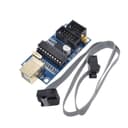
⚡ Power your projects with precision and ease!
The HiLetgo USBTinyISP is a compact, lightweight AVR ISP programmer designed for Arduino UNO and MEGA boards. Featuring dual power supply options (USB and external), it supports both 6-pin and 10-pin ISP interfaces, ensuring broad compatibility. Compatible across Windows, macOS, and Linux, it enables seamless bootloader burning and chip programming with popular IDEs. Ideal for professionals and hobbyists seeking reliable, versatile programming hardware.
| ASIN | B01CZVZ1XM |
| Best Sellers Rank | #693 in Single Board Computers (Computers & Accessories) |
| Brand | HiLetgo |
| Compatible Devices | Arduino UNO, Arduino MEGA |
| Customer Reviews | 4.2 4.2 out of 5 stars (91) |
| Hardware Interface | USB |
| Item Weight | 0.02 Kilograms |
| Manufacturer | HiLetgo |
| Model Number | 3-01-1056 |
| Operating System | Windows, macOS, Linux |
| Style Name | Classic |
M**O
Works great!
It works great. You just need to install all the necessary softwares: - USBtinyISP driver, from Adafruit - WinAVR (Include AVRdude) - Arduino IDE - ATtinyCore (very important) - MiniCore (very important) - AVRdudess (optional) I use It to burn bootloaders and program AVR chips from the arduino IDE. Update 2024: A incompatibility problem was found between new version of AVRdude and the USBtiny's driver. To fix this you have to replace the driver for a compatible version: You can do this using the program Zadig: 1) Unistall the old USBtiny driver using the Windows Devices Manager. 2) Open Zadig. 3) Connect your your USBtinyISP to your computer. Information immediately will be shown in the Zadig form. 4) Select WinUSB. 5) Click on Install Driver.
N**H
Just works...
I have an SMT Arduino Uno that had the micro-USB port snapped off the board. I can power the board easily through other means, but programming wasn't so easy. I figured this was cheaper than buying another UNO and my application didn't need the USB during operation (it's a well pump controller and replacement for a "pump saver" over- and under-load cutoff device). It works simply with the Arduino IDE, and once configured pretty much transparent. It turns out I can also use it for another application on an embedded system for which the original programmer is no longer available - bonus points!
C**F
Where's the documentation?
It would have literally cost nothing to put a little "+" symbol by pin 2 (VCC). Instead, I had to pull out my voltmeter to figure out which pin that was (if I want to program a microcontroller on a breadboard, for example, this is crucial information). In the attached picture, I have circled the positive pins (VCC) in yellow (one on my arduino UNO, the others on the this USBTiny that I am reviewing). Points off for Arduino as well for doing this, but that would a different review...
K**A
Works Perfectly!
Works perfectly. Was needed to flash an Arduino board that has no bootloader. Recommended.
M**Y
Half the time
These come without boot installed. I could only get 2 of the 4 to load the bootloader.
D**R
Worked perfect to put bootloader on Arduino Uno Mega
I had some Atmel controllers without a boot loader and this work perfectly with the Arduino IDE. Kind of a one time thing, but I do plan on getting more Atmel chips without the bootloader.
C**9
Did not work!
I could not get it to work. Maybe a scam product! There is not even a USB interface chip on board. I would not recommend!!!
J**A
Won’t burn a boot loader on ender 3 because of memory restrictions
This worked ish for the creality ender 3 pro. It won’t support burning a boot loader because of the size limitations but I was able to burn the full marlin 2.0 build with out a boot loader with this. If you need a boot loader on your ender 3 then the Arduino nano (with 6 pin icsp header) is the way to go. Easy to hook up and took 5 min to burn the boot loader.
C**8
usbtinyのドライバをインストール arduino内で、ブートローダの書込み ブートと目的ソフトを書き込んだマイコンのデータを読み込んで 量産時には、TL866などでマイコン本体に書き込み この方法で生産効率が向上します。
東**果
内容に10pケーブル添付と書かれていますが(2020/04現在) 写真の通りの6Pケーブルが添付されていました。
A**様
adafruitのUSBtinyISPドライバーで動作しました。 早速ArduinoMega2560のブートローダー再書き込みに使用してみました。 書き込み終了後のVerifyにてエラーが出ますが問題なさそうです。 Atmel-ICEを接続してデバッグするのにFuseビットをいじくりまわしたのが原因かもしれません。 とりあえずArduinoIDEに再び接続できるようになったので良しとします。
Trustpilot
2 weeks ago
1 week ago