Desertcart purchases this item on your behalf and handles shipping, customs, and support to Mexico.
🎨 Unlock your digital masterpiece with precision and speed!
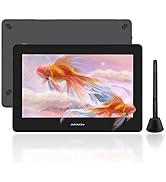
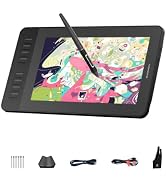
The GAOMON M10K is a professional-grade drawing tablet featuring a large 10 x 6.25 inch active area and a battery-free stylus with 8192 pressure sensitivity levels. It offers 10 customizable shortcut keys and a programmable touch ring to enhance workflow efficiency. Compatible with Windows, Mac, and select Android devices, it supports popular creative and remote work software. Designed for beginners and pros alike, it combines portability, ease of use, and precision at an unbeatable value.


| ASIN | B07HQDN7W6 |
| Active Surface Area | 10 x 6.25 inches |
| Additional Features | Battery-free Stylus, Built-in Pen Loop, Extra Replcement Nibs, Programmable Press Key, Touch Ring |
| Best Sellers Rank | #10 in Computer Graphics Tablets |
| Brand | GAOMON |
| Built-In Media | Battery-free Stylus, Carrying Bag, Pen Nib Clip, Pen Sleeve with Extra 8 Nibs, USB Cable |
| Color | Black |
| Compatible Devices | Certain Android Tablet & Smartphone, Desktop, Laptop, Mac |
| Connectivity Technology | USB |
| Customer Reviews | 4.4 out of 5 stars 17,842 Reviews |
| Display Type | No Screen |
| External Testing Certification | 0000 |
| Item Dimensions L x W | 14.17"L x 9.44"W |
| Item Type Name | Computer Graphics Tablets |
| Item Weight | 695 g |
| Manufacturer | GAOMON TECHNOLOGY CORPORATION |
| Mfr Part Number | A0.M10K00-1-002018-EU |
| Model Name | GAOMON M10K |
| Model Number | M10K 10*6.25 inches |
| Native Resolution | 1920x1080 |
| Number of Items | 1 |
| Operating System | Android 11, 12, 13, and 14, Windows 7 or later, macOS 10.12 or later |
| Pressure Sensitivity | 8192 levels |
| Screen Size | 10 inches |
| Special Feature | Battery-free Stylus , Built-in Pen Loop, Extra Replcement Nibs, Programmable Press Key, Touch Ring |
| Specific Uses For Product | Designing, Drawing, Painting |
| Target Audience | Artist, Content Creator, Designer, Student, Teacher |
| UPC | 653334993496 |
| Unit Count | 1 Count |
| Warranty Description | 1 year warranty under non human made damage |
A**A
BEAUTIFUL
I ordered one from another company, and that one was super glitchy. I ended up deciding to spend the extra $8 to get a better one, and this one is AMAZING! I love the dots to help orient my self, and the size is quite big! It is very portable, and the pressure sensitivity is amazing. I love how easy it is to use compared to the other one I purchased from another company. Will be keeping. Quite thin, but that is good! I love love love this I totally recommend. I am just using this for note taking.
G**N
Cheap & reliable - a great tablet for beginners and teachers
When I first saw this tablet I was rather skeptical; even for a smaller tablet it was incredibly cheap, especially when compared to the prices set by other brands. I went ahead and ordered this tablet, after all there’s not much to lose; on top of the Gaomon warranty I was also offered a 3 year long protection plan for a little under $5. Already a better start than any other tablet I’ve purchased. The tablet arrived much quicker than expected and I was also pleased to see how nicely everything was packaged. I attached a little unboxing video here; I went ahead and removed the plastic from the products (tablet, tablet pen, and glove) before recording, but everything was re-placed as how it was when it came in. The contents include: Tablet features: 6.5” by 4” Work Area. 4 Shortcut keys Everything else: The S620 tablet itself Battery-free AP32 pen (8192 levels pen pressure, aka pretty standard pen pressure but impressive for such a small tablet) 1x USB Type-C Adapter & 1x Micro USB Adapter Drawing glove Spare pen nibs (enough for the tablet’s whole lifetime, more nibs are available on their website but they provided plenty to start with) Setting up this tablet took no more than 10 minutes, Gaomon’s site was really easy to navigate. If you have another tablet make sure you uninstall that driver before installing this one, the same goes for any tablet, only one can work at a time. Not that big of a deal, just a tip for beginner tablet users! After around an hour working with the tablet, I got an error message on my computer and the driver stopped working. I went back to Gaomon’s website and right there on the front page (it’s so big you can’t miss it) was a link to download their universal driver that would fix the issue right up. kudos to them. Driver issues are super common with all tablets, but I’ve never seen a company that openly acknowledges & tries to give you as much access as possible to fix them as Gaomon does. I didn’t have to dig for this fix AT ALL, and the tablet worked normally after taking the 2 seconds to download the new driver. Super rare for tablet companies, you usually have to dig. There was only 1 cord for this tablet, which I was really pleased about. There’s no clutter! It’s definitely portable and quick. The glove fit me as well, which I wasn’t expecting since tablet companies tend to either send huge gloves or extremely tiny ones, but this one fit me perfectly! There’s also USB connectors in case you want to use the tablet on your phone; like I said, it’s made for portability and ease of use. The pen nibs supplied are enough to last the tablet lifetime, it’s overall a great deal. As for the tablet performance itself, it works just as well as my $350 Wacom Intous (medium). Obviously, it’s a lot smaller than I’m used to, which took some adjusting, but that’s expected. I got the hang of it within the same hour and worked on it as I would any other tablet after that. It performed just as well drawing wise as my Wacom. The only con really was the pen. For the first hour or two I was really enjoying the pressure of it. After an hour or so I had to push a bit harder for it to connect & to get the pressure I wanted. Again, this took some adjusting too and wasn’t my favorite, I’m more used to pens that don’t have so much “buffer room” so that’s more of a personal preference. Once I was more used to it after another hour or two it wasn’t so bad. For such a small and well priced tablet though, it’s surprising that it works THIS well. You definitely get bang for your buck I’ve never been one to use shortcut keys before, but I decided “why not” and set some up to use for this tablet, and wow I’ve been missing a lot! I like how these keys click a lot more than my Wacom’s do. Their sensitivity is really nice and the shortcut menu is right on the driver menu so it’s super easy to navigate and set up. I highly recommend this tablet to beginner artists (I’m going to be giving this tablet to my younger sister, who’s just recently getting into digital art/animation), it’s cheap, easy to understand, and very portable. It does it’s job well, what more can I say? In a time like this with the lot of us doing everything online, I’d also recommend this tablet to teachers (my own struggles to write equations with his mouse), it would really help with signing things online as well! I’m actually astounded that I spent hundreds on a tablet I could have gotten for less than half the price for the same quality from Gaomon. Leading tablet companies aren’t always the way to go, Gaomon has much better protection plans as well! And I got a free tablet glove. Now, I wouldn’t suggest this particular tiny tablet for full time artists like myself, they have other sizes that I expect to hold up just as well for under $100. Hell, I could even get a screen tablet for cheaper than I got my Wacom desk tablet for. Had I known about Gaomon when I was first looking for a tablet, I surely would have saved a lot of time, money, and clutter buying from them.
D**E
Good, Well Built Product
• Great for Illustration and photo editing • Great for enlarging subject mater and editing on a pixel level • Not interested in all the features so I covered up the side panel.
A**M
Perfect for beginners, but still great for the average user
I absolutely love this tablet! I decided to purchase it not for drawing but for journaling and note-taking on my laptop. I am pretty technologically illiterate and was very intimidated by a new device, new computer programs, and setting the buttons, but this thing is insanely easy to use. It took less than 3 minutes to install the driver and the device connected right away to two separate computers (newer Windows 10 desktop and 2012 MacBook Air). I was confused by setting the hotkeys at first but once I understood what I could use them for they are insanely easy to set up and change whenever you want. I’ve decided on settings for most of them, but I continually change one of the two pen buttons for whatever I’m working on at the time—so when I’m studying, I make it select the highlighter, and when I’m designing or writing I might change it to the selection or pen tools. I cannot stress enough how bad I am with technology and how easy it was for me to figure all this out on my own! I also love the size of this tablet. It’s incredibly lightweight and easy to handle, but it feels sturdy and well-built. There is plenty of room to write or draw anything I need and I find it very easy to hold and work with. Even without getting it on sale like I did, this tablet gives you way more space and buttons for way cheaper than others I looked at. I haven’t ever tried any other kind of tablet to compare them, but this certainly doesn’t seem cheap to me at all and I think it’s super fairly priced for the value compared to other options I researched. The pressure sensors in the pen seem to work very well too, but I’m no artist so I don’t want to give a full critique of that feature. I only have two complaints and one of them is not Gaomon’s fault. What I don’t love about the tablet itself is the scroll circle; it’s definitely adequate, but it’s a little clunky. It’s not as smooth as zooming or scrolling on the computer but it does work, especially for a casual user. An artist who needs more control might have more trouble with it. I also cannot figure out how to scroll horizontally (mostly when zoomed in which is necessary to write/draw clearly). My only other issue is that I specifically purchased this tablet to work with GoodNotes 5 on my Mac, and it isn’t as seamless as it could be. GN5 completely acknowledges on their website that they do not have full support for these kinds of tablets and I read that before purchasing. That being said, it definitely works well enough for a casual user like me, and it works way faster in other programs designed for its use like Sketchbook. It just lags a little bit, a little more often than I might like, but only in GoodNotes, and it’s not a dealbreaker.
M**L
Unleash Your Creativity with the GAOMON M10K Graphic Drawing Tablet
⭐⭐⭐⭐⭐ (5/5 stars) The GAOMON M10K Graphic Drawing Tablet is a powerful and versatile tool that opens up a world of possibilities for digital artists, illustrators, and creative enthusiasts. As someone who values precision, functionality, and seamless drawing experience, I am thrilled to give this product a well-deserved five-star rating. The standout feature of the GAOMON M10K Graphic Drawing Tablet is its impressive drawing area of 10 x 6.25 inches, providing ample space for your artistic expression. Whether you're sketching, illustrating, or designing, this tablet offers a comfortable and natural canvas for your digital creations. The high-resolution screen ensures clear and detailed visuals, allowing you to bring your ideas to life with exceptional accuracy and precision. The 8192 levels of pressure sensitivity are a game-changer for digital artists. The battery-free stylus delivers a responsive and fluid drawing experience, simulating the feel of traditional art tools. With each stroke, the tablet accurately captures the subtle variations in pressure, enabling you to create stunningly realistic and nuanced artwork. Whether you're shading, blending, or adding intricate details, the M10K delivers exceptional control and sensitivity. Customizability is another standout feature of the GAOMON M10K. The tablet is equipped with 10 customizable hot-keys, allowing you to personalize your workflow and access your favorite shortcuts with ease. Whether it's adjusting brush size, switching between tools, or zooming in and out, these programmable keys enhance your efficiency and streamline your creative process. With the ability to tailor the tablet to your specific needs, you can focus more on your art and less on navigating through menus. Compatibility is seamless with the GAOMON M10K. It supports both Mac and Windows operating systems, ensuring that artists of all preferences can enjoy its features. The tablet is easy to set up and connects effortlessly to your computer via USB. The driver software provided by GAOMON offers a user-friendly interface, allowing you to customize settings and optimize your drawing experience to your liking. Durability and reliability are essential qualities of any drawing tablet, and the GAOMON M10K delivers on both fronts. The tablet is built to withstand the demands of daily use, providing long-lasting performance. The stylus is lightweight yet sturdy, making it comfortable to hold for extended drawing sessions. The tablet's surface is resistant to scratches and wear, ensuring that it remains smooth and responsive over time. In conclusion, the GAOMON M10K Graphic Drawing Tablet is a superb choice for digital artists seeking a reliable, feature-rich, and customizable drawing experience. With its generous drawing area, impressive pressure sensitivity, customizable hot-keys, and seamless compatibility, it empowers artists to unleash their creativity and produce stunning digital artwork. The tablet's durability and reliability make it a worthy investment for both professionals and hobbyists. I highly recommend the GAOMON M10K Graphic Drawing Tablet as an essential tool for digital artistry.
T**T
Great no issues
Using this product for osu GREAT tbh, it takes some time to get use to I would 100% suggest this to anyone to switch. But you might be bad with it at first, but keep on doing it and I'm pretty sure you'll get better at jumps etc.
J**V
First Drawing Tablet and I love it
Ill start with a little background leading to why i chose this tablet Ive been graphic designing for a couple years (i just turned 23) now on and off making logos and some video editing. For the past couple months I’ve been really in a creative drawing mood but i wanted to get into digital art. Originally i was going to get an iPad, something i could take with me wherever i go but its 400$ and thats a pretty big investment. So i started looking into drawing tablets and watching youtube reviews and decided to go with this. Especially since i already use photo shop and am pretty familiar with the program. Now for my first review. I plan on doing a couple of reviews/updates because i feel like I’d be helpful for people who are looking into getting this with little to no drawing experience like myself. 09-04-21 The tablet got delivered and i was super excited to get it plugged in. I already watched youtube videos on how to set it up so i didn't have a problem with that. Surprisingly after about 5 mins of going through Gaomons program i was already used to using the pen as a mouse. I started up Ps and started just testing the pen pressure drawing lines. I also changed some of the buttons on the side to some shortcuts i thought would be helpful. I actually didnt use my keyboard for a little bit. I honestly didnt take me long to get use to the tablet after playing around with it for about 30 mins. My only complaint and why i didn't give it a 5 star is that the pen sounds like it’s scratching the surface. Other than that i love it and will be spending a lot of time with it and learning drawing fundamentals. 09-08-21 Welp im trying to keep my head high but I’ve already run into my first problem. Today was the first day i really had free time to sit and use the tablet. I used it for about 12 and everything wad going well untill about the last 2 hours randomly in photoshop and it happens pretty often it'll either draw a line across my canvass or erase a line through it, the annoying part is that it only does it when im finish say filling in a spot and i lift the pen off the tablet it'll draw a line across my work. So now i have to lift the pen pretty often to keep the line from popping up then i have to undo whatever i just did. The picture is what i spent all day working on. First tracing the original, then tracing my trace with a different brush and now color. I love the tablet and originally had it at 4* wouldve been 5 because the scratching sound that made me give it a 4 went away. Im giving it a 3 because i haven’t used the tablet for a full day and the problem with the line makes it really frustrating to try and get in a work flow because who knows when a line will go through your work. And you do want to catch it because if you dont and cant undo it , you end up having to go and fill it what it messed up.
B**Z
Easy, fun, lightweight to be creative anywhere
So easy to use and compatible with a variety of products…from laptops to iPhones. The size isn’t cumbersome and lightweight. Great for easy travel.
K**L
Top
top
Y**S
Super
Tablette graphique, super pour le prix qu’elle vaut du coup très bon rapport qualité prix
D**G
Bon produit
Très bon rapport qualité prix, bon produit pour débuter dans le dessin virtuel
E**I
A little slow and the pressure sensor is wack
I ordered this because my tablet from Wacom was broken. Its easy to say that my last tablet was more worth the money. The finess and touch on Gaomon does not even come close to a Wacom tablet. If youre looking for a tablet thats good with details, has high sensitivity and follows your pen easily, Gaomon is not the one. This is great for a beginners tablet tho.
Y**R
p good
very tuff works well especially for the price deff cop ts twin
Trustpilot
2 weeks ago
2 weeks ago