We remain fully operational. Our teams are working around the clock to ensure your deliveries continue safely.

DOWNLOAD THE APP


Customer Services
Copyright © 2025 Desertcart Holdings Limited
DOWNLOAD THE APP


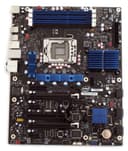
🚀 Power your workstation with Intel Extreme — where speed meets unstoppable performance!
The Intel DX58SO Extreme Series motherboard is a high-performance ATX board engineered for Intel Core i7-900 series processors with LGA1366 socket. It supports up to 16GB of triple-channel DDR3 memory, dual GPU setups via NVIDIA SLI or ATI CrossFireX, and features extensive connectivity including 12 USB ports and 6 SATA ports with RAID. Designed for enthusiasts and professionals, it offers advanced overclocking tools, 7.1 Dolby Digital audio, and gigabit Ethernet to deliver a powerhouse platform for gaming, content creation, and multitasking.
| ASIN | B001ISJONM |
| Best Sellers Rank | #4,432 in Computer Motherboards |
| Brand | Intel |
| CPU Model | Core i7 |
| CPU Socket | LGA 1366 |
| Chipset Type | Intel |
| Compatible Devices | Personal Computer |
| Compatible Processors | Intel Core i7 |
| Customer Reviews | 4.1 out of 5 stars 65 Reviews |
| Global Trade Identification Number | 00735858198004, 00735858203036 |
| Graphics Card Interface | PCI Express |
| Item Weight | 1.48 Kilograms |
| Main Power Connector Type | ATX |
| Manufacturer | INTEL - MOTHERBOARDS |
| Memory Clock Speed | 1333 MHz |
| Memory Slots Available | 4 |
| Memory Storage Capacity | 16 GB |
| Model Name | BOXDX58SO |
| Model Number | BOXDX58SO |
| Number of Ports | 12 |
| Platform | Windows 7 |
| Processor Socket | LGA 1366 |
| RAM Memory Technology | DDR3 1600;DDR3 1333; DDR3 1066 |
| Ram Memory Maximum Size | 16 GB |
| S/PDIF Connector Type | Optical |
| System Bus Standard Supported | SATA 3 |
| Total PCIe Ports | 2 |
| Total SATA Ports | 8 |
| Total Usb Ports | 12 |
| UPC | 999900599229 735858198004 675900971592 735858203036 |
| USB 2.0 | 12 |
| Warranty Description | 3 years |
J**2
Great Motherboard
First off their is no IDE or PS/2 connections so be ready for that. After I got everything in my computer put together and ready to go I went to plug in my keyboard and it was usb only. So just find yourself an a adapter or get yourself a new keyboard. The price of DDR3 is cheap so its not so much a big deal to invest in. There is one PCI slot and now with the newer BIOS update its SLI compatible which is great since when I read the description it says that its only Crossfire ready. If you want to go with something beyond two way SLI than you may want to go with the EVGA model which has more DIMM slots as well. I was going to go with EVGA but my new case would not allow it and I don't have the budget for three cards. I like the way the board is situated with DIMM slots running vertical and looks like everything is closer to the processor than on other boards I have seen. I guess when everything is moving at light speed a smallest measurement closer makes a difference on a motherboard. Install is a cinch just make sure you take your time and don't rush and make a stupid mistake. I have found that in my experience I mess up on stupid things instead of something big. Overclocking has been a little more simplified on this board which is what you should probably do if you invest in these boards. Overall this board has everything that I need with lots of SATA and USB ports and its super fast with my i7 920 along with my 6 Gigs of Corsair Dominator DDR3. All I can say is I can't wait to get my hands into some overclocking when I get the free time. Keep in mind only 64 bit Vista will see anything above about 3 and a half gigs so if you don't want 64 than just be ready not to see what you put in. One minor issue is the setup of the PCI Express slots since I have an 8800 GTS (one of the fatties) and a Creative X-Fi sound card it doesn't leave room for another 8800 GTS without me having to remove my sound card. Its not that big of an issue though since I plan on getting a smaller newer card anyways. Though if you have a fat card like me and something in the PCI slot and want to run SLI you might run into trouble so that is worth noting in my mind. Is this board worth it though I would have to say absolutely yes. According to Intel sticking in a fourth stick will cause a degrade in performance so since most ram that's DDR3 come in three packs its not so much a big deal. Also when it first came on and I entered BIOS everything was recognized but I could not get the thing to boot my ROM drive and it would just sit there with a black screen and then it would ask me to select cd drive type 1 or 2. After about three hours or so it all of a sudden worked after I selected 1 it booted finally and everything was installed (operating system). The next problem was it would not restart and as soon as my computer would go off and come on again it would be a black screen going nowhere. Then I remembered update your BIOS dummy and I read all the notes and a lot of issues I had was fixed in the BIOS update including my restart problem. There was an issue also with my type of ROM drive not booting when put first in priority and that is the issue I had with trying to get it to boot to install my operating system. Now everything runs perfect and I could not be happier. The reason I put all this in my review was it did not go as smooth as I thought it would and someone else might have problems. If you do have issues just drop me a comment and maybe I can help you out just from what I had to do.
C**.
Great performance and it has almost all you need.
I bought this motherboard to use it with an Intel i7 950 processor. I bundled it with 16GB of RAM from Corsair and I am very happy with it. So far, just 2 weeks, it runs very fast with Windows 7 and Pinnacle Studio for A/V editing. Setting up the motherboard is easy. Make sure you connect all the power plugs required as specified in the setup instructions card. It also has one installation screw less than my previous Intel motherboard, so be careful to remove the post from the case before setting the motherboard down. This motherboard only has 1 PCI slot. This PCI slot will be very close to your video card if you got a two slots wide model. I had problems installing a PCI IDE controller (it likely is too slow for this application). I decided to remove the older ATA/133 hard drives I had, but if you need to keep your ATA hard drives, consider getting a PCIe compatible card or IDE-to-SATA adapters for each one of them. Be aware that the the DX58SO motherboard has the memory "above" the processor (above in my case refers to the top of the mid-tower I installed it in). So if you are thinking about buying an alternate cooling system for your processor (like the Cooler Master V8), you may not be able to install a memory fan kit properly (like the Corsair airflow fan system).
D**J
Its a Good moBo. but...
This is a good mother board for the average user. It works VERY nice is simple and good for any one building a new computer. The audio is WAY better than most. It has HD audio and plenty of USB bays and will support a USB 3.0 card. I am using this one currently in an Antec 902 case, intel i7 930, XFX ATI Radeon 5850 and corsair 650W power unit. Together they work very well. I am impressed and would recomend this MoBo. Intel did a good job on this mobo. BUT... While you can over clock your CPU, RAM and GPU you cant overclock them too much. THis MoBo isnt built for EXTREME overclocking but you can overclock them some. For my CPU I went from a 2.8 to a 3.33 with no proble. Any higher the PC wont work. If you want to have a MoBo that you can overclock your CPU to unbelieveable hights this one isnt it. But If you want one that works very well and allows you some overclocking then this is it. Other than that issue i love it. I use it mainly for Photography and some gaming.
J**A
Bad quality Intel
I have been purchased the first DX58SO MOBO on february 20 with the i7-920, then few weeks I received them at my place (I live in Venezuela). Firts all work nice and well at firts boot. The Windows XP SP2 was installed without problems (in 18min). Only have 3GB detected from 4GB installed, but not problem at all. All drivers was installed without problems. The BIOS was updated as well. Well, around 2h of work with the system (DX58SO Intel DX58SO Extreme Series X58 ATX Tri-Channel DDR3 16GB SLI or CrossFireX LGA1366 Overclocking Utility Desktop Board - Retail + I7-920 Intel Core i7 Processor i7-920 2.66GHz 8 MB LGA1366 CPU BX80601920 + CORSAIR H50 Corsair Cooling Hydro Series H50 All in One High-performance CPU Cooler CWCH50-1 + CORSAIR XMS3 4GB Corsair XMS3 4 GB PC3-12800 1600Mhz Dual Channel Core i3 i5 i7 DDR3 Memory Kit CMX4GX3M2A1600C9 + ATI 5770HD + THERMALTAKE 750W + THERMALTAKE ELEMENT G CASE + WESTERN DIGITAL 1TB HDD + LG DVD-RAM) installing the "Dirt 2" game, I was put the headphone cable on rear chassis connector and PUF!. The video goes out! The fans spin go at full speed and the two red leds on MOBO turns on. Then, no recovery BIOS work, the MOBO state was unrecoverable. So, I was chat with Intel tech room. They told me to return the MOBO to the seller (Amazon.com). I did it and have the MOBO replaced some weeks after. Nice returning items department Amazon! Very gentle attention and rapid response, but again... So, I work in with the new on MOBO, installed all things in place. But again the poor quality and untested MOBO prior to box it from Intel, as the MOBO just turned on the fans. There was no video or boot was not possible to perform BIOS recovery. So, I was chat with Intel tech room for second time. They told me to return the MOBO only, without any of it parts (cables, manual and box) to them, using their UPS account. At this moment, the second MOBO replacement (the third unit at my hands) is on way home. Hope to receive it today or tomorrow I will edit this review when I have it on my hands and will see... Again. *************** Edited at May/16/2010 Well... I received the third (yes the 3!!!) MODO on friday morning, I din`t test it until that night. I didn't like to writte because I'm very dissapointed, very upset, very bother and very boring with Intel, ¡A company that show us for many years how a nice and stable PC will be built! This MOBO run exactly equal that second one (returned to Intel). Don't boot. No video at screen. BIOS recovery don't work. No beeps without memory installed. Only fans runs at normally speed and that's all. I don't know if the CPU was damage with the first MOBO when the two red leds on board turn on. Then the same leds didn't turn on at the others MOBO's tested (two already). I will chat or call to Intel call services to resolved this at monday. They doesn't work on weekends! But the problems! I don't like this DX58SO anymore. I like get money back, to buy and try with another MOBO builder, like MSI. I'm bother and boring with intel. 3 month from the first purchase and still didn't have the system stable and working. Now the problem is: this MOBO is the one that Intel gave me in RMA. They send to me the invoice, but I wasn't charged for it. But now... If I want a money back from Amazon (where my first dx58so was bought), I can send this RMA MOBO from intel to amazon? Nice question intel!!! So... sunrise and see. *************** Edited at January/6/2011 Well... Finally the MOBO was returned by RMA by Intel with the CPU. The first time when I have the problems, the CPU was fried!. Then the Intel tech service give me a RMA for the CPU. Two weeks later I received the new one and bingo! The MOBO with it WORKS PERFECTLY!! The first MOBO and the first CPU was damage both, but only the MOBO was returned by Intel tech order. So... The system is running today at 100% without problems. Very stable and very fast. For all problems that I have with this system, I will modify the first rate and give 3 stars now. Thanks for all that reply my review
D**S
They finally got it right
Well I purchased this board and had to send it back twice because of faulty boards. They wouldn't power up, also I noticed some heat sinks were loose. After I got the third, I got it up and running and it has been strong for over a year. Overclocking is pretty easy with it too. So three stars, I'm happy with the board now, but it took 3 boards to get one that actually worked.
B**D
Died after four months!
When I built my new Core I-7 computer I looked very closely at the components I'd use and after much debating I went with the DX58SO. I did so because they ditched the long obsolete serial ports and replaced them with MANY USB ports. Also, what better way to complement my new processor than to use it on a board built by the same company? I couldn't have been more wrong! The Three Stooges could've built a better motherboard using cardboard, shoestrings and magic markers. Think I'm joking? 1. The box was missing items, most notably the "Far Cry 2" disc. Intel's support told me (I'm not kidding) that it's not their concern and this won't happen if I buy my hardware from reputable dealers. I'd already told them I'd purchased it from Amazon.com (the MOST reputable dealer, IMHO), so this is one of many absurdities to come from Intel. I noticed similar complaints, so either there's a consumer conspiracy against Intel or they have a quality control issue. They did manage to get all of their self loving propaganda in the box. 2. No one at Intel seems to know what memory will work with this board. They advertised that it will work with 1.6v memory, but the box contained a sheet of paper that stated that anything above 1.5v will damage the motherboard/processor, which meant that the $200+ worth of 1.6v memory I'd bought was worthless. Intel tech support said 1.6v was o.k., but their website said 1.5v. So which is it? 3. See the Intel video and diagrams on this page that show the SATA connecters facing outward? They don't. The SATA connecters run along the edge of the board and face the front of the computer. They are approx two inches from the disc drives, which made them a real pain to hook up. 4. Don't use SATA cables with the silver clips. When you remove them the motherboard won't let go unless you use a lot of force. 5. The Quick Start sheet doesn't match the user's manual and both don't match the motherboard (for instance, the SATA connecters). Do ANY of Intel's departments talk to each other? 6. Sitting next to the second PCI slot (where you'd install a secondary graphics card) there's a connecter that you have to connect a power cable to. If you squint at the picture, it's the yellow thing above the "5" and "6". Good luck using that second slot! 7. There are four memory slots. WRONG! The manual states that if you put memory in the fourth slot it might degrade the computer's performance. WHAT??? Then why even put it in there? I've built a few computers since 2001 and all of them are still running (except the one with the Intel DX58SO). I've never come across a rotted piece of hardware like the DX58SO and the maddening frustration of dealing with Intel. It was designed by engineers with a mean spirited sense of humor and sold by a company that doesn't care. Whether you're new to building computers or have been around for a while, avoid this motherboard at all costs. You'll be replacing it soon enough!
P**N
Good Mother board
This motherboard will allow only two SLI graphics cards. This is fine if that is all you need. Others can take 3 cards. Be careful if you select a card that takes two slots... you lose a PCIe-x slot (the short one). Also, note that it is better to add the CPU cooler while the board is not mounted, if you use a Cooler Master case. You can't reach one of the four attachment bolts. Taking it all apart again is a pain. The utility from Intel will allow overclocking, and it has a automatic increment capability. Nice board. No other issues. The included fan works well on the IO Hub.
O**I
Know what you're doing
[edit]the latest BIOS fixes the LAN issue[edit] First off. do not update the bios to the 5417 version, stick with 5200 because the LAN card disables after waking from sleep mode. here's the link: <edit> since links are disabled, try googling "SOX5810J.86A" <edit> Secondly, for most ram, unless you've bought the fully tested stuff, you need to change the voltage to 1.62 and lower the "Multiplier" to 6 or 8, otherwise you'll have trouble posting. (I have the 16gb 1600DDR3 mem kit from KomputerBay and it works with the following settings: 7,7,7,[email protected] 8 multiplier) Processor i7 930 the six sata ports are angled sideways and can be difficult to connect to, especially if you've got a small ATX case. the HD audio connector is all the way in the back of the board next to the PCI windows. the PCIe ports are a little lower than normal, so expect your card to take up a PCI window 2 spaces lower than the top in your case.
Trustpilot
2 weeks ago
2 months ago