Elevate Your Build! 🚀
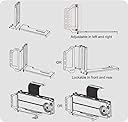
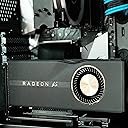
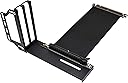
The EZDIY-FAB Vertical Graphics Card Holder Bracket is designed to showcase your GPU while optimizing your PC's interior space. With a 200mm PCIe 3.0 riser cable, it supports a wide range of graphics cards, including high-performance models like the RTX 2080 Ti. Its easy installation and durable materials make it a must-have for any serious gamer or PC builder.


| ASIN | B07VCWDG2C |
| Chipset Brand | NVIDIA |
| Customer Reviews | 4.0 4.0 out of 5 stars (175) |
| Date First Available | September 25, 2019 |
| Graphics Coprocessor | NVIDIA GeForce RTX 2080 Ti |
| Item Weight | 14.4 ounces |
| Item model number | US-GPU Bracket-V2 |
| Manufacturer | EZDIY-FAB |
| Package Dimensions | 11.97 x 7.4 x 1.26 inches |
J**R
Versatility/adaptability
Best vertical GPU mount I've found yet. As an engineer I've often found that many "extra's" for building a PSU tend to be garbage. Stamped and only one way to use it. There's not much thought that actually goes into production. It's a mental thought of crank it out as fast/cheap as possible to make our money. It's about time somebody had a little pre-throught and designed something that virtually everybody can use and is a fairly nice setup. Are there things I would do differently? Of course, but for the most part it's a good solid mount that gives the best adaptability per chassis you are currently using. It always gets ire up when you spend big coin on a chassis, quality parts, etc. and it comes down to a stamped piece of steel or badly machined piece of plastic that can throw a giant wrench in the works. Buy this adapter, you won't have any issues.
B**N
can mount *below* your bottom slot
a few things about this mount that set it apart from others: 1) it will let you go BELOW your bottom expansion slot in your case. I have an NHD15 cpu cooler and literally not an inch to spare so this was the only vertical GPU mount choice for me. 2) maximizes space between the GPU fans the side panel. The graphics card sits further back (towards the motherboard) than other mounts so it isn't squeezed against the side panel, starved for air. This could improve airflow over mounting on the motherboard (where the GPU is typically upside-down) 3) allows mounting when you have metal separating your expansion slots in your case To achieve those things, it had to be a bit flimsy so it definitely wants to be supported by something on the bottom. PCIe cable seems fine to me. I don't know how a bunch of wires wouldn't be gen3 compatible as some reviewers suggest; that doesn't even make sense.. Interface speed can be verified in GPU-Z and mine is still saying gen3. I don't notice a single frame lost. The cable is a bit too long though and has to be doubled over to keep it hidden behind the card. This causes it to push against the back of my card and it wants to come forward towards the end -- solved for the moment with a bit of electrical tape to keep it in place, but I will probably drill a hole in my PSU shroud and use a standoff and screw to attach the bottom of the mount more firmly to my case.
A**N
Difficult Assembly but Great Results
This is a great product in the end, however. It is a pain to install. At least for my 1080ti. It didn’t fit at first because my gpu was too long. I ended up having to flip flop my radiator and fans for my cpu aio cooler in order to give it enough space. The fans are now behind the radiator in this little rectangle of space. I have the nzxt h500i which is an atx case, this specific model doesn’t let you remove the front panel to let those fans breath which might cause issues down the road. All in all I would definitely recommend this mount to anyone as long as they have a decent sized case for their gpu. Crazy enough, I am idling at 22c which is incredible considering I usually idle at around 32c. 10 degree difference is incredible in my eyes. Plus, it achieved my original goal of being able to see the best looking side of the gpu. If you don’t mind a little finagling while installing, this is the perfect product for you. (THE PICTURE THAT SHOWS THE SIDE OF THE CASE IS A BEFORE PICTURE, shows how the radiator-fan orentation changed)
D**L
Great item, installed fairly quickly...
The only cons i have with this product is the fact that the pcie port is not Gen 4, but thats no problem since i still got a gen 3 card, screws came easy to install, however if you are using a mid tower case like i am, use the cushion that came with it to level the bracket, DO NOT USE THE LIFTER BRACKET, IT WILL NOT LEVEL PROPERLY... Other than that it was fairly easy to install, as you may know you have to install the graphics card in the assembled bracket prior to installing it in your system, that way it makes life easier. Looks really good and its definitely a cheaper option than the cable mod, although i would really like the cable mod brand, its not available unless u purchase thru global store.
H**O
Worth Every Penney!!!
Installed this in my 10yr old Thermaltake Armor+ and it went in NO problem. No shabby workmanship like I've seen in other reviews . The Inner or Outer mounting option was just what I was looking for. Used the outer mounting configuration for better air flow to the backside of GPU and motherboard mounted MS2 drive. Unexpected but nice surprise to see my GPU temp drop average 7-10 Celsius. Opted not to use risers due to my side fan. No degradation in GPU bench mark Using the PCI-e riser cable that it comes with. Overall its a Great Product at a Reasonable price. Cons: Only comes with an HDMI adapter so I had to buy a 90 Degree Right Panel- Mount Displayport (DP to DP) Male to Female Extension Adapter Cable for my second monitor.
D**K
WARNING: PCI Express Cable NOT RELIABLE
I purchased this Video Card Vertical Holder as a solution for my NZXT i510 and my Rx 5700xt. I was able to install the video card with some difficulty. When I turned on my computer, the computer would run for a few minutes and the blue screen of death would appear. I tried to run some benchmarks, but 3dMark would not even run due to unknown errors. The benchmark would just stop. I replaced the video card directly onto the motherboard and these problems went away. Of note, the metal is rather flimsy as many of the other reviewers have stated. If there are any rigid cables, such as your pci-e power cables or the included PCI-E riser cable, it may cause your video card not to sit in a perfect 90 degree angle. Also, would probably need to remove the video card entirely, anytime you need to move the computer as the video card will probably sway around and probably break everything. It is also a little difficult to plug in or change cables that are connected to your video card. But that is probably because this is designed for cases that were not meant to have a vertical gpu riser.
Trustpilot
1 week ago
1 week ago